Hello,
is it anyhow possible to rotate labels (LabelStyle)?
I need the labels to get fixed rotation and stay like that no matter the viewport's rotation.
 hajmajeboss
All 19 comments

hajmajeboss
on 23 Mar 2020
Screenshot is Cordova version of our app using OpenLayers.
hajmajeboss
on 23 Mar 2020
After a short look into LabelRenderer, it seems, that this isn't possible.
 charlenni
on 23 Mar 2020
charlenni
on 23 Mar 2020
Yes, I guess.
I started the issue to possibly discuss any possibilites, including editing the renderer somehow.
hajmajeboss
on 23 Mar 2020
Took another look at the label renderer and sadly, it doesn't look possible.
hajmajeboss
on 23 Mar 2020
Try to use the new user defined renderers. You get a canvas and can draw whatever you want. Should be possible and not so difficult.
charlenni
on 23 Mar 2020
I get a Skia canvas? There is no such method that allows me to draw rotated text (DrawText()).
hajmajeboss
on 23 Mar 2020
Yes, you get one. And you don’t rotate the text, you rotate the canvas in the other direction and than draw the text.
charlenni
on 23 Mar 2020
Well, there will be one canvas for one label? It won't work otherwise, I need every label to have different rotation.
hajmajeboss
on 23 Mar 2020
It is always the same canvas. But you could rotate it for each draw in another direction.
canvas.Save();
canvas.Rotate(30);
canvas.Restore();
canvas.Save();
canvas.Rotate(12);
canvas.Restore();
Or you could rotate by the difference.
charlenni
on 23 Mar 2020
Ok, will try. Thank you.
hajmajeboss
on 23 Mar 2020
See here.
charlenni
on 23 Mar 2020
Good. Custom renderers are really helpful here. First because everyone can solve their own problems. Second because this will result in more merge requests for new functionality.
 pauldendulk
on 24 Mar 2020
pauldendulk
on 24 Mar 2020
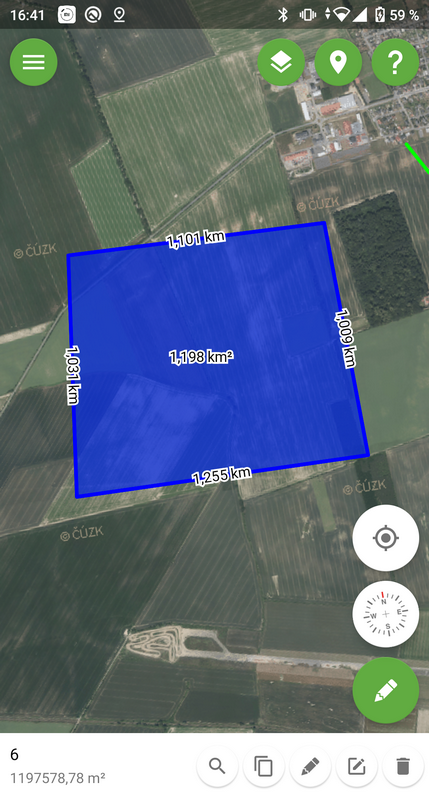
Worked like a charm. Thank you for the advice.
hajmajeboss
on 24 Mar 2020
@hajmajeboss Perhaps it is possible to create a PR out of this. I guess LabelStyle should get a Rotation field. Anything else? Could there be complications?
pauldendulk
on 25 Mar 2020
Why not add Rotation property and RotareWithMap property to LabelStyle and render it accordingly?
hajmajeboss
on 25 Mar 2020
Hello ! I ran into this problem today and I'm wondering if there could be a PR for this with what @hajmajeboss had mentioned above
 leo-costa
on 19 Aug 2020
leo-costa
on 19 Aug 2020
@leo-costa Yes, this is an addition that makes sense. Rotate and RotateWithMap could be seen as separate issues but for the feature described above you will need both.
This is the current functionality.
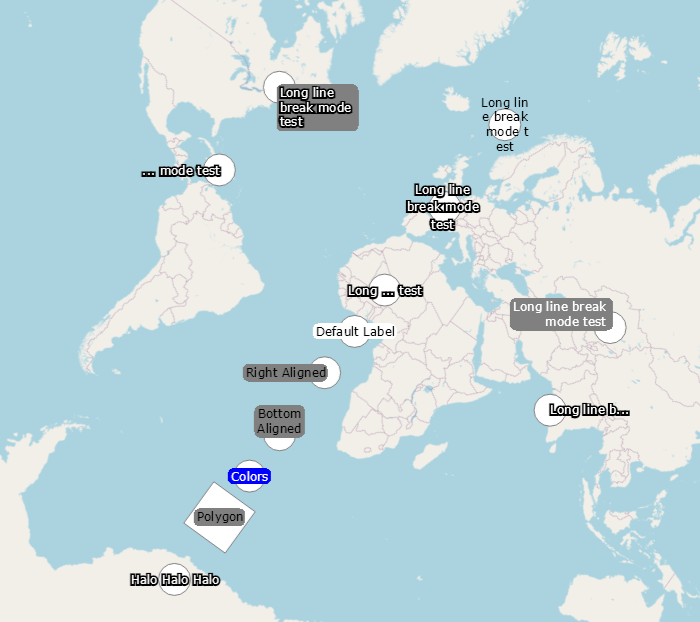
The labels don't rotate. Which is what you want in most cases.
RotateWithMap
RotateWithMap should be a boolean. Should default be false. If true the label will rotate with the map, so in the screenshot above the labels would be rotated 45 degrees. Not a common use case in itself.
Rotate
Individual rotation of the label. If RotateWithMap is false they will simply be rotated relative to the top of the form. If RotateWithMap is true they will be rotated relative to the north of the map.
pauldendulk
on 20 Aug 2020
@leo-costa I created a new issue for this, lets discuss this there:
https://github.com/Mapsui/Mapsui/issues/983
pauldendulk
on 20 Aug 2020
Related issues
 JesrigPineda
·
4Comments
JesrigPineda
·
4Comments
 EduardsBrown
·
5Comments
charlenni
·
3Comments
EduardsBrown
·
5Comments
charlenni
·
3Comments
 lukaszpitulski
·
5Comments
lukaszpitulski
·
5Comments
 TarasParashchuk
·
4Comments
TarasParashchuk
·
4Comments