Mapsui: release of unused memory (tiles, bitmaps)
Hi,
Let me introduce you in the issue what we have here.
Render mode - Skia
Tiles sources: local WMTS or tile.openstreetmap.org
MapControl {Mapsui.UI.Wpf.MapControl}
Mapsui 1.4.4
.NET Framework 4.6.2
so...
On the beginning we have the map with the base layer (one of the tiles sources).
With a zoom for example Viewport.Resolution = 6 .
Without any features.
The map consumes 20MB memory.
Next, we navigate (by mouse) on the map, and do zoom in and do zoom out many times by a long time.
Memory increases even into 1GB (usually it’s about 600MB).
Even after stopping any moving/zooming on the map the memory is not released.
We think that situation is because map process allocates the memory to increase performance of the app and the OS (Garbage Collector) cares about any reducing of RAM usage but is too slow (sometimes after closing the app the memory is still allocated (by long time)).
We suppose that it is some tiles caching or similar thing.
It’s big issue for us because we use the map in the app which already need a lot of memory and with that situation we have sometimes OutOfMemory error.
We’ve excluded any memory leaking from the app.
The query and questions are:
- Have we missed any param(s)/settings in the Mapsui where we can manage the memory consuming by the map, are any? (ex. CacheMode)
- Is it any way to speed up memory release by the map process? Maybe some way to force the GC to clear the allocated memory?
- Can we disable tiles caching?
If you need any more details please let me know.
Best Regards,
Łukasz
 lukaszpitulski
All 40 comments
So the map only has one baselayer? Or are other layers also shown while panning/zooming?
 pauldendulk
on 30 Aug 2018
pauldendulk
on 30 Aug 2018
If I zoom in an out in the default Mapsui sample I can not get the memory above 100 MB so I need to know what is different in your application.
pauldendulk
on 30 Aug 2018
The tests with our app+Mapsui were by a long time (2 hour ad more).
Only one base layer (TileLayer like OSM, WMTS), the rest are only for features (points, polygons, lines).
In the sample app (OSM base layer, many features), on the beginning is 100MB after a few zoom in/out and navigating the mem is 150-170 (short test), but is going down and up, so looks like the memory is being released...

(the sample app is clear WPF)
lukaszpitulski
on 3 Sep 2018
very quick (short time) tests:
Sample app (WMTS) ~200MB

Our app (the same WMTS) ~400MB

lukaszpitulski
on 3 Sep 2018
stays on the same level all the time and doesn't release long, can we force map to release allocated mem? (clear "cache"?)
lukaszpitulski
on 3 Sep 2018
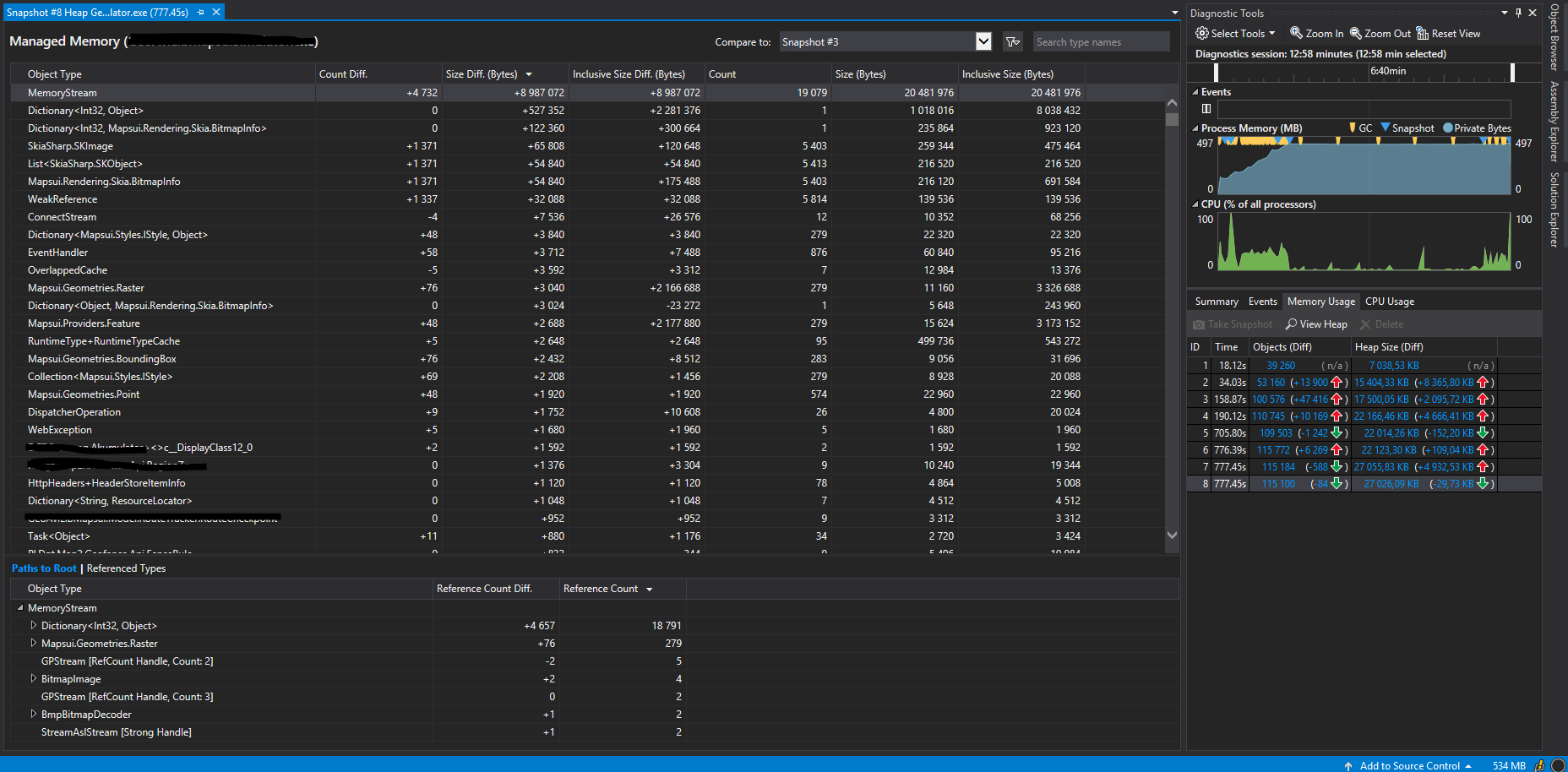
first suspects:
Mapsui.Rendering.Skia.BitmapInfo
MemoryStream
SkiaSharp.SKImage
lukaszpitulski
on 3 Sep 2018
Is this a aerial photo layer?
pauldendulk
on 3 Sep 2018
Do you use any symbols with bitmaps? Or any other raster things? It seems, that you add many bitmaps, which are stored as MemoryStreams.
 charlenni
on 3 Sep 2018
charlenni
on 3 Sep 2018
Or a RasterLayer?
charlenni
on 3 Sep 2018
The TileLayer has a BitmapCache to store raw bitmaps to avoid unnecessary calls to the server.
It is possible to pass a min and max tiles parameters to the TileLayer. The default is 300 for the max, if this is exceeded a cleanup is run to reduce it to the min number of tiles, which is default 200.
You can also use the minExtraTiles and maxExtraTiles parameters. They override the minTiles/maxTiles. These extra tiles are tiles on top of the number of tiles actually requested. This allows for a more narrow tuning of the tile cache.
pauldendulk
on 3 Sep 2018
If your memory keeps rising the TileLayer is not the main suspect.
Could there be too many calls to BitmapRegistry.Register? This should be used for a limited set of bitmaps. You can no keep adding bitmaps.
pauldendulk
on 3 Sep 2018
hmmmm...
yes, we use a lot of bitmaps(png) for features in the layers (10xLayers+1xbmapLayer), for points, for lines(breaks), for other things.
And a lot of calls BitmapRegistry.Instance.Register (I'm working on reducing it now, but we need bitmaps(png)).
The test:
- all layers without features (clear)
- base layer (background map layer) = TileLayer (200&300, all default params), WMTS (png, raster)
- no more bitmaps (MemoryStream)
but still we can't release allocated memory after a while time... still searching a solution
lukaszpitulski
on 4 Sep 2018
Your bitmap sybols are pre-generated, right (not some fancy code to draw a image on the fly)? Each of these bitmaps should be registered only once. After that reuse the bitmapId.
pauldendulk
on 4 Sep 2018
"fancy code".. yyy yes and no ;) .... need to check, change, and test it again.
Yes, bitmaps should be registered only once. (too many dynamic objects on the map :( )
I'm closing the issue for now and will reopen it if necessary (label: no bug)
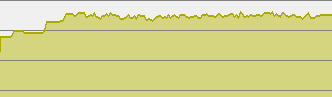
red lines : window with map is size changed
yellow area : zooming, navigating

lukaszpitulski
on 4 Sep 2018
one of the reason (found till now) of the memory leaking is
many calls of these:
new MemoryStream()
BitmapRegistry.Instance.Register
511
lukaszpitulski
on 9 Sep 2018
Hi,
how can I get from BitmapRegistry a ID of the image which is already there?
I don't want to register again (many times) exactly the same bitmap.
This of course doesn't work:
BitmapRegistry.Instance._register.FirstOrDefault(r => r.Value.Equals(image)).Key
Maybe a fix in Mapsui.Styles.BitmapRegistry.Instance.Register method such as when the _register contains bitmapData then return key of it and don't add new and don't increase counter.
lukaszpitulski
on 8 Oct 2018
Register the bitmap once and save the ID. Than you could use this ID until you unregister the bitmap or dispose Mapsui.
To check, if a bitmap already exists while registering is to time consuming. If you want to do this, you have to compare each already registered bitmap byte by byte with the new one. Perhaps that could be transferred by a new function. @pauldendulk should we create such a function?
charlenni
on 8 Oct 2018
@charlenni The byte by byte comparison would indeed be very expensive. If there was such a function we should remove it to avoid performance problems :).
Registering the bitmaps once at first use is the best idea. You could create your own cache module for this. Perhaps it caches based on file path or something like that. When the file path is not present you register the bitmaps and store the bitmapId in the cache.
So the key should be the file path (or url) and the value should be the bitmapId.
pauldendulk
on 10 Oct 2018
"The byte by byte comparison would indeed be very expensive" - yes it could. But seems the best solution.
And I'd done it before @charlenni answered, thanks!
Also I was thinking about some local list with any keys etc, like @pauldendulk advised, thanks!
So, the final solution is the mix of both ideas.
And yes, the performance is decreased but not too much (the bitmaps are very small, icons).
Maybe it's not nice solution but it works. (before: about few hundred bitmaps registered; now: no more than 10)
Only worries me that it is some kind of replacement (or extension) of BitmapRegistry in fact.
Thanks!
lukaszpitulski
on 10 Oct 2018
"Only worries me that it is some kind of replacement (or extension) of BitmapRegistry in fact."
even worse, it's duplicate of BitmapRegistry (IDictionary
If I have registered in the BitmapRegistry 10 bitmaps (10 unique pairs Int,Object), then I have also 10 records in my own list, the same in fact. (twice more memory is used!)
If in the BitmapRegistry will not be any functionality to prevent before duplicates on the bitmaps list, then I need to use own dictionary
And there to check if the bitmap is already and has an ID or not and must be registered.
I don't have name, url or file path of the bitmap, because many time it's from database as byte[], so I can't use a dictionary
I's trying create my own BitmapRegistry but of course Mapsui uses Mapsui.Styles.BitmapRegistry not mine.
So, I must to stay with to dictionaries,
private readonly IDictionary<int, object> _register
and
Dictionary<int, byte[]> BitmapRegister
and the problem is not the performance but memory leaking.
(Mapsui1.4.8)
lukaszpitulski
on 16 Oct 2018
When your bitmaps from a database as byte[] than there your problem occures there the first time. It could be, that you have hundreds of identical bitmaps. So it would be better, to create an own table for bitmaps with a unique ID for each bitmap and save this ID in your database. If this is aready the case, than you need only a Dictionary
If you don't want to use more memory, you could check by yourself, if a bitmap is already in Mapsui. Create a list with all IDs, that Mapsui knows and than compare each new bitmap with all this already registered bitmaps by calling BitmapRegistry.Instance.Get(id).
@pauldendulk One way to help in this case could be a check function.
````
public int GetID(object obj)
{
foreach (var entry in _register.ToList())
{
// Compare o with obj
if (entry.Value.Equals(obj))
{
return entry.Key;
}
}
        return -1;
    }
````
With this, each user could check by his own, if the bitmap is already registered or not. And there is no impact for other users.
charlenni
on 16 Oct 2018
Or it would be possible to use a HashTable, which holds the bitmaps as keys and the IDs as values. Is perhaps faster than the above check.
charlenni
on 16 Oct 2018
It is always possible to construct some kind of unique string. If it is a database record there is a query with elements that you can use for a unique string (from-database-
pauldendulk
on 19 Oct 2018
The images' sources are two (can be more), files and database.
Where the files are bitmaps such PNG in ResXResources ,
and the db stores only byte[] (and can’t store any other details about images).
@charlenni So I can’t store the ID because each instance of the app/map can use different bitmaps or the same but in different order, way etc. And when the source is not only database (where in db are not anything what could be unique ID for the bitmap, where many records can keep the same bitmap), and some bitmaps are used only temporary (no relations into db records).
So, I need to register bitmap each time when I use it first time in each instance. All depends from the dynamic situations on the map, from objects and layers, etc.
I was trying a lot of different solutions… one of them is local dictionary
and the value is Bitmap.ToByteArray(/PNG/) – memory expensive :(
Works, but in fact this is “duplicate” of the BitmapRegistry._register (2x mem allocated) :(
Another one is quazi-BitmapRegistry method by which I asked earlier …..
private static bool IsBitmapRegistered(byte[] bitmap)
{
    try
    {
        int id = 0;
        do
        {
            if (Mapsui.Styles.BitmapRegistry.Instance.Get(id) is MemoryStream ms)
            {
                if (ms.Length <= 0)
                    throw new Exception();

                ms.Position = 0;

                if (EqualsBytes(ms.ToArray(), bitmap))
                    return true;
            }
            id++;
        }
        while (true);
    }
    catch {}

    return false;
}
Where EqualsBytes is method to compare byte[] (by hash, by Equals, by each byte) – performance expensive :(
By IsBitmapRegistered method I can also find the bitmap ID (if I return id when the bitmaps are the same, are in BitmapRegistry).
@pauldendulk The dictionary
- when the files are source, then key: path, url, etc. (where byte[] from bitmap.ToByteArray(/System.Drawing.Imaging.ImageFormat.Png/) )
- when the bitmaps source is db, then key: byte[];
for both as key maybe I could use hash (SHA1CryptoServiceProvider, Convert.ToBase64String ComputeHash(byte[]))
But it’s still outside the BitmapRegistry solution.
I will try your suggestion.
The problem is if I have more like one the same bitmap but from different sources (eg in file1, file2, in db few times in different records), then still I register the same bmp and have different BitmapID, but better would be to have only one bitmap registered at once and one BitmapID used in many places (I don’t expect unregister it) and some kind mechanism to protect against re-registration the same bitmap in Mapsui BitmapRegistry.
BTW
Mapsui.Styles.BitmapRegistry.Instance.Register(?)
What type of object can be registered? Bitmap, byte[], MemoryStream, any?
http://mapsui.github.io/Mapsui/api/Mapsui.Styles.BitmapRegistry.html#Mapsui_Styles_BitmapRegistry_Register_System_Object_
Many Thanks,
Łukasz
lukaszpitulski
on 23 Oct 2018
As you mentioned, each type of checking for bitmaps, that will be registered, is to time expensive. So I would say, that this isn‘t a good place inside of Mapsui.
The best way would be to make your function for registering bitmaps as
Create hash of byte[]
Lookup hash in private Dictionary<hash,int>
If found
  Return founded BitmapID
Register byte[]
Save hash and BitmapID in private Dictionary<hash,int>
Return BitmapID
With this, you create each hash only once. After that, you compare only hashes, which shouldn‘t be expensive. Where the byte[] is from (file, db, resources) isn‘t relevant. This is the fastest way to check for double bitmaps.
You could register bitmaps, SVGs and Sprites of an atlas. That’s the reason, why you register objects.
charlenni
on 24 Oct 2018
Perhaps I have time in the next days and could create such a function.
charlenni
on 24 Oct 2018
I don't expect any changes in Mapsui (1.4.* or 2), I can handle this on my side. Thanks.
Just, I feel uncomfortable when I must to create some additional functionality when I expect this from the framework. I worry that could be something wrong with hash etc. Probably unnecessary and will be fine 👍 :)
You could register bitmaps, SVGs and Sprites of an atlas. That’s the reason, why you register objects
But the object has to be MemoryStream, right?
private static int BitmapId(byte[] bitmap)
{
    if (bitmap == null)
        return -1;

    var imageMS = new MemoryStream(bitmap);

    if (imageMS.Length <= 0)
        throw new Exception();

    imageMS.Position = 0;

    return Mapsui.Styles.BitmapRegistry.Instance.Register(imageMS);
}
can't be like that:
Mapsui.Styles.BitmapRegistry.Instance.Register(bitmap)
or
Mapsui.Styles.BitmapRegistry.Instance.Register(new System.Drawing.Bitmap("filepath"))
lukaszpitulski
on 24 Oct 2018
Have you ever had a situation when you have two objects System.Drawing.Bitmap (bitmap1, bitmap2) in code and they are from the same source (eg from file png) so in fact are the same image,
and after
using (MemoryStream ms = new MemoryStream())
{
    bitmap1.Save(ms, System.Drawing.Imaging.ImageFormat.Png);
    return ms.ToArray();
}
...
using (MemoryStream ms = new MemoryStream())
{
    bitmap2.Save(ms, System.Drawing.Imaging.ImageFormat.Png);
    return ms.ToArray();
}
the returns are two different byte[] ?
Is it possible? Could it be something with the System.Drawing.Bitmap/PNG properties (except raw bytes of bmp)?
lukaszpitulski
on 24 Oct 2018
Yes, you are right, the object should be a MemoryStream for bitmaps or SVGs. If you use an atlas, it is of type Sprite.
For the different arrays for the same bitmap: use ImageFormat.Bmp instead of ImageFormat.Png. Perhaps this helps. See here.
charlenni
on 24 Oct 2018
ooo (facepalm) I totally didn't think about the loss of quality when using System.Drawing.Imaging.ImageFormat.Png and about the differences in byte[] resulting from this.
Truly speaking I was sure that the PNG format is lossless in compression, quality etc.
I've looked at MSDN, and people there have a lot of ideas and give many replies but not too much help in this issue. Only what can reduce the loss of quality is using ImageFormat.Bmp as you suggested already.
But, in this issue the main case is "reduce memory leaking"... is the bmp heavier (more mem alloc.) than png ? :-?
lukaszpitulski
on 24 Oct 2018
Both are converted for the SymbolCache to SKImage/ImageSource. I assume, that both haven't any memory reduction mechanisms.
charlenni
on 24 Oct 2018
Bad news, I can't use ImageFormat.Bmp! :(
Bmp Array is 2.87 bigger/longer than Png Array.
In the example, the source image: file size 1340 B, file format PNG, hw 32x32.
After conversion to Arrays the byte[].Lengths:
Png:1446
Bmp:4150
Jpeg:1091
Tiff:2054

Looks like I have to stay with Png and find another way to resolve the issue.
(still working on dic
BTW
From byte[] to Bitmap I use: new System.Drawing.Bitmap(new MemoryStream(byte[])) (not System.Drawing.Bitmap.FromStream(new MemoryStream(byte[])) as System.Drawing.Bitmap)
lukaszpitulski
on 24 Oct 2018
Try to use Tiff. It's a loosless format too.
charlenni
on 24 Oct 2018
Oh, and I need a transparent background in images (icons), so... Png, Tiff, Gif etc.
But Tiff is 1.42 bigger than Png, only Jpeg is smaller but... compression etc., not good.
And for some reason, Tiff doesn't work with WPF Mapsui 1.4.8 here.
When Bitmap.Tiff is registered, nothing is shown on the map for features and layers with SymbolStyle.
(this issue we have had since we started work with Mapsui.1.3.3-beta.1.241, before Mapsui we'd used tiff for bitmaps/icons on the map).
lukaszpitulski
on 24 Oct 2018
heh now I'm surprised and confused... when I use Tiff for features then the map gets crazy, especially widgets (all) - they disappeared when the map is navigated, also widgets dis. below zoom 10 or they change positions (go outside the map/envelope). wow 👎
lukaszpitulski
on 24 Oct 2018
I assume, that Skia or WPF has Robles to render the icons and than stops to draw the rest.
Would it be possible to get this two files of the icons? Or are they private property?
charlenni
on 24 Oct 2018
Which files exactly? The one from the format-size example?
When I want to register the Image, I do:
private static int BitmapId(byte[] bitmap) {
    if (bitmap == null) return -1;
    var imageMS = new MemoryStream(bitmap);
    if (imageMS.Length <= 0) throw new Exception();
    imageMS.Position = 0;
    return Mapsui.Styles.BitmapRegistry.Instance.Register(imageMS);
}
@charlenni
Yes, you are right, the object should be a MemoryStream for bitmaps or SVGs. If you use an atlas, it is of type Sprite.
In the code above is byte[] to MemoryStream, can I do that or should be System.Drawing.Bitmap bitmap?
If so, then when I want to get the Image from the BitmapRegistry, can I do this:
image_bytes = Mapsui.Styles.BitmapRegistry.Instance.Get(id) as byte[];
or I have to do something like:
if (Mapsui.Styles.BitmapRegistry.Instance.Get(id) is MemoryStream ms) {
    if (ms.Length <= 0) throw new Exception();
    ms.Position = 0;
    image_bytes = ms.ToArray();
}
?
I suppose, I can't Mapsui.Styles.BitmapRegistry.Instance.Get(id) as byte[] returns null
But, what do you think?
lukaszpitulski
on 25 Oct 2018
Which files exactly? The one from the format-size example?
That PNG files, which you are used to make the tests.
In the code above is byte[] to MemoryStream, can I do that or should be System.Drawing.Bitmap bitmap?
It's open source code. The biggest advantage of open source code is, that you could take a look, what's going on. And if you would look into SymbolCache.cs, you would see, that MemoryStream is expected. This stream is in the extension function ToBitmapImage() converted into a BitmapImage.
Why do you have byte[] instead of streams? I thought, you get the bitmaps from resources or files on disc? Why do you convert them to byte[] and than back to stream?
I suppose, I can't Mapsui.Styles.BitmapRegistry.Instance.Get(id) as byte[] returns null
But, what do you think?
As you could see above: look into the code, line 39. There you find Get(id), which returns an object. The same object, which you provided when registering the bitmap.
If you want some code, which checks for already registered bitmaps, you could use this code. I didn't tested it, but should work.
````
private static System.Security.Cryptography.SHA256 hasher = System.Security.Cryptography.SHA256.Create();
private static Dictionary
private static int BitmapId(byte[] bitmap)
{
// Check, if bitmap is empty
if (bitmap == null)
{
return -1;
}
// Create a hash string for this byte array
var hashString = GetHash(bitmap);

// Check, if we have already registered this byte array
if (registeredBitmaps.ContainsKey(hashString))
{
    // Yes, we have. So return the known bitmapId for this byte array
    return registeredBitmaps[hashString];
}

// Convert byte array to MemoryStream
var imageMS = new MemoryStream(bitmap);
if (imageMS.Length <= 0) throw new Exception();
imageMS.Position = 0;

// Register bitmap
var bitmapId = Mapsui.Styles.BitmapRegistry.Instance.Register(imageMS);

// Add new bitmapId for new byte array to dictionary for later use
registeredBitmaps.Add(hashString, bitmapId);

return bitmapId;
}
private static string GetHash(byte[] input)
{
// Convert the input string to a byte array and compute the hash.
byte[] data = hasher.ComputeHash(input);
// Create a new Stringbuilder to collect the bytes
// and create a string.
StringBuilder sBuilder = new StringBuilder();

// Loop through each byte of the hashed data
// and format each one as a hexadecimal string.
for (int i = 0; i < data.Length; i++)
{
    sBuilder.Append(data[i].ToString("x2"));
}

// Return the hexadecimal string.
return sBuilder.ToString();
}
````
Here I used a SHA256, but you could also use a MD5 or any other hashing algorithm. There are many out there. It isn't the fastest, but for this, it should be fast enough, because each byte array is hashed only once.
@pauldendulk Do you think, we should have this in the library?
charlenni
on 25 Oct 2018
:) I've done something almost the same last night already 👍
Yes of course, I know that I can take a look into the code, but easer is to ask the authors and can get more details and advices. :)
The png: https://maps.google.com/intl/en_us/mapfiles/ms/micons/blue-dot.png
was used in the way which is described below.
To check the real size of objects I used VS17 debugger and the method:
long GetSizeOf(object obj)
{
    try{
        var bf = new System.Runtime.Serialization.Formatters.Binary.BinaryFormatter();
        var ms = new MemoryStream();
        bf.Serialize(ms, obj);
        var size = ms.Length;
        ms.Dispose();

        return size;
    }catch{}

    return -1;
}
so, it's like this:
PNG file in System.Resources.ResourceManager as System.Drawing.Bitmap
next transfer to byte[] (ByteArray: MemoryStream.ToArray with System.Drawing.Imaging.ImageFormat.Png)
...OR...
byte[] in db (from an image by MemoryStream.ToArray with ImageFormat.Png)
next Mapsui.Styles.BitmapRegistry.Instance.Register(imageMS) (imageMS = MemoryStream from byte[])
and BitmapId into styles
..and later...
when I need registered bitmap: Mapsui.Styles.BitmapRegistry.Instance.Get(id) as MemoryStream
and that's all, in nutshell. ;)
BitmapRegistry.Instance.Register(byte[])
BitmapRegistry.Instance.Get(id) as byte[] (null)
was an experiment, because...
Why do you have byte[] instead of streams? I thought, you get the bitmaps from resources or files on disc?
yes, like above, the files are in ResourceManager as Bitmap or in the db as byte[]
Why do you convert them to byte[] and than back to stream?
because byte[] is smaller than Bitmap, Image etc. ..._bytes->memstr->image->memstr->bytes_... this way maybe is not easily and nice looking in the code but... also the database was developed in this way with byte[] before Mapsui.
Perhaps... I suppose that the intention of the db authors was to have a portable Bitmap between prog.lang. and OS etc. So they didn't want to save System.Drawing.Bitmap and is byte[] then...
Yes maybe this
image = new Bitmap(new MemoryStream(bytes)); //bytes from the db
bytes = image.ToByteArray(/*System.Drawing.Imaging.ImageFormat.Png*/); //bytes by MemoryStream.ToArray
isn't nice like this
image = bitmap_from_db;
bitmap_into_db = image;
;)
but, always I need to do this:
image = System.Drawing.Image.FromStream(Mapsui.Styles.BitmapRegistry.Instance.Get(bitmapId) as MemoryStream);
I think that we can definitely close the issue. For my case the solution is:
- ImageFormat.Png
- dic
- interaction by BitmapRegistry (Get(id)) - for less memory consumption and more confidence
Many thanks for all the help in this case!
Best Regards,
Łukasz
lukaszpitulski
on 25 Oct 2018
Ok, now I understand it a little bit better. I know nothing about WPF programing. I always use the Skia renderer.
But if it now works for you, than all is ok.
charlenni
on 25 Oct 2018
Related issues
 YordanYanakiev
·
6Comments
YordanYanakiev
·
6Comments
 EduardsBrown
·
5Comments
lukaszpitulski
·
8Comments
EduardsBrown
·
5Comments
lukaszpitulski
·
8Comments
 TheProme
·
4Comments
lukaszpitulski
·
5Comments
TheProme
·
4Comments
lukaszpitulski
·
5Comments