Hi,
it would be nice to get some help for activating these two features.
Which andoid apps are possible?
Tutorials for OSRM, GraphHopper or Mapbox
 jakobroehrl
All 13 comments
Currently the placeholder text for routing is:
There is no routing engine set in Nextcloud additional settings. Routing is currently disabled for users.
Instead we can say:
Routing is currently disabled. [ Add a routing service ]
And the button could link to /settings/admin/additional
In the settings, the 3 different services should also have their homepage linked (in a new tab to not rip people out).
 jancborchardt
on 2 Sep 2019
jancborchardt
on 2 Sep 2019
Dear all,
Thanks for this great app. I look forward to self-hosting yet another google replacement thing !
I have a question regarding routing an names lookup (basically searching for anything in the search bar of the app).
I don't know if something is broken on my app or if I need something else. Please find below the behaviour I get:
- Search: the only search that works is for my Contacts names. Countries, street names, whole addresses... get a "Connexion au serveur perdu" ("Connection to server lost")
- I get some geotagged photos displayed ok
- I have installed OSRM backend docker, extracted, compiled the graph for France. I can reach it by using Curl (works great either on loclahost or from another computer on the LAN).
Exemple:
curl "http://127.0.0.1:5001/route/v1/driving/1.3696,43.59;1.3812,43.5608?steps=true"
Returns what looks like exactly what I need. - While searching for 2 contacts to get a route, I have the "No routing service set in the additional parameters. ...."
- I set the correct URLs on the Nextcloud Additionnal Parameters fields (http://localhost:5001/v1/). But when I try to request a route, (between 2 Contacts, as it's the only way right now for me) I get a
Erreur d'acheminement : undefinederror. (Something like "Routing error: undefined")
Questions:
- I couldn't find the list of features that are still in development vs. already working so maybe I'm just expecting too much. Sorry if that's the case.
- What am doing wrong ??
Kind regards
 Aquariu
on 2 Sep 2019
Aquariu
on 2 Sep 2019
I'm also new here on the Maps App and speaking in the vernacular, I'm super stoked about this part of Nextcloud!
As I am my own servers admin, both bare metal and Nextcloud, I like the dummy methods first (point and click), then the technical solutions later when the dummy ones don't work. My newness has me all confused about how mapping works. I have an intuition that it's basically an optimal hamiltonian path in a matrix representation of a graph of roads between two locations. I see that just doing the easy click of download and install in Nextcloud's interface gives me a fully functional mapping program:
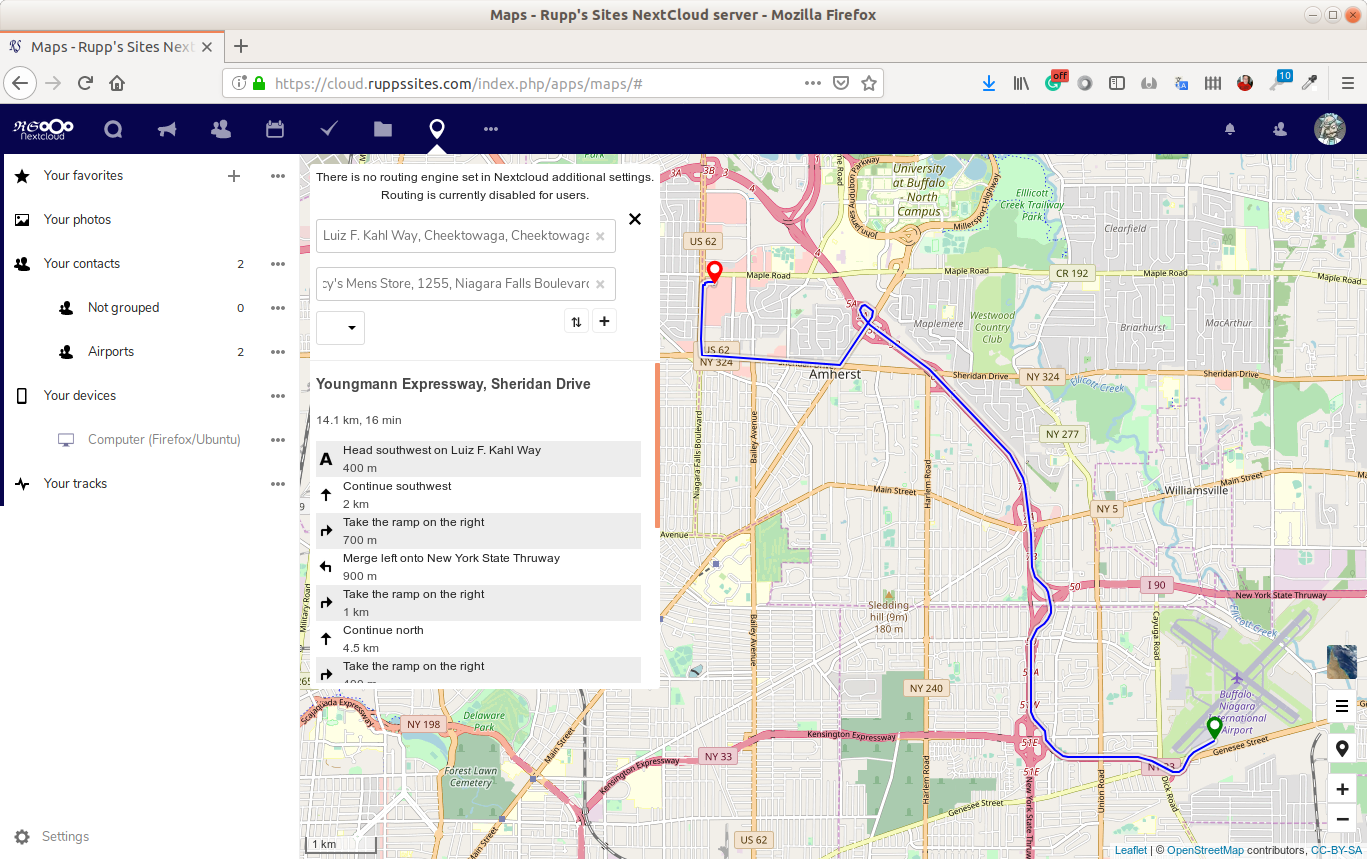
(BTW Side Note: _I have 6 airports entered into the contacts list of this users account_)
So I can get a route without "Routing" engines entered into the admin section? I'm guessing the empty dropdown would list those options if I finished putting things into the admin section. Last night I started looking into OSRM and just left it till this morning. Right now I'm confused but not frustrated; more like standing in front of a vending machine with the options prepaid and I don't know what to pick or how to get some treat out.
I'm not sure if the Admin settings are prompting me to install my own routing services on my server (_because of privacy and speed advantages_), or if you are trying to be generic by not giving a working example I could transpose from the suggestion text into my chosen option text-boxes:
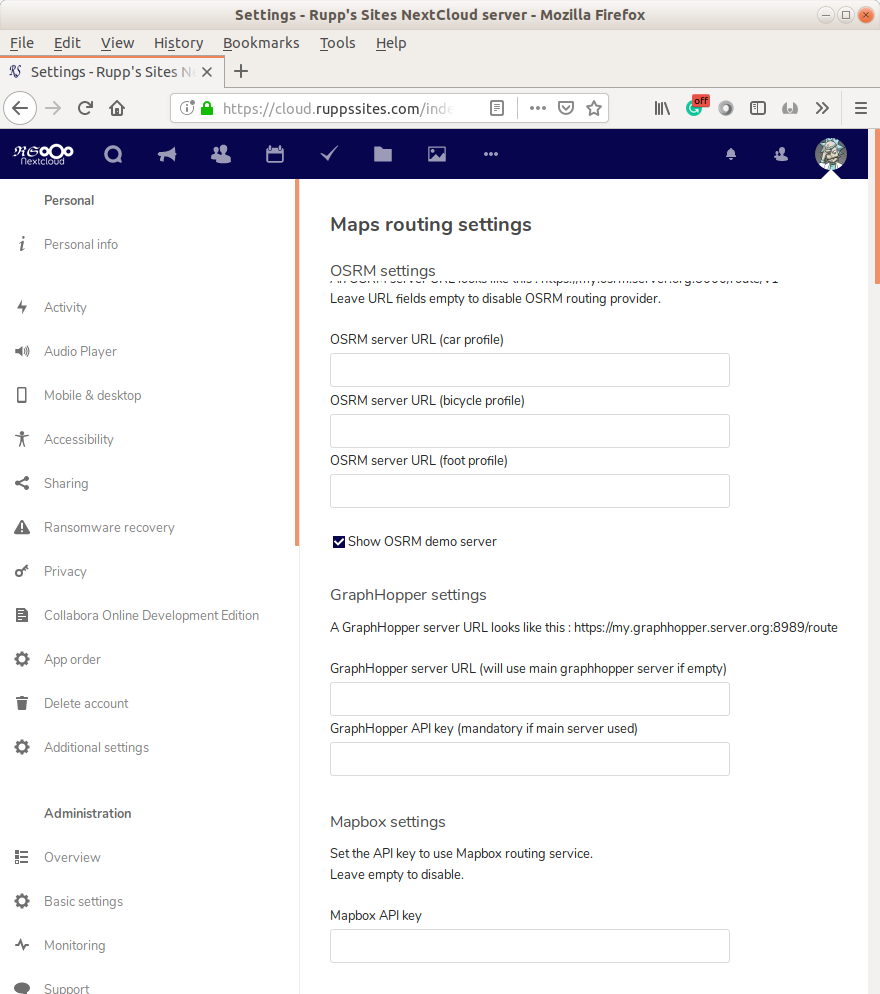
Yesterday I didn't know the words, OSRM, GraphHopper, or Mapbox even existed. Today I feel like I'm signing up for a 4 hour DIY course with a hard lab and no office hours.
It would be cool to see a flow chart of how the bigger pieces of mapping work together to help clear the fog of being so uneducated about something so pervasive and useful.
 WNYmathGuy
on 5 Sep 2019
WNYmathGuy
on 5 Sep 2019
So I can get a route without "Routing" engines entered into the admin section?
No that should not be possible, but maybe you had an older version of maps installed at some point?
Or the demo server activated?
I'm not sure if the Admin settings are prompting me to install my own routing services on my server (because of privacy and speed advantages), or if you are trying to be generic by not giving a working example I could transpose from the suggestion text into my chosen option text-boxes:
Well as you pointed already out, computing routes is not trivial. I think OSRM suggest you to provide 180GB or RAM for a routing engine just for Europe. I don't have that kind of hardware. So the second solution is an external Routing provider. It is hard to provide an working example as none of those routing providers are for free. They all have a free plan, but it is not sufficient for big installations or to ship it build into the maps app. So we just gave the option to include API keys for all routing providers we found, which where easy to integrate.
We didn't want to promote one routing provider over the other, as they have different pros and cons. For example I do a lot of cycling, but one of the routing providers sends me directly over the mountain, and thinks doing 2000m of altitude is a good Idea. The route is nice for MTB but not for a roadbike. But on other destinations it gives the bedder solutions.
It would be cool to see a flow chart of how the bigger pieces of mapping work together to help clear the fog of being so uneducated about something so pervasive and useful.
I agree that the general documentation of this app can be improved. As long as your are not going for a self hosted installation, it is not to complicated with the routing, but depending on the usage they might not be for free:
Go to:
https://account.mapbox.com/auth/signup/
or:
https://graphhopper.com/dashboard/#/register
create an account and get an API key.
If you plan to set up your own routing provider, I think it is beyond the documentation of this app.
 tacruc
on 5 Sep 2019
tacruc
on 5 Sep 2019
@tacruc
No that should not be possible, but maybe you had an older version of maps installed at some point?
Or the demo server activated?
My sequence of events were,
- Install the Maps app with the NC Admin Apps management interface
- Run the new Maps app
- Play around with inputting locations and observing the failures. _e.g. a standard USA mailing address doesn't get found, but copy and paste from pinpointing a location on the map and using the displayed address worked._
- Click the squiggly icon to get a route, add a second address and hit enter.
- Observe the route on map with turn by turn instructions in the side panel.
After the route was displayed I noticed the helpful message above the two addresses and went to my admin settings to check the box for Show OSRM demo server, however the demo server wasn't available till I added the Mapbox API key (_thanks, that was easy_). _BTW, GraphHopper threw no error message while trying to make an account, but later on I discovered they don't permit special characters in the passwords._
_BTW,_ BTW, It's creepy how close to my actual location the app got with my Firefox browser on Ubuntu 18.04. I have no idea how a FiOS connection could be so accurate.
So now, _with the options working for Demo, GraphHopper, and Mapbox_, the right click on the map has options for "Route from here", "Add route point", and "Route to here" but selecting them does nothing. I was able to add a favorite and use its name to search for it in the map location selector textbox; that was cool.
I see how different the choices are for Mapbox and GraphHopper for the same transportation methods. Oddly both are giving legitimately good routes for each option. I can't imagine how many possible routes their are from all the OSRM servers. Also, my servers sound tiny now that I hear the size of RAM you were talking about. I'm sporting about 1/6th the minimum required memory.
So I looked around a bit for a OSRM site and found nothing akin to the GraphHopper and Mapbox, so I assume their isn't one to just sign up at like the two I already got an API key from.
P.S. this is such a cool app!
WNYmathGuy
on 5 Sep 2019
Dear all,
After researching these threads on routing and trying several things, I have a hard time understanding what I'm supposed to be doing (or what I'm doing wrong) to get location searches and routing working.
My setup:
- Nextcloud 16.0.4 with latest Maps app, php7.3 on a Debian Buster
Behaviour:
- Clicking anywhere in a city does bring up a popup but it's not giving me an address. The circle keeps spinning.
- I got a Graphhopper API key (currently in the 2 weeks trial) but Maps app doesn't seem to use it "No routing engine setup in additionnal parameters, routing deactivated for users" phrase is still displayed above the search bar.
- In the dropdown menu to select the routing engine, the correct list is displayed depending on what is activated in the Parameters : either OSRM demo, a local OSRM docker, or Graphhopper. But the message about no available routing engine is still displayed and I can't search any address or get any Directions.
- My Graphhopper account says that exactly 0 requests have been made. Although I've been trying to use it.
- Even with the OSRM Docker running locally still no luck. Maps still says I have no routing setup.
Is there anything obvious I'm missing for normal address lookup to work ?
Kind regards,
Olivier
Aquariu
on 9 Sep 2019
I'm not somebody to listen to @Aquariu but...
- Clicking anywhere in a city does bring up a popup but it's not giving me an address. The circle keeps spinning.
When I single click on my map I get the pop-up with the address near the top of the message widget.
I'm clicking right near a streets line. Have you tried it in different countries?
- I got a Graphhopper API key (currently in the 2 weeks trial) but Maps app doesn't seem to use it "No routing engine setup in additionnal parameters, routing deactivated for users" phrase is still displayed above the search bar.
It sounds like you went as the Admin to your page for additional settings
https://YOUR_FQDN/index.php/settings/admin/additional
where you would have put the API keys. That's all I did and things worked. Mine even gave street addresses before getting API keys. Maybe the server has missing software that other people already have?
- Even with the OSRM Docker running locally still no luck. Maps still says I have no routing setup.
Kind regards,Olivier
I'm not doing it with Docker.
How about going to your https://YOUR_FQDN/index.php/settings/admin/support and clicking the Generate system report button to give the people that know what they are doing here more to judge it with?
Also, also, did you try running the admin in one browser on
https://YOUR_FQDN/index.php/settings/admin/logging
and a regular user in another browser on
https://YOUR_FQDN/index.php/apps/maps/
so you could see the errors live as a user clicks on the map?
WNYmathGuy
on 10 Sep 2019
"No routing engine setup in additionnal parameters, routing deactivated for users" phrase is still displayed above the search bar.
@Aquariu the message being displayed is a bug which will be fixed with 0.1.3: https://github.com/nextcloud/maps/issues/117 :)
jancborchardt
on 10 Sep 2019
Thanks for your reply. This was mostly a user/admin error (i.e. me). I had a firefox addon blocking requests to osrm servers as well as graphhopper. this leaves unresolved:
- The "no routing setting in additionnal parameters, routing deactivated" message. It's still displayed on my admin account but NOT on an empty normal user account. I'm investigating this as it's most probably a server issue on my side.
- I need to retry with OSRM Docker (yes it's a RAM hog but I seem to be able to load France with 8GB RAM and a 20+GB swap file/partition.
Fantastic app ! Congratulations to all involved. I'll be happy to test further (specially Phonetrack integration).
Cheers!
Olivier
Aquariu
on 10 Sep 2019
* The "no routing setting in additionnal parameters, routing deactivated" message. It's still displayed on my admin account but NOT on an empty normal user account. I'm investigating this as it's most probably a server issue on my side.
This is intended, since users can not do anything about it anyway.
Although I can see how it is confusing. 2 choices:
- We should maybe still show a message for users and say: "Routing not enabled for users. You can ask your admin to enable it."
- We don’t show routing at all for users if it’s not enabled, that is no icon in the search bar, no entries in the right-click menu. Not sure this is nice as people might expect it and will wonder why it’s not there?
What do you think @nextcloud/maps?
Btw this issue is getting way too long and broad, let’s please keep separate issues separate. :)
jancborchardt
on 10 Sep 2019
I setup the mapbox but it won’t work. Any idea how to setup an selfhosted OSRM Server?
 Happyfeet01
on 17 Oct 2019
Happyfeet01
on 17 Oct 2019
@happyfeet01 for support issues please use the forum: https://help.nextcloud.com/c/apps/maps
Regarding the Mapbox issue please open a separate issue with logs and more info. :)
jancborchardt
on 17 Oct 2019
I can work on adding some extra messages for easier set up.
 gary-kim
on 21 Oct 2019
gary-kim
on 21 Oct 2019
Related issues
 gucu
·
5Comments
jancborchardt
·
5Comments
gucu
·
5Comments
jancborchardt
·
5Comments
 ma12-co
·
7Comments
jancborchardt
·
12Comments
ma12-co
·
7Comments
jancborchardt
·
12Comments
 pilsnerbeer
·
10Comments
pilsnerbeer
·
10Comments
Most helpful comment
I can work on adding some extra messages for easier set up.