Mapper: Enhancement: Temporary highlight GPS Position
Steps to reproduce
- Working with a pretty good external GPS, the symbol representing the actual position gets highly unremarkable, especially over heavy background templates or scribbled areas.
Actual behaviour
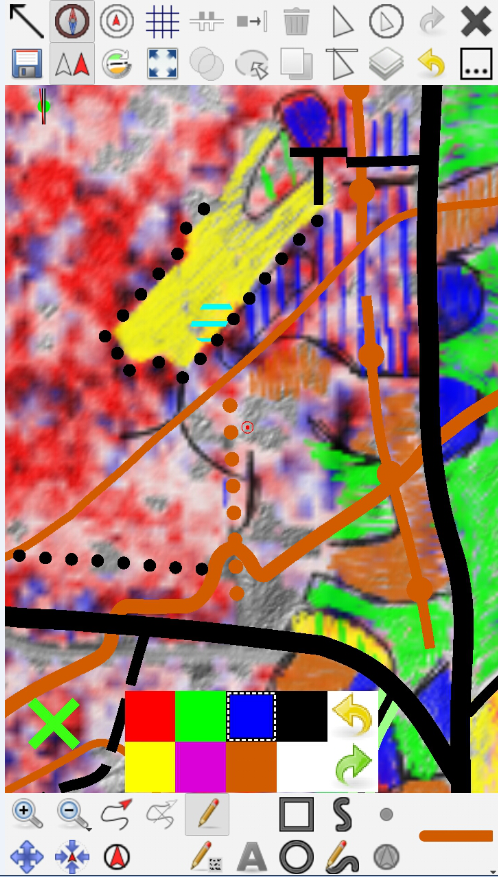
fig.1. not best example but it gets close to invisible on the red or brown areas
Expected behaviour
I seek an opiton to temporarily highlight the GPS Position by using a more prominent symbology for a short while (3 seconds) before returning to the normal symbology. Highlight might be somehow triggered for example by switching on and off GPS positioning.
Configuration
Mapper Version: 0.8.2.
Operating System: Android
 mlerjen
All 10 comments
Doesn't  Move to location button help here? It always adjusts map view so that actual position is in the center.
 lpechacek
on 28 Sep 2018
lpechacek
on 28 Sep 2018
For me better solution is to add customization of GPS position and GPS track. Record temporary trace is not recording track on my Note 4 when screen is off. Thus I usually rely on very tiny system GPS track (this is one is really hard to see).
 krticka
on 28 Sep 2018
krticka
on 28 Sep 2018
@lpechacek Move to location does not help much if the background is more prominent than the GPSmark.
@krticka I think it is generally okay that the GPS mark is plain, I just would appreciate the possibility to highlight the information for instance. Of course this could also be applied to the recorded track.
mlerjen
on 29 Sep 2018
Relates to #986.
 ollesmaps
on 30 Sep 2018
ollesmaps
on 30 Sep 2018
Might be more interesting to allow user to customize the diameter of the outer red circle, which shows the precision of GNSS signal. Now it's hard set to 66,66 %, if I am not mistaken, so presenting a slider in the settings of Android which would allow a user to change it to other (higher) value, it should make it more useful and also better visible in the devices with very precise GPS.
 jmacura
on 1 Oct 2018
jmacura
on 1 Oct 2018
How about combining highlighting with the "move to location" function? I would love that.
mlerjen
on 2 Oct 2018
While we're in here, I would like to see the gray distance circles get a thicker line width.
 sfroyen
on 4 Oct 2018
sfroyen
on 4 Oct 2018
I wonder if some sort of (slow) animation, such as blinking or spinning highlight, would be useful (and justify increased power consumption).
 dg0yt
on 6 Oct 2018
dg0yt
on 6 Oct 2018
For the record:
Working with a pretty good external GPS, the symbol representing the actual position gets highly unremarkable
Current diameter of the red dot is 1 mm on screen:
https://github.com/OpenOrienteering/mapper/blob/aa21231712266c9684105c138cf20ef875cc7e74/src/sensors/gps_display.cpp#L204
Curreent line width of the red accuracy circle is 0.2 mm on screen:
https://github.com/OpenOrienteering/mapper/blob/aa21231712266c9684105c138cf20ef875cc7e74/src/sensors/gps_display.cpp#L231
While we're in here, I would like to see the gray distance circles get a thicker line width.
Current line width is 0.1 mm on screen:
https://github.com/OpenOrienteering/mapper/blob/aa21231712266c9684105c138cf20ef875cc7e74/src/sensors/gps_display.cpp#L216
I seek an opiton to temporarily highlight the GPS Position by using a more prominent symbology for a short while (3 seconds) before returning to the normal symbology. Highlight might be somehow triggered for example by switching on and off GPS positioning.
Activating the compass should change the red dot into an red arrow of app. 2 mm length, but this is broken, and it wouldn't be much more visible in the given example. (Will fix it anyway.)
dg0yt
on 12 Oct 2018
some sort of (slow) animation, such as blinking
See #1156 for demonstration video
dg0yt
on 12 Oct 2018
Related issues
 reinisberzins
·
7Comments
ollesmaps
·
8Comments
reinisberzins
·
7Comments
ollesmaps
·
8Comments
 samlaminilepre
·
7Comments
samlaminilepre
·
7Comments
 IamShado
·
3Comments
mlerjen
·
8Comments
IamShado
·
3Comments
mlerjen
·
8Comments
Most helpful comment
How about combining highlighting with the "move to location" function? I would love that.