Mapbox-gl-native: The shape of the polygon will change at different zoomLevel
The shape of the polygon will change at different zoomLevel, it's similar to the issue https://github.com/mapbox/mapbox-gl-native/issues/3260
Platform: iOS Simulator 9.0
Mapbox SDK version: ios-v3.7.3
Steps to trigger behavior
Code, coordinates, and screenshots are as follows
    // Add the shape to style
    MGLShape *shape = [MGLShape shapeWithData:geoJSONData encoding:NSUTF8StringEncoding error:nil];
    MGLShapeSource *source = [[MGLShapeSource alloc] initWithIdentifier:@"1" shape:shape options:@{}];
    [self.mapView.style addSource:source];

    // Add layer
    MGLFillStyleLayer *layer = [[MGLFillStyleLayer alloc] initWithIdentifier:@"1-style" source:source];
    layer.fillColor = [MGLStyleValue valueWithRawValue:UIColor.redColor];
    [self.mapView.style addLayer:layer];

    // Locate viewport of MapView to the shape.
    self.mapView.zoomLevel = 15;
    self.mapView.centerCoordinate = CLLocationCoordinate2DMake(50.11312, 8.66866);
      [8.67266, 50.11792],
      [8.67267, 50.11778],
      [8.673, 50.11673],
      [8.673, 50.11673],
      [8.67195, 50.11675],
      [8.67195, 50.11675],
      [8.67185, 50.11674],
      [8.67172, 50.11674],
      [8.67137, 50.11673],
      [8.6713, 50.11673],
      [8.67123, 50.11672],
      [8.67107, 50.11668],
      [8.67104, 50.11666],
      [8.67102, 50.11665],
      [8.67098, 50.11662],
      [8.67098, 50.11655],
      [8.67098, 50.11648],
      [8.67092, 50.11591],
      [8.67086, 50.11542],
      [8.67086, 50.11542],
      [8.6708, 50.11528],
      [8.67076, 50.11518],
      [8.67068, 50.11502],
      [8.67048, 50.11473],
      [8.67042, 50.11466],
      [8.67034, 50.11459],
      [8.67026, 50.11451],
      [8.67021, 50.11447],
      [8.66997, 50.11427],
      [8.6699, 50.11422],
      [8.66969, 50.11407],
      [8.66958, 50.11399],
      [8.66947, 50.11391],
      [8.66878, 50.11341],
      [8.66851, 50.11324],
      [8.66851, 50.11324],
      [8.66859, 50.11319],
      [8.66866, 50.11312],
      [8.66876, 50.11296],
      [8.6689, 50.11278],
      [8.66903, 50.11259],
      [8.66906, 50.11255],
      [8.6691, 50.11251],
      [8.66938, 50.11224],
      [8.66972, 50.11186],
      [8.66976, 50.11172],
      [8.67047, 50.11092],
      [8.67081, 50.11053],
      [8.67087, 50.11048],
      [8.67087, 50.11048],
      [8.67112, 50.11019],
      [8.67134, 50.10997],
      [8.67134, 50.10997],
      [8.66966, 50.1095]
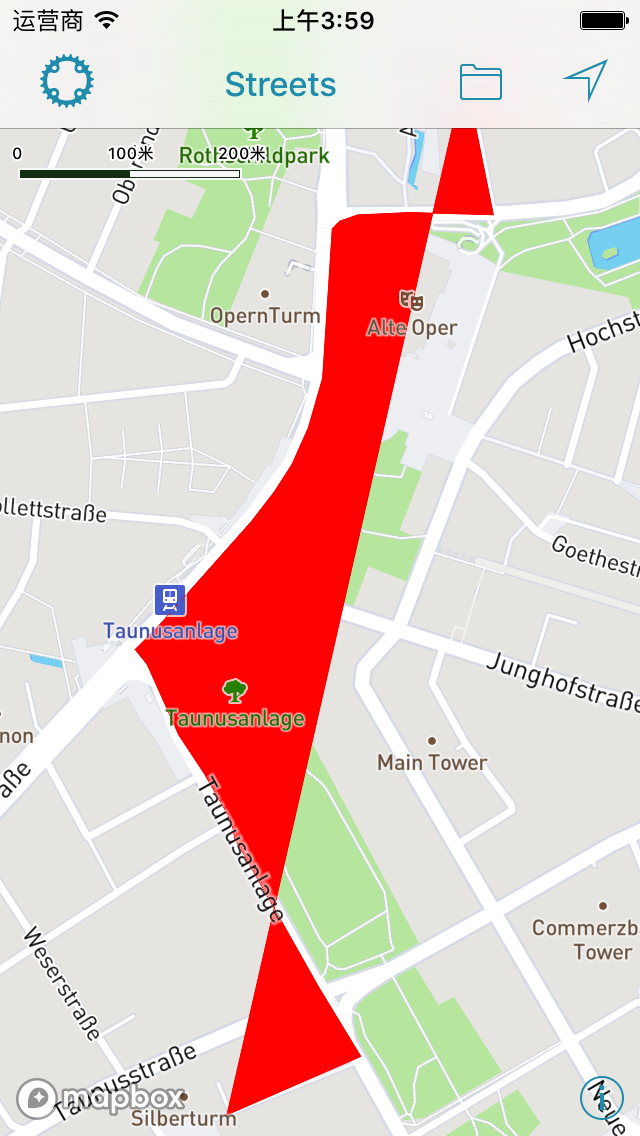
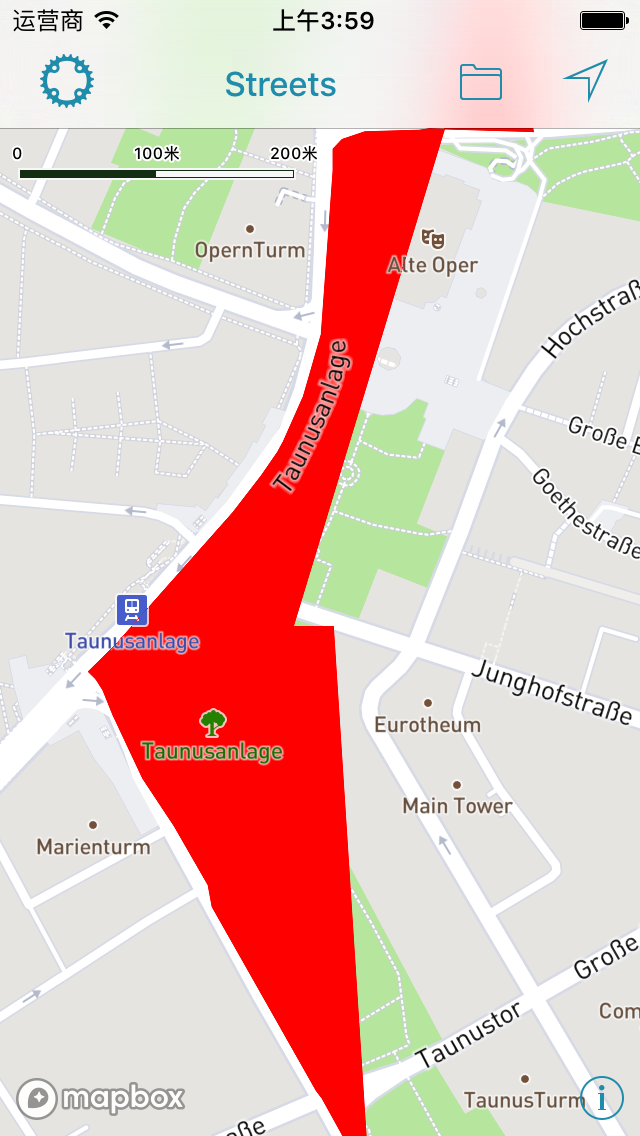
Expected behavior
When scaling a map, the shape of a polygon will not change
Actual behavior
When I zoom in the map, the shape of the polygon changes
 yzzhan
All 6 comments
Can you clarify which version of our iOS SDK you’re using? The v5.0.2 tag refers to an older Android release — the current iOS release is ios-v3.7.3.
 friedbunny
on 24 Jan 2018
friedbunny
on 24 Jan 2018
Sorry for the wrong version because of my carelessness,the correct version is ios-v3.7.3
yzzhan
on 25 Jan 2018
I'm seeing this issue as well. I have a polygon that looks fine. If I zoom too far in, it actually disappears. But this is like close enough a house takes up the full screen, so not a huge issue. The bigger issue is that when I start adding more polygons in real time, sometimes existing polygons get distorted like this.
A couple notes - I am drawing new polygons on the user end. I have a separate layer for the "in progress" polygon. When I'm drawing it, the original polygons don't get affected. However, I have a "new shape" button, which will put the in progress polygon on the layer with the other polygons. It's pressing this that sometimes results in other polygons getting distorted. And not every time, it seems to be based on distance from the other polygons. Perhaps something to do with being partially on a different tile? When it happens though, it affects 90% of existing polygons.
Update - Interestingly, the threshold for the distortions to occur becomes way lower (as in lower zoom value) as larger polygons are added.
 JacobJT
on 27 Feb 2018
JacobJT
on 27 Feb 2018
We're suffering this issue as well.
After migrate the classic annotations/delegate APIs to source/shape based APIs, polygons often get distorted when zoomIn or zoomOut.
 studyroz
on 6 Mar 2018
studyroz
on 6 Mar 2018
I found the solution to this was ensuring that the coordinates you use for the polygons meet the spec criteria of being a closed loop, i.e. the first and last coordinate should be the same. While the polygon will appear to be drawn correctly, there is obviously some stuff going on under the hood that requires that last point to match, and results in some wonky behavior when it does not.
JacobJT
on 6 Mar 2018
Great to hear that you resolved your issue @JacobJT ! Closing for now, please reopen if needed
 lilykaiser
on 12 Mar 2018
lilykaiser
on 12 Mar 2018
Related issues
friedbunny
·
4Comments
 lamhuynh96
·
3Comments
lamhuynh96
·
3Comments
 rshev
·
4Comments
rshev
·
4Comments
 ksinghal
·
3Comments
ksinghal
·
3Comments
 tobrun
·
3Comments
tobrun
·
3Comments
Most helpful comment
Great to hear that you resolved your issue @JacobJT ! Closing for now, please reopen if needed