Mapbox-gl-native: [iOS] Marker annotation is laid below MGLFillStyleLayer
Mapbox SDK version: 3.6.0
Steps to trigger behavior
- Add MGLShapeSource from MGLShape of a Multipolygon geojson to mapView.style
- Add MGLFillStyleLayer from that source to mapView.style
- Add MGLPointAnnotation to mapView
Expected behavior
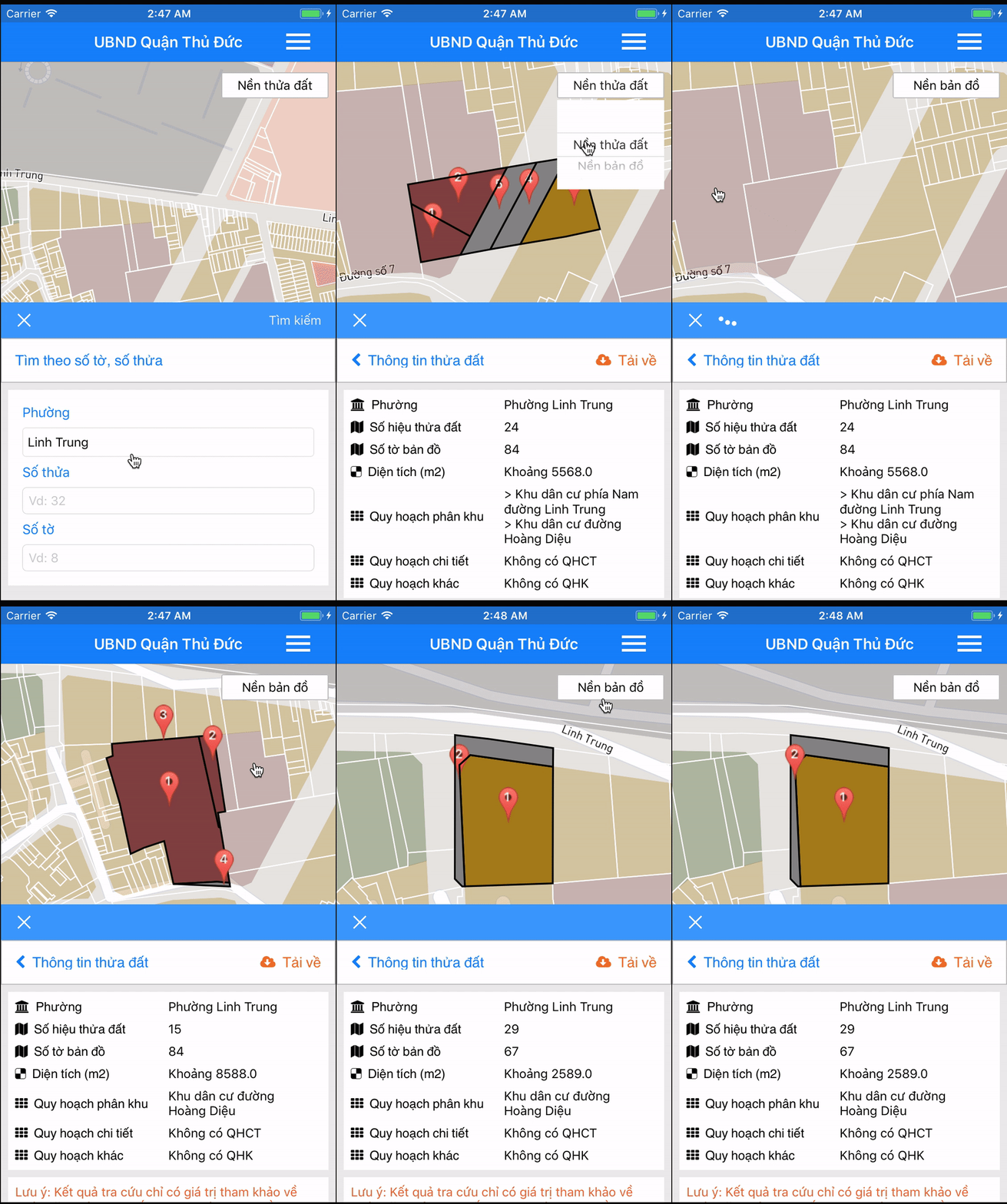
Marker annotation is laid above the layer
Actual behavior
Marker annotation is laid below the layer
A geojson like that:
{"geometry": {"type": "MultiPolygon", "coordinates": [[[[106.77093906069908, 10.859550595262505], [106.77070990921959, 10.859508814600904], [106.77070075721959, 10.859560644500913], [106.77065301570336, 10.859842003999765], [106.77099664821866, 10.8596564429009], [106.77093906069908, 10.859550595262505]]]]}, "type": "Feature", "properties": {"RGBColor": "127,63,63”}
But when I change map style to other style, remove then _re-add them in function mapView(_ mapView: _MGLMapView, didFinishLoading style: MGLStyle)_, everything is fine.
This is my code:
func drawQHPK(QHPKs: [QHPK]) {
        for (index, qhpk) in QHPKs.enumerated() {
            let encoder = JSONEncoder()
            let json = try! encoder.encode(qhpk)
            let feature = try! MGLShape(data: json, encoding: String.Encoding.utf8.rawValue)
            let source = MGLShapeSource(identifier: "qhpk\(index)-source", shape: feature, options: nil)
            mapView.style?.addSource(source)

            let colors = qhpk.properties.RGBColor.components(separatedBy: ",")
            let layer = MGLFillStyleLayer(identifier: "qhpk\(index)-layer", source: source)
            layer.fillColor = MGLStyleValue(rawValue: UIColor(red: CGFloat(Float(colors[0])!/255), green: CGFloat(Float(colors[1])!/255), blue: CGFloat(Float(colors[2])!/255), alpha: 1))
            layer.fillOutlineColor = MGLStyleValue(rawValue: .black)
            mapView.style?.addLayer(layer)

            let stroke = MGLLineStyleLayer(identifier: "qhpk\(index)-stroke", source: source)
            stroke.lineColor = MGLStyleValue(rawValue: .black)
            stroke.lineWidth = MGLStyleValue(rawValue: 2)
            mapView.style?.addLayer(stroke)

            let annotation = MGLPointAnnotation()
            annotation.coordinate = feature.coordinate
            mapView.addAnnotation(annotation)
            }
    }

func pickerView(_ pickerView: UIPickerView, didSelectRow row: Int, inComponent component: Int) {
        if mapType[row] != btnMapType.title(for: .normal) {
            switch row {
            case 0:
                addMapType(styleURL: nenThuaDat)
            case 1:
                addMapType(styleURL: nenBanDo)
            case 2:
                addMapType(styleURL: nenKhongAnh)
            default:
                addMapType(styleURL: nenThuaDat)
            }
            btnMapType.setTitle(mapType[row], for: .normal)
            mapTypePicker.isHidden = true
        }
    }

func addMapType(styleURL: String) {
        clearMap()
        let styleURL = URL(string: styleURL)
        mapView.styleURL = styleURL
    }

func mapView(_ mapView: MGLMapView, didFinishLoading style: MGLStyle) {
        drawQHPK(QHPKs: QHPKhu)
}
 lamhuynh96
All 3 comments
Thanks for the code and gif! I was not able to reproduce this issue, but from the gif, it looks like it is that the MGLLineStyleLayer (rather than the MGLFillStyleLayer) is covering the MGLAnnotation.
Do you still see the issue when you insert the style layers below a specific layer? For example:
        if let symbolLayer = style.layer(withIdentifier: "poi-scalerank3") {
            style.insertLayer(layer, below: symbolLayer)
            style.insertLayer(stroke, above: layer)
        }
 jmkiley
on 17 Jul 2017
jmkiley
on 17 Jul 2017
Workaround to insert fill layer below annotation points:
[self.mapView.style insertLayer:fillLayer belowLayer:[self.mapView.style layerWithIdentifier:@"com.mapbox.annotations.points"]];
 Shimaa-Hassan
on 19 Dec 2017
Shimaa-Hassan
on 19 Dec 2017
Closing this ticket as stale but please reopen if this is still an issue.
 lilykaiser
on 24 Aug 2018
lilykaiser
on 24 Aug 2018
Related issues
 michaelfomin
·
3Comments
michaelfomin
·
3Comments
 tobrun
·
3Comments
tobrun
·
3Comments
 rshev
·
4Comments
rshev
·
4Comments
 ksinghal
·
3Comments
ksinghal
·
3Comments
 brunoabinader
·
4Comments
brunoabinader
·
4Comments
Most helpful comment
Workaround to insert fill layer below annotation points:
[self.mapView.style insertLayer:fillLayer belowLayer:[self.mapView.style layerWithIdentifier:@"com.mapbox.annotations.points"]];