Mapbox-gl-native: MapView with a SceneTransitionAnimation
I have attempted to transition from a card view fragment containing a map view to a full screen activity when tapping a button. Unfortunately as see in the gif below, this transition does not appear to work as I would expect.
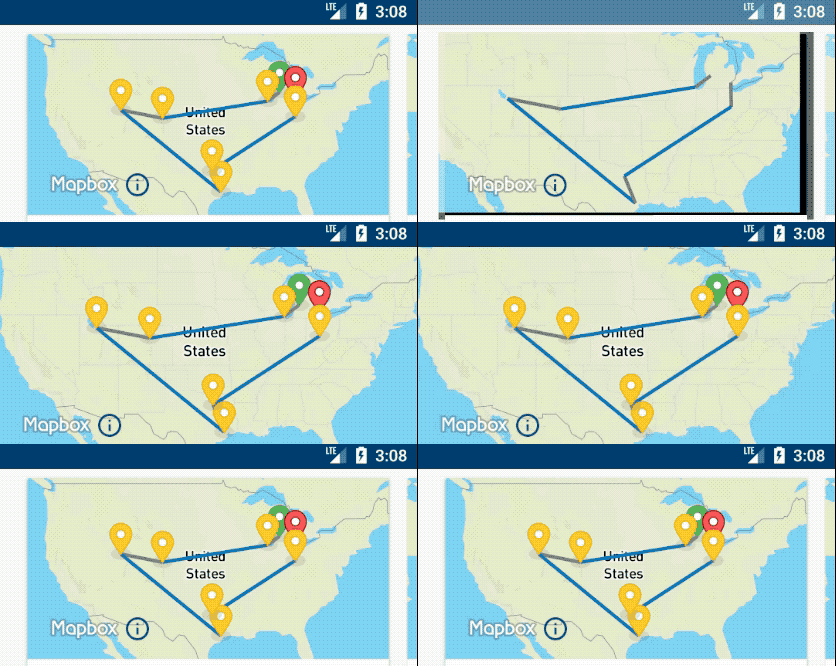
Higher quality version of the gif makes the issue easier to see available on gfycat.
My setup is a fragment and an activity that share a layout like this:
<?xml version="1.0" encoding="utf-8"?>
<android.support.constraint.ConstraintLayout
    xmlns:android="http://schemas.android.com/apk/res/android"
    xmlns:app="http://schemas.android.com/apk/res-auto"
    android:layout_width="match_parent"
    android:layout_height="wrap_content"
    >

<com.mapbox.mapboxsdk.maps.MapView
    android:id="@+id/mapView"
    android:layout_width="0dp"
    android:layout_height="0dp"
    app:layout_constraintRight_toRightOf="parent"
    app:layout_constraintLeft_toLeftOf="parent"
    app:layout_constraintTop_toTopOf="parent"
    app:layout_constraintBottom_toBottomOf="parent"
    app:layout_constraintDimensionRatio="H,2:1"
    android:transitionName="map"
    />

</android.support.constraint.ConstraintLayout>
My fragment then uses a SceneTransitionAnimation as its bundle to launch the activity.
override fun onCreateView(inflater: LayoutInflater, container: ViewGroup?, state: Bundle?): View? {
    ...

    mapView.onCreate(state)
    mapView.setStyleUrl(Style.MAPBOX_STREETS)
    mapView.getMapAsync { map ->
        // plot points and draw lines
    }
}

...

fun expand() {
    val intent = Intent(activity, ExpandViewActivity::class.java)
    val mapPair = Pair.create(mapView as View, "map")
    val options = ActivityOptionsCompat.makeSceneTransitionAnimation(
      activity,
      mapPair
    )
    startActivity(intent, options.toBundle())
}
 scottschmitz
All 4 comments
@scottschmitz
this transition does not appear to work as I would expect.
Are you referring to the flashing black background during the transition?
This is because the map content is drawn by GL on a SurfaceView. The flashing black background is part of intialising the SurfaceView. There are a couple of hacks around this:
- use a bitmap of the map in an imageview while transitioning instead of a MapView (make the MapView visible as part of the OnMapReady callback).
- use a TextureView (can be enabled on MapboxMapOptions or xml attrs), not sure about this approach but it could be that this approach could result in a better UX.
 tobrun
on 21 Jul 2017
tobrun
on 21 Jul 2017
Yes, I was referring to the flashing black background. It was looking even stranger since the pins and lines were still visible. Thanks for the workarounds!
scottschmitz
on 21 Jul 2017
@scottschmitz I ticketed out https://github.com/mapbox/mapbox-android-demo/issues/419 to add an example of SceneAnimationTransition in our demo app. There are no immediate actions required for this ticketed atm (we are aware of this behavior and will focus on improving this in future releases).
tobrun
on 24 Jul 2017
I have the same problem of reload effect of map with activity animations.
 SylvainHocq
on 4 Jul 2018
SylvainHocq
on 4 Jul 2018
Related issues
 xrayed
·
4Comments
xrayed
·
4Comments
 JobGetabu
·
3Comments
JobGetabu
·
3Comments
 ksinghal
·
3Comments
tobrun
·
3Comments
ksinghal
·
3Comments
tobrun
·
3Comments
 friedbunny
·
4Comments
friedbunny
·
4Comments
Most helpful comment
@scottschmitz I ticketed out https://github.com/mapbox/mapbox-android-demo/issues/419 to add an example of SceneAnimationTransition in our demo app. There are no immediate actions required for this ticketed atm (we are aware of this behavior and will focus on improving this in future releases).