Mapbox-gl-js: Extruded polygons have missing front faces when using a vector tiles source
Extruded polygons ("type": "fill-extrusion") are missing their front faces and only showing back faces if the source of the polygon data is from vector tiles (MVT). There is no issue when the source polygon comes from a GeoJSON source.
I believe this change is is the cause of the bug. It seems that in the vector tiles case, the wrong faces are culled: (My knowledge of 3D graphics is too limited to narrow it down further.)
https://github.com/mapbox/mapbox-gl-js/pull/7178
mapbox-gl-js version: from 0.50.0 thru 0.52.0 (0.49.0 works OK)
browser: Chrome
 davehartnoll
All 10 comments
You can see that the official example (which also uses MVT for buildings) looks fine: https://docs.mapbox.com/mapbox-gl-js/example/3d-buildings/
So I'd assume that the source of the issue is in your vector tiles. Can you provide a minimal reproducible test case (e.g. with JSFiddle) that demonstrates it? Otherwise we wouldn't be able to diagnose it.
 mourner
on 22 Jan 2019
mourner
on 22 Jan 2019
Thanks for the reply, and sorry for the delay in following up. It's taken longer than I expected to prepare a working example that would work from a fiddle.
The following fiddle shows the issue. If you change the mapbox version to 0.49.0 then the front faces show as they should (as well as the back faces which you can see if you zoom "into" a building). With any version after that, the front faces are missing. (I've tried supplying the polygons in both forced CW and CCW order but that made no difference.)
https://jsfiddle.net/90fxn1dc/5/
Dave.
davehartnoll
on 24 Jan 2019
@davehartnoll Are you using PostGIS St_AsMvT to create your tiles by any chance? I had the same issue but PostGIS have fixed it in 2.4.5. See here: https://github.com/mapbox/mapbox-gl-js/issues/7767
 joedjc
on 25 Jan 2019
joedjc
on 25 Jan 2019
@joedjc Thanks, that's exactly what I'm doing, and the PostGIS is version 2.4.4. Unfortunately, I'm stuck on that version as I'm using an Amazon RDS instance and I can't user a later version of PostGIS until they make Postgres 11 generally available (which will have access to PostGIS 2.5.0).
(I'm a bit annoyed with myself as when I searched for similar existing issues, I only searched for open issues.)
davehartnoll
on 25 Jan 2019
Let's close the issue's then — it's about invalid vector tiles and will resolve itself with an updated PostGIS version.
mourner
on 25 Jan 2019
@davehartnoll We are in the exact same position with AWS. Hopefully they update it soon.
joedjc
on 25 Jan 2019
This looks like a consequence of Add WebGL face culling for increased performance (#7178) in v0.50.0
Are you sure CCW does not fix it? From winding-order doumentation one would think that CW is correct, but CCW should be used for geographical coordinates.
I fixed/hacked it with changing Tt.backCCW = new Tt(!0, 1029, 2305); to Tt.backCCW = new Tt(!1, 1029, 2305); but i wonder if one could do something better than to turn off good optimization. Or to turn off optimization is some better way than changing .gl.js source code?
 watbywbarif
on 15 Feb 2019
watbywbarif
on 15 Feb 2019
@watbywbarif could you elaborate on your hack?
I am in the same boat (limited by AWS to upgrade PG, thus stuck on PostGIS 2.4.4).
It seems like reversing the order would cause problems on all geometries that currently do _not_ exhibit the undesired behavior.
I have noticed that it appears to be a function of the zoom level and geometry size/complexity. As a result, certain geometries break at lower zoom levels than others, but not all geometries break.
Example:
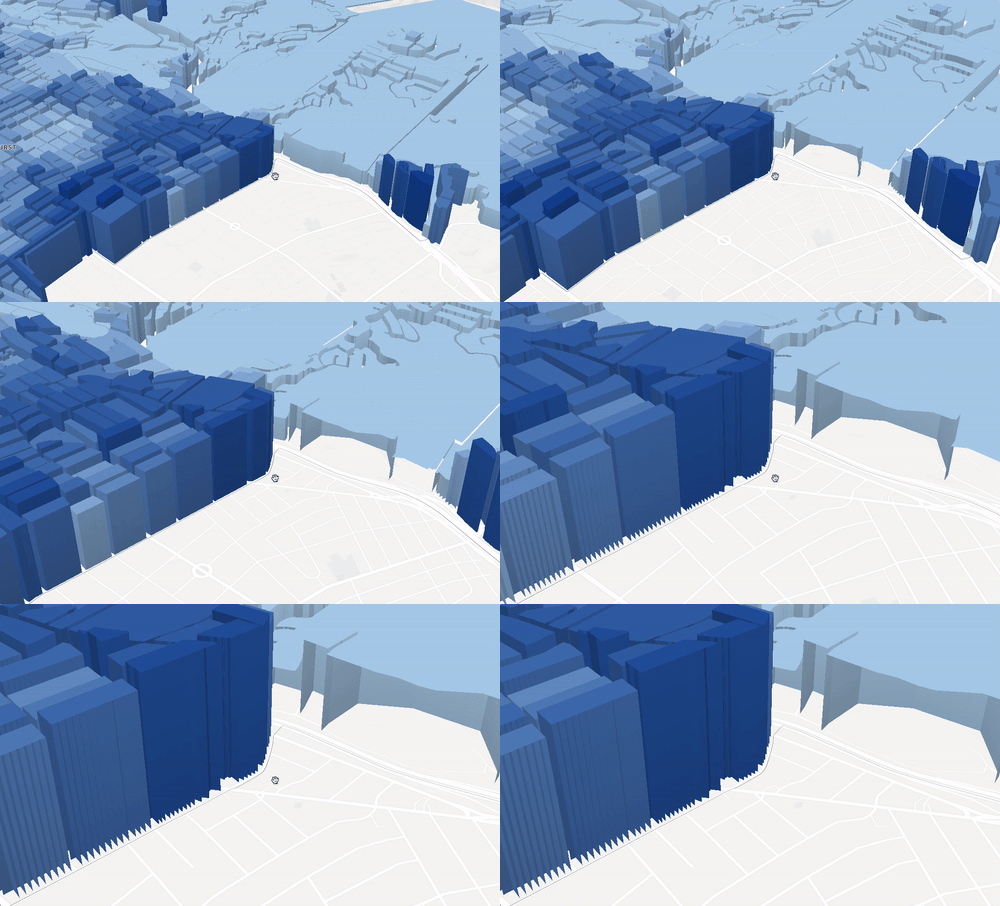
It also appears that geometries closer to the camera have this happen than farther - does that indicate that Mapbox GL is in anyway a part of this?
Example:
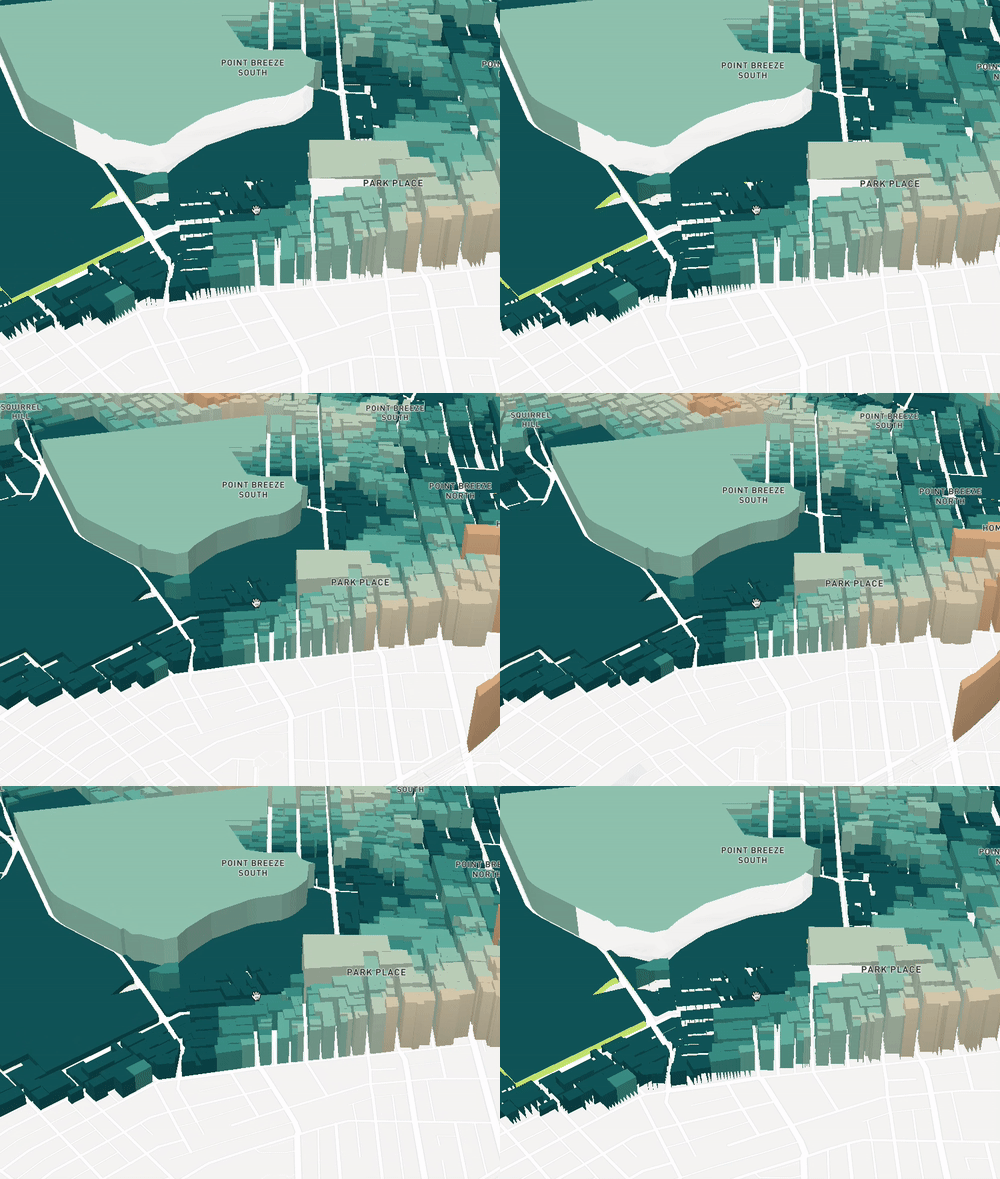
 kuanb
on 15 Feb 2019
kuanb
on 15 Feb 2019
@joedjc Thanks dude, saved me the headache - I thought our data or the styling got corrupted.
@davehartnoll We are in the same situation here with MS Azure. MS said that they will be updating PostGIS to 2.4.5 (which fixes this issue) on their managed Postgres DB service, but will only be ready in production in about 3 months time.
 jacknkandy
on 14 Mar 2019
jacknkandy
on 14 Mar 2019
I can't yet see it on the console but looks like the update is imminent on AWS: https://aws.amazon.com/about-aws/whats-new/2019/03/postgresql11-now-supported-in-amazon-rds/
joedjc
on 15 Mar 2019
Related issues
 infacq
·
3Comments
infacq
·
3Comments
 rigoneri
·
3Comments
rigoneri
·
3Comments
 BernhardRode
·
3Comments
BernhardRode
·
3Comments
 stevage
·
3Comments
stevage
·
3Comments
 Scarysize
·
3Comments
Scarysize
·
3Comments
Most helpful comment
This looks like a consequence of Add WebGL face culling for increased performance (#7178) in v0.50.0
Are you sure CCW does not fix it? From winding-order doumentation one would think that CW is correct, but CCW should be used for geographical coordinates.
I fixed/hacked it with changing
Tt.backCCW = new Tt(!0, 1029, 2305);toTt.backCCW = new Tt(!1, 1029, 2305);but i wonder if one could do something better than to turn off good optimization. Or to turn off optimization is some better way than changing .gl.js source code?