Mapbox-gl-js: [Question] about data-expression 'match'
mapbox-gl-js version: v0.43.0
Steps to Trigger Behavior
map.on('load', function () {

    map.addLayer({
        "id": "points",
        "type": "symbol",
        "source": {
            "type": "geojson",
            "data": {
                "type": "FeatureCollection",
                "features": [{
                    "type": "Feature",
                    "geometry": {
                        "type": "Point",
                        "coordinates": [-77.03238901390978, 38.913188059745586]
                    },
                    "properties": {
                        "title": "mapbox DC",
                        "title:en": "MAPBOX DC",
                        "icon": "monument"
                    }
                }, {
                    "type": "Feature",
                    "geometry": {
                        "type": "Point",
                        "coordinates": [-122.414, 37.776]
                    },
                    "properties": {
                        "title": "mapbox SF",
                        "title:en": "SF MAPBOX",
                        "icon": "harbor"
                    }
                }, {
                    "type": "Feature",
                    "geometry": {
                        "type": "Point",
                        "coordinates": [-100.414, 37.776]
                    },
                    "properties": {
                        "title": "Center",
                        "title:en": "Center",
                        "icon": "harbor"
                    }
                }]
            }
        },
        "layout": {
            "icon-image": "{icon}-15",
            "text-field":
              [
                'match',
                ['get', 'title'],
                ['get', 'title:en'],  // <--- here it doesn't work, ['string', 'Center'] is working
                ['get', 'title'],
                ['concat', ['get', 'title:en'], ['string', '\n'], ['get', 'title']]
              ],
            "text-font": ["Open Sans Semibold", "Arial Unicode MS Bold"],
            "text-offset": [0, 0.6],
            "text-anchor": "top"
        }
    });
});
I want to show 2 kind of languages in a point.
but if they are same text, I want to show just one text.
so I use `match of the data-expression, but not working as I expected.
Please help me how to compare two text of properties.
Expected Behavior
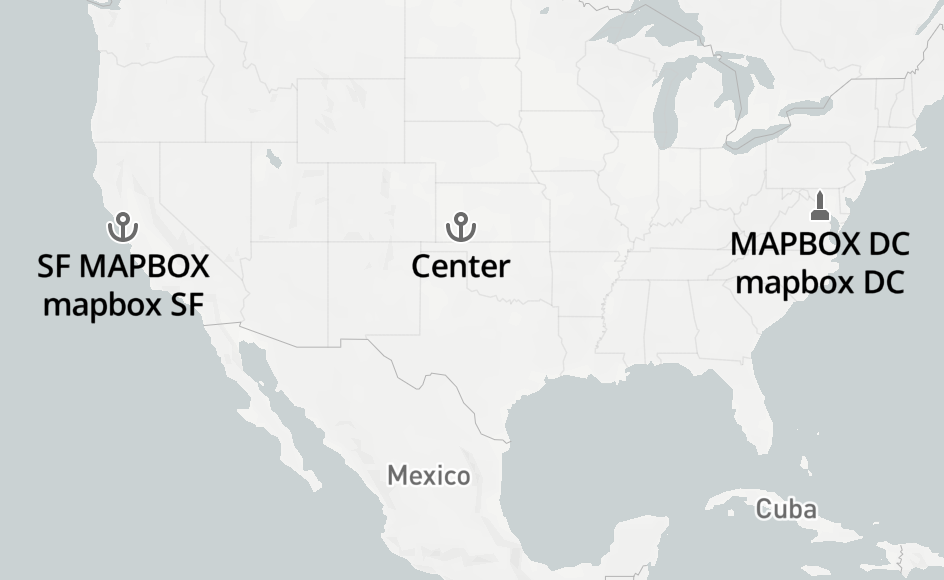
Test Code : https://jsfiddle.net/qutw5egn/5/
Actual Behavior

Test Code : https://jsfiddle.net/qutw5egn/4/
 iamdenny
All 3 comments
The labels in a match expression must be literal values (so it can be compiled to a lookup table internally). If you need a dynamic value, you can use a case expression instead:
[
  'case',
  ['==', ['string', ['get', 'title']], ['string', ['get', 'title:en']]],
  ['get', 'title'],
  ['concat', ['get', 'title:en'], '\n', ['get', 'title']]
]
 jfirebaugh
on 8 Jan 2018
jfirebaugh
on 8 Jan 2018
@jfirebaugh
I couldn't find out == in https://www.mapbox.com/mapbox-gl-js/style-spec/#expressions-decision
Please add == into Mapbox Style Specification
Thank you so much.
iamdenny
on 9 Jan 2018
Thanks for pointing that out. I opened #5968 to track getting it fixed.
jfirebaugh
on 9 Jan 2018
Related issues
 foundryspatial-duncan
·
3Comments
foundryspatial-duncan
·
3Comments
 mollymerp
·
3Comments
mollymerp
·
3Comments
 infacq
·
3Comments
infacq
·
3Comments
 Scarysize
·
3Comments
Scarysize
·
3Comments
 rasagy
·
3Comments
rasagy
·
3Comments
Most helpful comment
The labels in a
matchexpression must be literal values (so it can be compiled to a lookup table internally). If you need a dynamic value, you can use acaseexpression instead: