Mapbox-gl-js: Newline character in vector tiles is ignored in text label
This issue comes from this one: https://github.com/mapbox/mapbox-gl-js/pull/3179
I've got a vector tile server with features having multiline text properties. I'm looking for a way to tell MGL to break lines at special characters. I've tried using both \n and char(13) for line break, but neither works. char(13) is ignored, while \n gets displayed as is.
I'd be great to have an option like text-newline-character, so one can set a specific character to break lines at.
 nextstopsun
All 25 comments
If you have the ability to use newer JS features, a template literal multi-line string will be rendered as expected in a text label.
 ryanhamley
on 26 Jan 2018
ryanhamley
on 26 Jan 2018
@ryanhamley Can you please give more explanation?
nextstopsun
on 27 Jan 2018
I'm having this issue too - in Studio, should I not be able to enter something like "\n" in a text field, and get a newline? Newline _is_ a character... I don't want JS, this should be directly enterable in Studio text fields.
 KempWatson
on 14 Feb 2018
KempWatson
on 14 Feb 2018
Not sure if it applies to your cases, but this answer helped me.
According to that, setting text-max-width to 0 disables all wrapping (including \n). Setting it to Infinity fixed newline wrapping in my case.
 james-wagner11
on 4 Apr 2018
james-wagner11
on 4 Apr 2018
Hi @nextstopsun are you still experiencing this issue? If so, are you able to provide a minimal setup in JSBin that reproduces the error? I tried investigating and found that 'hello \n world' renders with the new line. Even using Cyrillic characters rendered as expected 'Лорем\nипсум\nдолор\nсит\nамет'. I'm using Chrome 66.0.3359.181 on a Mac. If you can share your browser and OS info with a working demo of the bug that would be very helpful in solving this issue.
ryanhamley
on 25 May 2018
@nextstopsun You need to use the newline character (hexadecimal 0x0a, char(10)), rather than the carriage return character (hexadecimal 0x0d, char(13)).
 jfirebaugh
on 25 May 2018
jfirebaugh
on 25 May 2018
@jfirebaugh Can I ask why this is closed? None of this works for me. I've tried \n, \r, 0x0a, 0x0d, no joy at all. Perhaps a line of working code example before closing the issue would help?
KempWatson
on 28 May 2018
Chiming in here as I am experiencing the same thing. Newline character is baked directly into my vector tiles and doesn't seem to trigger a newline on the tileset when pulled into Studio.
 kdanaher
on 20 Mar 2019
kdanaher
on 20 Mar 2019
The issue still exists. Chrome ver 61.0.3163.100 (64-bit), MacOS ver 10.14.5
No way to use linebreaks.
@jfirebaugh Can I also ask why this issue is closed just like KempWatson did?
 NickPepper
on 7 Jun 2019
NickPepper
on 7 Jun 2019
Hi @KempWatson @kdanaher @NickPepper I cannot reproduce the issues that you are reporting. Here's an example of a newline character being rendered properly from data embedded in a vector tile. This was created using Mapbox Studio. This is the GeoJSON I used to create the vector tile.
{
  "type": "FeatureCollection",
  "features": [
    {
      "type": "Feature",
      "properties": {
        "text": "hello\nworld"
      },
      "geometry": {
        "type": "Point",
        "coordinates": [
          -77.03651905059814,
          38.89332088074671
        ]
      }
    }
  ]
}
This example demonstrates using a newline character in a GeoJSON source rather than text that's embedded into a vector tile. Both the \n character and String.fromCharCode(10) create newlines as expected. \r and String.fromCharCode(13) will not because that's a carriage return rather than a newline.
If anyone believes there's a bug in how newlines are being handled, please include a demonstration of the issue so that we can determine if there's something unexpected happening. If you need general support on how to get newlines working in your style, you can contact Mapbox Support. Thanks everyone!
ryanhamley
on 7 Jun 2019
I've got an update that might help some folks who find this issue. If you're parsing JSON, you will need to escape the entire newline character before parsing in order for the newline to be rendered correctly. So it would need to be \\n before running JSON.parse. See this Stack Overflow question.
Edit: This is a bit of a red herring and probably isn't the problem most people are running into. It could be helpful to some people experiencing problems who end up on this ticket though so I'll leave it up.
ryanhamley
on 29 Jul 2019
Ryan, sadly that's not relevant to this issue... it's not about parsing
JSON, it's about entering a string with a carriage return into Mapbox
Studio, and generating tiles from that. \n, \r, \n\r, \r\n, \n, nothing
works. Should be easy, but this has been a problem and an open issue for
quite a long time. I have tested again last night, the problem persists.
JSBin will not help, the problem is not in coding, it is in Mapbox itself.
K. Watson
On Mon, Jul 29, 2019 at 2:45 PM Ryan Hamley notifications@github.com
wrote:
I've got an update that might help some folks who find this issue. If
you're parsing JSON, you will need to escape the entire newline character
before parsing in order for the newline to be rendered correctly. So it
would need to be \n before running JSON.parse. See this Stack Overflow
question
https://stackoverflow.com/questions/11591784/parsing-json-containing-new-line-characters
.—
You are receiving this because you were mentioned.
Reply to this email directly, view it on GitHub
https://github.com/mapbox/mapbox-gl-js/issues/6064?email_source=notifications&email_token=AC2OM5P2V4Q4HXRLU2576DTQB43FNA5CNFSM4ENYKMU2YY3PNVWWK3TUL52HS4DFVREXG43VMVBW63LNMVXHJKTDN5WW2ZLOORPWSZGOD3BUUGY#issuecomment-516114971,
or mute the thread
https://github.com/notifications/unsubscribe-auth/AC2OM5KMYTABROQ6QWE4MBTQB43FNANCNFSM4ENYKMUQ
.
KempWatson
on 30 Jul 2019
@KempWatson See https://github.com/mapbox/mapbox-gl-js/issues/8575 which was reported yesterday. There is a bug where if text-max-width is set to zero, newlines are ignored. Otherwise, newline characters do seem to work as expected as I demonstrated in my comment above.
Note though that the carriage return does not render a newline. My testing shows that \n, \r\n, and \n\r produce a line break. \r does not because GL JS considers the carriage return to be whitespace, not a breakable character as can be seen in this code. The library forces a line break on the newline character (\n or String.fromCharCode(10)). It would be possible to also force a break on carriage returns (\r\ or String.fromCharCode(13)) but this would require some discussion.
For one thing, making that change would probably be a breaking change which would have the potential to alter how some users' maps are rendered and it would likely be very hard for those users to figure out why they suddenly had new line breaks. But it's also not obvious that a carriage return should produce a line break. Historically, a carriage return moved a mechanical carriage back to the start of the existing line and it had to be combined with a line feed to move to the next line (hence the \r\n construct in that particular order). I'm not an expert here but my understanding is that Windows has generally used \r\n while Unix and OSX both use \n so causing a breaking change in the library to force a break on just \r seems unnecessary to me. If anyone has a minimal example that shows a newline character not being rendered when the text-max-width is set to > 0, let us know as that would be helpful in debugging any further issues with this.
ryanhamley
on 30 Jul 2019
I've attached some screenshots here, of both the dataset and the style
settings.
I've tried everything, nothing makes a line break. Note that the "Max
width" is set to 18em, but the fix above still does not work.
Kemp
On Tue, Jul 30, 2019 at 3:47 PM Ryan Hamley notifications@github.com
wrote:
@KempWatson https://github.com/KempWatson See #8575
https://github.com/mapbox/mapbox-gl-js/issues/8575 which was reported
yesterday. There is a bug where if text-max-width is set to zero,
newlines are ignored. Otherwise, newline characters do seem to work as
expected as I demonstrated in my comment above.Note though that the carriage return does not render a newline. My testing
shows that \n, \r\n, and \n\r produce a line break. \r does not because
GL JS considers the carriage return to be whitespace, not a breakable
character as can be seen in this code
https://github.com/mapbox/mapbox-gl-js/blob/master/src/symbol/shaping.js#L219.
The library forces a line break on the newline character
https://github.com/mapbox/mapbox-gl-js/blob/master/src/symbol/shaping.js#L281-L284
(\n or String.fromCharCode(10)). It would be possible to also force a
break on carriage returns (\r\ or String.fromCharCode(13)) but this would
require some discussion.For one thing, making that change would probably be a breaking change
which would have the potential to alter how some users' maps are rendered
and it would likely be very hard for those users to figure out why they
suddenly had new line breaks. But it's also not obvious that a carriage
return should produce a line break. Historically, a carriage return
moved a mechanical carriage back to the start of the existing line and it
had to be combined with a line feed to move to the next line (hence the
\r\n construct in that particular order). I'm not an expert here but my
understanding is that Windows has generally used \r\n while Unix and OSX
both use \n so causing a breaking change in the library to force a break
on just \r seems unnecessary to me. If anyone has a minimal example that
shows a newline character not being rendered when the text-max-width is
set to > 0, let us know as that would be helpful in debugging any further
issues with this.—
You are receiving this because you were mentioned.
Reply to this email directly, view it on GitHub
https://github.com/mapbox/mapbox-gl-js/issues/6064?email_source=notifications&email_token=AC2OM5KVUACKIHRODU4FUPTQCCLGZA5CNFSM4ENYKMU2YY3PNVWWK3TUL52HS4DFVREXG43VMVBW63LNMVXHJKTDN5WW2ZLOORPWSZGOD3FDMJQ#issuecomment-516568614,
or mute the thread
https://github.com/notifications/unsubscribe-auth/AC2OM5OGVJMLWDQG6QSRY33QCCLGZANCNFSM4ENYKMUQ
.
KempWatson
on 30 Jul 2019
If I use the \n into the "text-field" definition it works. For example:
["concat",["get","name"],"\n(",["get","ele"],")"]
if I have the "name" field with a \n inside then it does not work. For example:
"New \nYork"
not working also
"New \\nYork"
New ideas?
Giorgio
 ghigio2000
on 10 Oct 2019
ghigio2000
on 10 Oct 2019
Yes, exactly, This has nothing to do with the JavaScript frontend API, this
is about how to put a carriage return into a field in the GeoJSON from the
portal.
Kemp Watson
On Thu, Oct 10, 2019 at 8:32 AM ghigio2000 notifications@github.com wrote:
If I use the \n into the "text-field" definition it works. For example:
["concat",["get","name"],"\n(",["get","ele"],")"]if I have the "name" field with a \n inside then it does not work. For
example:
"New \nYork"
not working also
"New \nYork"New ideas?
Giorgio
—
You are receiving this because you were mentioned.
Reply to this email directly, view it on GitHub
https://github.com/mapbox/mapbox-gl-js/issues/6064?email_source=notifications&email_token=AC2OM5PVSTCEXOH45BXJTXTQN4OF3A5CNFSM4ENYKMU2YY3PNVWWK3TUL52HS4DFVREXG43VMVBW63LNMVXHJKTDN5WW2ZLOORPWSZGOEA4CJMQ#issuecomment-540550322,
or unsubscribe
https://github.com/notifications/unsubscribe-auth/AC2OM5JB6UHKSYW6EOHUXM3QN4OF3ANCNFSM4ENYKMUQ
.
KempWatson
on 10 Oct 2019
To correct the above: this is about newlines, not technically carriage
returns. How does one define a multi-line string in a field in the portal?
\r, \n, \n\r, \r\n,
, html entities, all fail.
Kemp Watson
On Thu, Oct 10, 2019 at 9:27 AM Kemp Watson kemp@objectivepathology.com
wrote:
Yes, exactly, This has nothing to do with the JavaScript frontend API,
this is about how to put a carriage return into a field in the GeoJSON from
the portal.Kemp Watson
On Thu, Oct 10, 2019 at 8:32 AM ghigio2000 notifications@github.com
wrote:If I use the \n into the "text-field" definition it works. For example:
["concat",["get","name"],"\n(",["get","ele"],")"]if I have the "name" field with a \n inside then it does not work. For
example:
"New \nYork"
not working also
"New \nYork"New ideas?
Giorgio
—
You are receiving this because you were mentioned.
Reply to this email directly, view it on GitHub
https://github.com/mapbox/mapbox-gl-js/issues/6064?email_source=notifications&email_token=AC2OM5PVSTCEXOH45BXJTXTQN4OF3A5CNFSM4ENYKMU2YY3PNVWWK3TUL52HS4DFVREXG43VMVBW63LNMVXHJKTDN5WW2ZLOORPWSZGOEA4CJMQ#issuecomment-540550322,
or unsubscribe
https://github.com/notifications/unsubscribe-auth/AC2OM5JB6UHKSYW6EOHUXM3QN4OF3ANCNFSM4ENYKMUQ
.
KempWatson
on 10 Oct 2019
I have to rectify.
To me the \n works.
I discovered that if I put \n in my Postgis database, when I export the geodata.JSON using ogr2ogr from Postgis the \n become \\n
I then opened the geodata.JSON with a text editor and changed all \\n into \n
At this point I used the new geodata.JSON with tippecanoe and the resultant mbtiles is properly showing the breakline.
Hope this helps,
Giorgio
ghigio2000
on 10 Oct 2019
This is not the issue - nothing to do with JavaScript, or PostGIS, or
anything else. Just simply the operation of the Mapbox Studio console at
https://www.mapbox.com/studio.
Kemp Watson
On Thu, Oct 10, 2019 at 10:17 AM ghigio2000 notifications@github.com
wrote:
I have to rectify.
To me the \n works.
I discovered that if I put \n in my Postgis database, when I export the
geodata.JSON using ogr2ogr from Postgis the \n become \n
I then opened the geodata.JSON with a text editor and changed all \n into
\n
At this point I used the new geodata.JSON with tippecanoe and the
resultant mbtiles is properly showing the breakline.Hope this helps,
Giorgio—
You are receiving this because you were mentioned.
Reply to this email directly, view it on GitHub
https://github.com/mapbox/mapbox-gl-js/issues/6064?email_source=notifications&email_token=AC2OM5L5SZWZLORDWUBMMFDQN42PHA5CNFSM4ENYKMU2YY3PNVWWK3TUL52HS4DFVREXG43VMVBW63LNMVXHJKTDN5WW2ZLOORPWSZGOEA4QRUA#issuecomment-540608720,
or unsubscribe
https://github.com/notifications/unsubscribe-auth/AC2OM5JBVTDGHACJDJPOILLQN42PHANCNFSM4ENYKMUQ
.
KempWatson
on 10 Oct 2019
Hey @KempWatson it turns out that you are correct. There's a bug in Studio when entering newline characters directly into a text field. It seems like the text field is being sanitized. I've filed a bug with the Studio team https://github.com/mapbox/studio/issues/12212
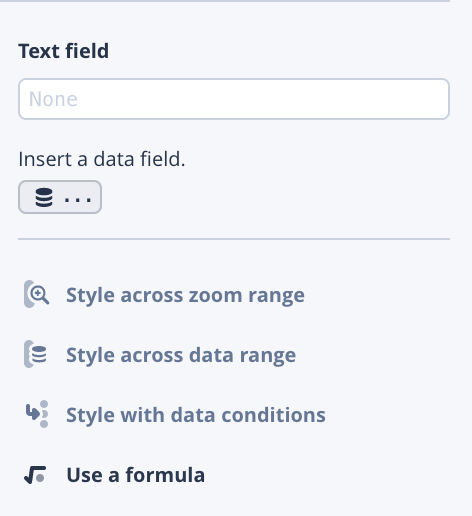
In the meantime, there are two options to work around this. Once you enter the text in the text-field, you can click the Edit JSON button at the bottom of the column (see the image below). This will show you the output JSON which will have an extra \ in it. Remove that slash and your newline should work as expected. For example, if you entered Hello\nWorld in the text field, the JSON will be Hello\\nWorld.

You can also click on Use a formula and use the & to concat your strings with a newline character if you'd prefer to use an expression.
Thanks for reporting this and being persistent. Hopefully this will solve your issue.
ryanhamley
on 10 Oct 2019
Thanks Ryan... I'd swear I tried the first workaround to no avail, but not
the second. I'll try both tonight and report back here,
Kemp
On Thu, Oct 10, 2019 at 3:33 PM Ryan Hamley notifications@github.com
wrote:
Hey @KempWatson https://github.com/KempWatson it turns out that you are
correct. There's a bug in Studio when entering newline characters directly
into a text field. It seems like the text field is being sanitized. I've
filed a bug with the Studio team mapbox/studio#12212
https://github.com/mapbox/studio/issues/12212In the meantime, there are two options to work around this. Once you enter
the text in the text-field, you can click the Edit JSON button at the
bottom of the column (see the image below). This will show you the output
JSON which will have an extra \ in it. Remove that slash and your newline
should work as expected. For example, if you entered Hello\nWorld in the
text field, the JSON will be Hello\nWorld.[image: Screen Shot 2019-10-10 at 12 29 08 PM]
https://user-images.githubusercontent.com/4523080/66600174-c9b1cc00-eb59-11e9-9e33-5db4b4e93832.pngYou can also click on Use a formula and use the & to concat your strings
with a newline character if you'd prefer to use an expression.[image: Screen Shot 2019-10-10 at 12 31 04 PM]
https://user-images.githubusercontent.com/4523080/66600239-f534b680-eb59-11e9-9fea-25e0dfc5cea0.pngThanks for reporting this and being persistent. Hopefully this will solve
your issue.—
You are receiving this because you were mentioned.
Reply to this email directly, view it on GitHub
https://github.com/mapbox/mapbox-gl-js/issues/6064?email_source=notifications&email_token=AC2OM5KPQ6NKYBG2PYZZJTLQN57RZA5CNFSM4ENYKMU2YY3PNVWWK3TUL52HS4DFVREXG43VMVBW63LNMVXHJKTDN5WW2ZLOORPWSZGOEA5SF4Q#issuecomment-540746482,
or unsubscribe
https://github.com/notifications/unsubscribe-auth/AC2OM5JQLOAJSYJNXBIT2XDQN57RZANCNFSM4ENYKMUQ
.
KempWatson
on 10 Oct 2019
Hi @KempWatson @ryanhamley @ghigio2000 any success? This is still an issue in STUDIO. A /n in the text field box in Studio previews fine, and enters fine when viewing that json, but does not render with a line break, so frustrating...
 ramz211
on 30 May 2020
ramz211
on 30 May 2020
@ramz211 do you have an example you can point us to? either by creating a map or sharing the style you created
ryanhamley
on 1 Jun 2020
Ryan, it's really simple, just try to make a two-line text string in Mapbox
Studio. Can't do it... it's not about the map, it's about Studio.
Kemp Watson
On Mon, Jun 1, 2020 at 5:40 PM Ryan Hamley notifications@github.com wrote:
@ramz211 https://github.com/ramz211 do you have an example you can
point us to? either by creating a map or sharing the style you created—
You are receiving this because you were mentioned.
Reply to this email directly, view it on GitHub
https://github.com/mapbox/mapbox-gl-js/issues/6064#issuecomment-637126953,
or unsubscribe
https://github.com/notifications/unsubscribe-auth/AC2OM5KLQU67ETHZ4UIXG6DRUQN35ANCNFSM4ENYKMUQ
.
KempWatson
on 1 Jun 2020
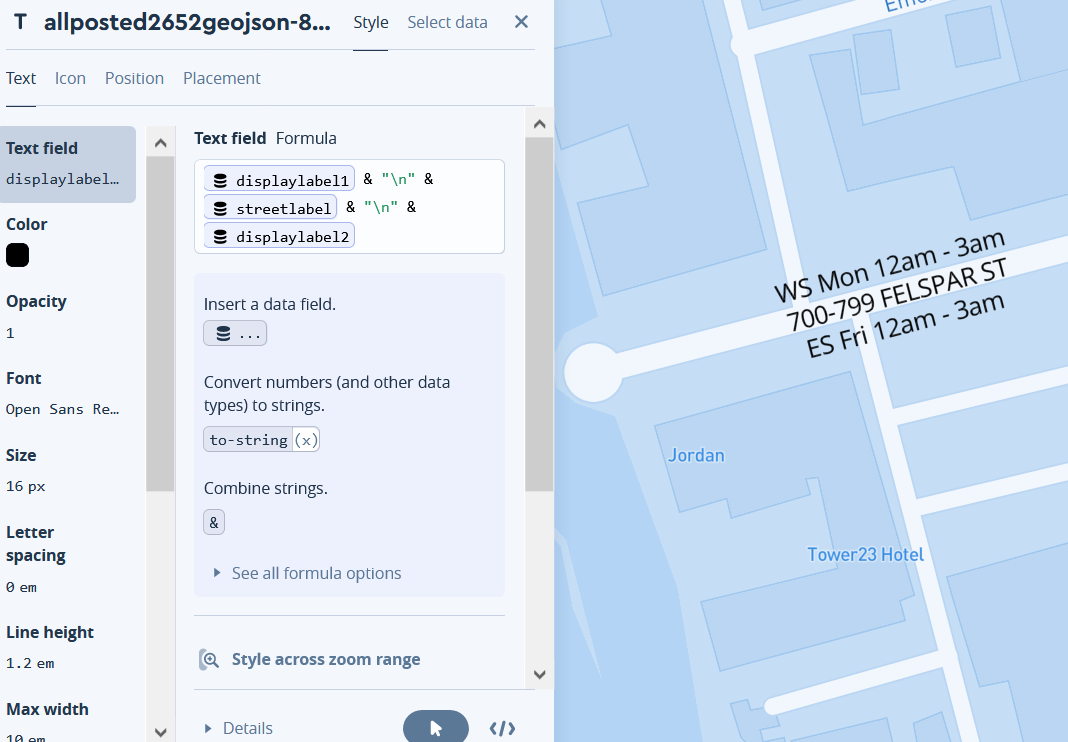
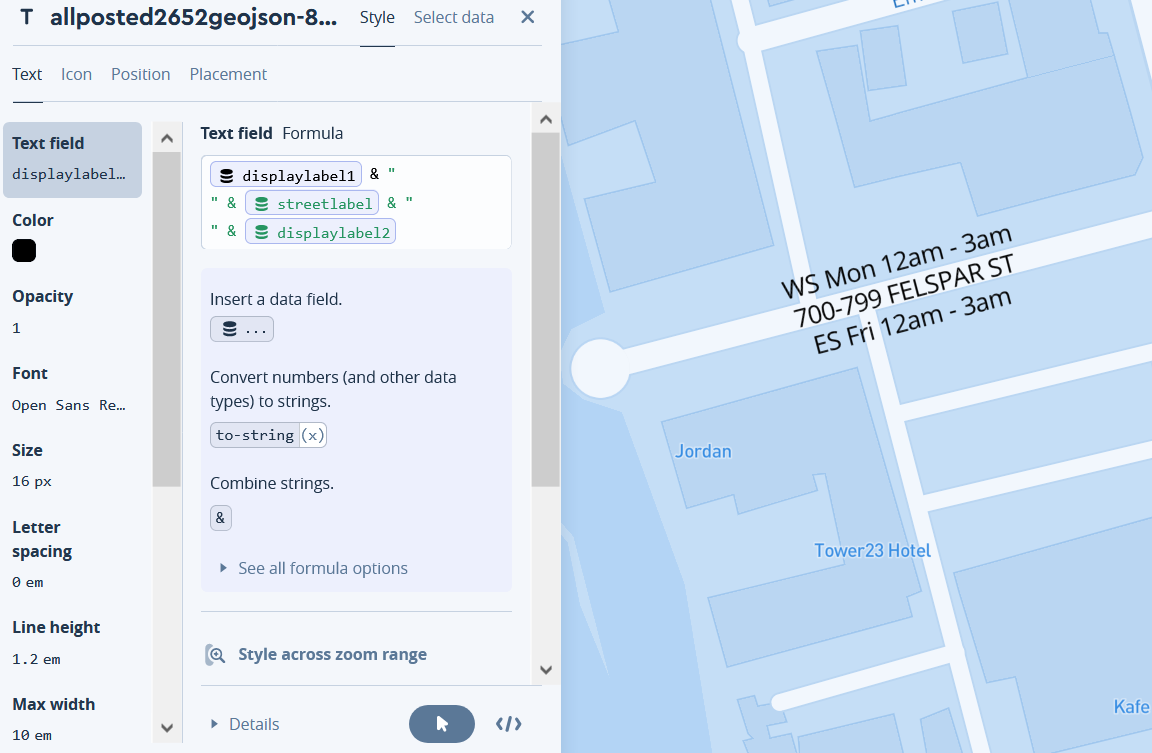
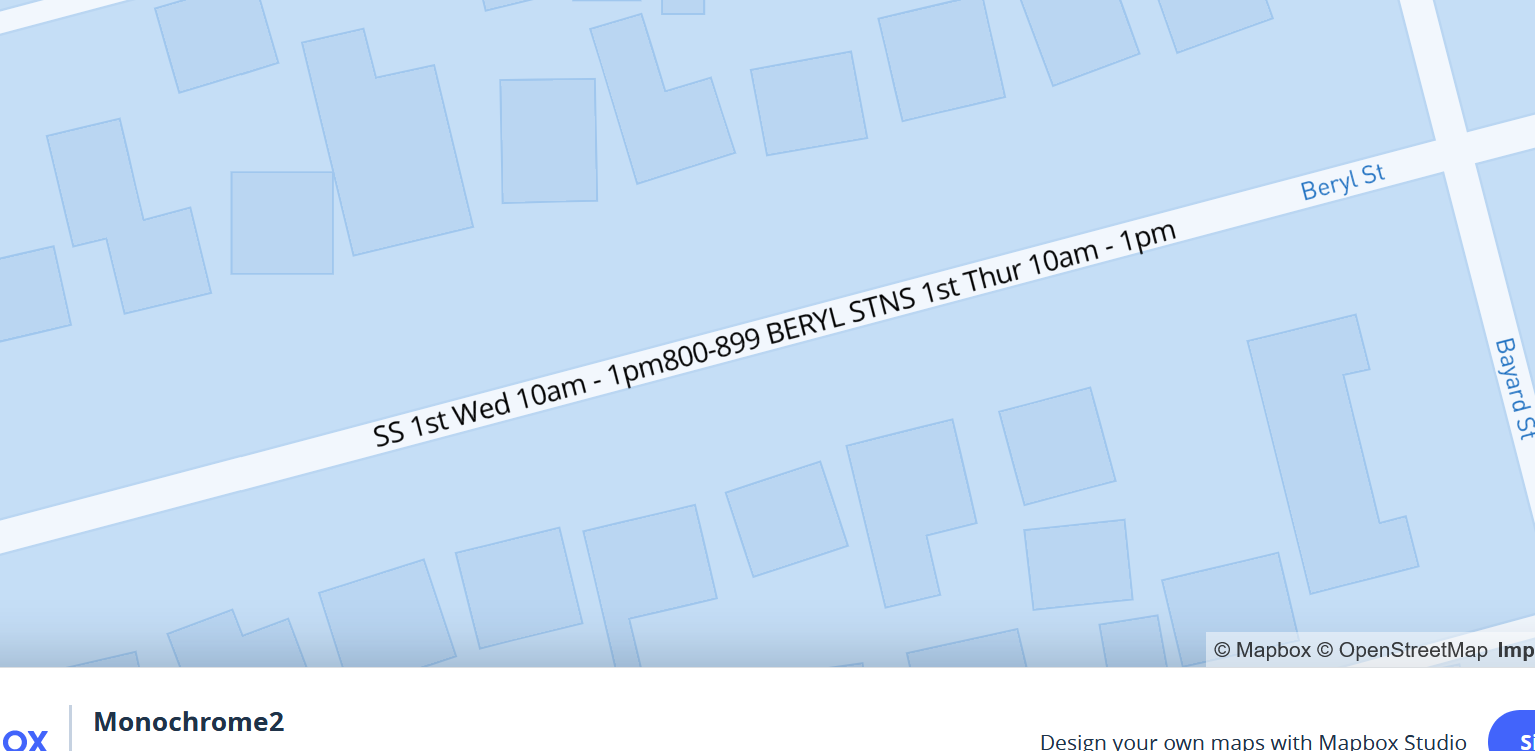
@ryanhamley here are screen shots of a \n previewing fine in Studio, but on Render it ignores the line breaks. In Studio, if you click on View Json, it looks fine, but when you go back to the Text Field boxes all \n have been removed

ramz211
on 1 Jun 2020
Related issues
 Scarysize
·
3Comments
Scarysize
·
3Comments
 stevage
·
3Comments
stevage
·
3Comments
 samanpwbb
·
3Comments
samanpwbb
·
3Comments
 foundryspatial-duncan
·
3Comments
jfirebaugh
·
3Comments
foundryspatial-duncan
·
3Comments
jfirebaugh
·
3Comments