Mapbox-gl-js: Give user control over how to scale patterns by zoom
Sometimes the current strategy for pattern scaling works; most of the time it looks weird.
Many textures and patterns are designed to be displayed at specific sizes and don't look good or lose legibility if scaled up or down, so an option to have 'static' patterns that don't change as the user zooms would be open up a lot more possibilities with patterns.
 samanpwbb
All 20 comments
I completely agree. This would be immensely helpful especially for data-drive textures. For now, I had question about current implementation, are the fill patterns actual size at zoom level integers?
Looks like relevant bit in draw_fill.js but I can quite make sense of it:
var factor = (tile.tileExtent / tile.tileSize) / Math.pow(2, painter.transform.tileZoom - tile.coord.z);

var matrixA = mat3.create();
mat3.scale(matrixA, matrixA, [
    1 / (imagePosA.size[0] * factor * image.fromScale),
    1 / (imagePosA.size[1] * factor * image.fromScale)
]);
 KP
on 16 Dec 2015
KP
on 16 Dec 2015
@samanpwbb are you thinking about something like this?
@KP yes, fill patterns should be actual size at integer zoom levels
 ansis
on 4 Jan 2016
ansis
on 4 Jan 2016
@ansis maybe – curious how that strategy works for patterns that are fully filled.
What I had in mind was simpler: no animation at all on textures.
Some other questionably good ideas:
- In order to maximize the amount of time a texture is shown at actual size while also giving some illusion of movement, would it be possible to show static textures but then trigger a one-time animation in or out whenever user hits an integer zoom level?
- Continue to scale textures, but _only_ underscale them. Never overscale them.
samanpwbb
on 4 Jan 2016
@samanpwbb like this?

_disregarding the tile boundaries_
 kelvinabrokwa
on 4 Jan 2016
kelvinabrokwa
on 4 Jan 2016
As you can see above, keeping the image the same size throughout causes some funky behavior because the size of the image does not evenly divide the size of the tiles. This results is some wild sliding.
I don't think its worth fixing this before layer-by-layer rendering lands. Thoughts?
kelvinabrokwa
on 4 Jan 2016
I don't think its worth fixing this before layer-by-layer rendering lands. Thoughts?
It's too sloppy. If we can't have patterns that are seamless across tiles then we shouldn't bother.
samanpwbb
on 4 Jan 2016
I think layer-by-layer will land in the next couple days!
 lucaswoj
on 4 Jan 2016
lucaswoj
on 4 Jan 2016
https://github.com/mapbox/mapbox-gl-js/pull/1908 will fix the seamlessness but I think that not scaling textures will still look weird. Without scaling, the patterned area doesn't look like it's part of the map surface.
two possible approaches:
- something like this where the pattern isn't scaled but the spacing is
- scale the pattern but reset it when the user stops zooming
In order to maximize the amount of time a texture is shown at actual size while also giving some illusion of movement, would it be possible to show static textures but then trigger a one-time animation in or out whenever user hits an integer zoom level?
I'm not following
Continue to scale textures, but only underscale them. Never overscale them.
This would look pretty much like the current implementation except all patterns would be half as big.
ansis
on 8 Jan 2016
two possible approaches:
- something like this where the pattern isn't scaled but the spacing is
- scale the pattern but reset it when the user stops zooming
The first approach would work well for symbol patterns where the symbols are _not_ seamlessly tiled. As you zoom the spacing between the symbols changes by the scale of the symbols doesn't. I think this would be implemented as part of the symbol type by adding a new symbol-placement value that would create lots of of individual symbol points to cover a polygon.
The second approach is the only approach I can think of that would work for seamless patterns. It might look weird it in it's own different ways.
cc @alinapaz
ansis
on 2 Sep 2016
For me, the approach that works best with seamless patterns is ideal.
KP
on 10 Sep 2016
When I get some time I'll start hacking on some enhancements to the pattern spec.
 mollymerp
on 16 Sep 2016
mollymerp
on 16 Sep 2016
Linking the scaled spacing ticket I opened a while back in the style-spec repo: https://github.com/mapbox/mapbox-gl-style-spec/issues/427
This month is the 3 year anniversary of that gif by @ansis btw, nice to see the convo moving :)
 ajashton
on 16 Sep 2016
ajashton
on 16 Sep 2016
@KP does https://github.com/mapbox/mapbox-gl-js/issues/1831#issuecomment-247503214 help you track towards a solution?
 alinapaz
on 29 Sep 2016
alinapaz
on 29 Sep 2016
Is there any progress on this?
 rudza
on 17 Jan 2018
rudza
on 17 Jan 2018
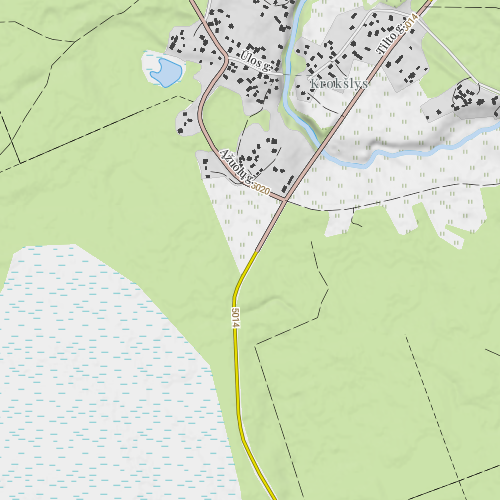
Does this issue cover situations when pattern should not be scaled and rotated?
Say wetland symbol is one of the best known in maps and it will not be possible to ignore for a long time. Here is how wetland and meadow symbols look at x.99 scale and rotated:
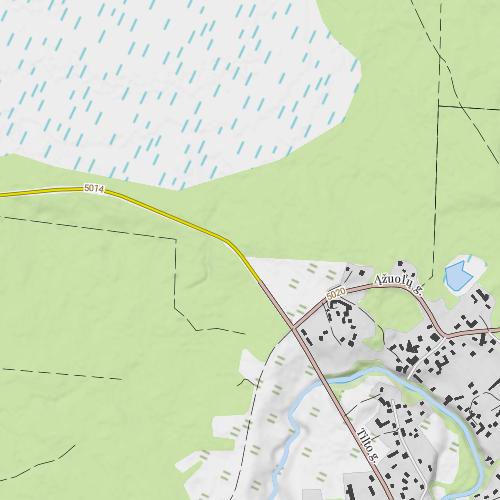
This is how they look at x.0 and no rotation:
 tomass
on 11 Nov 2018
tomass
on 11 Nov 2018
@tomass yes, this covers that problem. Thanks for the example!
ansis
on 12 Nov 2018
Better ideas for solving this are articulated in https://github.com/mapbox/mapbox-gl-js/issues/6296 and https://github.com/mapbox/mapbox-gl-js/issues/6295, closing here!
samanpwbb
on 8 Oct 2019
how is this ticket still haunting me 4 years later 😩
kelvinabrokwa
on 30 Oct 2019
Any updates?
 anish01stha
on 26 Dec 2019
anish01stha
on 26 Dec 2019
@ansis Is the code of your demo available somewhere?
 BramOoms
on 15 Dec 2020
BramOoms
on 15 Dec 2020
Related issues
 PBrockmann
·
3Comments
PBrockmann
·
3Comments
 bgentry
·
3Comments
samanpwbb
·
3Comments
bgentry
·
3Comments
samanpwbb
·
3Comments
 aderaaij
·
3Comments
aderaaij
·
3Comments
 aaronlidman
·
3Comments
aaronlidman
·
3Comments
Most helpful comment
@samanpwbb are you thinking about something like this?

@KP yes, fill patterns should be actual size at integer zoom levels