Manim: Improve handling of scenes without animations
Suggestion
When manim is called to render a scene without animations, this situation should be detected and
- Manim should run as if it were called with
-s, i.e., an image containing the last (and in this case only frame) should be produced - the log message informing the user that "0 animations have been rendered" should be adapted to explain why no video has been produced and that an image has been rendered instead.
(The bug report below eventually lead to this suggestion.)
How I got the problem:
I installed manimce yesterday, the first examples ( squareToCircle ) working fine. when I go to play the Text or Latex examples in the docs website,
I have faced a lot of problems with latex even with the original manim!
I reinstalled the Miktex, so most of the problems are solved, Latex examples in the original manim working fine
but when I use latex examples in manimce, I found a problem with the generated text file.
\Desktop\project\media\videos\scene\480p15\partial_movie_files\ExampleLaTeX\partial_movie_file_list.txt: Invalid data found when processing input
I think there is something missing inside the text file
and this is the folder of partial movie files:
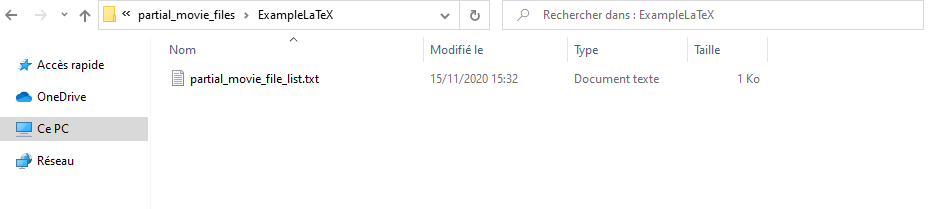
The scene file:
from manim import *
 class SquareToCircle(Scene):
    def construct(self):
        circle = Circle()                   # create a circle
        circle.set_fill(PINK, opacity=0.5)  # set the color and transparency

        square = Square()
        square.flip(RIGHT)
        square.rotate(-3 *  TAU / 8)

        self.play(ShowCreation(square))
        self.play(Transform(square, circle)) # interpolate the square into the circle
        self.play(FadeOut(square))           # fade out animation

 class Example1Text(Scene):
    def construct(self):
        text = Text('Hello world').scale(3)
        self.add(text)

 class ExampleLaTeX(Scene):
    def construct(self):
        tex = Tex(r'\LaTeX').scale(3)
        self.add(tex)
Tried Solutions:
Reinstalling _MiKTeX_ (solved some problems like converting into .dvi and an index out of range error)
Reinstalling _manimce_
Reinstalling _FFmpeg_
Deleting cached data in all media's folders
 dakyion
All 8 comments
Hello! The scenes you posted above don't contain animations, so manim will not render a video.
You can look at the generated output by adding either something like self.wait() in the end -- or by running manim file.py ClassName -s -- the -s flag tells Manim to render a picture.
 behackl
on 15 Nov 2020
behackl
on 15 Nov 2020
Hello! The scenes you posted above don't contain animations, so
manimwill not render a video.You can look at the generated output by adding either something like
self.wait()in the end -- or by runningmanim file.py ClassName -s-- the-sflag tells Manim to render a picture.
Hi,
You are right, I have used the -s this time, and it worked.
Thanks a lot!
But, I have some suggestion for such a thing not to happen to others:
Either
1) You Add a note in the first tutorial that scenes that don't have animation must be run with an additional flag of -s .
or
2) You make it _detected automatically_, if the scene doesn't have animation, the manim library should render it to an image without the need of adding the -s flag!
and Thanks again!
_( I don't know if this issue should be closed or to be considered for the suggestions I wrote above)_
dakyion
on 15 Nov 2020
Thanks @dakyion for your report and your suggestions. I personally think we should do the second point (detect automatically).
At the very least, for now we should maybe try to add this to the troubleshooting page.
@behackl do we want to open a new issue for this?
 leotrs
on 15 Nov 2020
leotrs
on 15 Nov 2020
I personally think we should do the second point (detect automatically).
Agreed, this is a good idea.
do we want to open a new issue for this?
We can use this one, no need to open a new one; I'll edit the description. This shouldn't be too difficult to add implement I think -- and we can also adapt the log message saying "Rendered 0 animations" accordingly.
behackl
on 15 Nov 2020
I'm not a huge fan of detecting automatically. It will be a huge source of confusion.
Why not just raising an exception? If the partial movie file lsit is empty, it means that there is nothing to render.
 huguesdevimeux
on 17 Nov 2020
huguesdevimeux
on 17 Nov 2020
I'm not a huge fan of detecting automatically. It will be a huge source of confusion.
Why not just raising an exception? If the partial movie file lsit is empty, it means that there is nothing to render.
I see the error stating that the partial movie file is empty still too often to be comfortable with this approach. I don't think that the combination of printing a warning and rendering an image instead would raise much confusion though.
Whatever we do, it would be good to have more explicit messages in the case of 0 animations. :-)
behackl
on 17 Nov 2020
Is this issue still open? If so, can I take a look into it?
 rlinwu
on 28 Nov 2020
rlinwu
on 28 Nov 2020
@rlinwu yes! Please feel free to continue discussion here or open a PR.
leotrs
on 28 Nov 2020
Related issues
 Ammar34
·
6Comments
huguesdevimeux
·
6Comments
huguesdevimeux
·
7Comments
Ammar34
·
6Comments
huguesdevimeux
·
6Comments
huguesdevimeux
·
7Comments
 naveen521kk
·
5Comments
naveen521kk
·
5Comments
 ackxolotl
·
4Comments
ackxolotl
·
4Comments