Manim: Manim written in different language produces an error
If this is a support request:
Please attempt to solve the problem on your own before opening an issue.
Between old issues, StackOverflow, and Google, you should be able to find
solutions to most of the common problems.
Include at least:
- Steps to reproduce the issue (e.g. the command you ran)
- The unexpected behavior that occurred (e.g. error messages or screenshots)
- The environment (e.g. operating system and version of manim)
If this is a feature request:
Include the motivation for making this change.
 Ayan2357
All 18 comments
I had been trying to create a scene using #525 but had been getting a error "Latex error converting to dvi" to which i tried following #36 but still kept getting the error. Also, i would like to try the assamese language in manim. Can you guide me the steps?
Ayan2357
on 29 Apr 2020
i would like to try the assamese language in manim
manim uses Latex at its core, which only supports english by default ..... but there are numerous Latex packages which for other languages, try searching them.
edit: I found this package https://ctan.org/pkg/bangtex?lang=en (maybe outdated, I haven't tested !)
"Latex error converting to dvi"
share the full error and log files ..
 tshrpl
on 29 Apr 2020
tshrpl
on 29 Apr 2020
This is the error
Traceback (most recent call last):
File "C:\Manim\manim_3_feb\manimlib\extract_scene.py", line 153, in main
scene = SceneClass(*scene_kwargs)
File "C:\Manim\manim_3_feb\manimlib\scene\scene.py", line 54, in __init__
self.construct()
File "tutorial\1_text_format.py", line 222, in construct
tex=TextMobject("\jap{これはmanimのあるアニメーションです}").scale(1.5)
File "C:\Manim\manim_3_feb\manimlib\mobject\svg\tex_mobject.py", line 144, in __init__
self, self.arg_separator.join(tex_strings), *kwargs
File "C:\Manim\manim_3_feb\manimlib\mobject\svg\tex_mobject.py", line 45, in __init__
self.template_tex_file_body
File "C:\Manim\manim_3_feb\manimlib\utils\tex_file_writing.py", line 20, in tex_to_svg_file
dvi_file = tex_to_dvi(tex_file)
File "C:\Manim\manim_3_feb\manimlib\utils\tex_file_writing.py", line 67, in tex_to_dvi
"See log output above or the log file: %s" % log_file)
Exception: Latex error converting to dvi. See log output above or the log file: C:\Manim\manim_3_feb\manimlib\filesTex\e89320de1c1ff07e.log
Ayan2357
on 29 Apr 2020
And this is the log file
This is pdfTeX, Version 3.14159265-2.6-1.40.21 (MiKTeX 2.9.7400 64-bit) (preloaded format=latex 2020.4.29) 29 APR 2020 21:22
entering extended mode
*C:/Manim/manim_3_feb/manimlib/files/Tex/e89320de1c1ff07e.tex
(C:/Manim/manim_3_feb/manimlib/files/Tex/e89320de1c1ff07e.tex
LaTeX2e <2020-02-02> patch level 5
L3 programming layer <2020-04-06>)
! Emergency stop.
<> ...feb/manimlib/files/Tex/e89320de1c1ff07e.tex
Here is how much of TeX's memory you used:
20 strings out of 480931
627 string characters out of 2909553
239226 words of memory out of 3000000
15990 multiletter control sequences out of 15000+200000
532338 words of font info for 24 fonts, out of 3000000 for 9000
1141 hyphenation exceptions out of 8191
12i,0n,15p,92b,8s stack positions out of 5000i,500n,10000p,200000b,50000s
No pages of output.
Ayan2357
on 29 Apr 2020
do you have tlmgr installed on your windows system? (test it by typing on cmd)
tshrpl
on 29 Apr 2020
It is not installed
Ayan2357
on 29 Apr 2020
i have miktex, havent tried tex live
Ayan2357
on 29 Apr 2020
install the bangtex package, and edit this file to include it manimlib/utils/tex_template.tex
tshrpl
on 29 Apr 2020
I have the bangtex package installed. But what exactly do i edit?
Ayan2357
on 29 Apr 2020
When i tried checking #525, and followed its edit for the japanese language, it did not work as intended and i got the "Latex error converting to dvi" error.
Ayan2357
on 29 Apr 2020
@tshrpl Can you provide me with the edits that i need to do in the tex_template.tex file?
Ayan2357
on 29 Apr 2020
instead of configuring your latex system, I suggest using custom fonts ....
the result will be pretty good
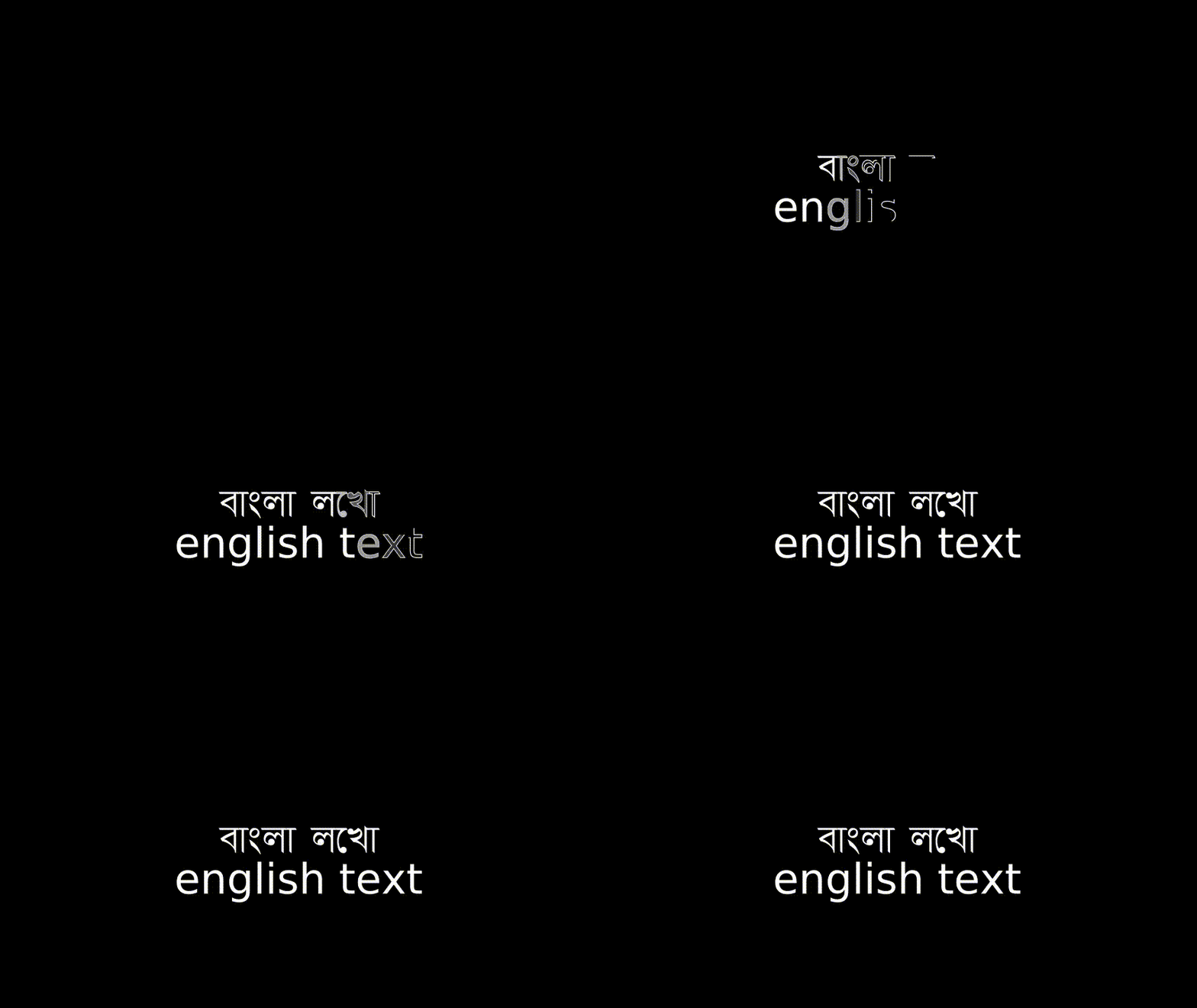
class test_3(Scene):
def construct(self):
text1 = Text('বাংলা লেখা', font='Akaash')
text2 = Text('english text', font='Arial').move_to(DOWN)
self.play(Write(text1), Write(text2))
self.wait()
steps
tshrpl
on 29 Apr 2020
@tshrpl It is working. But there are inconsistencies. For instance, you have written বাংলা লেখা but if you look closely at the output, it is বাংলা লখো. Most of the times it spits out absolutely meaningless words.
Ayan2357
on 29 Apr 2020
meaningless words
(well, I'm not a native speaker so sorry for the nonsense you had to read I used google translate) ...
this is an encoding problem, not a problem in manim ..... there are some char like "..." which are treated like single char instead of multiple in unicode, but there is also a "..." (multiple char version)
try this in python
print('লে')
and see the output in terminal, it's two chars right ... but you just pasted one char in your text editor !?!
try searching for the single char version ...
bangla/assamese unicode encoding is inherently broken
workaround for now
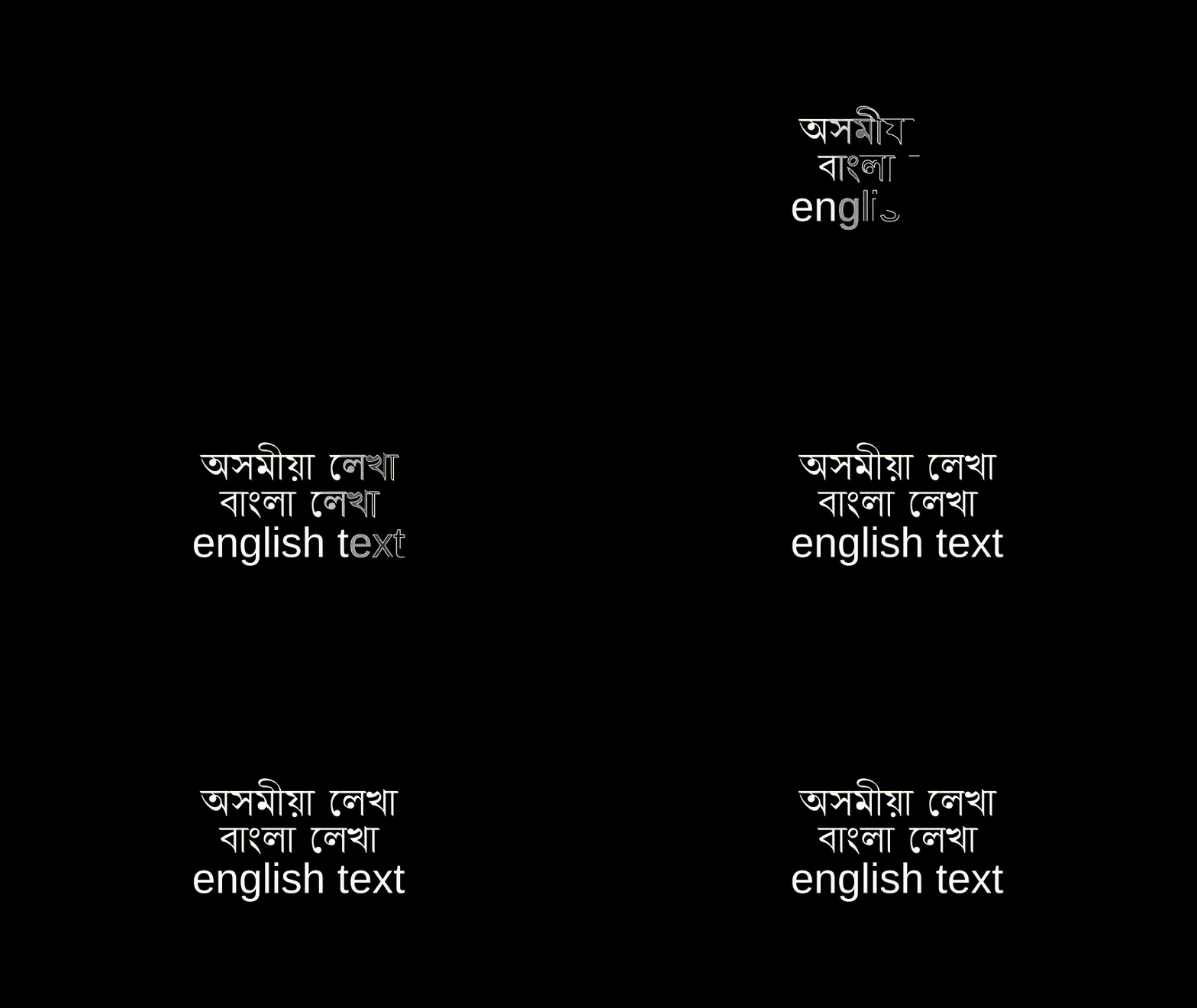
class bangla_test_6(Scene):
    def construct(self):
        text1 = Text('অসমীয়া েলখা', font='Akaash').move_to(UP)
        text2 = Text('বাংলা েলখা', font='Akaash')
        text3 = Text('english text', font='Arial').move_to(DOWN)
        self.play(Write(text1), Write(text2), Write(text3))
        self.wait()
@tshrpl This one did help in solving some issues but not all. Like i tried এনেদৰে, but just couldn't come up with anything.
Ayan2357
on 30 Apr 2020
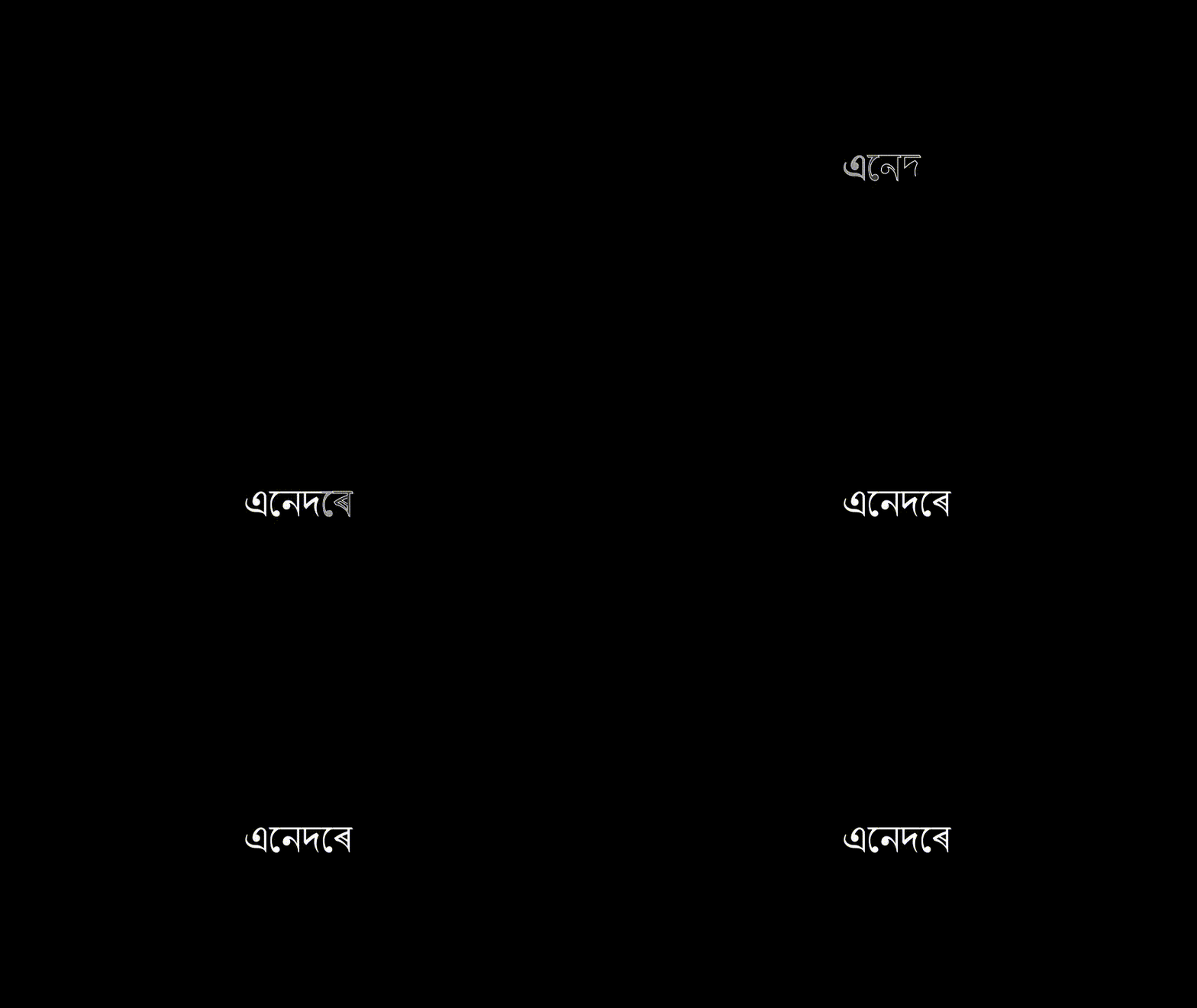
class bangla_3(Scene):
    def construct(self):
        text1 = Text('এেনদেৰ', font='Akaash')
        self.play(Write(text1))
        self.wait()
# not heavily tested
def format_assamese_text(s):
    s = list(s)
    for i in range(1, len(s)):
        if s[i] == 'ে':
            s[i-1], s[i] = s[i], s[i-1]
    return ''.join(s)
Related issues
 Campanulata
·
4Comments
Campanulata
·
4Comments
 SuperVegetaSon
·
4Comments
SuperVegetaSon
·
4Comments
 liangpu597
·
5Comments
liangpu597
·
5Comments
 OGALI
·
3Comments
OGALI
·
3Comments
 Glidos
·
5Comments
Glidos
·
5Comments
Most helpful comment
(well, I'm not a native speaker so sorry for the nonsense you had to read I used google translate) ...
this is an encoding problem, not a problem in manim ..... there are some char like "..." which are treated like single char instead of multiple in unicode, but there is also a "..." (multiple char version)
try this in python
print('লে')
and see the output in terminal, it's two chars right ... but you just pasted one char in your text editor !?!
try searching for the single char version ...
bangla/assamese unicode encoding is inherently broken
workaround for now

maybe useful