Mailspring: Bug: mailsmtp Error Code: 296
Describe the bug
When trying to add an Office 365 account, I get an error code 296 on the SMTP part, IMAP connects correctly.
To Reproduce
Steps to reproduce the behavior:
- Go to 'Add a new account'
- Click on 'Office 365'
- Enter credentials
- Error with login
- Click on 'View logs'
Expected behavior
The connection should be validated and account added.
Setup: (please complete the following information):
- OS: Windows 10 Family Edition
- Windows version: 1909 (18363.836)
- Mailspring Version: 1.7.7-71504f2c
Additional context
SMTP error logs
----------SMTP----------
connect smtp.office365.com 587
220 LO2P265CA0351.outlook.office365.com Microsoft ESMTP MAIL Service ready at Thu, 21 May 2020 09:15:34 +0000
init
EHLO BUREAU
250-LO2P265CA0351.outlook.office365.com Hello [89.157.132.36]
250-SIZE 157286400
250-PIPELINING
250-DSN
250-ENHANCEDSTATUSCODES
250-STARTTLS
250-8BITMIME
250-BINARYMIME
250-CHUNKING
250 SMTPUTF8
start TLS
STARTTLS
220 2.0.0 SMTP server ready
done
OpenSSL version: OpenSSL 1.1.0f  25 May 2017
init after starttls
EHLO BUREAU
250-LO2P265CA0351.outlook.office365.com Hello [89.157.132.36]
250-SIZE 157286400
250-PIPELINING
250-DSN
250-ENHANCEDSTATUSCODES
250-AUTH LOGIN XOAUTH2
250-8BITMIME
250-BINARYMIME
250-CHUNKING
250 SMTPUTF8


SASL_PATH:

SMTP Last Response Code: 250
SMTP Last Response: LO2P265CA0351.outlook.office365.com Hello [89.157.132.36]
SIZE 157286400
PIPELINING
DSN
ENHANCEDSTATUSCODES
AUTH LOGIN XOAUTH2
8BITMIME
BINARYMIME
CHUNKING
SMTPUTF8


mailsmtp Last Error Code: 296
mailsmtp Last Error Explanation: Unknown
mailsmtp Last Error Location: 10
mailsmtp Last Auth Type: 16
 VincentPloquien
All 13 comments
I can confirm, having installed the most recent Mailspring update this morning (1.7.7-71504f2c), I can no longer send email through my Office 365 Outlook account. I receive this popup
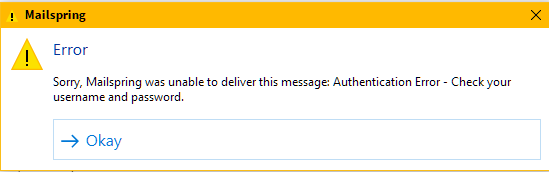
from an authentication error.
Contents of Log file:
----------IMAP----------
connect <mailcore::IMAPSession:0078F868>
* OK The Microsoft Exchange IMAP4 service is ready. [TABPADIAUAAyADYANQBDAEEAMAAwADQAMwAuAEcAQgBSAFAAMgA2ADUALgBQAFIATwBEAC4ATwBVAFQATABPAE8ASwAuAEMATwBNAA==]
ssl connect outlook.office365.com 993 2
OpenSSL version: OpenSSL 1.1.0f  25 May 2017
1 CAPABILITY
* CAPABILITY IMAP4 IMAP4rev1 AUTH=PLAIN AUTH=XOAUTH2 SASL-IR UIDPLUS ID UNSELECT CHILDREN IDLE NAMESPACE LITERAL+
1 OK CAPABILITY completed.
connect ok
login
2 LOGIN "[email protected]" "*********"
2 OK LOGIN completed.
3 CAPABILITY
* CAPABILITY IMAP4 IMAP4rev1 AUTH=PLAIN AUTH=XOAUTH2 SASL-IR UIDPLUS MOVE ID UNSELECT CLIENTACCESSRULES CLIENTNETWORKPRESENCELOCATION BACKENDAUTHENTICATE CHILDREN IDLE NAMESPACE LITERAL+
3 OK CAPABILITY completed.
4 NAMESPACE
* NAMESPACE (("" "/")) NIL NIL
4 OK NAMESPACE completed.
login ok
5 LIST "" "*"
* LIST (\HasNoChildren) "/" Archive
* LIST (\HasNoChildren) "/" Calendar
* LIST (\HasNoChildren) "/" Clutter
* LIST (\HasChildren) "/" Contacts
* LIST (\HasNoChildren) "/" "Contacts/Skype for Business Contacts"
* LIST (\HasChildren) "/" "Conversation History"
* LIST (\HasNoChildren \Trash) "/" "Deleted Items"
* LIST (\HasNoChildren \Drafts) "/" Drafts
* LIST (\Marked \HasNoChildren) "/" INBOX
* LIST (\HasNoChildren) "/" Journal
* LIST (\HasNoChildren \Junk) "/" "Junk Email"
* LIST (\HasChildren) "/" Mailspring
* LIST (\HasNoChildren) "/" Mailspring/Snoozed
* LIST (\HasNoChildren) "/" Notes
* LIST (\HasNoChildren) "/" Outbox
* LIST (\HasNoChildren) "/" Scheduled
* LIST (\HasNoChildren \Sent) "/" "Sent Items"
* LIST (\HasNoChildren) "/" Tasks
5 OK LIST completed.


----------SMTP----------
connect smtp.office365.com 587
220 LO2P265CA0094.outlook.office365.com Microsoft ESMTP MAIL Service ready at Thu, 21 May 2020 10:36:13 +0000
init
EHLO DESKTOP-5KS9PF3
250-LO2P265CA0094.outlook.office365.com Hello [86.143.110.170]
250-SIZE 157286400
250-PIPELINING
250-DSN
250-ENHANCEDSTATUSCODES
250-STARTTLS
250-8BITMIME
250-BINARYMIME
250-CHUNKING
250 SMTPUTF8
start TLS
STARTTLS
220 2.0.0 SMTP server ready
done
OpenSSL version: OpenSSL 1.1.0f  25 May 2017
init after starttls
EHLO DESKTOP-5KS9PF3
250-LO2P265CA0094.outlook.office365.com Hello [86.143.110.170]
250-SIZE 157286400
250-PIPELINING
250-DSN
250-ENHANCEDSTATUSCODES
250-AUTH LOGIN XOAUTH2
250-8BITMIME
250-BINARYMIME
250-CHUNKING
250 SMTPUTF8


SASL_PATH:

SMTP Last Response Code: 250
SMTP Last Response: LO2P265CA0094.outlook.office365.com Hello [86.143.110.170]
SIZE 157286400
PIPELINING
DSN
ENHANCEDSTATUSCODES
AUTH LOGIN XOAUTH2
8BITMIME
BINARYMIME
CHUNKING
SMTPUTF8


mailsmtp Last Error Code: 296
mailsmtp Last Error Explanation: Unknown
mailsmtp Last Error Location: 10
mailsmtp Last Auth Type: 16
 erex
on 21 May 2020
erex
on 21 May 2020
Got the same error, I am going to try to go back to 1.7.6 to see if the error disappears.
 ilyasst
on 21 May 2020
ilyasst
on 21 May 2020
I am able to send e-mails (Office 365) with 1.7.6 on Windows 10.
ilyasst
on 21 May 2020
Same problem for me. Reverting back to 1.7.6!
 kzadora
on 21 May 2020
kzadora
on 21 May 2020
I have the same problem! How can I revert?
 carlocosr
on 21 May 2020
carlocosr
on 21 May 2020
@carlocosr just uninstall Mailspring, then download the older installation from Releases, and install it. I did that and my account information was preserved.
kzadora
on 21 May 2020
@carlocosr just uninstall Mailspring, then download the older installation from Releases, and install it. I did that and my account information was preserved.
It works! Thanks
carlocosr
on 21 May 2020
+1 to this bug on 1.7.7 with Windows 10 and Office 365 mail accounts.
 zachbf
on 24 May 2020
zachbf
on 24 May 2020
Hey folks! Thanks for reporting this—I'm looking in to this now and will keep you posted. It looks like it's working on my Windows 10 test computer, so I'm installing a fresh copy of Windows 10 into a VM.
In Mailspring 1.7.6, we updated OpenSSL to a newer release to fix connection issues with a bunch of mail providers (most recently Yahoo) that upgraded to require newer versions of TLS. I think this may be related, but hopefully will know more in a few hours.
I appreciate everyone's patience - as @kzadora mentioned you can downgrade to the old release and delete Mailspring's Update.exe in ~/AppData/Local/Mailspring to stop it from re-upgrading. In the future I'll see if we can come up with a better way to stick to old releases, though hopefully this kind of issue will be rare. Stay tuned!
 bengotow
on 24 May 2020
bengotow
on 24 May 2020
Hey folks, I was able to track this down - in order to upgrade OpenSSL in the previous release I rebuilt libetpan and sasl2, and sasl2 was (surprisingly) configured to build without the LOGIN authentication mechanism on Windows. I submitted a fix to the sasl folks upstream so this doesn't happen to anyone else, and I'll get a new release of Mailspring out today or tomorrow. Sorry for the hassle, I really appreciate everyone's patience with this. I expect that this will be the major mailsync change in a while since I'm focusing on calendar support this summer. Cheers!
bengotow
on 25 May 2020
@bengotow Hey! I just saw the release you published, thanks for the quick fix!
How soon is it expected to be in the update channel that the app uses?
Regards!
 fermino
on 25 May 2020
fermino
on 25 May 2020
I can confirm that release 1.7.8 on Windows fixes the problem for me. Thank you for quick turnaround, @bengotow, much appreciated!!
kzadora
on 25 May 2020
Can also confirm that if fixed the issue! Thanks
VincentPloquien
on 26 May 2020
Related issues
 scooby
·
3Comments
scooby
·
3Comments
 LeandroStanger
·
3Comments
LeandroStanger
·
3Comments
 ghost
·
3Comments
ghost
·
3Comments
 k4rli
·
3Comments
k4rli
·
3Comments
 jerry79
·
3Comments
jerry79
·
3Comments
Most helpful comment
Hey folks, I was able to track this down - in order to upgrade OpenSSL in the previous release I rebuilt libetpan and sasl2, and sasl2 was (surprisingly) configured to build without the LOGIN authentication mechanism on Windows. I submitted a fix to the sasl folks upstream so this doesn't happen to anyone else, and I'll get a new release of Mailspring out today or tomorrow. Sorry for the hassle, I really appreciate everyone's patience with this. I expect that this will be the major mailsync change in a while since I'm focusing on calendar support this summer. Cheers!