Mailspring: Bug: Lost New Lines after being sent
Describe the bug
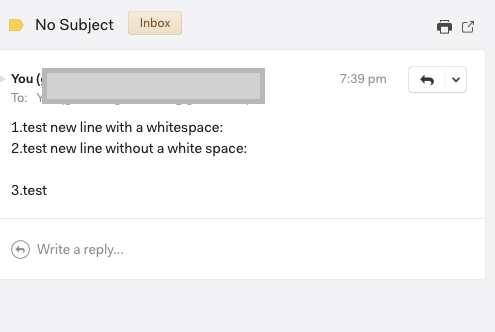
In the editor, empty lines with a space character at the beginning will be gone when sending the email.
To Reproduce
Steps to reproduce the behavior:
- In the editor type (note the space character in the second line, between 1. and 2.):
1.test new line with a space character:

2.test new line without a whitespace:

3.test
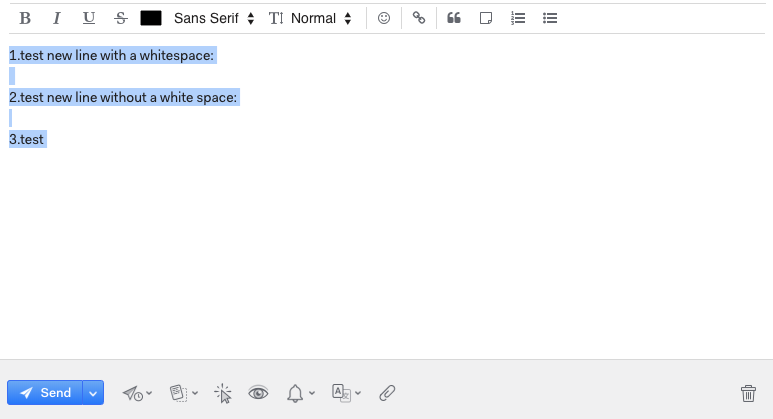
- Send the email, and this is what I get in the email viewer:
Setup: (please complete the following information):
- OS: macOS
- OS Version 10.15.4 (19E266)
- Mailspring Version: Version 1.7.4 (1.7.4)
Additional context
Probably the same as issue #1395
 shenghan97
All 4 comments
Hey! Thanks for reporting this - I've been able to reproduce the problem thanks to your instructions. It looks like the first newline (with the space) is translated into a <div> </div> in the email, and the second without a space is a <br>.
It looks like if we substitute that space for a character that enforces a line height, like , it works. Will see what Gmail and other editors do and try to fix this.
 bengotow
on 16 Apr 2020
bengotow
on 16 Apr 2020
Hey! I was able to fix this and it'll be shipped in the 1.7.5 release tomorrow. It turns out I did a bunch of work to match Gmail and two specific cases were still not correct:
- Case where a line contains exactly one blank space and no other text
- Case where a line contains one blank space and then text (the blank space is lost)
Cheers!
bengotow
on 16 Apr 2020
Hey folks, thanks for reporting this. Happy to say this has been resolved in 1.7.6 which shipped this afternoon. 🚀 The app should auto-update, but if it doesn't you can also grab the new release from GitHub's Releases tab or from https://getmailspring.com/download. Thanks for your patience and help tracking this down, enjoy the update!
bengotow
on 23 Apr 2020
🎉 Thanks for all the work you've put into this amazing app!!
Hey folks, thanks for reporting this. Happy to say this has been resolved in 1.7.6 which shipped this afternoon. 🚀 The app should auto-update, but if it doesn't you can also grab the new release from GitHub's Releases tab or from https://getmailspring.com/download. Thanks for your patience and help tracking this down, enjoy the update!
shenghan97
on 23 Apr 2020
Related issues
 LeandroStanger
·
3Comments
LeandroStanger
·
3Comments
 tuxmachine
·
3Comments
tuxmachine
·
3Comments
 dgattey
·
3Comments
dgattey
·
3Comments
 KristerV
·
3Comments
KristerV
·
3Comments
 ghost
·
3Comments
ghost
·
3Comments