Mailspring: Bug: Couldn't add imap account
Describe the bug
After "successfully" adding an imap account, the account doesn't show the account anywhere.
To Reproduce
Steps to reproduce the behavior:
- Go to 'Preferences'
- Click on 'Accounts'
- Click on the '+' sign on the bottom of the account list window
- Click on 'IMAP/SMTP'
- Type in the correct Name, Email, and Password
- Click on 'Continue'
- Fill in each entry correctly
- Click on 'Connect Account'
- A window pops up, saying something similar to "successfully connected to imap account". The window closes itself in around 1sec
- My account doesn't show in the account list
 WHMHammer
All 23 comments
Sorry, I forgot to mention that I'm running version 1.7.4 on 64-bit Windows 10 Pro 1909
WHMHammer
on 8 Mar 2020
I have exactly the same problem.
OS: Mac OS 10.15.3
Version: 1.7.4
Edit: If you can't wait until it is fixed and need immediate fix, downgrade Mailspring version to 1.7.2
https://github.com/Foundry376/Mailspring/releases/tag/1.7.2
 boraikizoglu
on 8 Mar 2020
boraikizoglu
on 8 Mar 2020
I got the same issue; and the same account set up in another computer in Mailspring could not update anymore.
 linked2ding
on 9 Mar 2020
linked2ding
on 9 Mar 2020
The same problem also showed up in my Ubuntu 18.04 Computer. I could not find my university email to mailspring after a successful adding.
 Fitz13009
on 9 Mar 2020
Fitz13009
on 9 Mar 2020
Same problem, 2015 iMac running Elementary Hera 5.1
 ChefReg
on 9 Mar 2020
ChefReg
on 9 Mar 2020
Same Problem Windows 10
 genesteelmen
on 9 Mar 2020
genesteelmen
on 9 Mar 2020
Same problem Windows 10
 JohnnyBrr
on 10 Mar 2020
JohnnyBrr
on 10 Mar 2020
Same issue
OS: Ubuntu 18.04.4 LTS
Version: 1.7.4
 jefflenz
on 10 Mar 2020
jefflenz
on 10 Mar 2020
Same issue
OS: Windows 10 Home
Version: 1.7.4
 esoto-geret
on 10 Mar 2020
esoto-geret
on 10 Mar 2020
Same issue;
OS: Ubuntu 19.10;
Version 1.7.4
 vucacruz
on 10 Mar 2020
vucacruz
on 10 Mar 2020
Same problem. Fedora 31
 pashtet422
on 11 Mar 2020
pashtet422
on 11 Mar 2020
FYI I rolled back to 1.7.2, and successfully added my account.
WHMHammer
on 11 Mar 2020
Temp solution. Install an older version located here.
 pythonInRelay
on 14 Mar 2020
pythonInRelay
on 14 Mar 2020
Hello, I changed the password of my email account and when I try to update the setting in mailspring I receive a blank window. Is it the same issue?
A solution?
 sketet
on 7 Apr 2020
sketet
on 7 Apr 2020
Same problem. While adding the account it connects fine and gives no error, but then it doesn't show anywhere. And actually, same happens with an Hotmail account.
 facubarril
on 14 Apr 2020
facubarril
on 14 Apr 2020
Same problem as well.
 xtrp
on 14 Apr 2020
xtrp
on 14 Apr 2020
Hello, if I remove the current version, then I install an older version, I lose all the settings? The older version recognize the setting folders in .home with the setting of the newer version?
I've several accounts, with all the settings... signatures... I don't want to do it again!
sketet
on 15 Apr 2020
Hello, if I remove the current version, then I install an older version, I lose all the settings? The older version recognize the setting folders in .home with the setting of the newer version?
I've several accounts, with all the settings... signatures... I don't want to do it again!
Snap package and github package has different settings environment
I don't want to be responsible for that but.
I installed an older version from github (rpm package) without removing a newer one (newer one was from github too). then i created a new imap account, and installed latest version again. and everything works flawlessly.
P.S. make a copy of a home/.config/Mailspring folder, it helps you undo your changes, if something goes wrong
pashtet422
on 15 Apr 2020
Same issue on windows 10 64bit + mailspring 1.7.4
 Marco22874
on 15 Apr 2020
Marco22874
on 15 Apr 2020
Hello, if I remove the current version, then I install an older version, I lose all the settings? The older version recognize the setting folders in .home with the setting of the newer version?
I've several accounts, with all the settings... signatures... I don't want to do it again!Snap package and github package has different settings environment
I don't want to be responsible for that but.
I installed an older version from github (rpm package) without removing a newer one (newer one was from github too). then i created a new imap account, and installed latest version again. and everything works flawlessly.
P.S. make a copy of a home/.config/Mailspring folder, it helps you undo your changes, if something goes wrong
I installed with .deb, if I try to install an older version, keeping the current version, I receive this error.
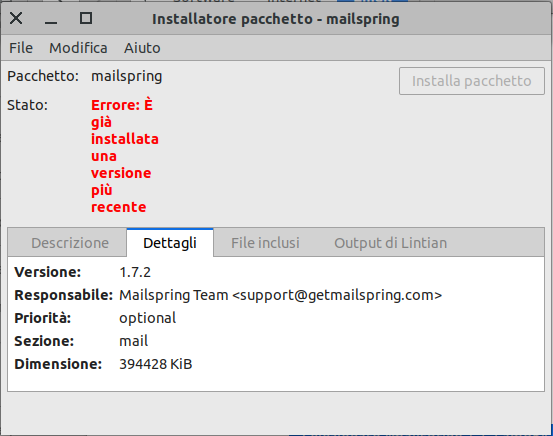
So I've to remove and then reinstall. But like I told, I don't want to enter all the data again.
I will see...
When is it expected a new release with the correction of this bug?
sketet
on 15 Apr 2020
Hello,
had the same problem on Linux Mint 19.3 with Mailspring 1.7.4.
Tried to do:
sudo snap refresh mailspring --channel=latest/edge
Which installed version 1.7.5 and I can now add IMAP account without problems.
 DrMorbid
on 15 Apr 2020
DrMorbid
on 15 Apr 2020
The version 1.7.5 solves the IMAP problem for me.
Thanks!
 alvaro-leite
on 17 Apr 2020
alvaro-leite
on 17 Apr 2020
Hey folks—thanks for filing this, this is a pretty serious bug. It was reported in a handful of other issues and we shipped a fix for it yesterday in version 1.7.5.
You can download the update from GitHub releases or from https://getmailspring.com/download, and the app should also auto-update if you have been using it. Sorry for the delay getting a fix out for this one, I appreciate everyone's help debugging and triaging the problem!
 bengotow
on 17 Apr 2020
bengotow
on 17 Apr 2020
Related issues
 ghost
·
3Comments
ghost
·
3Comments
 DylanC
·
3Comments
DylanC
·
3Comments
 justindoran
·
3Comments
justindoran
·
3Comments
 imbrn
·
3Comments
imbrn
·
3Comments
 DanielRios549
·
3Comments
DanielRios549
·
3Comments
Most helpful comment
Hey folks—thanks for filing this, this is a pretty serious bug. It was reported in a handful of other issues and we shipped a fix for it yesterday in version 1.7.5.
You can download the update from GitHub releases or from https://getmailspring.com/download, and the app should also auto-update if you have been using it. Sorry for the delay getting a fix out for this one, I appreciate everyone's help debugging and triaging the problem!