Mailspring: Synchronization errors after update to v1.7.1
After update to 1.7.1 on Win10 I get synchronization errors, find attached my log.
 DavidZenz
All 27 comments
I have similar problem on CentOS 7 x86_64. I have sync problems with custom IMAP server.
 tukusejssirs
on 15 Oct 2019
tukusejssirs
on 15 Oct 2019
The same thing happens to me, I use the client for Windows 10.
I've tried everything to try to fix it but nothing.
From clearing cache, clearing accounts, uninstalling the program, clearing AppData content and nothing.
I even tried to install the previous version of the program and the program itself is updated, ruining everything.
I've been there all morning but nothing.
Needless to say, the update to 1.7.1 does not fix it.
Regards.
 JCChaux
on 15 Oct 2019
JCChaux
on 15 Oct 2019
Same problem
 233mhz
on 15 Oct 2019
233mhz
on 15 Oct 2019
Same problem on Ubuntu 18.04.
I hope there will be the possibility to disable that annoying button for autotraslation of incoming emails.
 marcomaskez
on 15 Oct 2019
marcomaskez
on 15 Oct 2019
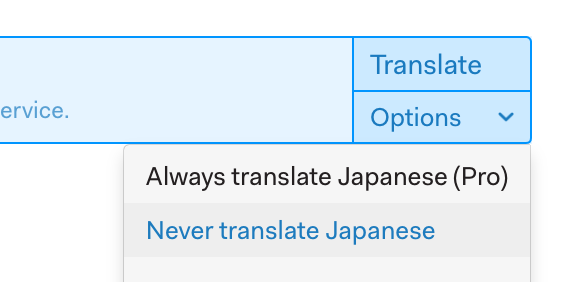
@marcomaskez, although you might want to disable the autotranslation altogether (i.e. globally), currently you can disable it per language from the autotranslation options (Never translate [lang]):
tukusejssirs
on 15 Oct 2019
I have the same problem.
 WebCraftersStudio
on 15 Oct 2019
WebCraftersStudio
on 15 Oct 2019
Seams related to the new contacts sync. I'm seeing a critical error in the sync log. Is there a way to turn the new contact sync off as currently email sync is not working for me due to the sync error being 'critical'.
5115 [2019-10-15 08:22:24.841] [calContacts] [critical]
 ***
 *** An exception occurred during program execution:
 *** (unknown exception details)
 ***

5115 [2019-10-15 08:22:24.918] [calContacts] [critical]  *** Stack trace (line numbers are approximate):
 *** (unknown)  clone
 ***
 angusscown
on 15 Oct 2019
angusscown
on 15 Oct 2019
Since the update I cannot sync my Office365 account :-(
Sync errors and have tried Re-authentification, Clearing cache, Removing and adding back the O365 account....
 athelas64
on 16 Oct 2019
athelas64
on 16 Oct 2019
I back up this issue.
Exaclty the same problem here.
Same log and happen after last update.
mailcow self-hosted webmail here that I could not synchronize anymore with the same log output
 shyne99
on 16 Oct 2019
shyne99
on 16 Oct 2019
@Foundry376, @bengotow, are you aware of this issue? We’d like to hear something from the devs. ;)
tukusejssirs
on 16 Oct 2019
Same problem here.. MacOS Mojave 10.14.6.
Worked perfectly up till update 1.7.0 when synchronisations issues started with my Outlook (IMAP)-account. 1.7.1 did nothing to resolve it. Log says:
32512 [2019-10-16 16:07:45.397] [] [critical]
 ***
 *** An exception occurred during program execution:
 *** (unknown exception details)
 ***

32512 [2019-10-16 16:07:45.545] [] [critical]  *** Stack trace (line numbers are approximate):
 *** in mailsync     DavXML::DavXML(__1::string, __1::string)
 *** in mailsync     DAVWorker::performXMLRequest(__1::string, __1::string, __1::string)
 *** in mailsync     DAVWorker::resolveAddressBook()
 *** in mailsync     DAVWorker::runContacts()
 *** in mailsync     DAVWorker::run()
 *** in mailsync     runCalContactsSyncWorker()
 *** in mailsync     main::$_7::operator()() const
 *** in mailsync     void* __1::__thread_proxy(void*)
 *** 0x7fff587e72eb  _pthread_body
 *** 0x7fff587ea249  _pthread_start
 *** 0x7fff587e640d  thread_start
 ***
 mimavox
on 16 Oct 2019
mimavox
on 16 Oct 2019
@marcomaskez, although you might want to disable the autotranslation altogether (i.e. globally), currently you can disable it per language from the autotranslation options (Never translate [lang]):
That should be perfect, except that when i click on "Never translate
marcomaskez
on 16 Oct 2019
@marcomaskez, not in my case. On CentOS 7, when I click on this option for English, it asked me to confirm it and after confirmation it removed that (let’s say) translation banner from every email in English. And it did it on the fly, that is Mailspring did it without need to restart it.
tukusejssirs
on 16 Oct 2019
Hey folks—thanks for filing this. It looks like there are two things happening here. In the latest version of Mailspring we're attempting to auto-discover CardDav and CalDav services for your email accounts (for contact and calendar sync). It looks like those lookups are failing, which by itself is ok. However, it looks like the mailsync process is crashing trying to generate a stack trace for some reason, which is taking down mail sync in addition to stopping contact sync.
Thankfully, we run part of CardDAV discovery from our servers to avoid pinning to a version of glibc on Linux (it's a long story...) but we can most likely stop these crashes with an update to our web service that stops contact discovery earlier in the process.
I'll take a look and get this fixed ASAP. Also @marcomaskez thanks for calling out that "Never translate" issue - I don't think we saw that in testing so I'll try to reproduce that as well.
Sorry for the hassle folks—if it's any consolation, this release brought most of the code for calendar sync as well, so when we launch the full calendar feature later this year it should go smoothly.
 bengotow
on 16 Oct 2019
bengotow
on 16 Oct 2019
The "never traslate" problem, i think, is restricted to my enviromnent or to Ubuntu 18.04. I've discovered a pair of minutes ago that when Mailspring got stuck after i've pressed the button, it's only the mouse click that stopped working (across the entire system, not only in Mailspring and only the click). The keyboard was still responding, so i've pressed ENTER with button focused and i've been able to deactivate translation.
marcomaskez
on 16 Oct 2019
I had a similar issue causing Mailspring to freeze my entire UI on Ubuntu 19.04 - i wasn't able to reproduce it yet. But probably @marcomaskez will open a dedicated issue? I'd follow up.
 florianb
on 16 Oct 2019
florianb
on 16 Oct 2019
@bengotow, I believe the issue is also on macOS as @mimavox has reported an issue on macOS Mojave 10.14.6, so I think you should add macos label, too. :)
tukusejssirs
on 16 Oct 2019
Sounds good that you've located the core of the problem! Personally, I'm not at all interested in any calendar sync so to turn it off it sounds fine by me. I just want an email client that handles my email well and nothing more.
mimavox
on 16 Oct 2019
Hey folks—here's a quick update:
1) I've deployed a server change that will make Mailspring a bit less "adventurous" in trying to find your CardDav / CalDav servers if you do not have SRV records and your domain does not respond to the .well-known URL scheme. This should limit the crashes in the current version 1.7.1 since Mailspring won't go hitting random URLs trying to find your servers and throwing up it's hands when those requests fail in terrible ways.
2) I've committed a change to make these sort of "critical errors" in contacts / calendar sync not terminate mailsync and raise the "Issue with one or more of your accounts" warning in Mailspring. Calendar and contact sync will just fail quietly and retry later. I think we'll revisit this later this year when Calendar launches but in a more nuanced way.
bengotow
on 16 Oct 2019
Wow, seriously impressed. It is working now!
Thank you for pulling out such fast resolution!❤
athelas64
on 16 Oct 2019
Yes, working on MacOS as well! Thank you!!
mimavox
on 17 Oct 2019
On CentOS 7 (installed from .rpm) it works as before/expected, but (having multiple accounts) when clicking on joined Trash, at the top in brownish background it says Showing # threads with deleted messages with a loading icon indefinately, but when clicking on any separate Trash, there is Empty trash now instead of loading icon.
tukusejssirs
on 18 Oct 2019
Closing after inactivity, thanks folks!
bengotow
on 17 Feb 2020
:tada: thank you very much for your support!
florianb
on 17 Feb 2020
Just found this support page today.
I'm a Pro user/subscriber who submitted a ticket on this back on January 19, with no response whatsoever!!!
The email response I received stated "we prioritize customer support for paying users of Mailspring Pro"...apparently this is not the case!
I am having/been having this issue for quite a while now with this this sync issue running 1.7.2, 1.7.3 and 1.7.4:
`20556 [2020-03-02 16:51:40.379] [background] [info] Sync loop complete.
20556 [2020-03-02 16:51:51.494] [metadataExpiration] [info] Scanning for expired metadata
20556 [2020-03-02 16:51:51.494] [metadataExpiration] [info] -- Will wake for next expiration in 7200sec
20556 [2020-03-02 16:51:55.311] [calContacts] [critical]
* An exception occurred during program execution:
* (unknown exception details)
20556 [2020-03-02 16:51:55.336] [calContacts] [critical] * Stack trace (line numbers are approximate):
* (unknown) clone
`
I have 5 different IMAP email accounts under 4 different domains all on the same server, yet I only have this issue with 3 accounts between 2 different domain names. The others work without issue.
Also, being very frustrated with this error, today I tried to delete the offending accounts from Mailspring thinking that re-adding them might help.
That just created more issues. In 1.7.4 every time I tried to add a basic IMAP account, I would just land back on the Account Screen but the account was not added. I then tried to re-install the mailspring-1.7.4-amd64.deb which did not help. So I removed the mailspring-1.7.4-amd64.deb package, cleared the Mailspring folder, re-installed the mailspring-1.7.2-amd64.deb package once again, and started over.
This presented another issue - If trying to setup a basic IMAP account as the first account, I am presented with a Blank pop-up screen and cannot do anything from that point forward. I have to close the program and it goes right back to the Account setup page.
If I enter a GMAIL account as the first one, that worked as expected, but then trying to add my IMAP accounts was a no go!
I ended up removing the mailspring-1.7.4-amd64.deb package, clearing the Mailspring folder and re-installed mailspring-1.7.2-amd64.deb at which point I was able to re-add all my accounts and signatures again.
I have not yet again upgraded to the mailspring-1.7.4-amd64.deb package in case I need to try to delete, and re-add any of my accounts again.
I currently have 11 email accounts setup in Mailspring, 6 of them being Gmail/Gapps accounts, and 5 IMAP accounts and only 3 of these I am having an issue with.
Please advise.
 vdisp
on 2 Mar 2020
vdisp
on 2 Mar 2020
Today the contacts sync problem started occurring at my setup too, besides the mail archive sync errors as described in Mailspring syncFolderUIDRange problem
Running on
- macos 10.14.6
- mailspring 1.7.4
- davmail 5.4.0
- connected to EWS office365
It is unclear to me why this problem started occurring only today, after almost a week of syncing my archive and sending/receiving multiple mails a day.
 steefdebruijn
on 3 Mar 2020
steefdebruijn
on 3 Mar 2020
I am also having similar errors
6992 [2020-03-09 10:33:07.779] [background] [info] Sync loop deleting unlinked messages with phase 2.
6992 [2020-03-09 10:33:07.782] [background] [info] Sync loop complete.
6992 [2020-03-09 10:33:11.408] [metadataExpiration] [info] Scanning for expired metadata
6992 [2020-03-09 10:33:11.409] [metadataExpiration] [info] -- Will wake for next expiration in 7200sec
6992 [2020-03-09 10:33:16.281] [calContacts] [critical]  *** Stack trace:
 ***   raise
 ***   abort
 ***   terminate
 ***   _is_exception_typeof
 ***   _is_exception_typeof
 ***   RtlInterlockedCompareExchange64
 ***   RtlInterlockedCompareExchange64
 ***   KiUserExceptionDispatcher
 ***   _CxxThrowException
 ***
- mailspring version = 1.7.4-d54ff730
- Windows 10 v1809
- connecting via imap with inmotionhosting.com
 xplreitr
on 9 Mar 2020
xplreitr
on 9 Mar 2020
Related issues
 ghost
·
3Comments
ghost
·
3Comments
 dgattey
·
3Comments
dgattey
·
3Comments
 KristerV
·
3Comments
KristerV
·
3Comments
 scooby
·
3Comments
scooby
·
3Comments
 jerry79
·
3Comments
jerry79
·
3Comments
Most helpful comment
Hey folks—thanks for filing this. It looks like there are two things happening here. In the latest version of Mailspring we're attempting to auto-discover CardDav and CalDav services for your email accounts (for contact and calendar sync). It looks like those lookups are failing, which by itself is ok. However, it looks like the mailsync process is crashing trying to generate a stack trace for some reason, which is taking down mail sync in addition to stopping contact sync.
Thankfully, we run part of CardDAV discovery from our servers to avoid pinning to a version of glibc on Linux (it's a long story...) but we can most likely stop these crashes with an update to our web service that stops contact discovery earlier in the process.
I'll take a look and get this fixed ASAP. Also @marcomaskez thanks for calling out that "Never translate" issue - I don't think we saw that in testing so I'll try to reproduce that as well.
Sorry for the hassle folks—if it's any consolation, this release brought most of the code for calendar sync as well, so when we launch the full calendar feature later this year it should go smoothly.