Mailspring: Missing CSS class names
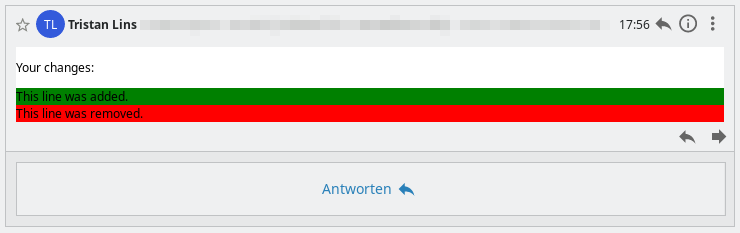
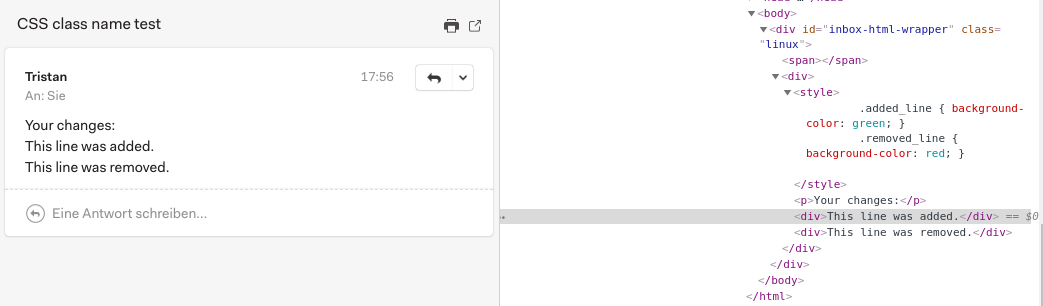
When viewing emails, most / all CSS classes are removed from the HTML. However, this behavior destroys numerous formatting when no inline formats are defined.
Some mail templates (for example, Foundation for Emails) look partly strange. For example, lack width definitions, paddings, colors, ...
I mean, that would have changed in one of the last versions. In my opinion, this is an ugly behavior, if not a misconduct. Some of my emails look very "broken" because of the lack of formatting.
What operating system are you using?
KDE neon User Edition 5.14 / Ubuntu 18.04 like
What version of Mailspring are you using?
1.5.5-b7939d38 (deb Install)
Is the issue reproducible with a particular attachment, message, signature, etc?
Source HTML
<html>
<head>
    <style>
        .added_line { background-color: green; }
        .removed_line { background-color: red; }
    </style>
</head>
<body>
    <p>Your changes:</p>
    <div class="added_line">This line was added.</div>
    <div class="removed_line">This line was removed.</div>
</body>
</html>
Send with mail -a "Content-type: text/html" -s "CSS class name test" [email protected] < example.html
Expected (Thunderbird):
Actual:
 tristanlins
All 4 comments
Hey! Thanks for reporting this — I'll see if I can reproduce this. Mailspring should be "inlining" the available styles (converting stylesheets to style="" attributes), not removing them entirely.
 bengotow
on 23 Jan 2019
bengotow
on 23 Jan 2019
Hey @tristanlins thanks for providing the steps to reproduce, I was able to get this to happen as well. It actually looks like this has been broken for about a year [?!] since we replaced the old HTML sanitizer with a new one that leveraged Chromium's new document.implementation.createHTMLDocument() API. I'll get this fixed and shipped ASAP.
bengotow
on 23 Jan 2019
It actually looks like this has been broken for about a year ...
That may be, I had not updated for a while. Besides, I noticed that a while ago, so far I had not taken the time to look at it 😇
tristanlins
on 23 Jan 2019
Hey! This has been fixed in 1.6.0 which shipped today. The app should auto-update, but you can also get the new version manually from https://getmailspring.com/download. Thanks - enjoy the app!
bengotow
on 18 Mar 2019
Related issues
 imbrn
·
3Comments
imbrn
·
3Comments
 vsanchez
·
3Comments
vsanchez
·
3Comments
 psivesely
·
3Comments
psivesely
·
3Comments
 scooby
·
3Comments
scooby
·
3Comments
 DanielRios549
·
3Comments
DanielRios549
·
3Comments