Mailspring: Text is black-on-black in dark theme, highlight color is wrong
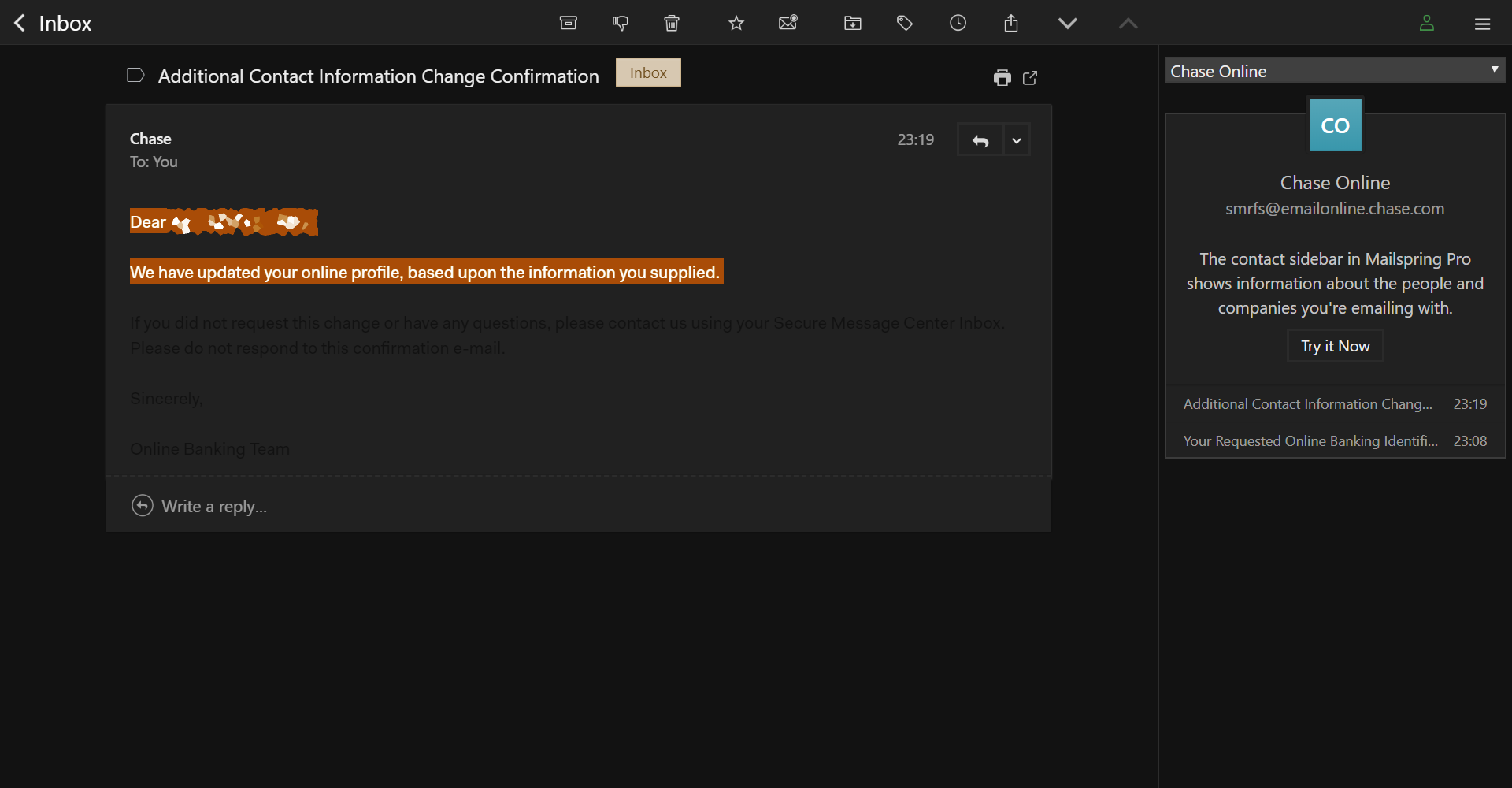
The text behavior changed in the most recent update. Before on the default dark themes, black text would automatically turn white to contrast the black background, but now the text is black and can't be seen against the dark background.
The highlight text color is also now orange instead of the green it was before. Is there a way to to correct this or a guide/manual online to customize the theme colors to a file I can re-import in case the issue isn't fixed in the next update?
 ChocoTonic
All 8 comments
I believe this must be due to this : https://github.com/Foundry376/Mailspring/commit/8a18d2eb4f0bb48293e979ce12722626db00ae3f
I was not able to find any other commit that might affect this, I'll dig around later
 eclipsed-ninja
on 31 Dec 2018
eclipsed-ninja
on 31 Dec 2018
Anyone aware of a workaround? Ability to edit the theme to force a different font color for now?
 ransagy
on 31 Dec 2018
ransagy
on 31 Dec 2018
@eclipsed-ninja doesn't look like correct source of the problem to me. Files and code suggests a list of mails (inbox view, etc), not a single message or list of messages of a single mail. Also changes are related mostly to background and the thing that got broken is text color.
I also would like to know a workaround or have this fixed as a quick bugfix release.
 dzek69
on 31 Dec 2018
dzek69
on 31 Dec 2018
Hey folks—thanks for reporting this. I think this is because we upgraded to Electron 4 (and with it, a newer version of Chromium) in the last release. Will see if I can track this down and we'll get a fix out ASAP
 bengotow
on 1 Jan 2019
bengotow
on 1 Jan 2019
Hey! Just a heads up that the fix for this just shipped a few minutes ago—Mailspring will auto-update soon, and you can also download the new version directly here: https://github.com/Foundry376/Mailspring/releases/tag/1.5.5. Thanks!
bengotow
on 3 Jan 2019
Thanks Ben, much appreciated! Will verify on both my machines ASAP.
EDIT: Confirmed, thanks!
ransagy
on 3 Jan 2019
I can confirm it does work as expected now, thanks.
dzek69
on 3 Jan 2019
Also confirmed.
 kode54
on 4 Jan 2019
kode54
on 4 Jan 2019
Related issues
 DanielRios549
·
3Comments
DanielRios549
·
3Comments
 LeandroStanger
·
3Comments
LeandroStanger
·
3Comments
 applesea2
·
3Comments
applesea2
·
3Comments
 ghost
·
3Comments
ghost
·
3Comments
 psivesely
·
3Comments
psivesely
·
3Comments
Most helpful comment
Hey folks—thanks for reporting this. I think this is because we upgraded to Electron 4 (and with it, a newer version of Chromium) in the last release. Will see if I can track this down and we'll get a fix out ASAP