Mailspring: When replying, changing the subject does not create a new thread
Are there any related issues?
https://github.com/Foundry376/Mailspring/issues/193
What operating system are you using?
MacOS v10.13.4
What version of Mailspring are you using?
Mailspring v1.2.1
--
Bug?
Do you have any third-party plugins installed? If so, which ones?
No
Is the issue related to a specific email provider (Gmail, Exchange, etc.)?
No. I checked with could of them.
Reference Image
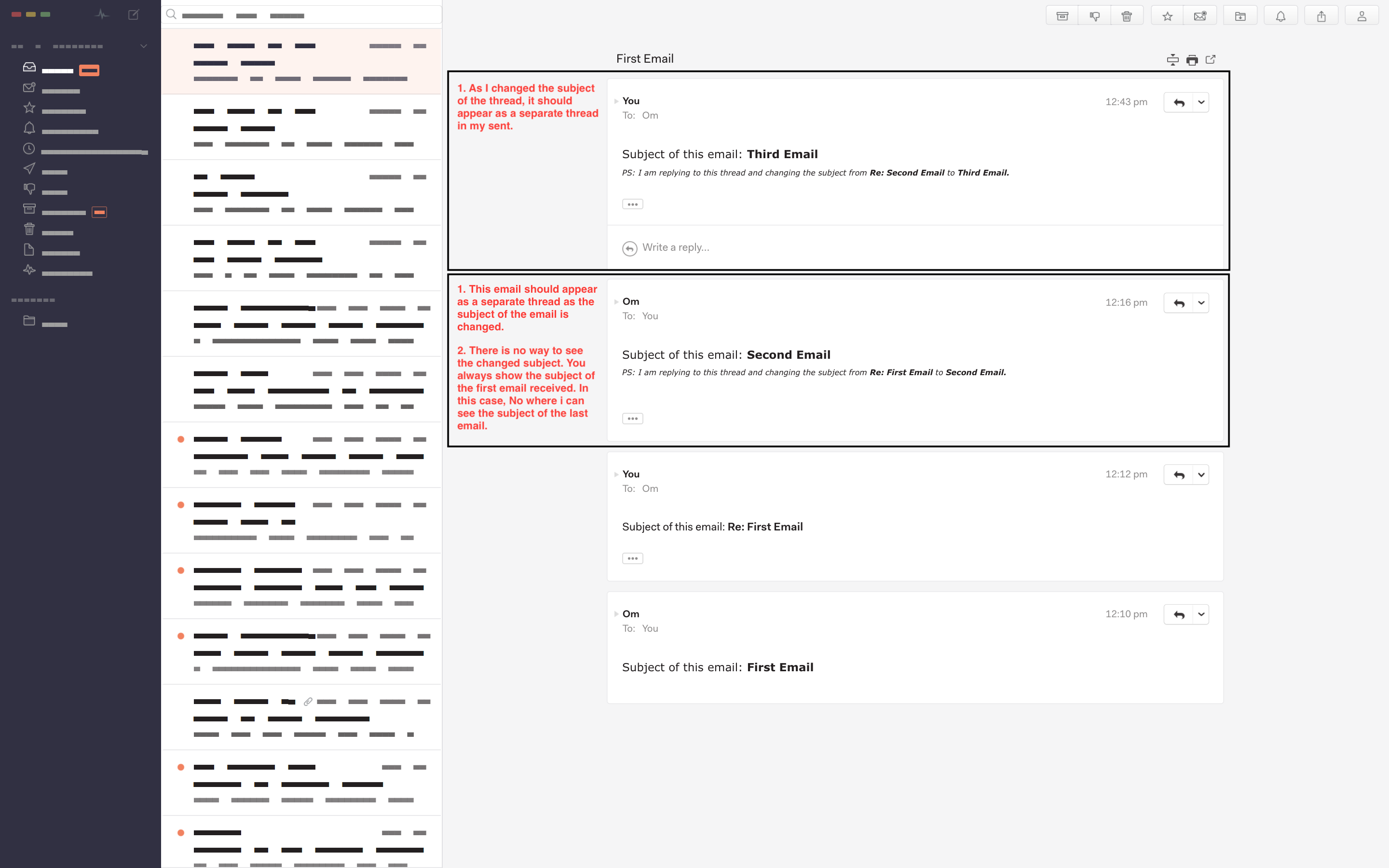
Issue
Consider that in my Mailspring, I am logged in with [email protected]. There is another email id, [email protected]. I do not use mailspring for [email protected].
- Now [email protected] sent an email to [email protected].
- [email protected] replied back.
- [email protected] replied back on the same thread but changed the subject. Now this should appear as a new thread inside my Mailspring app. It appears in the same thread. This is a common behavious obervered across every other email clients including Gmail. Changing the subject can be considered as a begining of the new thread.
- [email protected] replied back on the last email and again changed the subject. Now this should appear as a new thread in my sent. This is shown in the same thread.
Suggested change @bengotow
As most of the users are used to Gmail, please observe how the threading works in Gmail. This might be just one issue I highlighted, but there can be many more. As I find I will keep raising tickets here.
For this issue, on replying if someone is changing the subject, please create a new thread
 patelom
All 6 comments
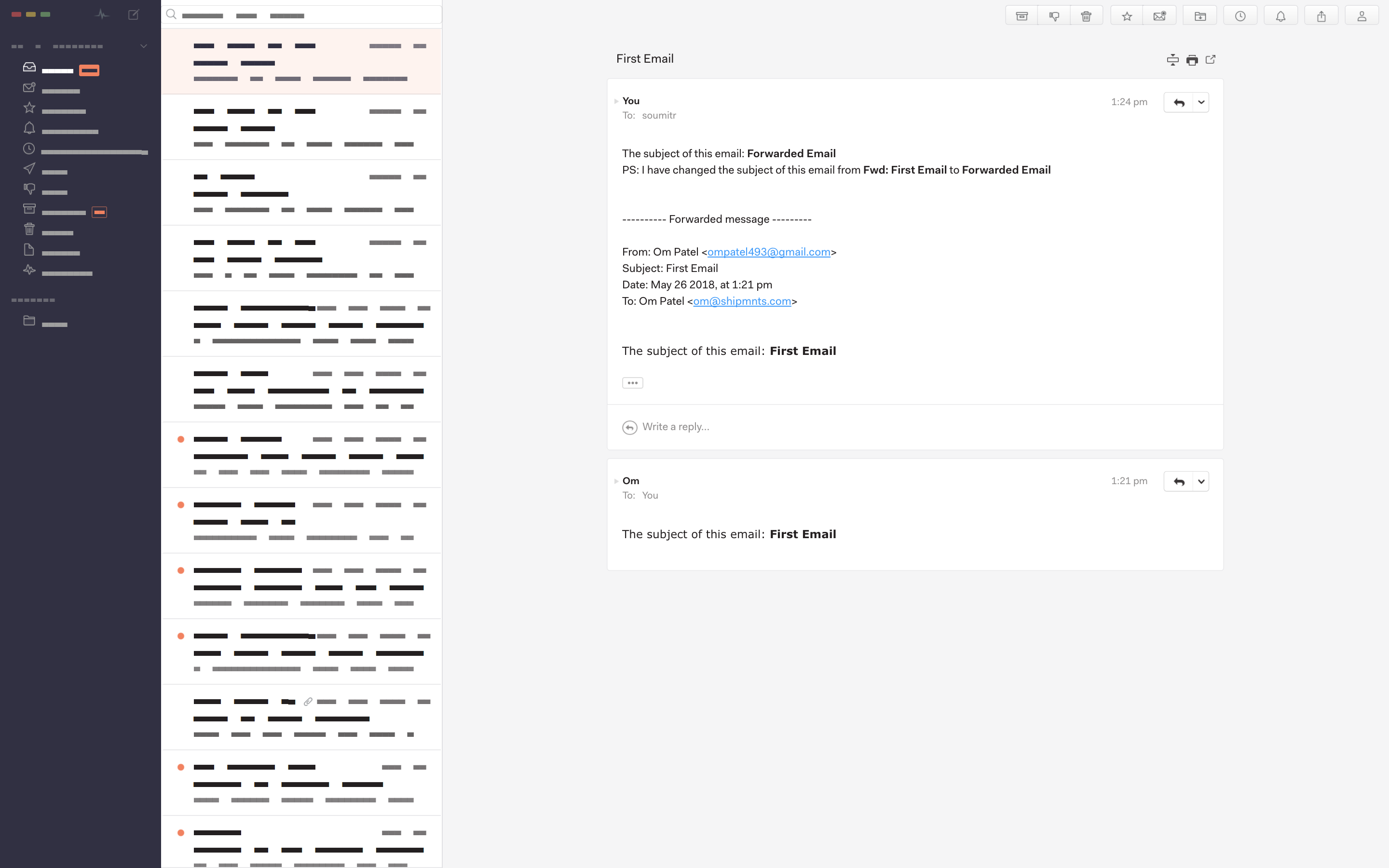
The similar thing happens while forwarding an email. If I got an email, I changed the subject and forwarded it to someone. There is no way to see the subject of the forwarded email.
Reference Screen Shot
patelom
on 26 May 2018
Hey! Thanks for reporting this—you're correct, Mailspring will never break the thread when creating a reply / forward. I actually didn't think Gmail did either when I originally wrote this a couple years ago, but I was able to reproduce your scenario and choosing "Edit Subject" and changing the subject even slightly within Gmail creates a new thread.
This should be fairly straightforward to fix—I'll see what I can do.
Do let me know if you find other ways Mailspring is different. Gmail may be a bit of a moving target—I could have sworn this was correct—but I'd definitely like to emulate the webmail behavior when possible.
 bengotow
on 30 May 2018
bengotow
on 30 May 2018
@bengotow would love to know if this would be something you are planning to fix by the next release? And have you had any thoughts on the Search UI?
Thanks.
patelom
on 25 Jun 2018
Hey! I'm actually wrapping up the next release right now and it includes a totally overhauled search bar that exposes all the of the available query options (and adds a few more). I'm still working on the reply threading, but I hope to have that fixed in the release after this one.
bengotow
on 14 Jul 2018
Much thanks @bengotow ! The searching experience has become much better now. Looking forward to the reply to threading fix!
patelom
on 18 Jul 2018
@bengotow thanks for Mailspring. Wanted to check if this issue will be fixed soon. It's creating a hiccup because when I am forwarding the same email to different recipients via different emails its still grouping them all into the same thread. And that is making tracking conversation with all the different recipients difficult.
 karannshah
on 3 Sep 2018
karannshah
on 3 Sep 2018
Related issues
 dgattey
·
3Comments
dgattey
·
3Comments
 3v1n0
·
3Comments
3v1n0
·
3Comments
 ghost
·
3Comments
ghost
·
3Comments
 scooby
·
3Comments
scooby
·
3Comments
 liam-wiltshire
·
3Comments
liam-wiltshire
·
3Comments
Most helpful comment
Hey! I'm actually wrapping up the next release right now and it includes a totally overhauled search bar that exposes all the of the available query options (and adds a few more). I'm still working on the reply threading, but I hope to have that fixed in the release after this one.