Mailspring: Cannot sync Outlook.com
What operating system are you using?
Windows 10
What version of Mailspring are you using?
1.1.4
Bug?
Do you have any third-party plugins installed? If so, which ones?
No
Is the issue related to a specific email provider (Gmail, Exchange, etc.)?
Microsoft Outlook
Is the issue reproducible with a particular attachment, message, signature, etc?
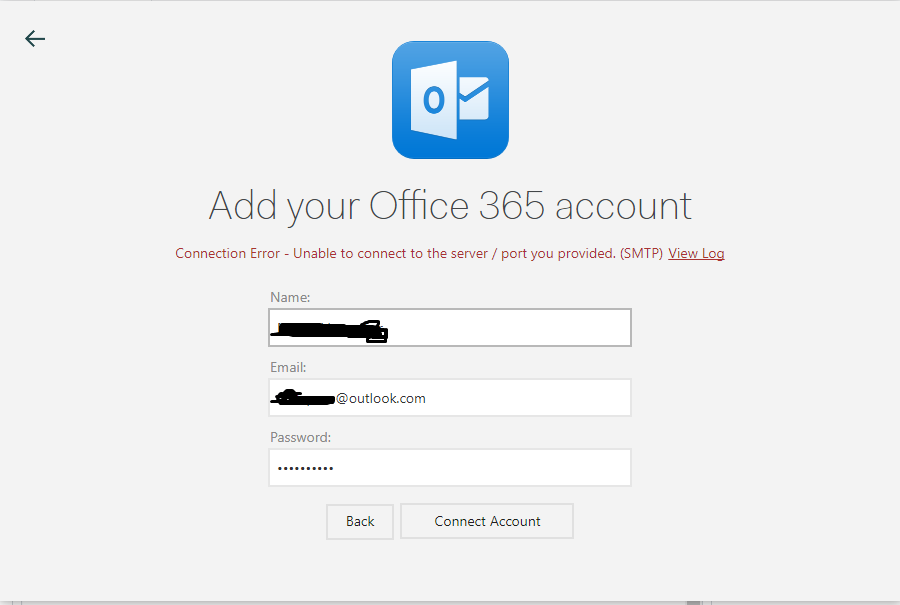
This is the error log
_----------IMAP----------
- OK The Microsoft Exchange IMAP4 service is ready. [UABOADEAUABSADAAMQBDAEEAMAAxADAANwAuAEkATgBEAFAAUgBEADAAMQAuAFAAUgBPAEQALgBPAFUAVABMAE8ATwBLAC4AQwBPAE0A]
1 CAPABILITY - CAPABILITY IMAP4 IMAP4rev1 AUTH=PLAIN AUTH=XOAUTH2 SASL-IR UIDPLUS ID UNSELECT CHILDREN IDLE NAMESPACE LITERAL+
1 OK CAPABILITY completed.
2 LOGIN "sftac@outlook.com" "***"
2 OK LOGIN completed.
3 CAPABILITY - CAPABILITY IMAP4 IMAP4rev1 AUTH=PLAIN AUTH=XOAUTH2 SASL-IR UIDPLUS MOVE ID UNSELECT CLIENTACCESSRULES CLIENTNETWORKPRESENCELOCATION BACKENDAUTHENTICATE CHILDREN IDLE NAMESPACE LITERAL+
3 OK CAPABILITY completed.
4 NAMESPACE - NAMESPACE (("" "/")) NIL NIL
4 OK NAMESPACE completed.
5 LIST "" "*" - LIST (\HasNoChildren) "/" Archive
- LIST (\HasNoChildren Trash) "/" Deleted
- LIST (\Marked \HasNoChildren \Drafts) "/" Drafts
- LIST (\Marked \HasNoChildren) "/" Inbox
- LIST (\HasNoChildren \Junk) "/" Junk
- LIST (\HasNoChildren) "/" n*rj.*@outlook.com
- LIST (\HasNoChildren) "/" Notes
- LIST (\Marked \HasNoChildren) "/" Outbox
- LIST (\HasNoChildren) "/" Scheduled
- LIST (\Marked \HasNoChildren \Sent) "/" Sent
- LIST (\HasChildren) "/" "Sync Issues"
- LIST (\HasNoChildren) "/" "Sync Issues/Conflicts"
- LIST (\HasNoChildren) "/" "Sync Issues/Local Failures"
- LIST (\HasNoChildren) "/" "Sync Issues/Server Failures"
5 OK LIST completed.
----------SMTP----------
mailsmtp Last Error Code: 25
mailsmtp Last Error Location: 1_
I have masked my email for privacy
 napsterv
All 12 comments

 the-aus
on 5 Mar 2018
the-aus
on 5 Mar 2018
Same issue, arch 4.15.7-1, Mailspring 1.1.4.
Equivalent error log.
Other IMAP account connected succesfully.
 jlcs-es
on 7 Mar 2018
jlcs-es
on 7 Mar 2018
Same here, Win 10, Mailspring 1.1.5.
Find my error log here.
(I also have the same issue on a linux box running kde neon.)
 Toby-S-Steele
on 29 Mar 2018
Toby-S-Steele
on 29 Mar 2018
I'm receiving the same error on my end.
Version 1.1.5, Ubuntu 17.10 x64
 thoward27
on 3 Apr 2018
thoward27
on 3 Apr 2018
Happening here too.
Manjaro Linux
Kernel 4.17
 JoonasC
on 23 Apr 2018
JoonasC
on 23 Apr 2018
I'm also seeing this error.
The are also duplicate errors now: #788 #748
 RicardoEPRodrigues
on 4 May 2018
RicardoEPRodrigues
on 4 May 2018
I have used this guide to set up Outlook.com in Mailspring manually (i.e. as a generic IMAP account): https://www.lifewire.com/access-outlook-in-thunderbird-3572532 (yes, it's written for Thunderbird but you can set the same numbers in Mailspring :) )
I also suspect that the automatic setup tries to use the wrong port.
 madve2
on 7 May 2018
madve2
on 7 May 2018
I'm not sure if the Office 365 option is meant for your outlook.com email. Office 365 is a subscription service from Microsoft. However, as the above post says, you can manually enter the IMAP/SMTP settings, but, I suggest logging into your outlook.com and grabbing the information direct from Microsoft.
- Log into your outlook.com account through your web browser
- Click the Settings icon on the right side of the navbar
- Click View full settings (near the bottom of the menu)
- Click the Sync email option
- Scroll down to the IMAP/SMTP settings
For reference, here are the values:
IMAP setting
Server name: outlook.office365.com
Port: 993
Encryption method: TLS

SMTP setting
Server name: smtp.office365.com
Port: 587
Encryption method: STARTTLS
 freddiehaddad
on 15 May 2018
freddiehaddad
on 15 May 2018
same issue,
kernel: 4.16.5, OS: Antergos, mailspring: 1.2.1-7e...
for *@hotmail.com it fails. However my *@hotmail.nl account succeeded.
 NoeelMoeskops
on 19 May 2018
NoeelMoeskops
on 19 May 2018
Started for me today. Ubuntu 16.04. Can receive but can't sent. Same log output as above. Its a school email running on office365
 ansermino
on 13 Jul 2018
ansermino
on 13 Jul 2018
Hey folks—thanks for reporting this. I've changed the default Outlook port in 314993f0b5d25474c37eba5089366eb0acbb0b86, and we've also revised the onboarding screen so that it presents Office365 and Outlook.com / Live.com as two separate options, which should resolve a lot of the confusion I think. Stay tuned! The new version should ship in a day or two.
 bengotow
on 6 Aug 2018
bengotow
on 6 Aug 2018
Hey folks! This has shipped in 1.4.1. You can get the update automatically if you're using the Mac and Windows versions, or the Linux snapcraft release, and you can also download it from https://getmailspring.com/download. I'm going to go ahead and close this and we'll re-open it if necessary. Thanks—enjoy the app!
bengotow
on 15 Aug 2018
Related issues
 jerry79
·
3Comments
jerry79
·
3Comments
 purefan
·
3Comments
purefan
·
3Comments
 justindoran
·
3Comments
justindoran
·
3Comments
 psivesely
·
3Comments
psivesely
·
3Comments
 ghost
·
3Comments
ghost
·
3Comments
Most helpful comment
I'm not sure if the Office 365 option is meant for your outlook.com email. Office 365 is a subscription service from Microsoft. However, as the above post says, you can manually enter the IMAP/SMTP settings, but, I suggest logging into your outlook.com and grabbing the information direct from Microsoft.
For reference, here are the values: