Mailkit: The SSL certificate presented by the server is not trusted by the system for one or more of the following reasons
Describe the bug
Every once in a while, when sending an e-mail from an ASP.NET Core app through the local SMTP server, it fails with this exception: (unfortunately, the exception type itself is not logged)
- data:
- source: MailKit
- hResult: -2146233088
- message: An error occurred while attempting to establish an SSL or TLS connection. The SSL certificate presented by the server is not trusted by the system for one or more of the following reasons: 1. The server is using a self-signed certificate which cannot be verified. 2. The local system is missing a Root or Intermediate certificate needed to verify the server's certificate. 3. The certificate presented by the server is expired or invalid. See https://github.com/jstedfast/MailKit/blob/master/FAQ.md#InvalidSslCertificate for possible solutions.
- helpLink: https://github.com/jstedfast/MailKit/blob/master/FAQ.md#InvalidSslCertificate
- stackTrace: at MailKit.Net.Smtp.SmtpClient.ConnectAsync(String host, Int32 port, SecureSocketOptions options, Boolean doAsync, CancellationToken cancellationToken) at mycode()...
- innerException:
- Source: System.Private.CoreLib
- HResult: -2146233087
- Message: The remote certificate is invalid according to the validation procedure.
- ClassName: System.Security.Authentication.AuthenticationException
- RemoteStackIndex: 0
- StackTraceString: at System.Net.Security.SslState.StartSendAuthResetSignal(ProtocolToken message, AsyncProtocolRequest asyncRequest, ExceptionDispatchInfo exception) at System.Net.Security.SslState.CheckCompletionBeforeNextReceive(ProtocolToken message, AsyncProtocolRequest asyncRequest) at System.Net.Security.SslState.StartSendBlob(Byte[] incoming, Int32 count, AsyncProtocolRequest asyncRequest) at System.Net.Security.SslState.ProcessReceivedBlob(Byte[] buffer, Int32 count, AsyncProtocolRequest asyncRequest) at System.Net.Security.SslState.StartReadFrame(Byte[] buffer, Int32 readBytes, AsyncProtocolRequest asyncRequest) at System.Net.Security.SslState.StartReceiveBlob(Byte[] buffer, AsyncProtocolRequest asyncRequest) at System.Net.Security.SslState.CheckCompletionBeforeNextReceive(ProtocolToken message, AsyncProtocolRequest asyncRequest) at System.Net.Security.SslState.StartSendBlob(Byte[] incoming, Int32 count, AsyncProtocolRequest asyncRequest) at System.Net.Security.SslState.ProcessReceivedBlob(Byte[] buffer, Int32 count, AsyncProtocolRequest asyncRequest) at System.Net.Security.SslState.StartReadFrame(Byte[] buffer, Int32 readBytes, AsyncProtocolRequest asyncRequest) at System.Net.Security.SslState.PartialFrameCallback(AsyncProtocolRequest asyncRequest) --- End of stack trace from previous location where exception was thrown --- at System.Net.Security.SslState.ThrowIfExceptional() at System.Net.Security.SslState.InternalEndProcessAuthentication(LazyAsyncResult lazyResult) at System.Net.Security.SslState.EndProcessAuthentication(IAsyncResult result) at System.Net.Security.SslStream.EndAuthenticateAsClient(IAsyncResult asyncResult) at System.Net.Security.SslStream.<>c.
b__46_2(IAsyncResult iar) at System.Threading.Tasks.TaskFactory 1.FromAsyncCoreLogic(IAsyncResult iar, Func2 endFunction, Action1 endAction, Task1 promise, Boolean requiresSynchronization) --- End of stack trace from previous location where exception was thrown --- at MailKit.Net.Smtp.SmtpClient.ConnectAsync(String host, Int32 port, SecureSocketOptions options, Boolean doAsync, CancellationToken cancellationToken)
Most of the time, sending an e-mail works just fine. The Exim SMTP certificate is automatically updated with LetsEncrypt. But actually, the connection is not supposed to use SSL at all. This is the connection data in the application:
using (var smtpClient = new SmtpClient())
{
    await smtpClient.ConnectAsync("localhost", 587, false);
    await smtpClient.SendAsync(msg);
    await smtpClient.DisconnectAsync(true);
}
Nothing was changed in either the ASP.NET Core application or the mail server during the time of the last error at 2019-09-13 06:38:29 +0200.
To Reproduce
Not reproducible.
Desktop (please complete the following information):
- OS: Ubuntu Server 16.04 LTS x64
Additional context
This might be a bug in .NET Core. If you believe this, please let me know a good place to report the issue on their side.
 ygoe
ygoe
All 12 comments
Passing false as the useSsl argument only disables SSL-port wrapping, it does not disable STARTTLS.
If you want to disable STARTTLS, you need to use:
await smtpClient.ConnectAsync ("localhost", 587, SecureSocketOptions.None);
That said, the issue you are hitting is that the CA server is probably temporarily unreachable now and then and so certificate revocation checks fail to do their lookups.
You can disable this using client.CheckCertificateRevocation = false;
 jstedfast
on 13 Sep 2019
jstedfast
on 13 Sep 2019
@jstedfast Thank you for the explanation. CRL connectivity might indeed be the cause here. And I'll reread the docs and update my code to properly set SSL.
ygoe
on 13 Sep 2019
Well, it's all about reading the manual... Or the FAQ. I had the same issue and this resolved it. Thank you @jstedfast.
Just for reference: https://github.com/jstedfast/MailKit/blob/master/FAQ.md#1-the-mail-server-does-not-support-ssl-on-the-specified-port
 SeppPenner
on 11 Feb 2020
SeppPenner
on 11 Feb 2020
You're welcome and I'm glad you guys got things working :-)
jstedfast
on 11 Feb 2020
Hm, while this has resolved the issue for not using SSL/STARTTLS on localhost, it still fails when using the public DNS name with SSL. I've already the SecureSocketOptions.SslOnConnect option but get the same error when I put my public DNS name as first argument and port 465. This connection is made from the same machine that the SMTP server is running on.
SSL connections from Thunderbird/Windows or other Android clients as well as with MailKit from another machine (my Windows dev machine and another report) work fine with SSL. Just not locally. Can I get more details about why the certificate has a problem? Simply RemoteCertificateChainErrors is a bit vague.
ygoe
on 12 Feb 2020
@ygoe SslStream is part of the dotnet framework so whatever errors you are getting are not anything I have any expertise in, but if you give more information about the errors, maybe I can help.
Otherwise you'll probably have to ask the dotnet framework developers.
jstedfast
on 12 Feb 2020
@ygoe
I've already the SecureSocketOptions.SslOnConnect option but get the same error when I put my public DNS name as first argument and port 465. This connection is made from the same machine that the SMTP server is running on.
This will not work (But has nothing to do with MailKit itself)... If I understood you correctly, you're trying to do something like this:
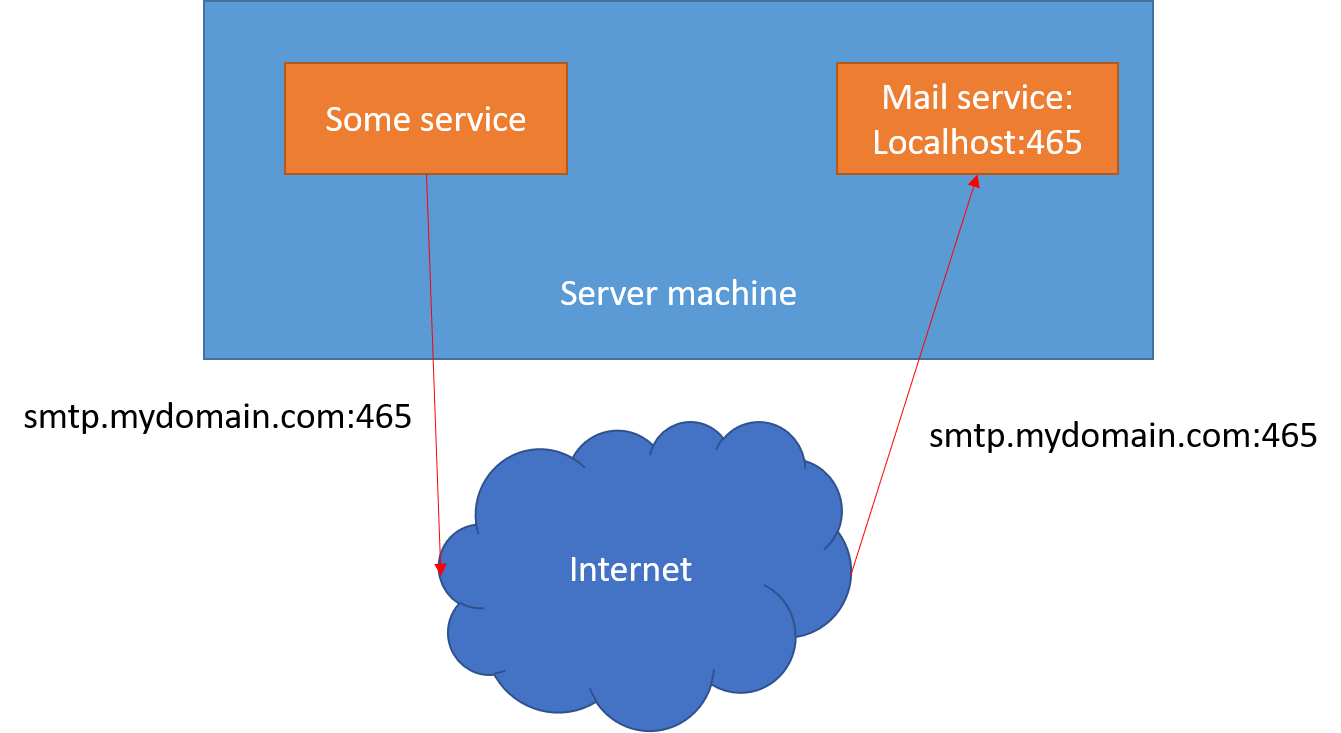
while in fact you want to do this:
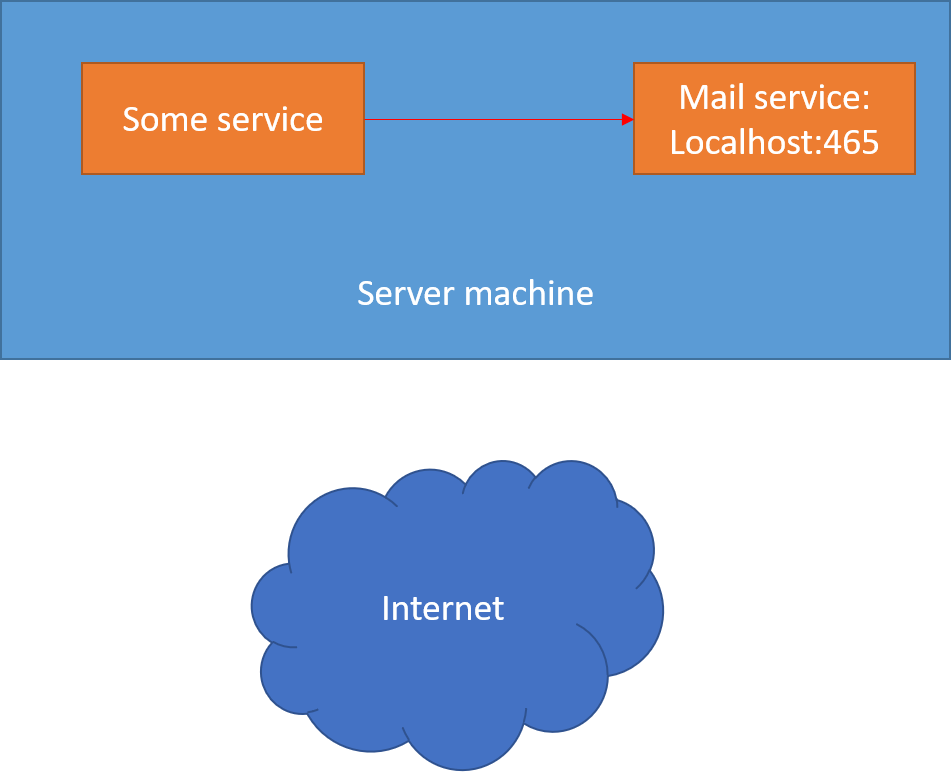
If you open the connection from the same machine to the same machine over the DNS name, the verification over SSL won't work as far as I know. Nevertheless, even if I'm wrong and this works: Why would you do that? This loops to the internet back to your server unnecessarily.
SeppPenner
on 13 Feb 2020
@SeppPenner Yes, that picture roughly describes the situation. Although the SMTP server listens on both localhost and the public interface. And when connecting to the local service through its public name, it indeed goes through a different network interface, but Linux should be smart enough to only route this traffic internally and not outside over the next network switch that would just throw it right back at me.
I specified the public name for the SSL certificate validation to work. If I connect to "localhost", I certainly can't expect SSL validation to work when the presented certificate isn't for "localhost" but the public name.
I'm trying to create a little test case and see how far I can simplify it to narrow down the cause of the problem.
ygoe
on 13 Feb 2020
I used the test app from the other thread and tried it on that Linux machine. It fails when built with .NET Core 2.2 but succeeds with .NET Core 3.0 and 3.1. Guess it's a .NET Core thing then. A quick web search didn't give me anything interesting. I'll recheck this when the main application is upgraded to .NET Core 3.
ygoe
on 13 Feb 2020
Just to leave a note for future visitors:
MailKit + .NET Core <=2.x + Linux will fail to validate a Let's Encrypt-issued certificate.
This is because Let's Encrypt does not use CRLs for leaf certificates, only OCSP. However, OCSP checking on Linux was only added in 3.0 (https://github.com/dotnet/corefx/pull/35367).
Since MailKit (by default) requests revocation checking but no mechanism is available, a validation failure results.
SmtpClient.CheckCertificateRevocation = false; is sufficient to work around it.
 alexzorin
on 13 Feb 2020
alexzorin
on 13 Feb 2020
Thanks, that's probably the better workaround. I can confirm that it works on my system.
ygoe
on 14 Feb 2020
I recommend CheckCertificateRevocation = true, with a try/catch for this exception which retries with a client having CheckCertificateRevocation = false.
 jjxtra
on 7 Jul 2020
jjxtra
on 7 Jul 2020
Related issues
 atiqi36
·
7Comments
atiqi36
·
7Comments
 Radzhab
·
3Comments
Radzhab
·
3Comments
 mcoyle012
·
7Comments
mcoyle012
·
7Comments
 portal7
·
3Comments
jstedfast
·
4Comments
portal7
·
3Comments
jstedfast
·
4Comments
Most helpful comment
Passing
falseas theuseSslargument only disables SSL-port wrapping, it does not disableSTARTTLS.If you want to disable STARTTLS, you need to use:
That said, the issue you are hitting is that the CA server is probably temporarily unreachable now and then and so certificate revocation checks fail to do their lookups.
You can disable this using
client.CheckCertificateRevocation = false;