Mailkit: Email File Attachment is empty
I'm following the steps as documentation says about how to send a email with attachment on dotnet 3.0 using Visual Studio 2019. It sends ok, but when i check email on webmail, I can see the attached file (in my case, a PDF document) but empty (0 bytes)
This is my Code
public async Task SendEmailAsync(string toEmail, string toName,
string subject, string message, List<IFormFile> files = null)
        {
            var mimeMessage = new MimeMessage();

            mimeMessage.From.Add(new MailboxAddress("Portal 7", "[email protected]));

            if (string.IsNullOrWhiteSpace(toName))
            {
                mimeMessage.To.Add(new MailboxAddress(toEmail));
            }
            else
            {
                mimeMessage.To.Add(new MailboxAddress(toName, toEmail));
            }

            mimeMessage.Subject = "My Subject";

            var builder = new BodyBuilder
            {
                HtmlBody = message
            };

            // Check for files attachments
            if (files != null)
            {
                foreach (var fileAttachment in files)
                {
                    if (fileAttachment != null)
                    {
                        using MemoryStream memoryStream = new MemoryStream();

                        await fileAttachment.CopyToAsync(memoryStream);

                      // For this case, i assume that always will be a PDF's  --- NOT FOR REAL CASE USE ---

                        builder.Attachments.Add(fileAttachment.FileName, memoryStream, new ContentType("application", "pdf"));

                    }
                }
            }

            // Set MessageBody
            mimeMessage.Body = builder.ToMessageBody();

            using var client = new SmtpClient
            {
                // For demo-purposes, accept all SSL certificates (in case the server supports STARTTLS)
                ServerCertificateValidationCallback = (s, c, h, e) => true
            };


            if (_env.IsDevelopment())
            {
                await client.ConnectAsync(emailSetting.MailServer, emailSetting.MailPort, true).ConfigureAwait(false);
            }
            else
            {
                await client.ConnectAsync(emailSetting.MailServer, emailSetting.MailPort, emailSetting.UseSSL).ConfigureAwait(false);
            }

            // Note: only needed if the SMTP server requires authentication
            await client.AuthenticateAsync(emailSetting.Sender, emailSetting.Password).ConfigureAwait(false);

            await client.SendAsync(mimeMessage).ConfigureAwait(false);

            await client.DisconnectAsync(true).ConfigureAwait(false);
        }
Expected behavior
Email Message and his Attachment document with proper content and size
Screenshots
This is the original file
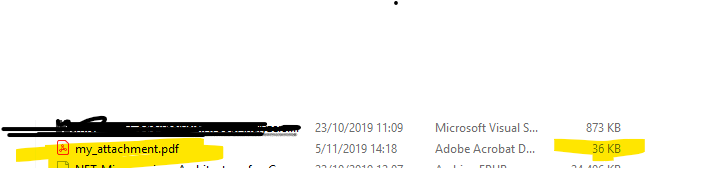
This is what i dowload from email attachment

Desktop (please complete the following information):
- OS: [Windows 10]
- Browser [chrome]
- Version [78.0.3904.108 (Build oficial) (64 bits)]
 portal7
All 3 comments
Have you try to set memoryStream.Position=0 before adding attachments list?
 Sbaia
on 24 Nov 2019
Sbaia
on 24 Nov 2019
As @Sbaia correctly suggested, you need to set memoryStream.Position = 0 before using it to create an attachment. In other words, change the following snippet of code from this:
using (MemoryStream memoryStream = new MemoryStream()) {
    await fileAttachment.CopyToAsync(memoryStream);

    // For this case, i assume that always will be a PDF's  --- NOT FOR REAL CASE USE ---
    builder.Attachments.Add(fileAttachment.FileName, memoryStream, new ContentType("application", "pdf"));
}
to this:
using (MemoryStream memoryStream = new MemoryStream()) {
    await fileAttachment.CopyToAsync(memoryStream);
    memoryStream.Position = 0;

    // For this case, i assume that always will be a PDF's  --- NOT FOR REAL CASE USE ---
    builder.Attachments.Add(fileAttachment.FileName, memoryStream, new ContentType("application", "pdf"));
}
 jstedfast
on 24 Nov 2019
jstedfast
on 24 Nov 2019
just FFI
using this works fine!!!
using (MemoryStream memoryStream = new MemoryStream())
                        {
                            await fileAttachment.CopyToAsync(memoryStream).ConfigureAwait(true);
                            builder.Attachments.Add(fileAttachment.FileName, memoryStream.ToArray(), MimeKit.ContentType.Parse(fileAttachment.ContentType));
                        }
Related issues
 ghost
·
3Comments
ghost
·
3Comments
 shayazm
·
3Comments
shayazm
·
3Comments
 nik0s100
·
3Comments
nik0s100
·
3Comments
 MaximKiselev
·
7Comments
MaximKiselev
·
7Comments
 dbogatov
·
7Comments
dbogatov
·
7Comments
Most helpful comment
Have you try to set memoryStream.Position=0 before adding attachments list?