Mahapps.metro: DialogCoordinator.ShowMessageAsync Button Accent
What steps will reproduce this issue?
I am using the DialogCoordinator to display dialogs and I noticed when a dialog is displayed it does not use the colors of my custom theme. I tried setting the MetroDialogSettings and setting ColorScheme, but none of the choices for ColorScheme have an affect on the button colors of the dialog. No matter what I set for the ColorScheme, the OK button was always using the light blue theme color.
Expected outcome
Dialog buttons are themed with the current set theme.
Environment
- MahApps.Metro v1.2.4
- Windows 7.0
- Visual Studio 2013
- .NET Framework 4.5
 Hikerakashiya
All 5 comments
@Hikerakashiya This is a little bit tricky and must be explained on main mahapps docu (tba)
The dialogs use there own button styles https://github.com/MahApps/MahApps.Metro/blob/develop/MahApps.Metro/Themes/Dialogs/BaseMetroDialog.xaml#L6-L24
So if you want to override this styles you must create your own res dictionary with the style overrides and put this on the DialogSettings.CustomResourceDictionary.
    <Style BasedOn="{StaticResource SquareButtonStyle}" TargetType="{x:Type Button}">
        <Setter Property="controls:ControlsHelper.ContentCharacterCasing" Value="Normal" />
        <!-- Your custom style changes -->
    </Style>

    <Style x:Key="AccentedDialogSquareButton"
           BasedOn="{StaticResource AccentedSquareButtonStyle}"
           TargetType="{x:Type Button}">
        <Setter Property="controls:ControlsHelper.ContentCharacterCasing" Value="Normal" />
        <!-- Your custom style changes -->
    </Style>

    <Style x:Key="AccentedDialogHighlightedSquareButton"
           BasedOn="{StaticResource HighlightedSquareButtonStyle}"
           TargetType="{x:Type Button}">
        <Setter Property="controls:ControlsHelper.ContentCharacterCasing" Value="Normal" />
        <!-- Your custom style changes -->
    </Style>
yourDialogSettings.CustomResourceDictionary = new ResourceDictionary { Source = new Uri("pack://application:,,,/YourReallyCoolApp;component/CustomStyles/CustomDialogStyles.xaml") }
Hope this helps!
 punker76
on 14 Apr 2016
punker76
on 14 Apr 2016
@punker76 Thanks for the response. Why can't the dialog inherit the styles from the main overall theme? It does not seem intuitive this way. Also how does the ColorScheme setting work for dialog settings?
Hikerakashiya
on 14 Apr 2016
@Hikerakashiya You maybe totally right, so I'll look at this point. The ColorScheme setting handles e.g. background and foreground brushes...
punker76
on 14 Apr 2016
I had the same problem and discovered that I missed to include
<ResourceDictionary Source="pack://application:,,,/MahApps.Metro;component/Styles/Accents/BaseLight.xaml" />
in the App.xaml
Without this reference the dialog will always appear in the "default" light theme with blue as the color.
 robertmuehsig
on 13 Dec 2016
robertmuehsig
on 13 Dec 2016
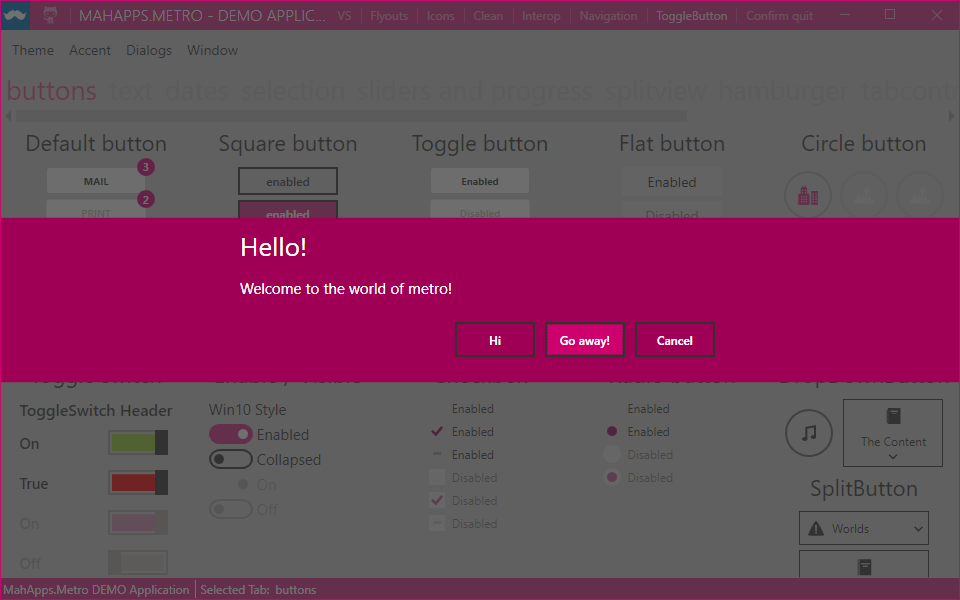
This should work now in upcoming v1.6.0 since the Dialog and Flyout controls try to find the current theme. So a custom theme or accent wont be override anymore.

punker76
on 15 Jan 2018
Related issues
 bardospeter
·
3Comments
bardospeter
·
3Comments
 Coder-Bryan
·
3Comments
Coder-Bryan
·
3Comments
 barryBithead
·
5Comments
barryBithead
·
5Comments
 Foxtrek64
·
4Comments
punker76
·
3Comments
Foxtrek64
·
4Comments
punker76
·
3Comments
Most helpful comment
I had the same problem and discovered that I missed to include
in the App.xaml
Without this reference the dialog will always appear in the "default" light theme with blue as the color.