Mahapps.metro: MainWindow always on top after minimize then restore
Hi Guys,
I encountered an interesting issue that bother me a lot... Post the issue out to see if anyone has the same issue with me.
After applying hambuger menu(mainly feature I used) to my own project, everything is fine except the mainwindow will always be on top after minimize then restore. The strange thing is the issue only occurs after minimize.
Steps to reproduce the behavior:
- Open the application
- Minimize the window by clicking the minimize button on the top right corner
- Open the application again by clicking the application on taskbar
- The application now always on top
Expected behavior
Ohter applicaion window should be on top if I set focus on them.
Screenshots
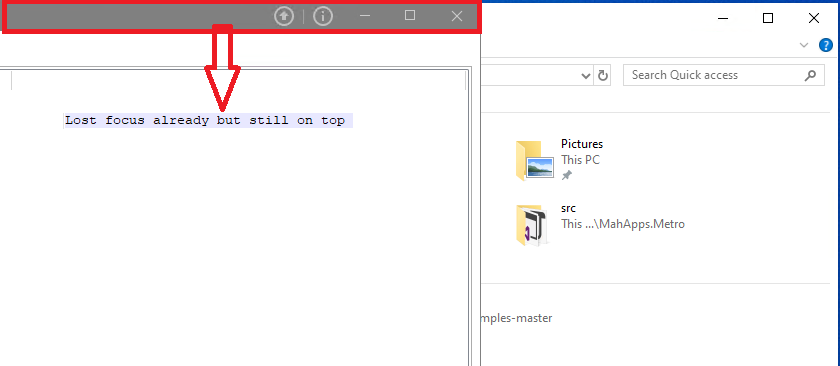
Environment(please complete the following information):
- MahApps.Metro version [v1.6.5]
- OS: [Win10 1903]
- Visual Studio [2017 15.8.3 and 2019 16.2.2]
- .NET Framework [4.7.2]
I appreciate any inputs :)
Regards,
 Coder-Bryan
All 3 comments
@Coder-Bryan This should be already fixed in latest source (v2.0 alpha on NuGet, with ControlzEx v4.x).
 punker76
on 25 Sep 2019
punker76
on 25 Sep 2019
@punker76 Thanks for your info. As I know, we only publish the preview of V2.0 alpha on NuGet... I am trying upgrade now:).
Coder-Bryan
on 26 Sep 2019
@punker76 Thanks again for your advice. The issue was gone after upgrading to V2.0 alpha. 👍 👍 👍
Coder-Bryan
on 27 Sep 2019
Related issues
 fredericoregateiro
·
10Comments
fredericoregateiro
·
10Comments
 benjamin275
·
17Comments
benjamin275
·
17Comments
 AndrzejKl
·
12Comments
AndrzejKl
·
12Comments
 oschwab
·
17Comments
oschwab
·
17Comments
 furqansafdar
·
11Comments
furqansafdar
·
11Comments
Most helpful comment
@punker76 Thanks again for your advice. The issue was gone after upgrading to V2.0 alpha. 👍 👍 👍