Mahapps.metro: Change the Validation Error Position
The Validation Error Popup is blocking the Description of my Texbox since it's on the right side by default. Is it there a way to change it to the left?
Here's my situation:

And this is the original Form:

So when the window opens, the user can't see there is a field called "Name", just something that can't be blank, but he can't know what he's supposed to type.
I tried a watermark instead, but I didn't like it for this particular application, I rather a Form style, as it is.
EDIT :
I tried this code in my Resources.xaml:
<Style TargetType="{x:Type mahapps:CustomValidationPopup}">
    <Setter Property="Placement" Value="Left" />
</Style>
But it didn't make any difference.
 feinstein
All 18 comments
@feinstein Which version of MahApps are you using?
 punker76
on 10 Sep 2015
punker76
on 10 Sep 2015
1.1.2, the latest stable version.
feinstein
on 10 Sep 2015
@feinstein so, please try the latest alpha. there was something changed. you can now inherit from a base style for the CustomValidationPopup.
    <Style x:Key="MetroValidationPopup"
           TargetType="{x:Type controls:CustomValidationPopup}">
        <Setter Property="HorizontalAlignment"
                Value="Right" />
        <Setter Property="HorizontalOffset"
                Value="0" />
        <Setter Property="VerticalOffset"
                Value="0" />
        <Setter Property="PopupAnimation"
                Value="Fade" />
        <Setter Property="Placement"
                Value="Right" />
    </Style>
@feinstein any news for this?
punker76
on 10 Sep 2015
@punker76 I will let you know as soon as I get to the office.
feinstein
on 10 Sep 2015
@punker76 I have good and bad news....
I used your code, and changed it to Left. It works, but on the first interaction with the new Window, the validation adorner get's shifted to the right. After I click or change the TextBox I am in or any other thing I do, it goes to the correct position.
Here's an image of what happens, I tested it with Right and Left, and it's a before and after. You can see how both scenarios have a shift to the right.

feinstein
on 10 Sep 2015
@feinstein it would be really nice if this could be separated in a single short app to demonstrate/reproduce this (for debugging...).
punker76
on 10 Sep 2015
@punker76 ok, let me see if I can make one for you quickly.
feinstein
on 10 Sep 2015
@punker76 it appears to be an issue with a Window with no Width and Heigh and this properties:
GlowBrush="{DynamicResource AccentColorBrush}"
NonActiveGlowBrush="DarkGray"
SizeToContent="WidthAndHeight"
ResizeMode="NoResize"
WindowStartupLocation="CenterOwner"
How do you prefer for me to send you the demo app's files?
feinstein
on 10 Sep 2015
@feinstein just come to gitter and send me a zip via private chat
punker76
on 10 Sep 2015
Could you please paste the full code that is showing how we can position the valisation popup.
Is it possible to show it below the textbox.
 aryustemov
on 22 Apr 2016
aryustemov
on 22 Apr 2016
how to use a CustomValidationPopup?
 thanoue
on 16 Nov 2017
thanoue
on 16 Nov 2017
Could you please paste the full code that is showing how we can position the valisation popup.
Is it possible to show it below the textbox.
Please, paste a simple example. I don't know how to set validation error position on combobox.
 romigrabarz
on 24 May 2019
romigrabarz
on 24 May 2019
I need help with position of Validation popup.
My xaml like this:
<mah:MetroWindow x:Class="WpfApp2.MainWindow"
                 xmlns="http://schemas.microsoft.com/winfx/2006/xaml/presentation"
                 xmlns:x="http://schemas.microsoft.com/winfx/2006/xaml"
                 xmlns:mah="http://metro.mahapps.com/winfx/xaml/controls"
                 Title="MainWindow" Height="450" Width="800">
    <Grid>
        <TextBox Width="200" Height="50" Text="{Binding Tekst, UpdateSourceTrigger=PropertyChanged, ValidatesOnDataErrors=True}"/>
    </Grid>
</mah:MetroWindow>
Validation popup allways still right.
https://drive.google.com/file/d/1dkZYAAtIfG1p6F0XSiRrowXXzHJBSEhM/view?usp=sharing
I want to change position that poup to TOP. How to achive this?
Please full example code.
romigrabarz
on 15 Sep 2020
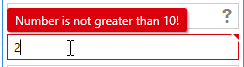
@romigrabarz You can override the style of the popup by adding this to the resources of your App.xaml
<Style BasedOn="{StaticResource MahApps.Styles.CustomValidationPopup}" TargetType="{x:Type controls:CustomValidationPopup}">
    <Setter Property="Placement" Value="Top" />
    <Setter Property="HorizontalOffset" Value="5" />
    <Setter Property="VerticalOffset" Value="-2" />
</Style>
You can play with the offset properties if you don't like the position.
punker76
on 15 Sep 2020
Thanks! Works with Application resources, but not when I add this resource in my xaml view:
````xaml
xmlns:x="http://schemas.microsoft.com/winfx/2006/xaml"
xmlns:mah="http://metro.mahapps.com/winfx/xaml/controls"
Title="MainWindow" Height="450" Width="800">
````
How to make this works with XAML view, not in App.xaml?
romigrabarz
on 15 Sep 2020
@romigrabarz Is there a specific reason why you need this at your window?
punker76
on 16 Sep 2020
I don't have App.xaml because I wirte class library with xaml views and pass this as extensions to another third exe program (not WPF). Everything works fine (mah controls etc.) but I can't add styles into App.xaml.
Every styles I have to added to ResourceDictionary into my view.
romigrabarz
on 16 Sep 2020
Related issues
 furqansafdar
·
11Comments
punker76
·
30Comments
furqansafdar
·
11Comments
punker76
·
30Comments
 patriksvensson
·
18Comments
patriksvensson
·
18Comments
 AndrzejKl
·
12Comments
AndrzejKl
·
12Comments
 yousufctec
·
10Comments
yousufctec
·
10Comments
Most helpful comment
Could you please paste the full code that is showing how we can position the valisation popup.
Is it possible to show it below the textbox.