Magisk: Android before 8.0 does not allow type transition from untrusted_app domains
I flashed latest 20416 version of Magisk today, it boots up perfectly...
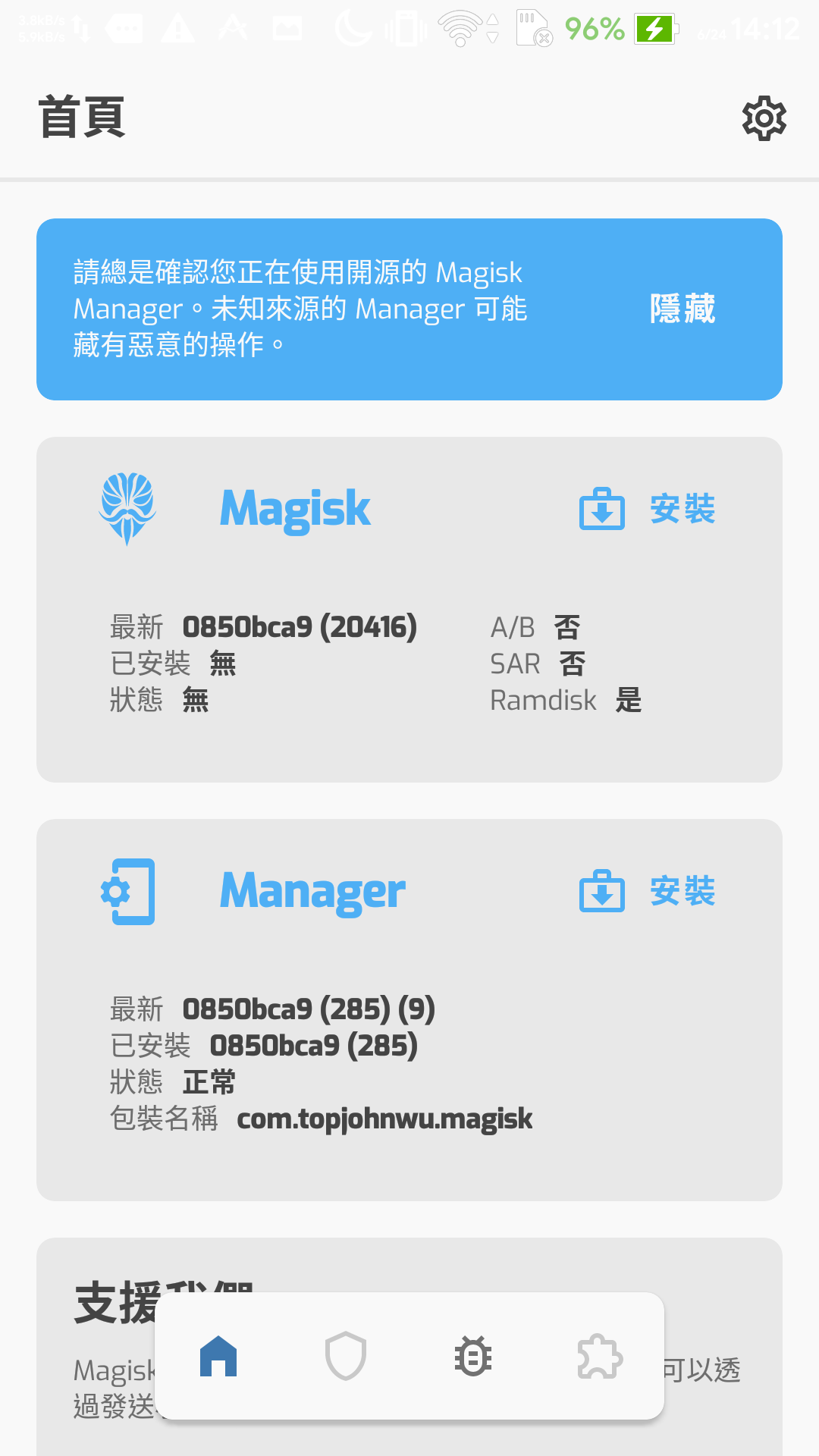
But I open the Magisk Manager, It shows doesn't install magisk, but Magisk Xposed module and some extension for Magisk work normally.
Some programs that needs root can't get root permission (Maybe blocked by the Manager?)
Some screenshots below...
(Sorry for my bad English...)
今天我刷了最新的20416版本,還蠻棒的是終於正常啟動了…
但是打開Manager的時候發現會顯示沒有安裝,但是一些模組像是Xposed看起來是已經載入完成了
需要Root權限的程式沒辦法工作(或許被Manager擋掉了…?)
附上一些截圖…

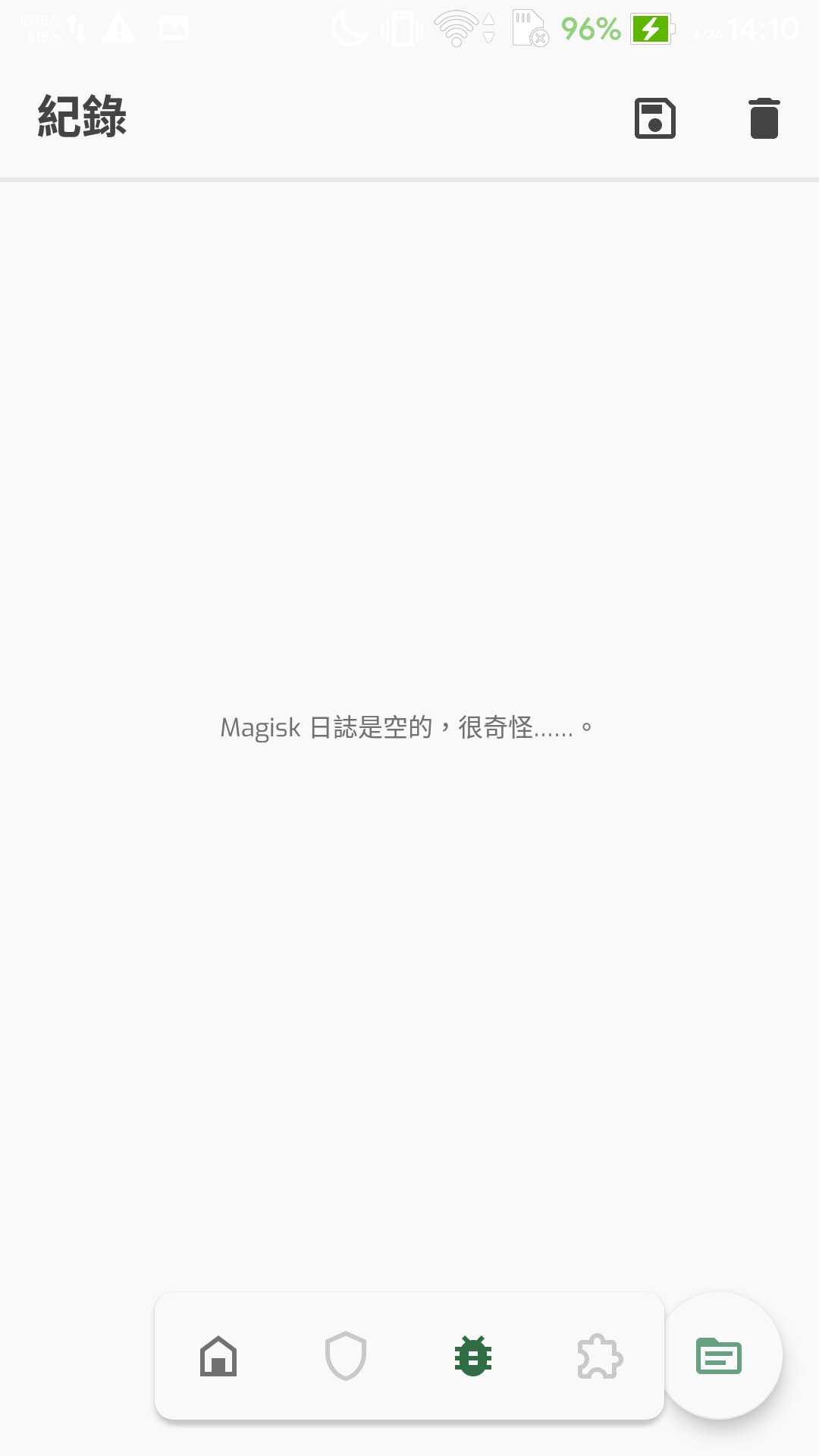
The normal Manager (Package Name not modify by the Manager) also not work...
原始的Manager也沒辦法工作(包名沒被改過的)
 Bob-YsPan
All 12 comments
This is probably linked to https://github.com/topjohnwu/Magisk/commit/43146b8316a467cbd7dee0b3afe593a76291918a & https://github.com/topjohnwu/Magisk/commit/ec3705f2ed187863efc34af5415495e1ee7775d2
Please send logcat + Your android version + Your phone models or ROM name
Please try to launch an app that requires root access and try opening Magisk manager before grabbing logs to get the maximum amount of information as possible about the issue.
Alternatively, you can grab magisk.log from TWRP by copying cache/magisk.log or data/cache/magisk.log (Location depends on phone model) to sdcard (Internal storage)
 Fox2Code
on 24 Jun 2020
Fox2Code
on 24 Jun 2020
logcat.txt
Their's my logcat
Android 10
Oneplus 7 Pro xXx_NoLimits_11.6 on Oxygen OS 10.0.6.GM21BA with arter97 kernel
I'l first opened Lucky Patcher that have forever granted Root That worked fined and saw the granted message
Than I opened up Termux and typed su And waited a good minute before I saw a notification it was denied while I didn't saw, A popup to grant root. This is the exact behaviour with Magisk Manager Canary. Only that the Canty manager was deleted after 30 seconds or something after it failed to granted root
Logcat started Before opening Lucky Patcher and ended after I saw the notification that Termux was denied root access.
 Gusted
on 26 Jun 2020
Gusted
on 26 Jun 2020
Thanks @Gusted I extracted the important part of the logcat and found this
(For Magisk a.m = SuRequestActivity )
06-26 00:30:57.672 20587 20587 D AppCompatDelegate: Exception while getting ActivityInfo
06-26 00:30:57.672 20587 20587 D AppCompatDelegate: android.content.pm.PackageManager$NameNotFoundException: ComponentInfo{com.pLUXH.r.SO88.kjO/a.m}
06-26 00:30:57.672 20587 20587 D AppCompatDelegate:     at android.app.ApplicationPackageManager.getActivityInfo(ApplicationPackageManager.java:461)
06-26 00:30:57.672 20587 20587 D AppCompatDelegate:     at a.r3.b(:6)
06-26 00:30:57.672 20587 20587 D AppCompatDelegate:     at a.v2.attachBaseContext(:1)
06-26 00:30:57.672 20587 20587 D AppCompatDelegate:     at a.wo0.attachBaseContext(Unknown Source:5)
06-26 00:30:57.672 20587 20587 D AppCompatDelegate:     at android.app.Activity.attach(Activity.java:7726)
06-26 00:30:57.672 20587 20587 D AppCompatDelegate:     at android.app.ActivityThread.performLaunchActivity(ActivityThread.java:3342)
06-26 00:30:57.672 20587 20587 D AppCompatDelegate:     at android.app.ActivityThread.handleLaunchActivity(ActivityThread.java:3527)
06-26 00:30:57.672 20587 20587 D AppCompatDelegate:     at android.app.servertransaction.LaunchActivityItem.execute(LaunchActivityItem.java:83)
06-26 00:30:57.672 20587 20587 D AppCompatDelegate:     at android.app.servertransaction.TransactionExecutor.executeCallbacks(TransactionExecutor.java:135)
06-26 00:30:57.672 20587 20587 D AppCompatDelegate:     at android.app.servertransaction.TransactionExecutor.execute(TransactionExecutor.java:95)
06-26 00:30:57.672 20587 20587 D AppCompatDelegate:     at android.app.ActivityThread$H.handleMessage(ActivityThread.java:2123)
06-26 00:30:57.672 20587 20587 D AppCompatDelegate:     at android.os.Handler.dispatchMessage(Handler.java:107)
06-26 00:30:57.672 20587 20587 D AppCompatDelegate:     at android.os.Looper.loop(Looper.java:214)
06-26 00:30:57.672 20587 20587 D AppCompatDelegate:     at android.app.ActivityThread.main(ActivityThread.java:7710)
06-26 00:30:57.672 20587 20587 D AppCompatDelegate:     at java.lang.reflect.Method.invoke(Native Method)
06-26 00:30:57.672 20587 20587 D AppCompatDelegate:     at com.android.internal.os.RuntimeInit$MethodAndArgsCaller.run(RuntimeInit.java:516)
06-26 00:30:57.672 20587 20587 D AppCompatDelegate:     at com.android.internal.os.ZygoteInit.main(ZygoteInit.java:950)
06-26 00:30:57.674  1584  1676 D OpPowerConsumpStatsInjector: notifyPkgEvent
06-26 00:30:57.677  1584  4817 D ActivityTaskManager: setRequestedOrientation() to 14 for ActivityRecord{6d1f61a u0 com.pLUXH.r.SO88.kjO/a.c t1690} from pid=20587, uid=10243
06-26 00:30:57.687 20587 20587 E s51     : java.io.IOException: Connection refused
06-26 00:30:57.687 20587 20587 E s51     :  at android.net.LocalSocketImpl.connectLocal(Native Method)
06-26 00:30:57.687 20587 20587 E s51     :  at android.net.LocalSocketImpl.connect(LocalSocketImpl.java:296)
06-26 00:30:57.687 20587 20587 E s51     :  at android.net.LocalSocket.connect(LocalSocket.java:147)
06-26 00:30:57.687 20587 20587 E s51     :  at a.t51.<init>(:1)
06-26 00:30:57.687 20587 20587 E s51     :  at a.x51.a(Unknown Source:11)
06-26 00:30:57.687 20587 20587 E s51     :  at a.s51.onCreate(:3)
06-26 00:30:57.687 20587 20587 E s51     :  at android.app.Activity.performCreate(Activity.java:7820)
06-26 00:30:57.687 20587 20587 E s51     :  at android.app.Activity.performCreate(Activity.java:7809)
06-26 00:30:57.687 20587 20587 E s51     :  at android.app.Instrumentation.callActivityOnCreate(Instrumentation.java:1318)
06-26 00:30:57.687 20587 20587 E s51     :  at android.app.ActivityThread.performLaunchActivity(ActivityThread.java:3363)
06-26 00:30:57.687 20587 20587 E s51     :  at android.app.ActivityThread.handleLaunchActivity(ActivityThread.java:3527)
06-26 00:30:57.687 20587 20587 E s51     :  at android.app.servertransaction.LaunchActivityItem.execute(LaunchActivityItem.java:83)
06-26 00:30:57.687 20587 20587 E s51     :  at android.app.servertransaction.TransactionExecutor.executeCallbacks(TransactionExecutor.java:135)
06-26 00:30:57.687 20587 20587 E s51     :  at android.app.servertransaction.TransactionExecutor.execute(TransactionExecutor.java:95)
06-26 00:30:57.687 20587 20587 E s51     :  at android.app.ActivityThread$H.handleMessage(ActivityThread.java:2123)
06-26 00:30:57.687 20587 20587 E s51     :  at android.os.Handler.dispatchMessage(Handler.java:107)
06-26 00:30:57.687 20587 20587 E s51     :  at android.os.Looper.loop(Looper.java:214)
06-26 00:30:57.687 20587 20587 E s51     :  at android.app.ActivityThread.main(ActivityThread.java:7710)
06-26 00:30:57.687 20587 20587 E s51     :  at java.lang.reflect.Method.invoke(Native Method)
06-26 00:30:57.687 20587 20587 E s51     :  at com.android.internal.os.RuntimeInit$MethodAndArgsCaller.run(RuntimeInit.java:516)
06-26 00:30:57.687 20587 20587 E s51     :  at com.android.internal.os.ZygoteInit.main(ZygoteInit.java:950)
So it's seem likes the request couldn't be delivered?
So their was no open server that listen to the request, not sure how the new su request process work and if it has to do with After97 kernel/xXx No limits or just oneplus in particular
Gusted
on 26 Jun 2020
Also my guesses are that https://github.com/topjohnwu/Magisk/commit/43146b8316a467cbd7dee0b3afe593a76291918a is the commit that caused this as it rewrote the server part
Gusted
on 26 Jun 2020
Yes it has to do with the selinux downloading https://github.com/topjohnwu/magisk_files/tree/7a388abedd902a773ac803984166ecd58d5edb80 magisk-debug.zip before the new SELinux policy totally works again and shows up a notification if you want to grant root
Gusted
on 26 Jun 2020
Hello.
I had the same problem on the Galaxy Note 9 (Android 10) One UI 2.1
The problem is from the latest canary version.
The problem of the activation files, as well as the installation file.
Root apps are not given permission.
Also, the magisk app is not hidden.
Thank you.
 aaref1234
on 28 Jun 2020
aaref1234
on 28 Jun 2020
And the same problem in the latest version.
aaref1234
on 28 Jun 2020
Here is my Magisk log captured today...
This file at /cache/magisk.log I copied via MTP of the recovery.
I try some things below when phone boot to the system:
- When phone boots up, enter the Magisk manager
- Reboot it to recovery mode
- Copy the magisk.log
This is my phone spec:
- Asus Zenfone 2 ZE551ML
- Intel Atom Z3580
- 4GB LPDDR3
\
Bob-YsPan
on 29 Jun 2020
This issue also happens on HTC 10 with LOS14.1.
 acsway878787
on 4 Jul 2020
acsway878787
on 4 Jul 2020
#2938 is still happened
 mooseIre
on 6 Jul 2020
mooseIre
on 6 Jul 2020
The problem fixed on my phone since 20419 version, thanks.
Now my phone's Manager can detect magisk again.
Bob-YsPan
on 8 Jul 2020
Related issues
 Kratos291
·
3Comments
Kratos291
·
3Comments
 Rakleed
·
4Comments
Rakleed
·
4Comments
 guitardedhero
·
3Comments
guitardedhero
·
3Comments
 auanasgheps
·
4Comments
auanasgheps
·
4Comments
 Nanolx
·
4Comments
Nanolx
·
4Comments
Most helpful comment
This is probably linked to https://github.com/topjohnwu/Magisk/commit/43146b8316a467cbd7dee0b3afe593a76291918a & https://github.com/topjohnwu/Magisk/commit/ec3705f2ed187863efc34af5415495e1ee7775d2
Please send
logcat+ Your android version + Your phone models or ROM namePlease try to launch an app that requires root access and try opening Magisk manager before grabbing logs to get the maximum amount of information as possible about the issue.
Alternatively, you can grab
magisk.logfrom TWRP by copyingcache/magisk.logordata/cache/magisk.log(Location depends on phone model) tosdcard(Internal storage)