Magisk: Direct Installation method of Magisk (20408) using MM (284) Fails on NAND/MTD based devices
This is branch of #2720 , originating from #1526 .
Finding bootimage should be after closing issues above fixed, and while flashing from recovery it is actually working well.
When trying to update Magisk using "direct Installation" option in Magisk manager (which is recommended method), the flashing process supposedly finds bootimage, but fails after dumping.
Output of Magisk Manager:
- Target image: /dev/BOOT
- Device platform: armeabi-v7a
! Unsupported/Unknown image format
! Installation failed
I think I will need to examine what actually is contained in /dev/BOOT and whether it dumps correct image.
I'll try to update on the issue when possible.
 Msprg
Msprg
All 34 comments
Okay so, in /dev/ on my device, there actually is bootimg, along with BOOT.
A3500F:/ # ls -a /dev/
.                 cache            gsensor               mtk_jpeg            ptyp6     sw_sync     ttypa
..                camera-isp       hid-keyboard          mtk_sched           ptyp7     tgt         ttypb
.coldboot_done    camera-pipemgr   hwmsensor             mtkfb_vsync         ptyp8     touch       ttypc
BOOT              camera-sysram    input                 mtp_usb             ptyp9     tpd_em_log  ttypd
MTK_SMI           console          ion                   network_latency     ptypa     tty         ttype
MT_pmic_adc_cali  cpu_dma_latency  kd_camera_flashlight  network_throughput  ptypb     ttyGS0      ttypf
RT_Monitor        cpuctl           kd_camera_hw          null                ptypc     ttyGS1      tun
Vcodec            cpuset           kmsg                  nvram               ptypd     ttyGS2      uboot
__properties__    device-mapper    log                   pmt                 ptype     ttyGS3      uhid
accdet            devmap           logo                  ppp                 ptypf     ttyMT0      uibc
aed0              dummy_cam_cal    loop-control          preloader           radio     ttyMT1      uinput
aed1              dummy_eeprom     mali                  pro_info            random    ttyMT2      urandom
alarm             eac              mbr                   protect_f           recovery  ttyMT3      usb_accessory
android           ebc              memcg                 protect_s           rtc0      ttyp0       usrdata
android_adb       ebr1             misc                  psaux               sec_ro    ttyp1       uvvp_hotplug
ashmem            expdb            misc-sd               ptmx                seccfg    ttyp2       wmtWifi
bfqio             fd               mt_otg_test           pts                 snapshot  ttyp3       wmtdetect
binder            fm               mtfreqhopping         ptyp0               snd       ttyp4       xLog
block             fscklogs         mtgpio                ptyp1               socket    ttyp5       xt_qtaguid
bmtpool           full             mtk-adc-cali          ptyp2               stpbt     ttyp6       zero
bootimg           fuse             mtk-kpd               ptyp3               stpgps    ttyp7
btif              gps              mtk_almk              ptyp4               stpwmt    ttyp8
bus               graphics         mtk_disp              ptyp5               stune     ttyp9
Attempts to dump the image resulted in:
A3500F:/ # busybox nanddump -f /sdcard/bootimg_BOOT.img /dev/BOOT
nanddump: MEMGETINFO: Not a typewriter
1|A3500F:/ # busybox nanddump -f /sdcard/bootimg_bootimg.img /dev/bootimg
A3500F:/ #
The warning from nanddump on /dev/BOOT is telling me soemthing is wrong.
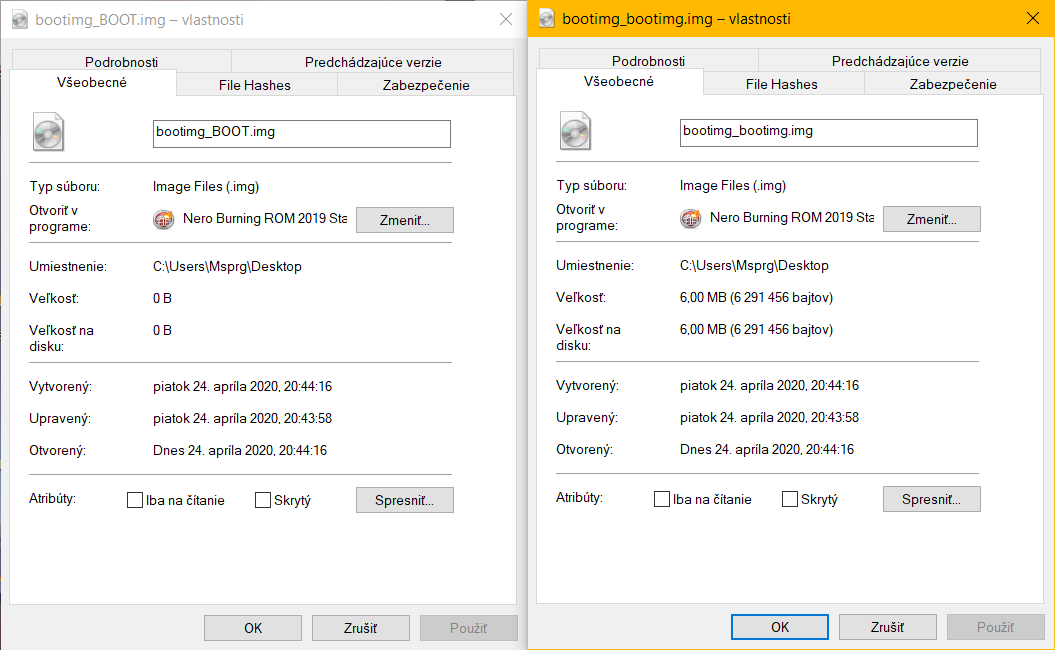
Yep /dev/BOOT is definitely NOT bootimage. The good news is however that /dev/bootimg dumps just fine and looks like it should work.
I think this requires again bootimage detection tuning, so @osm0sis , your turn :wink:.
(Maybe find all situable files into array, and then test every file to see if it is pointing to some partition, or if it is other kind of file 😃 )
Msprg
on 24 Apr 2020
Both bootimg and BOOT are char devices so no way to further distinguish between them.
But yeah we'll have to see why Manager is behaving differently than the zip where I fixed it to take bootimg first. Maybe a different pesky script tucked away in it somewhere.
I'll dig around.
 osm0sis
on 24 Apr 2020
osm0sis
on 24 Apr 2020
@osm0sis I didn't update the app, that might be the issue.
Will push out a new app with the updated script and see if that fixes the issue
 topjohnwu
on 25 Apr 2020
topjohnwu
on 25 Apr 2020
Magisk Manager does not rely on any external scripts to find boot images, since it supports targeting slots, the boot image finding has to be done by itself. The code for detection is still in util_functions.sh so any bug fixes should be done directly it there (as you did), but that has to be embedded into the APK itself to make a difference
topjohnwu
on 25 Apr 2020
Ah that makes sense. Okay, so we'll wait for the next Manager Canary build and then hopefully @Msprg @martobg10 and @488315 can all confirm a Direct Install works after updating to it. :+1:
osm0sis
on 25 Apr 2020
I only install through twrp since this fire hd 8 2018 and Amazon devices uses amonet exploit which patches boot image with it's custom header but I can't install it though the magisk app and it will cause a bootloop.
 488315
on 25 Apr 2020
488315
on 25 Apr 2020
Sidenote: We could probably add amonet to magiskboot, especially if it's similar to the Nook ones and just a static header. Can you upload your recovery.img?
osm0sis
on 25 Apr 2020
https://github.com/chaosmaster/android_bootable_recovery/blob/amonet/amonet.cpp
This folder contains recovery images
https://forum.xda-developers.com/attachment.php?attachmentid=4818373
The source code is
https://github.com/chaosmaster/amonet/tree/mt8163-karnak
So the header should be here
488315
on 25 Apr 2020
Alright guys, 284 is out. :crossed_fingers:
osm0sis
on 5 May 2020
Unfortunately for me, the issue still persists 😢
The log however changed somewhat:
- Target image: /dev/BOOT
- Device platform: armeabi-v7a
- Unpacking boot image (This line has beed added)
! Unsupported/Unknown image format
! Installation failed
And that's trying to flash 20408 using 284?
osm0sis
on 5 May 2020
Yes. 😿
Magisk currently installed - 20407
Trying to install new magisk - 20408
Using MM - 284
Msprg
on 5 May 2020
The updated util_functions.sh with my changes is definitely in 284, so I'm really confused...
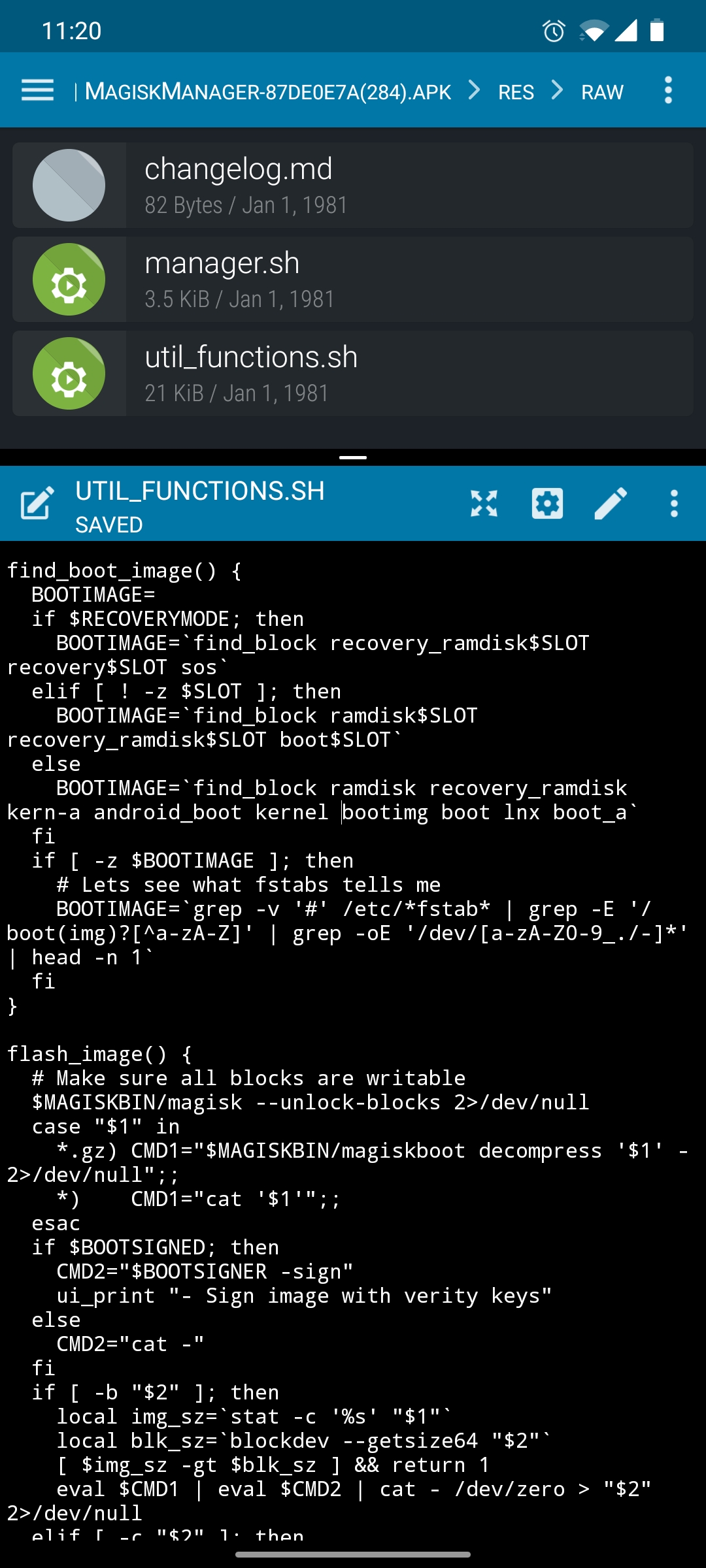
Any ideas @topjohnwu ?
osm0sis
on 5 May 2020
Okay I might just be diong absolute bullshit, @osm0sis, but when I run your script from terminal emulator it appears to be unable to find fstab so it can not read where is boot mounted properly...?
A3500F:/storage/emulated/0 # RECOVERYMODE=0
A3500F:/storage/emulated/0 # sh find_bootimg.sh
find_bootimg.sh[8]: find_block: not found
grep: /etc/*fstab*: No such file or directory

A3500F:/storage/emulated/0 # ls /etc/
Changelog.txt            firmware                           media_codecs_google_video_le.xml  resolv.conf
NOTICE.html.gz           fonts.xml                          media_codecs_mediatek_audio.xml   seccomp_policy
agps_profiles_conf2.xml  gps.conf                           media_codecs_mediatek_video.xml   security
apns-conf.xml            hostapd                            media_codecs_performance.xml      selective-spn-conf.xml
audio_effects.conf       hosts                              media_profiles.xml                sensitive_pn.xml
audio_policy.conf        htc_audio_effects.conf             mkshrc                            spn-conf.xml
bash                     init                               mtk_omx_core.cfg                  ssh
bluetooth                init.d                             nano                              sysconfig
clatd.conf               media_codecs.xml                   permissions                       terminfo
compiled-classes         media_codecs_ffmpeg.xml            ppp                               vimrc
dolby                    media_codecs_google_audio.xml      preloaded-classes                 wifi
event-log-tags           media_codecs_google_telephony.xml  public.libraries.txt
fallback_fonts.xml       media_codecs_google_video.xml      recovery-resource.dat
A3500F:/storage/emulated/0 #
...and there really is not fstab ... unsurprisingly, but I think it should be there...
...
Okay so it looks like in my entire device, there is only one file matching pattern fstab, and that is:
A3500F:/ # cat /fstab.mt6582
# Android fstab file.
#<src>           <mnt_point>         <type>    <mnt_flags and options>                 <fs_mgr_flags>
# The filesystem that contains the filesystem checker binary (typically /system) cannot
# specify MF_CHECK, and must come before any filesystems that do specify MF_CHECK
/emmc@android       /system         ext4    ro,commit=1,noauto_da_alloc                         wait
/emmc@usrdata       /data           ext4    noatime,nosuid,nodev,noauto_da_alloc,discard        wait,check
/emmc@cache         /cache          ext4    noatime,nosuid,nodev,noauto_da_alloc,discard        wait,check
/emmc@protect_f     /protect_f      ext4    noatime,nosuid,nodev,noauto_da_alloc,discard        wait,check
/emmc@protect_s     /protect_s      ext4    noatime,nosuid,nodev,noauto_da_alloc,discard        wait,check
/devices/platform/mtk-msdc.1/mmc_host*          auto    auto    defaults                voldmanaged=sdcard1:auto,encryptable=userdata
/devices/platform/mt_usb*               auto    auto    defaults        voldmanaged=usb:auto
A3500F:/ #
Yes, it is in filesystem root, yes it is weird.
Msprg
on 5 May 2020
The correct way to test would be:
. /data/adb/magisk/util_functions.sh
find_boot_image
@osm0sis, I am sorry I did not know.
A3500F:/ # . /data/adb/magisk/util_functions.sh
A3500F:/ # find_boot_image
A3500F:/ # echo $BOOTIMAGE
/dev/recovery
A3500F:/ #
That does not seem right...
(may I ask, what function does a space between . and /data/adb/... have?
Msprg
on 5 May 2020
Sorry, missed a couple steps.
export RECOVERYMODE=false
. /data/adb/magisk/util_functions.sh
find_boot_image
echo $BOOTIMAGE
Okay this looks much better:
A3500F:/ # su
A3500F:/ # whoami
root
A3500F:/ # export RECOVERYMODE=false
A3500F:/ # . /data/adb/magisk/util_functions.sh
A3500F:/ # find_boot_image
A3500F:/ # echo $BOOTIMAGE
/dev/bootimg
A3500F:/ #
By the way, the function takes tiiime to run maybe even 5 minutes. Should it be like it?
Msprg
on 5 May 2020
That is indeed long, but if you recall it's now searching through a bunch of stuff before it falls back to /dev, so it's just the cost of doing business for NAND while avoiding false positives for everyone (and also might be faster in normal practice due to env/shell differences).
So, the question remains, why is Manager's output from that different?
osm0sis
on 5 May 2020
That's the output from the latest MM. It correctly found my bootimg location.
- Target image: /dev/bootimg
- Device platform: armeabi-v7a
- Unpacking boot image
! Unsupported/Unknown image format
! Installation failed
My fstab is also in root, I mentioned that before in another issue.
https://github.com/topjohnwu/Magisk/issues/2740#issuecomment-624141015
For me, it takes less than 5 seconds.
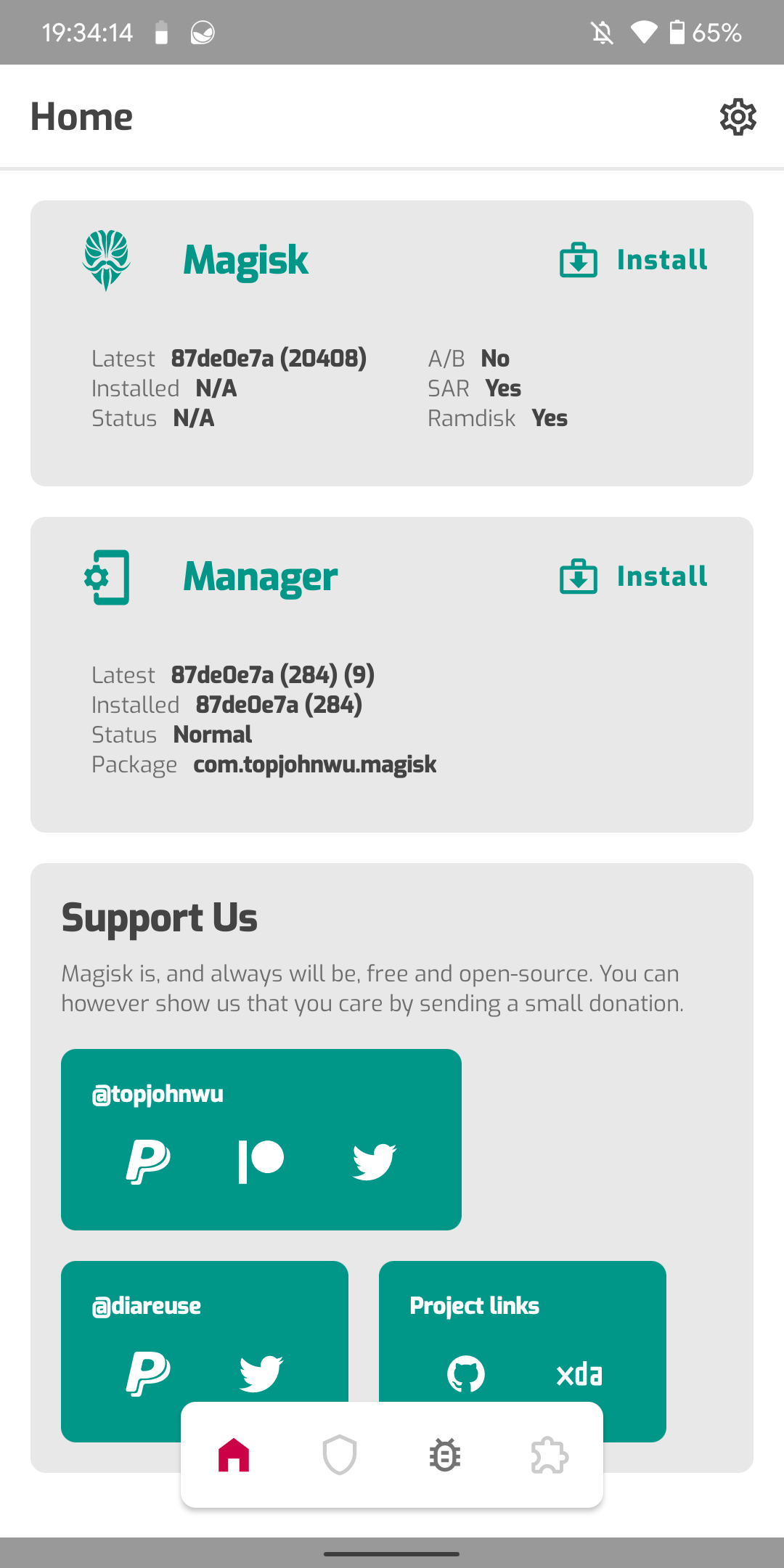
Something is broken in the new canary. On my Poco F1, I tried to update from 20407 to 20408, but after installing in MM, the Magisk Manager still shows me the previous version (20407) number in "Installed" section. I restarted the phone and now it shows "N/A" in "Installed" section.
I tried to "dirty" downgrade from 20408 to 20407, but it doesn't work. Still N/A in MM.
(sorry for my English)
 turb1te
on 5 May 2020
turb1te
on 5 May 2020
@martobg10, please let's stay on topic, but see here: https://github.com/topjohnwu/Magisk/issues/2763
osm0sis
on 5 May 2020
@martobg10, please let's stay on topic, but see here: #2763
I assumed that it is related to our problem. I'm sorry!
turb1te
on 5 May 2020
@osm0sis, is there something I can do right now, or we now just wait for... miracle or whatever?
(I wanted to edit util_functions.sh in the MM apk, for debugging purposes, but I am not an android developer and I am not aware of any easy way to do so.)
Msprg
on 6 May 2020
I'll run some tests, @topjohnwu might find his way back to us here too. I'll keep you posted.
osm0sis
on 6 May 2020
Hello, just checking if there is any progress, or if I can help with something.
Msprg
on 27 May 2020
I tried to recreate but Manager still finds the right location for my device here. Not sure how to proceed.
osm0sis
on 27 May 2020
Oh, okay, @osm0sis If youre able to recreate MM which will log everything needed, like all related variables, function progress and results, to some log file I will run it on my device, and we´ll look at the
generated log, then, maybe we get some results, otherwise you can label this as "stalled" 😆.
Msprg
on 27 May 2020
My only thought is that somehow it thinks your device has a SLOT so gets hung up on that shorter list without bootimg
osm0sis
on 27 May 2020
@Msprg I've got a bit of time this afternoon. PM me your email on XDA and we can see about debugging this more directly. :+1:
osm0sis
on 27 May 2020
I do have a device which also suffers from this issue. If someone can guide me exactly what I should do - I can try to help debugging it.
 Runner-cz
on 27 May 2020
Runner-cz
on 27 May 2020
I do have a device which also suffers from this issue. If someone can guide me exactly what I should do - I can try to help debugging it.
No working solution RN I am afraid. We are working on it right now actually.
Msprg
on 27 May 2020
ok. then when there is a test version available - I can test too. :-)
Runner-cz
on 27 May 2020
A workaround we've found for now is to have Manager download the Magisk zip, then you can flash it using the manual button in the Modules pane.
Just points to some deeper issue with the Manager Direct Install env. It shouldn't be behaving this differently.
osm0sis
on 27 May 2020
Ah apparently /dev/bootimg is properly detected on @Msprg's device now after all, so the patch part @martobg10 reported is the next problem, and it's relatively straight-forward.
Basically John has the whole thing reimplemented in Java except for boot_patch.sh:
So our nanddump workarounds in util_functions.sh for the dump and patch portion just don't happen.
I can probably figure out how to add our workarounds there, which will do until @topjohnwu gets around to cutting down on the code duplication and relies more on util_functions.sh everywhere like he's been planning.
osm0sis
on 27 May 2020
Related issues
 coderobe
·
56Comments
coderobe
·
56Comments
 Akitakek
·
40Comments
Akitakek
·
40Comments
 rfgamaral
·
45Comments
rfgamaral
·
45Comments
 sabpprook
·
62Comments
sabpprook
·
62Comments
 kam821
·
52Comments
kam821
·
52Comments
Most helpful comment
@osm0sis I didn't update the app, that might be the issue.
Will push out a new app with the updated script and see if that fixes the issue