All 8 comments
Wow
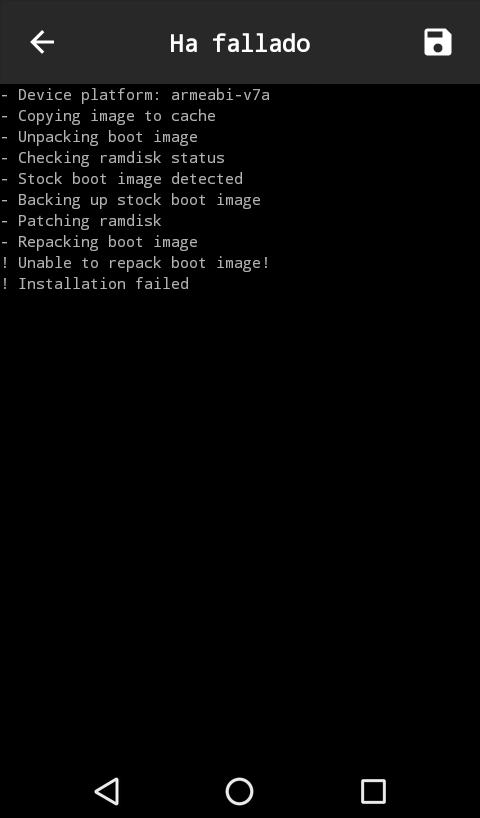
Error #1: it's using 32bit busybox and failing. Guessing you're one of the few devices that's armeabi-v7a running 64bit OS
Error #2: Segmentation fault, possibly caused by error #1
 unixandria-xda
on 24 Aug 2019
unixandria-xda
on 24 Aug 2019
Error 1 isn't of any concern, it now always tries the x86 binary first. #1766 will hide that correctly so it stops worrying people.
The segfault is because it didn't read or unpack the image correctly:
RECOV_DTBO_SZ [1919508803]
(That's a very wrong size.)
Please upload the actual boot.img. Otherwise how could we ever figure out and fix the issue?
 osm0sis
on 26 Aug 2019
osm0sis
on 26 Aug 2019
@dubcusb please upload your boot image as @osm0sis said
 topjohnwu
on 27 Aug 2019
topjohnwu
on 27 Aug 2019
Oh sorry for my delay. I kind of lost hope in this since I realized I won't be able to unlock my phone's bootloader without third party services (it's Huawei).
If, however, fixing this/finding the problem may help other huawei users or people with similar errors, I can upload the boot image here (as soon as I get home).
Again, sorry for not answering earlier.
 SeerLite
on 27 Aug 2019
SeerLite
on 27 Aug 2019
Ok here is a zip with the boot.img I was using for the process.
boot.zip
SeerLite
on 28 Aug 2019
@topjohnwu
Similarly to magiskboot, unpackbootimg has issues with the above image, but the output differs: unpackbootimg still thought there was a large dtb, but no additional large recovery_dtbo like magiskboot thought. Clearly the header's got some funky variant going on. I'll look into it more tomorrow probably.
osm0sis
on 28 Aug 2019
It's because Huawei has added some data in the header at decimal offset 1632 (where recovery_dtbo info is stored on newer devices): Cairo-L23C469B125_65583_181210_SIGN
We'll have to add some protections against such nonsense to magiskboot and unpackbootimg. :+1:
osm0sis
on 29 Aug 2019
1848 should fix this.
osm0sis
on 17 Sep 2019
Related issues
 ananjaser1211
·
4Comments
ananjaser1211
·
4Comments
 Ralozey
·
4Comments
Ralozey
·
4Comments
 Fs00
·
3Comments
Fs00
·
3Comments
 Madis0
·
3Comments
Madis0
·
3Comments
 HikariCalyx
·
3Comments
HikariCalyx
·
3Comments