Magisk: Feature request: install over OTA sideload
I have the problem that my Pixel 3 XL is not receiving OTAs. On every check, it reports me that the latest update is installed. If I take a look at the official Android page for Crosshatch there is a new firmware, however.
Magisk has instructions and capability to survive an OTA as soon as you follow the correct procedure
Here the only problem is that my device won't get any OTA ("system is already up to date") from the official channel, so I must use adb sideload to install the patches.
Currently, I am doing the following.
- Download OTA zip
adb sideload ota.zip- Reboot to bootloader
- Boot TWRP
- Flash Magisk zip
What I never tried is to install Magisk to the inactive slot and perform the sideload, as I don't know its effects.
Could it be possible in future revisions of Magisk to allow survive a sideload and/or provide instructions on how to?
 djechelon
All 21 comments
Nope, unfortunately it is impossible
 topjohnwu
on 8 Jul 2019
topjohnwu
on 8 Jul 2019
Instead of downloading OTA download the full factory image. Extract and patch the boot image. Place the patched boot image in the same directory as flash-all.bat/sh
Modify flash-all
Replace the -w at the end of the script with --skip-reboot so:
fastboot -w update {image-zip}
becomes
fastboot --skip-reboot update {image-zip}
Add another line to the end of the script:
fastboot --slot all flash boot {patched-boot-image}
Now when you reboot you'll have Magisk already installed.
 jancm
on 22 Jul 2019
jancm
on 22 Jul 2019
Instead of downloading OTA download the full factory image. Extract and patch the boot image. Place the patched boot image in the same directory as flash-all.bat/sh
Modify flash-all
Replace the -w at the end of the script with --skip-reboot so:
fastboot -w update {image-zip}
becomes
fastboot --skip-reboot update {image-zip}Add another line to the end of the script:
fastboot --slot all flash boot {patched-boot-image}Now when you reboot you'll have Magisk already installed.
This method does not work.
--slot all and --skip-reboot are not valid fastboot commands.
 Samg381
on 9 Nov 2019
Samg381
on 9 Nov 2019
@Samg381 Are you certain about that?
$ fastboot -h | grep -P -- '--(slot|skip-reboot)'
 --slot SLOT                Use SLOT; 'all' for both slots, 'other' for
 --skip-reboot              Don't reboot device after flashing.
$ fastboot --version
fastboot version 29.0.5-5949299
 Irfy
on 9 Nov 2019
Irfy
on 9 Nov 2019
I just used them yesterday. They're absolutely valid. Make sure you're on
the latest version of fastboot.
On Fri, Nov 8, 2019, 23:24 Samg381 notifications@github.com wrote:
Instead of downloading OTA download the full factory image. Extract and
patch the boot image. Place the patched boot image in the same directory as
flash-all.bat/shModify flash-all
Replace the -w at the end of the script with --skip-reboot so:
fastboot -w update {image-zip}
becomes
fastboot --skip-reboot update {image-zip}Add another line to the end of the script:
fastboot --slot all flash boot {patched-boot-image}Now when you reboot you'll have Magisk already installed.
This method does not work.
--slot all and --skip-reboot are not valid fastboot commands.—
You are receiving this because you commented.
Reply to this email directly, view it on GitHub
https://github.com/topjohnwu/Magisk/issues/1678?email_source=notifications&email_token=AI2V22W4JPHUARYP4KMX22TQSY3PZA5CNFSM4H62XAKKYY3PNVWWK3TUL52HS4DFVREXG43VMVBW63LNMVXHJKTDN5WW2ZLOORPWSZGOEDT5PWQ#issuecomment-552064986,
or unsubscribe
https://github.com/notifications/unsubscribe-auth/AI2V22SEME6THBQIJLKILDDQSY3PZANCNFSM4H62XAKA
.
jancm
on 10 Nov 2019
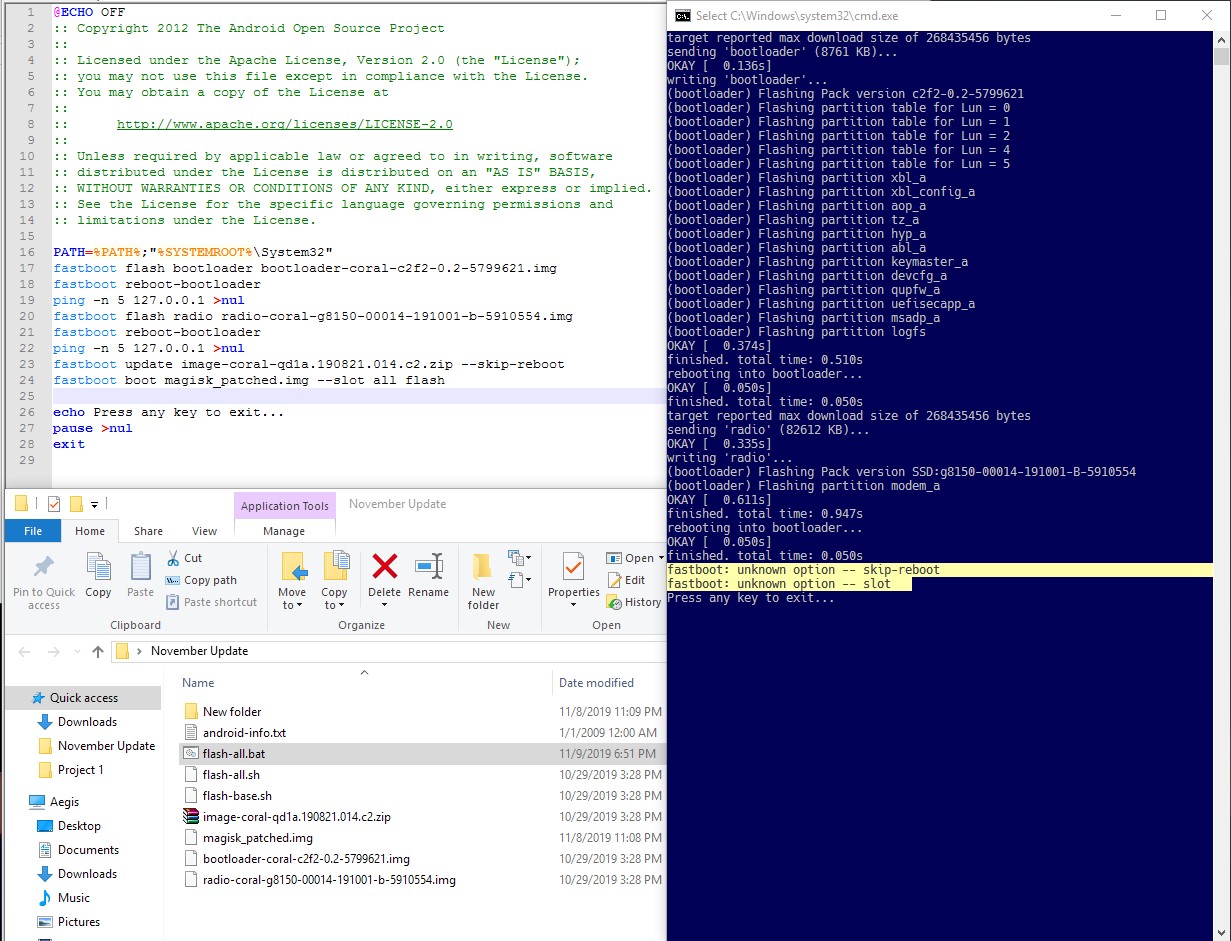
Confirmed latest version of Fastboot. No dice.
Samg381
on 10 Nov 2019
What's the output of "fastboot --version"?
Mine is
version 29.0.2-5738569
Also output of
"fastboot --help|tail -n18
(Although tail is a Linux command so I'm not sure how to get that on
Windows. I want the last 18 lines of the help output, starting with
options: )
On Sat, Nov 9, 2019, 18:43 Samg381 notifications@github.com wrote:
[image: Screenshot_2]
https://user-images.githubusercontent.com/3127698/68536435-a6c53400-0320-11ea-85c2-f0c86db72b78.jpg
Latest version of Fastboot and everything. Incorrect or outdated command.—
You are receiving this because you commented.
Reply to this email directly, view it on GitHub
https://github.com/topjohnwu/Magisk/issues/1678?email_source=notifications&email_token=AI2V22VN3UJBLCWPGFP5RR3QS5DIXA5CNFSM4H62XAKKYY3PNVWWK3TUL52HS4DFVREXG43VMVBW63LNMVXHJKTDN5WW2ZLOORPWSZGOEDURV2Y#issuecomment-552147691,
or unsubscribe
https://github.com/notifications/unsubscribe-auth/AI2V22V3KJBKX7HBIT2JFODQS5DIXANCNFSM4H62XAKA
.
jancm
on 10 Nov 2019
version: 29.0.5-5949299
I am running windows. If you can provide me the command, I will run it.
Samg381
on 10 Nov 2019
options:
-w Wipe userdata.
-s SERIAL Specify a USB device.
-s tcp|udp:HOST[:PORT] Specify a network device.
-S SIZE[K|M|G] Break into sparse files no larger than SIZE.
--force Force a flash operation that may be unsafe.
--slot SLOT Use SLOT; 'all' for both slots, 'other' for
non-current slot (default: current active slot).
--set-active[=SLOT] Sets the active slot before rebooting.
--skip-secondary Don't flash secondary slots in flashall/update.
--skip-reboot Don't reboot device after flashing.
--disable-verity Sets disable-verity when flashing vbmeta.
--disable-verification Sets disable-verification when flashing vbmeta.
--unbuffered Don't buffer input or output.
--verbose, -v Verbose output.
--version Display version.
--help, -h Show this message.
Samg381
on 10 Nov 2019
Help says they're supported. Check your script. My guess is you typed
something wrong. Like I said I literally just used them yesterday.
On Sat, Nov 9, 2019, 23:34 Samg381 notifications@github.com wrote:
options:
-w Wipe userdata.
-s SERIAL Specify a USB device.
-s tcp|udp:HOST[:PORT] Specify a network device.
-S SIZE[K|M|G] Break into sparse files no larger than SIZE.
--force Force a flash operation that may be unsafe.
--slot SLOT Use SLOT; 'all' for both slots, 'other' for
non-current slot (default: current active slot).
--set-active[=SLOT] Sets the active slot before rebooting.
--skip-secondary Don't flash secondary slots in flashall/update.
--skip-reboot Don't reboot device after flashing.
--disable-verity Sets disable-verity when flashing vbmeta.
--disable-verification Sets disable-verification when flashing vbmeta.
--unbuffered Don't buffer input or output.
--verbose, -v Verbose output.
--version Display version.
--help, -h Show this message.—
You are receiving this because you commented.
Reply to this email directly, view it on GitHub
https://github.com/topjohnwu/Magisk/issues/1678?email_source=notifications&email_token=AI2V22V77MK4DHCDQQ24G5DQS6FL5A5CNFSM4H62XAKKYY3PNVWWK3TUL52HS4DFVREXG43VMVBW63LNMVXHJKTDN5WW2ZLOORPWSZGOEDUVEUY#issuecomment-552161875,
or unsubscribe
https://github.com/notifications/unsubscribe-auth/AI2V22SJBKUY7KVEYR62VRTQS6FL5ANCNFSM4H62XAKA
.
jancm
on 10 Nov 2019
I've been scrutinizing these two lines for several hours now, surrounded by bloody bits of my scalp and hair. I haven't an earthly idea what the issue could be.
fastboot update image-coral-qd1a.190821.014.c2.zip --skip-reboot
fastboot boot magisk_patched.img --slot all flash
The order is wrong. Option has to come before command
fastboot --skip-reboot update image-coral-qd1a.190821.014.c2.zip
fastboot --slot all flash boot magisk_patched.img
On Sat, Nov 9, 2019, 23:43 Samg381 notifications@github.com wrote:
I've been scrutinizing these two lines for several hours now, surrounded
by bloody bits of my scalp and hair. I haven't an earthly idea what the
issue could be.fastboot update image-coral-qd1a.190821.014.c2.zip --skip-reboot
fastboot boot magisk_patched.img --slot all flash—
You are receiving this because you commented.
Reply to this email directly, view it on GitHub
https://github.com/topjohnwu/Magisk/issues/1678?email_source=notifications&email_token=AI2V22U44BRKXGUKO4RK4JTQS6GPHA5CNFSM4H62XAKKYY3PNVWWK3TUL52HS4DFVREXG43VMVBW63LNMVXHJKTDN5WW2ZLOORPWSZGOEDUVI5Y#issuecomment-552162423,
or unsubscribe
https://github.com/notifications/unsubscribe-auth/AI2V22SLGVDLG2IPGMCW5QDQS6GPHANCNFSM4H62XAKA
.
jancm
on 10 Nov 2019
Tried it that way too. No dice.
Samg381
on 10 Nov 2019
Works on my end from a Mac with fastboot version 29.0.5-5949299. I wasn't aware of the --skip-reboot option, so thanks for sharing that.
 bobziuchkovski
on 3 Dec 2019
bobziuchkovski
on 3 Dec 2019
Thank you @jancm. Your process worked for me to finally get on December 2019 OTA. Couldn't take another day of maybe Google presenting me with the update.
 jschleppy
on 10 Dec 2019
jschleppy
on 10 Dec 2019
I did this and bricked my phone. Now I'm reinstalling from factory images. Fortunately I backed up all my stuff beforehand!
 Riamse
on 26 Feb 2020
Riamse
on 26 Feb 2020
Uh oh, it's bootlooping now
Riamse
on 26 Feb 2020
Oh it's bootlooping because I flashed the magisk_patched.img at the end, oops. I've flashed the stock boot.img and it's taking me to setup now.
Riamse
on 26 Feb 2020
Alright let's see if i can flash magisk now that I set up the phone.
Riamse
on 26 Feb 2020
The answer is yes. Praise topjohnwu.
Riamse
on 26 Feb 2020
(Sorry for replying to a dead thread, I kind of just panicked because I don't really play with mobile and all of this adb and fastboot stuff is really out of my comfort zone 😞)
Riamse
on 26 Feb 2020
Related issues
 dg28gadhavi
·
3Comments
dg28gadhavi
·
3Comments
 KaMyKaSii
·
3Comments
KaMyKaSii
·
3Comments
 Kratos291
·
3Comments
Kratos291
·
3Comments
 pbbqdd
·
4Comments
pbbqdd
·
4Comments
 betaxab
·
4Comments
betaxab
·
4Comments
Most helpful comment
Instead of downloading OTA download the full factory image. Extract and patch the boot image. Place the patched boot image in the same directory as flash-all.bat/sh
Modify flash-all
Replace the -w at the end of the script with --skip-reboot so:
fastboot -w update {image-zip}
becomes
fastboot --skip-reboot update {image-zip}
Add another line to the end of the script:
fastboot --slot all flash boot {patched-boot-image}
Now when you reboot you'll have Magisk already installed.