device oneplus 3t
android 8.0
the latest beta was working perfectly
log :
https://drive.google.com/open?id=1ZAlSYL47wsekpJrdHQ9AuFIykR3Top4C
 achozex
All 16 comments
Same here on Oneplus 3 RR official nougat 7.1.2 build final.
 sqdesign
on 1 Sep 2018
sqdesign
on 1 Sep 2018
Same on pixel xl with android 9.
 bogdan-radocea
on 1 Sep 2018
bogdan-radocea
on 1 Sep 2018
same on mi A1 stock oreo 8.1
 mihirhpanchal
on 1 Sep 2018
mihirhpanchal
on 1 Sep 2018
Same on Samsung Galaxy A3 (2017) stock Nougat
Edit: I was able to fix it using the Patch Boot Image File method
Edit_2: Magisk is not recognized as installed in TWRP; when I try to uninstall magisk or flash Magisk modules
 evacakh
on 1 Sep 2018
evacakh
on 1 Sep 2018
I was able to install the latest magisk after using the magisk uninstaller.
Steps that should work:
1) flash-all.sh (flash-all.bat for windows) REMEMBER TO REMOVE THE -w FROM THE flash-all SCRIPT!!!
2) let the phone boot fully.
3) disable any lockscreen security (fingerprint, pattern, pin, etc.)
4) boot the twrp img file (latest is from 30 august 2018) using fastboot boot twrp-3.2.3-1-marlin.img
5) install the Magisk uninstaller zip from recovery
6) reboot the phone and let it fully boot.
7) boot the twrp img file (latest is from 30 august 2018)
8) install the twrp installer zip, reboot the phone and let it fully boot.
9) reboot to recovery and install the Magisk v17.0 zip file
10) reboot the phone and let it fully boot.
11) the phone should boot normally.
12) install the latest Magisk manager
bogdan-radocea
on 1 Sep 2018
Just for the sake of completeness: Same on HTC 10
 Wandang
on 1 Sep 2018
Wandang
on 1 Sep 2018
Well, the issue is that you need the magisk uninstaller, even if you do a full flash (dirty)/upgrade over the older version. The v16.0 worked just fine in the past, but now it seems that v17.0 corrupts the system or boot partition somehow.
bogdan-radocea
on 1 Sep 2018
Same on Mi 6 with MIUI 10 Stable (Android 8.0).
 Skimige
on 1 Sep 2018
Skimige
on 1 Sep 2018
Same on Pixel 1. Can someone please guide a complete beginner with Magisk how they recover from this?
 Larpon
on 1 Sep 2018
Larpon
on 1 Sep 2018
Related thread on xda: Bootloop after magisk update
 a-xin
on 1 Sep 2018
a-xin
on 1 Sep 2018
Maybe a way to temporarily out:
- Go to your recovery.
- Flash Magisk uninstaller (Backup your modules!), then reboot. Your device should boot normally without root & modules. If not, find your stock boot.img then flash it.
- Remove all lockscreen security.
- Reboot to recovery, flash Magisk v17.0
- Reset lockscreen security & your modules.
Skimige
on 1 Sep 2018
Got my Pixel working again with no fuzz following the Linux instructions from Bootloop after magisk update
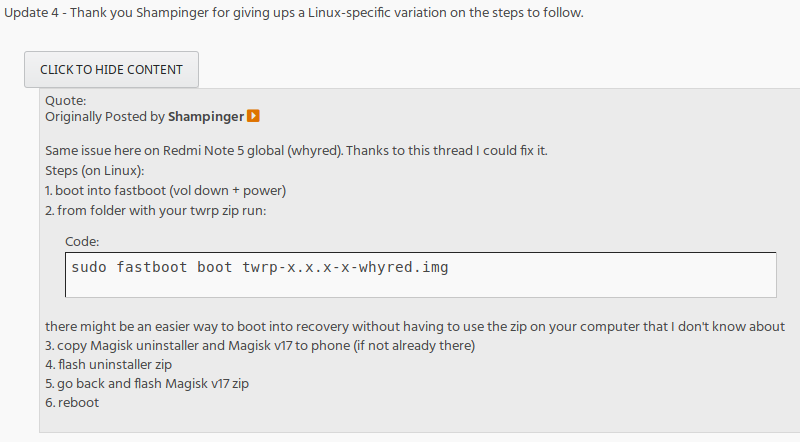
Using twrp image from twrp-pixel-installer-sailfish-3.2.3-0.zip and the downloads from the releases in this repo
Thanks guys!
Larpon
on 1 Sep 2018
Had the same issue, just uninstall Magisk with Magisk uninstaller and then install Magisk 17, also clean cache & Dalvik
 Jviix
on 1 Sep 2018
Jviix
on 1 Sep 2018
Fixed in ff3dad245721c7d01f2c4772c700dafbc6ba9ef9
 topjohnwu
on 1 Sep 2018
topjohnwu
on 1 Sep 2018
@topjohnwu Resolved but it looks from the patch that anyone who installed MagiskManager v5.9.0 prior to installing Magisk v17 will need to uninstall then install cleanly, yes? Or does Magisk v17.1 install cleanly over Magisk v16 even if MagiskManager v5.9.0 was installed first?
 mikehardy
on 1 Sep 2018
mikehardy
on 1 Sep 2018
- Remove all lockscreen security.
why remove the lockscreen security?
 Crescendo-BLYAT
on 30 Nov 2018
Crescendo-BLYAT
on 30 Nov 2018
Related issues
 auanasgheps
·
4Comments
auanasgheps
·
4Comments
 Kratos291
·
3Comments
Kratos291
·
3Comments
 koffiato
·
4Comments
koffiato
·
4Comments
 ThiefMaster
·
3Comments
ThiefMaster
·
3Comments
 dg28gadhavi
·
3Comments
dg28gadhavi
·
3Comments
Most helpful comment
Related thread on xda: Bootloop after magisk update