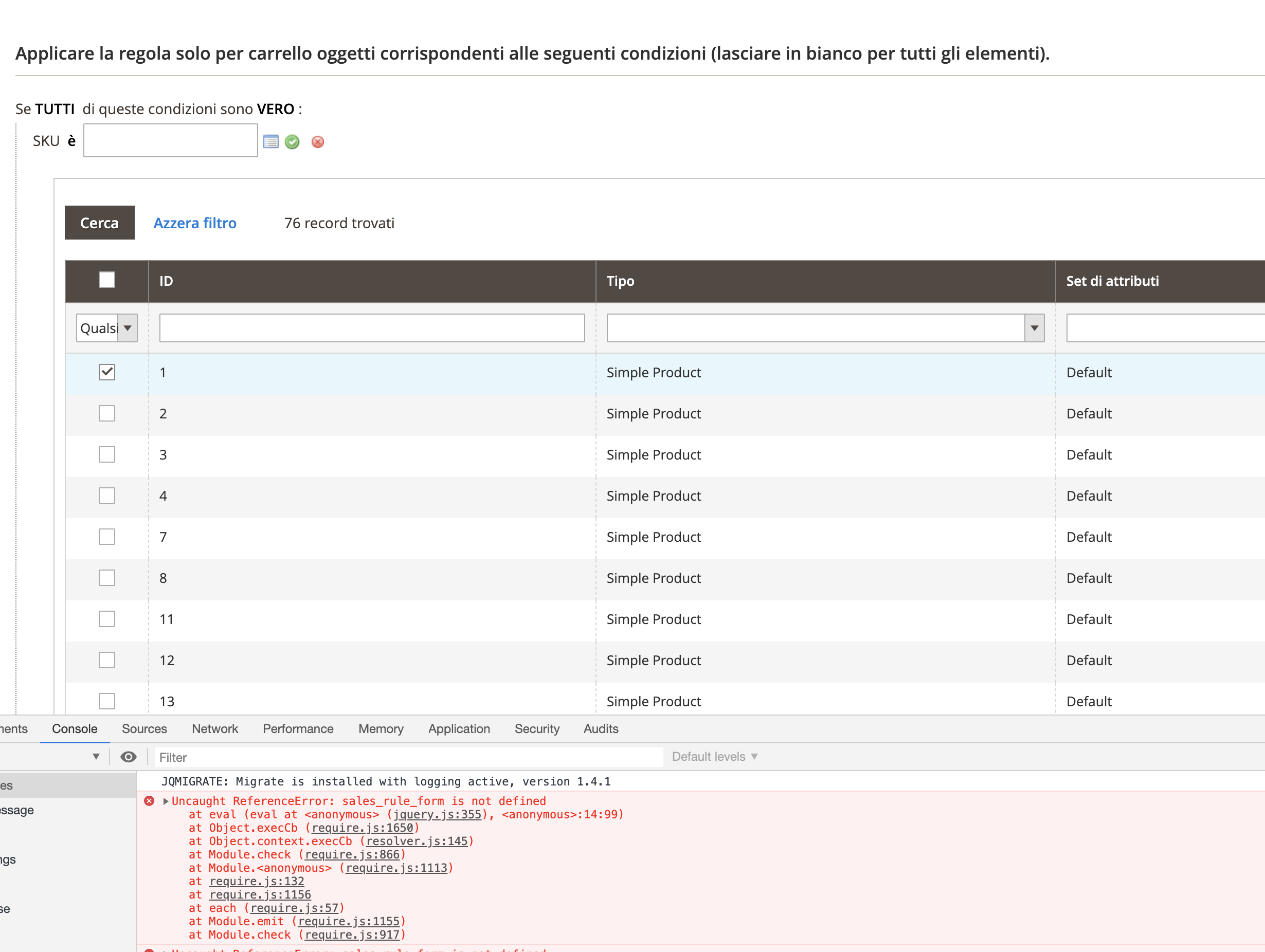
Magento2: Error JS when select product attribute in sales rules: Uncaught ReferenceError: sales_rule_form is not defined
Preconditions (*)
- Magento 2.3.5-p1 (reproduced only on composer versions of Magento)
Steps to reproduce (*)
- Go to sales rule
- in tab Action try to select a product's attribute (example SKU)
- then click to show product to search
Expected result (*)
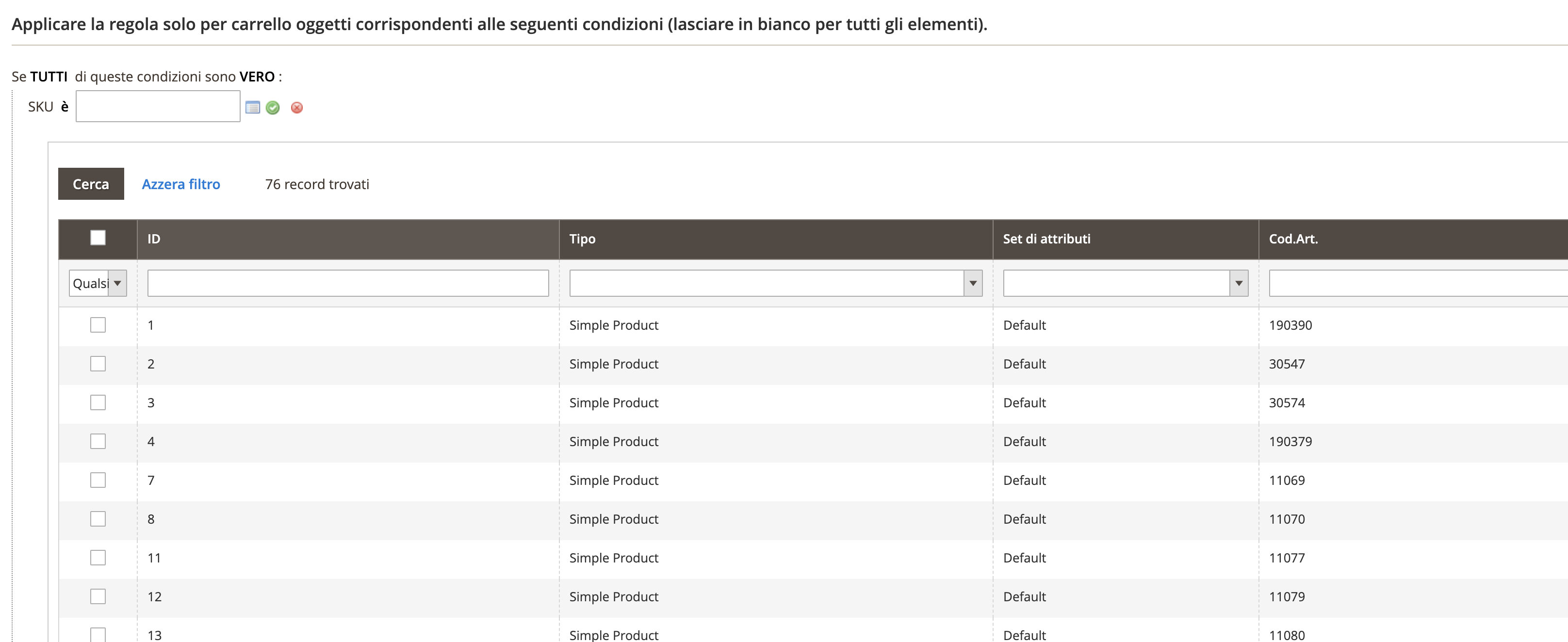
- The list of product that I can select
Actual result (*)
- The list of products with a JS error and if I try to select one product, this not added in input field
 lionalex
All 25 comments
Hi @lionalex. Thank you for your report.
To help us process this issue please make sure that you provided the following information:
- [ ] Summary of the issue
- [ ] Information on your environment
- [ ] Steps to reproduce
- [ ] Expected and actual results
Please make sure that the issue is reproducible on the vanilla Magento instance following Steps to reproduce. To deploy vanilla Magento instance on our environment, please, add a comment to the issue:
@magento give me 2.4-develop instance - upcoming 2.4.x release
For more details, please, review the Magento Contributor Assistant documentation.
@lionalex do you confirm that you were able to reproduce the issue on vanilla Magento instance following steps to reproduce?
- [ ] yes
- [ ] no
- Join Magento Community Engineering Slack and ask your questions in #github channel.
![m2-assistant[bot] picture](https://avatars0.githubusercontent.com/in/27048?v=4&s=40) m2-assistant[bot]
on 13 May 2020
m2-assistant[bot]
on 13 May 2020
@magento give me 2.4-develop instance
 edenduong
on 14 May 2020
edenduong
on 14 May 2020
Magento instance deployment temporary unavailable due to service maintenance.
 magento-engcom-team
on 14 May 2020
magento-engcom-team
on 14 May 2020
Hi @engcom-Alfa. Thank you for working on this issue.
In order to make sure that issue has enough information and ready for development, please read and check the following instruction: :point_down:
- [ ] 1. Verify that issue has all the required information. (Preconditions, Steps to reproduce, Expected result, Actual result).
Details
If the issue has a valid description, the labelIssue: Format is validwill be added to the issue automatically. Please, edit issue description if needed, until labelIssue: Format is validappears.
[ ] 2. Verify that issue has a meaningful description and provides enough information to reproduce the issue. If the report is valid, add
Issue: Clear Descriptionlabel to the issue by yourself.[ ] 3. Add
Component: XXXXXlabel(s) to the ticket, indicating the components it may be related to.[ ] 4. Verify that the issue is reproducible on
2.4-developbranchDetails
- Add the comment@magento give me 2.4-develop instanceto deploy test instance on Magento infrastructure.
- If the issue is reproducible on2.4-developbranch, please, add the labelReproduced on 2.4.x.
- If the issue is not reproducible, add your comment that issue is not reproducible and close the issue and _stop verification process here_![ ] 5. Add label
Issue: Confirmedonce verification is complete.[ ] 6. Make sure that automatic system confirms that report has been added to the backlog.
m2-assistant[bot]
on 15 May 2020
@magento give me 2.3.4 instance
 pemann
on 18 May 2020
pemann
on 18 May 2020
Hi @pemann. Thank you for your request. I'm working on Magento 2.3.4 instance for you
magento-engcom-team
on 18 May 2020
:white_check_mark: Confirmed by @engcom-Alfa
Thank you for verifying the issue. Based on the provided information internal tickets MC-34380 were created
Issue Available: @engcom-Alfa, _You will be automatically unassigned. Contributors/Maintainers can claim this issue to continue. To reclaim and continue work, reassign the ticket to yourself._
magento-engcom-team
on 18 May 2020
@magento give me 2.4-develop instance
edenduong
on 20 May 2020
Hi @edenduong. Thank you for your request. I'm working on Magento 2.4-develop instance for you
magento-engcom-team
on 20 May 2020
Hi @edenduong, here is your Magento instance.
Admin access: https://i-28211-2-4-develop.instances.magento-community.engineering/admin_3ed5
Login: 1ed9d1b4 Password: fee0b281ba95
Instance will be terminated in up to 3 hours.
magento-engcom-team
on 20 May 2020
Seems it was fixed in 2.4-develop.
edenduong
on 20 May 2020
So, is there a solution?
lionalex
on 29 Jun 2020
Seems it was fixed in 2.4-develop.
in my magento 2.3.4 can I fixed the bug?
lionalex
on 9 Jul 2020
Is there a solution for versions below 2.4 ?
 Thomsath
on 21 Jul 2020
Thomsath
on 21 Jul 2020
Has anyone found a solution for this? We are also experiencing this issue with our shop after updating to 2.3.5
 squeegy06
on 5 Aug 2020
squeegy06
on 5 Aug 2020
 diegoplada
on 5 Aug 2020
diegoplada
on 5 Aug 2020
patch file from magento support team (for EE version),
MDVA-26005_EE_2.3.4_COMPOSER_v1.patch.zip
To apply the patch:
Please upload the patch into your Magento root directory and run the SSH command below:
patch -p1 < FILE_NAME.patch
 jonaschen623
on 5 Aug 2020
jonaschen623
on 5 Aug 2020
Hi @himanshu8dev! :wave:
Thank you for collaboration. Only members of Community Contributors Team are allowed to be assigned to the issue. Please use @magento add to contributors team command to join Contributors team.
m2-assistant[bot]
on 26 Sep 2020
@magento add to contributors team
 himanshu8dev
on 26 Sep 2020
himanshu8dev
on 26 Sep 2020
Hi @himanshu8dev! :wave:
Thank you for joining. Please accept team invitation :point_right: here :point_left: and add your comment one more time.
m2-assistant[bot]
on 26 Sep 2020
@magento I am working on this
himanshu8dev
on 26 Sep 2020
@magento Issue has been fixed in the latest Magento 2.3-develop code base. please update the file with 2.3.5-p1.
himanshu8dev
on 26 Sep 2020
The issue has been fixed in develop branch @magento-engcom-team as I have checked the source code twice but the code is not updated in the 2.3.5-p1 version so kindly proceed further with the related step.
himanshu8dev
on 26 Sep 2020
@sidolov Can you please check my above comment? the issue has been resolved in the latest package but not updated in 2.3.5 version.
himanshu8dev
on 2 Oct 2020
Hi @himanshu8dev , it's expected behavior, the known issue will be fixed in the upcoming release. Since the issue is fixed in the develop branch I'm closing it since it's not relevant anymore. Thank you for your collaboration!
 sidolov
on 2 Oct 2020
sidolov
on 2 Oct 2020
Related issues
 PascalBrouwers
·
3Comments
PascalBrouwers
·
3Comments
 jzalenski
·
3Comments
jzalenski
·
3Comments
 denis-g
·
3Comments
denis-g
·
3Comments
 algostore
·
3Comments
algostore
·
3Comments
 PushEngineering
·
3Comments
PushEngineering
·
3Comments