Magento2: Unable to view/edit grouped product in admin
Preconditions (*)
- Magento EE 2.3.3
- PHP 7.2.25
Steps to reproduce (*)
- Create a grouped product
- Edit grouped product in back end
Expected result (*)
- Product edit form is shown
Actual result (*)
- The following error appears:
Fatal error: Uncaught TypeError: Argument 2 passed to Magento\Framework\Stdlib\ArrayManager::set() must be of the type array, null given, called in /Users/molovo/projects/bmc/vendor/magento/module-catalog-staging/Ui/DataProvider/Product/Form/Modifier/ScheduleDesignUpdate.php on line 60 and defined in /Users/molovo/projects/bmc/vendor/magento/framework/Stdlib/ArrayManager.php:72 Stack trace: #0 /Users/molovo/projects/bmc/vendor/magento/module-catalog-staging/Ui/DataProvider/Product/Form/Modifier/ScheduleDesignUpdate.php(60): Magento\Framework\Stdlib\ArrayManager->set('data/config/lab...', NULL, 'Design') #1 /Users/molovo/projects/bmc/vendor/magento/module-catalog/Ui/DataProvider/Product/Form/ProductDataProvider.php(73): Magento\CatalogStaging\Ui\DataProvider\Product\Form\Modifier\ScheduleDesignUpdate->modifyMeta(Array) #2 /Users/molovo/projects/bmc/vendor/magento/framework/View/Element/UiComponentFactory.php(316): Magento\Catalog\Ui\DataProvider\Product\Form\ProductDataProvider->getMeta() #3 /Users/molovo/projects/bmc/vend in /Users/molovo/projects/bmc/vendor/magento/framework/Stdlib/ArrayManager.php on line 72
 molovo
All 21 comments
Hi @ajijshekh123. Thank you for working on this issue.
In order to make sure that issue has enough information and ready for development, please read and check the following instruction: :point_down:
- [ ] 1. Verify that issue has all the required information. (Preconditions, Steps to reproduce, Expected result, Actual result).
Details
If the issue has a valid description, the labelIssue: Format is validwill be added to the issue automatically. Please, edit issue description if needed, until labelIssue: Format is validappears.
[ ] 2. Verify that issue has a meaningful description and provides enough information to reproduce the issue. If the report is valid, add
Issue: Clear Descriptionlabel to the issue by yourself.[ ] 3. Add
Component: XXXXXlabel(s) to the ticket, indicating the components it may be related to.[ ] 4. Verify that the issue is reproducible on
2.4-developbranchDetails
- Add the comment@magento give me 2.4-develop instanceto deploy test instance on Magento infrastructure.
- If the issue is reproducible on2.4-developbranch, please, add the labelReproduced on 2.4.x.
- If the issue is not reproducible, add your comment that issue is not reproducible and close the issue and _stop verification process here_![ ] 5. Add label
Issue: Confirmedonce verification is complete.[ ] 6. Make sure that automatic system confirms that report has been added to the backlog.
![m2-assistant[bot] picture](https://avatars0.githubusercontent.com/in/27048?v=4&s=40) m2-assistant[bot]
on 13 Dec 2019
m2-assistant[bot]
on 13 Dec 2019
Give me @magento give me 2.4-develop instance
 ajijshekh123
on 13 Dec 2019
ajijshekh123
on 13 Dec 2019
Hi @ajijshekh123. Thank you for your request. I'm working on Magento 2.4-develop instance for you
 magento-engcom-team
on 13 Dec 2019
magento-engcom-team
on 13 Dec 2019
Hi @ajijshekh123, here is your Magento instance.
Admin access: https://i-26031-2-4-develop.instances.magento-community.engineering/admin
Login: admin Password: 123123q
Instance will be terminated in up to 3 hours.
magento-engcom-team
on 13 Dec 2019
@molovo - It is proper working on Default Magento 2.4 Verison.
If you face an issue on your end. Please upload the video or screenshot.
Thanks.
ajijshekh123
on 13 Dec 2019
@ajijshekh123 here's a screenshot of the error received when visiting the admin detail page.

The code used to generate the product is as follows:
private function createGroupedProduct(ProductInterface $product, ConfigurationInterface $configuration): ?ProductInterface
{
    // Add bike product
    $child    = null;
    $children = $product->getTypeInstance()->getUsedProducts($product);
    foreach ($children as $option) {
        $swatches = $this->swatchHelper->getSwatchesByOptionsId([$option->getSize()]);
        $swatch   = array_pop($swatches);
        if ($swatch && $swatch['value'] === $configuration->getSize()) {
            $child = $option;
        }
    }

    if (!$child) {
        return null;
    }

    try {
        /** @var ProductInterface $groupedProduct */
        $groupedProduct = $this->productFactory->create();
        $groupedProduct->setSku($child->getSku().'-configuration-'.$configuration->getId());
        $groupedProduct->setUrlKey($child->getSku().'-configuration-'.$configuration->getId());
        $groupedProduct->setTypeId(Grouped::TYPE_CODE);
        $links = [];

        $link = $this->productLinkFactory->create()
            ->setSku($groupedProduct->getSku())
            ->setLinkedProductSku($child->getSku())
            ->setLinkType('associated');
        $link->getExtensionAttributes()
            ->setQty(1);
        $links[] = $link;

        // Add cone product
        $link = $this->productLinkFactory->create()
            ->setSku($groupedProduct->getSku())
            ->setLinkedProductSku('cone-'.$configuration->getCone())
            ->setLinkType('associated');
        $link->getExtensionAttributes()
            ->setQty(1);
        $links[] = $link;

        // Add spacer product
        $link   = $this->productLinkFactory->create()
            ->setSku($groupedProduct->getSku())
            ->setLinkedProductSku('spacer')
            ->setLinkType('associated');
        $link->getExtensionAttributes()
            ->setQty((int) $configuration->getSpacer());
        $links[] = $link;

        // Add stem product
        $link = $this->productLinkFactory->create()
            ->setSku($groupedProduct->getSku())
            ->setLinkedProductSku('stem-'.$configuration->getStem())
            ->setLinkType('associated');
        $link->getExtensionAttributes()
            ->setQty(1);
        $links[] = $link;

        $groupedProduct->setProductLinks($links);
        $groupedProduct->save();

        return $groupedProduct;
    } catch (\Exception $e) {
        $this->logger->critical($e->getMessage(), json_decode(json_encode($e), true));
    }

    return null;
}
The products are correctly generated, and appear in the admin listing, but I cannot view or edit them.
molovo
on 16 Dec 2019
Hi @molovo,
This issue may be related to your customization code or Third-party integration.
Thanks.
ajijshekh123
on 16 Dec 2019
@ajijshekh123 the only custom code above is the ConfigurationInterface object used to retrieve values. Everything else (to actually create the product) is methods from within Magento core
molovo
on 16 Dec 2019
Judging by the error message, it looks as though something to do with the design configuration isn't being set when the product model is created
molovo
on 16 Dec 2019
Yes @molovo, This issue may be happening.
ajijshekh123
on 16 Dec 2019
Hi @engcom-Echo. Thank you for working on this issue.
In order to make sure that issue has enough information and ready for development, please read and check the following instruction: :point_down:
- [ ] 1. Verify that issue has all the required information. (Preconditions, Steps to reproduce, Expected result, Actual result).
Details
If the issue has a valid description, the labelIssue: Format is validwill be added to the issue automatically. Please, edit issue description if needed, until labelIssue: Format is validappears.
[ ] 2. Verify that issue has a meaningful description and provides enough information to reproduce the issue. If the report is valid, add
Issue: Clear Descriptionlabel to the issue by yourself.[ ] 3. Add
Component: XXXXXlabel(s) to the ticket, indicating the components it may be related to.[ ] 4. Verify that the issue is reproducible on
2.4-developbranchDetails
- Add the comment@magento give me 2.4-develop instanceto deploy test instance on Magento infrastructure.
- If the issue is reproducible on2.4-developbranch, please, add the labelReproduced on 2.4.x.
- If the issue is not reproducible, add your comment that issue is not reproducible and close the issue and _stop verification process here_![ ] 5. Add label
Issue: Confirmedonce verification is complete.[ ] 6. Make sure that automatic system confirms that report has been added to the backlog.
m2-assistant[bot]
on 16 Dec 2019
Hello @molovo
Thank you for contribution and collaboration!
@sdzhepa Could you move this issue into Magento Commerce private repository where it could be fixed and delivered by Solution Partners Contribution Program.
Current repository and issue tracker aimed at Magento Open Source version only and the main focus is community contribution/collaboration. It described in Issue reporting guidelines and it is a part of the issue report template:
Verify, that the issue you are about to report does not relate to the Magento Commerce. GitHub is intended for Magento Open Source users to report on issues related to Open Source only. There are no account management services associated with GitHub. You can report Commerce-related issues in one of two ways:
- You can use the Support portal associated with your account
- If you are a Partner reporting on behalf of a merchant, use the Partner portal.
 engcom-Echo
on 16 Dec 2019
engcom-Echo
on 16 Dec 2019
Hi @sdzhepa. Thank you for working on this issue.
In order to make sure that issue has enough information and ready for development, please read and check the following instruction: :point_down:
- [ ] 1. Verify that issue has all the required information. (Preconditions, Steps to reproduce, Expected result, Actual result).
Details
If the issue has a valid description, the labelIssue: Format is validwill be added to the issue automatically. Please, edit issue description if needed, until labelIssue: Format is validappears.
[ ] 2. Verify that issue has a meaningful description and provides enough information to reproduce the issue. If the report is valid, add
Issue: Clear Descriptionlabel to the issue by yourself.[ ] 3. Add
Component: XXXXXlabel(s) to the ticket, indicating the components it may be related to.[ ] 4. Verify that the issue is reproducible on
2.4-developbranchDetails
- Add the comment@magento give me 2.4-develop instanceto deploy test instance on Magento infrastructure.
- If the issue is reproducible on2.4-developbranch, please, add the labelReproduced on 2.4.x.
- If the issue is not reproducible, add your comment that issue is not reproducible and close the issue and _stop verification process here_![ ] 5. Add label
Issue: Confirmedonce verification is complete.[ ] 6. Make sure that automatic system confirms that report has been added to the backlog.
m2-assistant[bot]
on 16 Dec 2019
Hello @engcom-Echo
Did you try to reproduce it on the both EE(Enterprise) and CE(Open Source) editions and can confirm this is Enterprise specific?
 sdzhepa
on 17 Dec 2019
sdzhepa
on 17 Dec 2019
Hello @molovo @sdzhepa
I am not able to reproduce this issue on the 2.4-develop branch by provided steps.
Tested on the both EE(Enterprise) and CE(Open Source) editions.
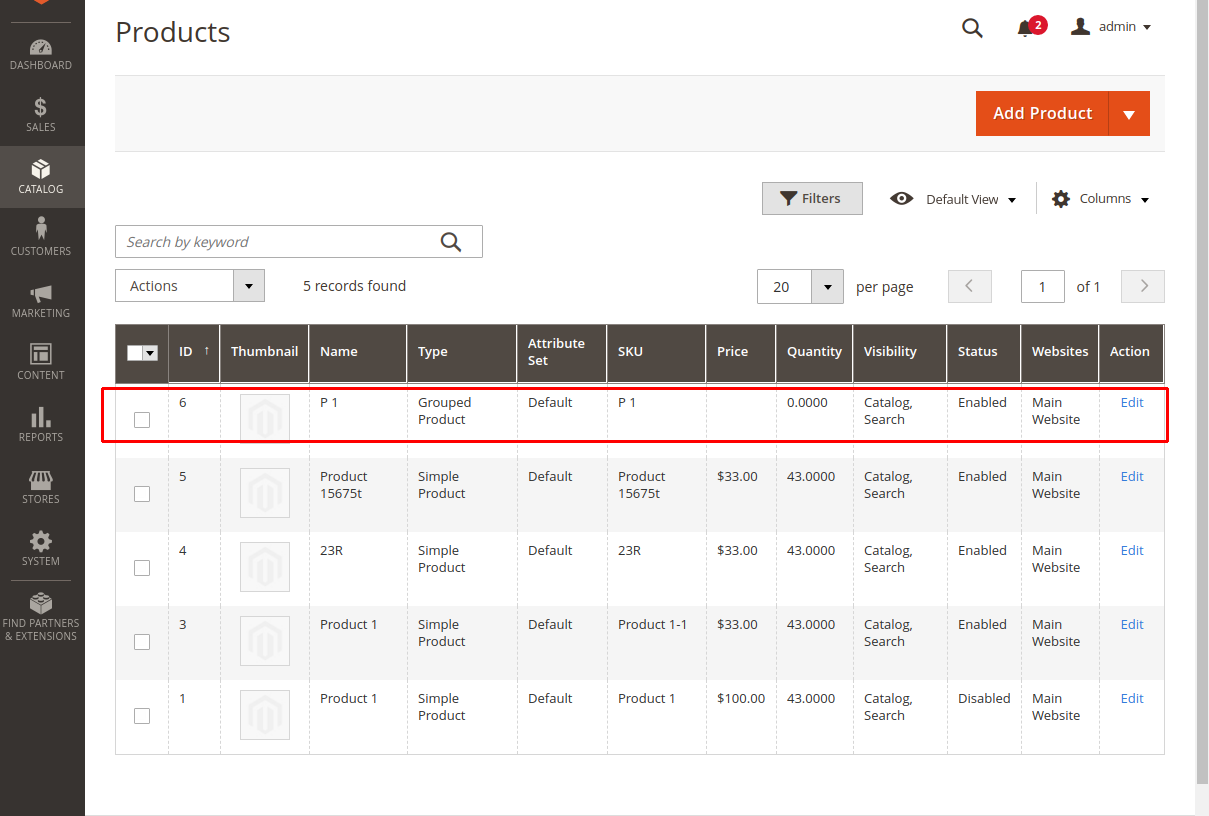
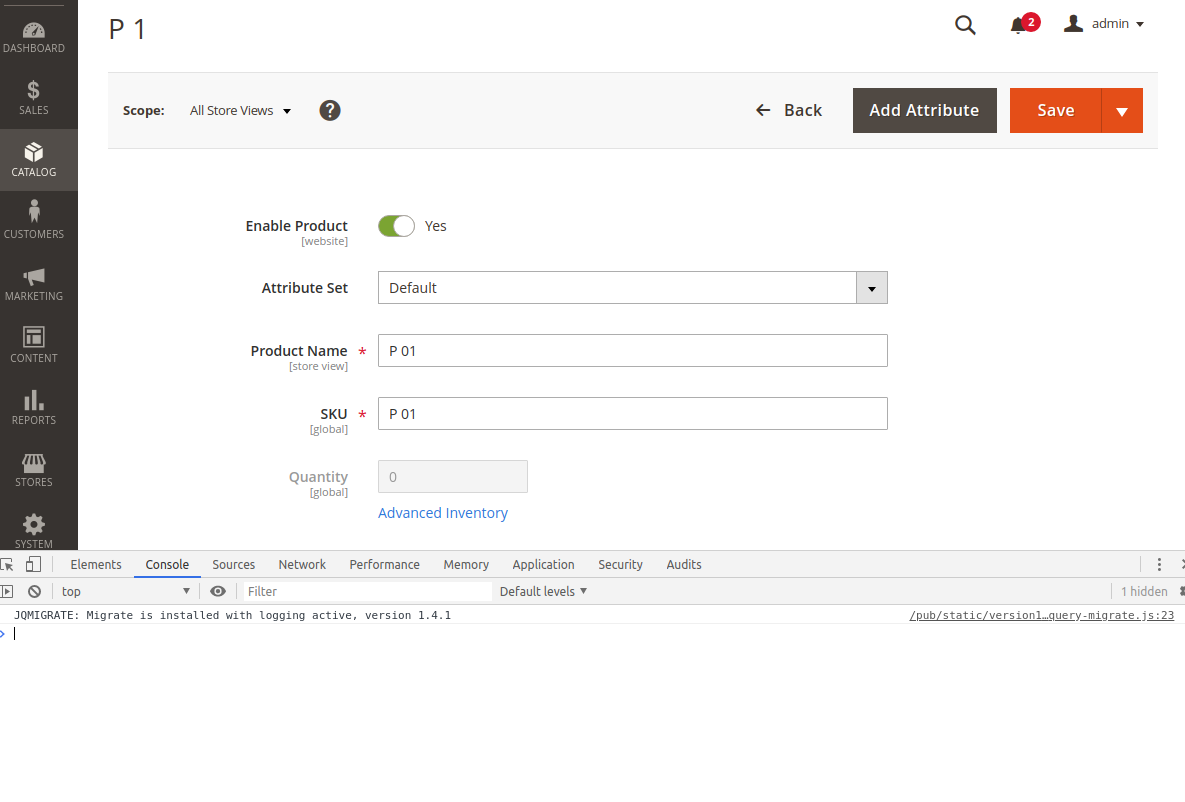
Testing scenario:
Steps to reproduce:
- Create a grouped product
- Edit grouped product in back end
Result:
Product edit form is shown. No errors.
So I have to close this issue.
Thanks for your report!
engcom-Echo
on 18 Dec 2019
@engcom-Echo as I have outlined above, this issue only occurs when creating the product programatically, not when creating it through the admin area.
molovo
on 18 Dec 2019
Hello @molovo
This GitHub repository is intended for bug reports in core Magento modules, in case of problems with some third party extensions/themes their respective vendors should be contacted instead.
engcom-Echo
on 18 Dec 2019
@engcom-Echo I am aware of this. As I also have stated above, the error is occuring within the Magento core modules, when creating a product using the code above.
molovo
on 18 Dec 2019
Hi @molovo where did you get a manual to create grouped product programmatically ? :) I think that you have an issue some where in your code, because error says that it expected to be array, but instead got null, so i think your missed some data in your code. Could you check how it works in "core" files an find the difference with your code ? or you can check integration test files to find how create grouped product programaticaly
 Nazar65
on 19 Dec 2019
Nazar65
on 19 Dec 2019
Hey, I know it has been a long time for this post. But I was facing the same issue and realize the issue was that the attribute_set_id for the catalog_product_entity was incorrect set up. Due a mistake on my script I was insertin with the attribute_set_id as 0, instead 4.
You can check the why the issue happens here:
\vendor\magento\module-catalog\Ui\DataProvider\Product\Form\Modifier\Eav.php
On method getGroups that relies on ATTRIBUTE_SET_ID, and if is 0 it never populate the 'design' info for $meta.
 kin-allan
on 5 Nov 2020
kin-allan
on 5 Nov 2020
I got a similar error:
"TypeError: Argument 2 passed to Magento\Framework\Stdlib\ArrayManager::set() must be of the type array, null given, called in /vendor/magento/module-catalog-staging/Ui/DataProvider/Product/Form/Modifier/ScheduleDesignUpdate.php on line 64"
The problem is, that in the Attribute Set I removed the attributes for Scheduled Design...
 Eddcapone
on 20 Nov 2020
Eddcapone
on 20 Nov 2020
Related issues
 gg24
·
3Comments
gg24
·
3Comments
 jzalenski
·
3Comments
jzalenski
·
3Comments
 PushEngineering
·
3Comments
PushEngineering
·
3Comments
 algostore
·
3Comments
algostore
·
3Comments
 xi-ao
·
3Comments
xi-ao
·
3Comments