Magento2: Magento 2.3.3. Wrong logic in get.php(static content serving) triggering exception ObjectManager isn\'t initialized
Preconditions (*)
- Magento 2.3.3
- Nginx dedicated server
- Php 7.2
Steps to reproduce (*)
- We were faced with issue of incorrect logic in get.php after upgrading magento to 2.3.3.
- Please take a look at get.php:
https://github.com/magento/magento2/blob/2.3-develop/pub/get.php#L56
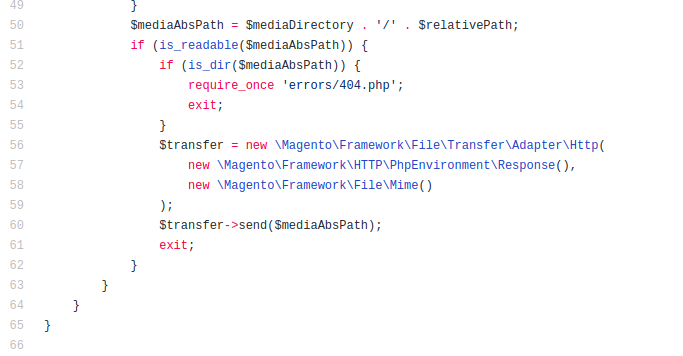
- Here we can see creation of new object (\Magento\Framework\File\TransferAdapter\Http) but if we go inside the class and look at his constructor
- Construct is calling ObjectManger::getInstance
https://github.com/magento/magento2/blob/2.3.3/lib/internal/Magento/Framework/File/Transfer/Adapter/Http.php#L47
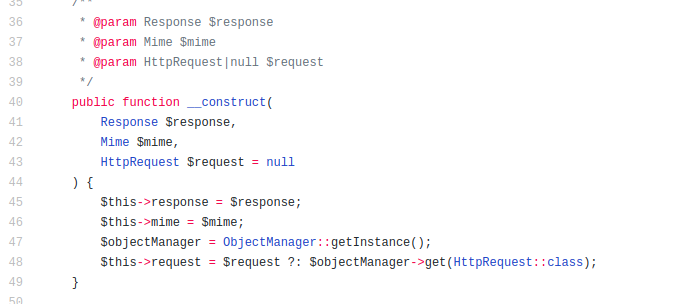
The main thing that ObjectManager is not initialized by this time and we are getting exception
https://github.com/magento/magento2/blob/2.3.3/lib/internal/Magento/Framework/App/ObjectManager.php#L36
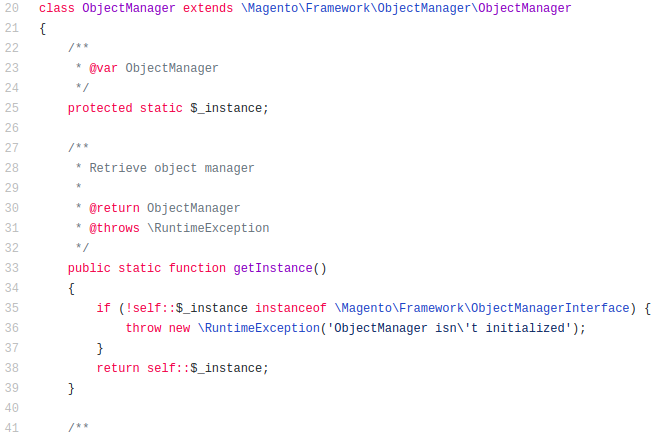
ObjectManager initialization will be done at application bootstrap, here
https://github.com/magento/magento2/blob/2.3-develop/pub/get.php#L75
When this error occures?
In case you have different servers/nodes/containers for webserver and php, webserver will not serve static content and pass request to the backend (PHP magento)...
Expected result
No exception during file serving process
Actual result
RuntimeException - ObjectManager isn\'t initialized
 oncesk
All 7 comments
Hi @oncesk. Thank you for your report.
To help us process this issue please make sure that you provided the following information:
- [ ] Summary of the issue
- [ ] Information on your environment
- [ ] Steps to reproduce
- [ ] Expected and actual results
Please make sure that the issue is reproducible on the vanilla Magento instance following Steps to reproduce. To deploy vanilla Magento instance on our environment, please, add a comment to the issue:
@magento give me 2.3-develop instance - upcoming 2.3.x release
For more details, please, review the Magento Contributor Assistant documentation.
@oncesk do you confirm that you were able to reproduce the issue on vanilla Magento instance following steps to reproduce?
- [ ] yes
- [ ] no
- Join Magento Community Engineering Slack and ask your questions in #github channel.
![m2-assistant[bot] picture](https://avatars0.githubusercontent.com/in/27048?v=4&s=40) m2-assistant[bot]
on 3 Dec 2019
m2-assistant[bot]
on 3 Dec 2019
Hi @engcom-Echo. Thank you for working on this issue.
In order to make sure that issue has enough information and ready for development, please read and check the following instruction: :point_down:
- [ ] 1. Verify that issue has all the required information. (Preconditions, Steps to reproduce, Expected result, Actual result).
Details
If the issue has a valid description, the labelIssue: Format is validwill be added to the issue automatically. Please, edit issue description if needed, until labelIssue: Format is validappears.
[ ] 2. Verify that issue has a meaningful description and provides enough information to reproduce the issue. If the report is valid, add
Issue: Clear Descriptionlabel to the issue by yourself.[ ] 3. Add
Component: XXXXXlabel(s) to the ticket, indicating the components it may be related to.[ ] 4. Verify that the issue is reproducible on
2.3-developbranchDetails
- Add the comment@magento give me 2.3-develop instanceto deploy test instance on Magento infrastructure.
- If the issue is reproducible on2.3-developbranch, please, add the labelReproduced on 2.3.x.
- If the issue is not reproducible, add your comment that issue is not reproducible and close the issue and _stop verification process here_![ ] 5. Add label
Issue: Confirmedonce verification is complete.[ ] 6. Make sure that automatic system confirms that report has been added to the backlog.
m2-assistant[bot]
on 3 Dec 2019
@engcom-Echo Thank you for verifying the issue.
Unfortunately, not enough information was provided to acknowledge ticket. Please consider adding the following:
- [ ] Update issue content to follow format required by Issue Reporting Guidelines
Once all required information is added, please add label "Issue: Confirmed" again.
Thanks!
 magento-engcom-team
on 3 Dec 2019
magento-engcom-team
on 3 Dec 2019
:white_check_mark: Confirmed by @engcom-Echo
Thank you for verifying the issue. Based on the provided information internal tickets MC-29342 were created
Issue Available: @engcom-Echo, _You will be automatically unassigned. Contributors/Maintainers can claim this issue to continue. To reclaim and continue work, reassign the ticket to yourself._
magento-engcom-team
on 3 Dec 2019
Hi @oncesk, can you provide a specific scenario where we can reproduce this issue? Thanks!
 gabrieldagama
on 22 Sep 2020
gabrieldagama
on 22 Sep 2020
There seems to be a bug in pub/get.php:
$mediaDirectoryis read fromvar/resource_config.jsonwhere in our setup it is set to/var/www/html/pub/media/.$relativePathis simply the URL path of the HTTP request, e.g./media/catalog/product/cache/ccd8d44c60afb81c13822e813fe440e5/0/1/01_065_0211_0_i_01_1eaf.jpg$mediaAbsPathis set by joining$mediaDirectoryand$relativePathwith a/
This leads to a $mediaAbsPath like /var/www/html/pub/media//media/catalog/product/cache/ccd8d44c60afb81c13822e813fe440e5/0/1/01_600_1002_0_i_01_265c.jpg, i.e. the media directory appears twice in the path, which doesn't seem to be correct.
 thomasheller
on 29 Sep 2020
thomasheller
on 29 Sep 2020
I'm getting this issue after upgrading from 2.3.5-p1 to 2.3.5-p2.
 pixel-paul
on 13 Nov 2020
pixel-paul
on 13 Nov 2020
Related issues
 jzalenski
·
3Comments
jzalenski
·
3Comments
 comunidademagento
·
3Comments
comunidademagento
·
3Comments
 andreaskoch
·
3Comments
andreaskoch
·
3Comments
 salelsol
·
3Comments
salelsol
·
3Comments
 punkstar
·
3Comments
punkstar
·
3Comments
Most helpful comment
There seems to be a bug in
pub/get.php:$mediaDirectoryis read fromvar/resource_config.jsonwhere in our setup it is set to/var/www/html/pub/media/.$relativePathis simply the URL path of the HTTP request, e.g./media/catalog/product/cache/ccd8d44c60afb81c13822e813fe440e5/0/1/01_065_0211_0_i_01_1eaf.jpg$mediaAbsPathis set by joining$mediaDirectoryand$relativePathwith a/This leads to a
$mediaAbsPathlike/var/www/html/pub/media//media/catalog/product/cache/ccd8d44c60afb81c13822e813fe440e5/0/1/01_600_1002_0_i_01_265c.jpg, i.e. themediadirectory appears twice in the path, which doesn't seem to be correct.