Magento2: Magento 2.3 Command line installation issue : Connection "default" is not defined
Preconditions (*)
- Magento 2.3.1
- Ubuntu 18.04 LTS
- PHP 7.2.16-1+ubuntu18.04.1+deb.sury.org+1 (cli) (built: Mar 7 2019 20:23:29) ( NTS )
- MySQL 5.6.43-84.3 Percona Server (GPL), Release 84.3, Revision 71967c9
- Composer 1.9-dev (using composer.phar)
- /var/run/mysqld/mysqld.sock exist
- PDO config pdo_mysql.default_socket points to /var/run/mysqld/mysqld.sock (reference to this issue https://github.com/magento/magento2/issues/4281)
Steps to reproduce (*)
- run the following using composer.phar
php composer.phar create-project --repository=https://repo.magento.com/ magento/project-community-edition htdocs - And do the the following installation in command line
php bin/magento setup:install --base-url=http://magepwa.test --db-host=localhost --db-name=magepwa --db-user=root --db-password=pass --backend-frontname=admin --admin-firstname=admin --admin-lastname=admin [email protected] --admin-user=admin --admin-password=xxxx --language=en_US --currency=USD --timezone=UTC --use-rewrites=1
Expected result (*)
- It should install the magento2.3 without any problems
Actual result (*)
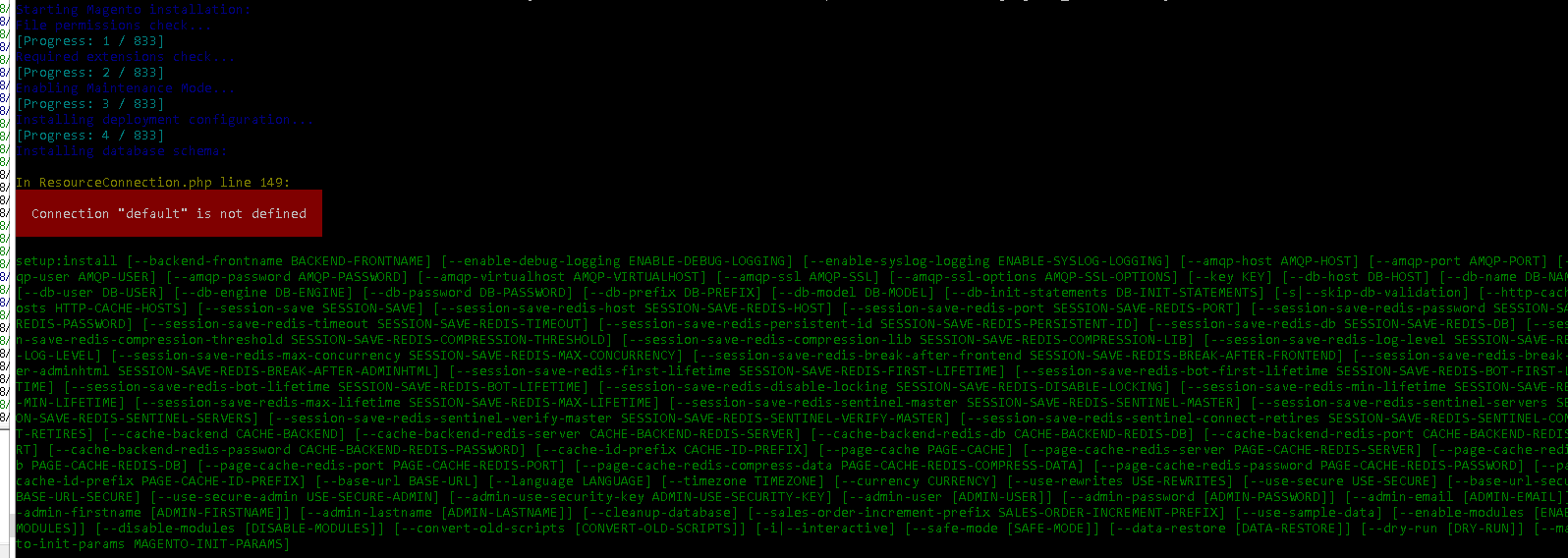
 netorica
All 7 comments
Hi @mahanmp. Thank you for your report.
To help us process this issue please make sure that you provided the following information:
- [ ] Summary of the issue
- [ ] Information on your environment
- [ ] Steps to reproduce
- [ ] Expected and actual results
Please make sure that the issue is reproducible on the vanilla Magento instance following Steps to reproduce. To deploy vanilla Magento instance on our environment, please, add a comment to the issue:
@magento-engcom-team give me 2.3-develop instance - upcoming 2.3.x release
For more details, please, review the Magento Contributor Assistant documentation.
@mahanmp do you confirm that you was able to reproduce the issue on vanilla Magento instance following steps to reproduce?
- [ ] yes
- [ ] no
![m2-assistant[bot] picture](https://avatars0.githubusercontent.com/in/27048?v=4&s=40) m2-assistant[bot]
on 8 Apr 2019
m2-assistant[bot]
on 8 Apr 2019
Hi @engcom-backlog-nazar. Thank you for working on this issue.
In order to make sure that issue has enough information and ready for development, please read and check the following instruction: :point_down:
- [ ] 1. Verify that issue has all the required information. (Preconditions, Steps to reproduce, Expected result, Actual result).
Details
If the issue has a valid description, the labelIssue: Format is validwill be added to the issue automatically. Please, edit issue description if needed, until labelIssue: Format is validappears.
[ ] 2. Verify that issue has a meaningful description and provides enough information to reproduce the issue. If the report is valid, add
Issue: Clear Descriptionlabel to the issue by yourself.[ ] 3. Add
Component: XXXXXlabel(s) to the ticket, indicating the components it may be related to.[ ] 4. Verify that the issue is reproducible on
2.3-developbranchDetails
- Add the comment@magento-engcom-team give me 2.3-develop instanceto deploy test instance on Magento infrastructure.
- If the issue is reproducible on2.3-developbranch, please, add the labelReproduced on 2.3.x.
- If the issue is not reproducible, add your comment that issue is not reproducible and close the issue and _stop verification process here_!
[ ] 5. Verify that the issue is reproducible on
2.2-developbranch.Details
- Add the comment@magento-engcom-team give me 2.2-develop instanceto deploy test instance on Magento infrastructure.
- If the issue is reproducible on2.2-developbranch, please add the labelReproduced on 2.2.x[ ] 6. Add label
Issue: Confirmedonce verification is complete.[ ] 7. Make sure that automatic system confirms that report has been added to the backlog.
m2-assistant[bot]
on 8 Apr 2019
HI @mahanmp thank you for you report, this issue related to your configuration, please verify all your settings, and try again, i believe that you are missed something in your environment config.
 ghost
on 8 Apr 2019
ghost
on 8 Apr 2019
Can you lead me to a possible config that i missed with this kind of error?
I tried to put incorrect database credentials and it seems to show a different error which is mysql error.
netorica
on 8 Apr 2019
@mahanmp Composer 1.9-dev (using composer.phar) can you try with non dev version ?
ghost
on 8 Apr 2019
I tried to use the latest snapshot now https://getcomposer.org/download/1.8.4/composer.phar which is Composer version 1.8.4 2019-02-11 10:52:10
And i still get the same issue.
I really don't get the idea where this thing leads to an issue aside from this https://github.com/magento/magento2/issues/4281 but I don't use HHVM and the /var/run/mysqld/mysqld.sock exist
I would suggest that you try the same Preconditions that I did above to replicate my issue.
netorica
on 8 Apr 2019
I captured the issue, the issue was the opcache.enable_cli was enabled. Is this intentional?
netorica
on 8 Apr 2019
Related issues
 kandrejevs
·
3Comments
kandrejevs
·
3Comments
 comunidademagento
·
3Comments
comunidademagento
·
3Comments
 PushEngineering
·
3Comments
PushEngineering
·
3Comments
 xi-ao
·
3Comments
xi-ao
·
3Comments
 denis-g
·
3Comments
denis-g
·
3Comments
Most helpful comment
I captured the issue, the issue was the opcache.enable_cli was enabled. Is this intentional?