Magento2: Multisource Inventory, can't ship items when using default Stocks
Preconditions (*)
- Magento 2.3
- Multisource inventory setup to use default stock
Steps to reproduce (*)
- Create a simple product with Qty 1
- Complete checkout process with that product
- Go to admin panel: try to create shipment for that order
Expected result (*)
- Shipment should be created, no errors
Actual result (*)
- Error:
Not all of your products are available in the requested quantity.
I've debugged this to be an issue with
vendor/magento/module-inventory-source-deduction-api/Model/SourceDeductionService.php class and it's execute method
When multiple source inventory module uses defalts stock, it should not check stock of any sources.
I personally think that entire Source Selection / Deduction should be removed from module logic when default stock is being used.
 qsolutions-pl
All 20 comments
Hi @qsolutions-pl. Thank you for your report.
To help us process this issue please make sure that you provided the following information:
- [ ] Summary of the issue
- [ ] Information on your environment
- [ ] Steps to reproduce
- [ ] Expected and actual results
Please make sure that the issue is reproducible on the vanilla Magento instance following Steps to reproduce. To deploy vanilla Magento instance on our environment, please, add a comment to the issue:
@magento-engcom-team give me 2.3-develop instance - upcoming 2.3.x release
For more details, please, review the Magento Contributor Assistant documentation.
@qsolutions-pl do you confirm that you was able to reproduce the issue on vanilla Magento instance following steps to reproduce?
- [ ] yes
- [ ] no
 magento-engcom-team
on 8 Mar 2019
magento-engcom-team
on 8 Mar 2019
The corresponding ticket created on MSI GitHub https://github.com/magento-engcom/msi/issues/2073
But current steps to reproduce are not enough to replicate the issue, as the most basic scenario is described which is covered by both Functional Acceptance and integration tests and non-reproducible on clean Magento 2.3 installation with MSI.
I have several questions which could shed some light and lead us to finding a root cause of the issue:
- Do you have any 3PD extensions installed which affect the default inventory flow or modify inventory calculation
- How many stocks you have created? Just default one or there are other Sources/Stocks create? If you have more than one stock/sources - please describe how these sources assigned to stocks
- What Quantity did you set to Product while creating it? Did you use admin UI or created product and set Qty programmatically?
- What Quantity did you use during the Order placement?
- What product Qty you have in source item table?
mysql> select * from inventory_source_item where sku = %you sku%; - What product Qty you have in legacy Catalog Inventory StockItem table?
mysql> select * from cataloginventory_stock_item where product_id = %your product id% \G - What reservations you have created for this product?
mysql> select * from inventory_reservation where sku = %you sku%;
 maghamed
on 9 Mar 2019
maghamed
on 9 Mar 2019
- There are no 3rd party extensions related to stock management
- We created only 1 stock, default one
- Product Qty = 1, product was created in admin UI, managed stock
- Ordered 1 qty
- 15
- 15
- 0
Stock was updated by the client over the weekend.
Could this be related to Magento 2.2 -> 2.3 upgrade which was done last week?
qsolutions-pl
on 11 Mar 2019
Hi @engcom-backlog-nazar. Thank you for working on this issue.
In order to make sure that issue has enough information and ready for development, please read and check the following instruction: :point_down:
- [ ] 1. Verify that issue has all the required information. (Preconditions, Steps to reproduce, Expected result, Actual result).
Details
If the issue has a valid description, the labelIssue: Format is validwill be added to the issue automatically. Please, edit issue description if needed, until labelIssue: Format is validappears.
[ ] 2. Verify that issue has a meaningful description and provides enough information to reproduce the issue. If the report is valid, add
Issue: Clear Descriptionlabel to the issue by yourself.[ ] 3. Add
Component: XXXXXlabel(s) to the ticket, indicating the components it may be related to.[ ] 4. Verify that the issue is reproducible on
2.3-developbranchDetails
- Add the comment@magento-engcom-team give me 2.3-develop instanceto deploy test instance on Magento infrastructure.
- If the issue is reproducible on2.3-developbranch, please, add the labelReproduced on 2.3.x.
- If the issue is not reproducible, add your comment that issue is not reproducible and close the issue and _stop verification process here_!
[ ] 5. Verify that the issue is reproducible on
2.2-developbranch.Details
- Add the comment@magento-engcom-team give me 2.2-develop instanceto deploy test instance on Magento infrastructure.
- If the issue is reproducible on2.2-developbranch, please add the labelReproduced on 2.2.x_Next steps are available in case you are a member of Community Maintainers._
[ ] 6. Add label
Issue: Confirmedonce verification is complete.[ ] 7. Make sure that automatic system confirms that report has been added to the backlog.
magento-engcom-team
on 11 Mar 2019
hey @qsolutions-pl ,
We created only 1 stock, default one
did you create Default stock or it was created by Magento in the scope of installation/upgrade?
5. 15
6. 15
7. 0
This looks strange because as you see Magento considers that you have 15 items of this product, but not 0.
Could this be related to Magento 2.2 -> 2.3 upgrade which was done last week?
If you proceed with Magento 2.2 -> 2.3 upgrade we disable all new Inventory modules (read the whole MSI) to prevent any possible Backward Incompatibilities (for example, if a merchant had some inventory customizations), and the absence of reservations (step 7. 0) proofs that MSI was not active when your order has been placed, because since Magento 2.3.0 all the orders lead to inventory reservation being created.
maghamed
on 11 Mar 2019
Hi @qsolutions-pl thank you for you report, i'm not able to reproduce following steps you described, this may be related to your environment or some custom data. please try reproduce this on clean 2.3 magento .
 ghost
on 12 Mar 2019
ghost
on 12 Mar 2019
Reopened because we are still waiting @qsolutions-pl to provide more details regarding this issue.
@engcom-backlog-nazar did you trying to reproduce via the initial steps or applying 2.2 -> 2.3 upgrade procedure?
maghamed
on 12 Mar 2019
@maghamed no, only with clean 2.3.0 instance, but in which version of 2.2 we need upgrade ? 2.2.6 or 2.2.7 ?
ghost
on 12 Mar 2019
We upgraded from 2.2.6 -> 2.3.0
And to answer one of the questions above, there were never any customizations done to inventory processing, there was no need to.
I will try to replicate the scenario this week once I have some free time (probably friday).
qsolutions-pl
on 13 Mar 2019
@qsolutions-pl
The point is that during migration 2.2.* -> 2.3.0
We disable all MSI modules and business logic to prevent it from affecting possible existing customizations.
Thanks why in fact, you don't have MSI running on your instance of Magento
maghamed
on 13 Mar 2019
Hi @qsolutions-pl any updates ?
ghost
on 19 Mar 2019
@qsolutions-pl i'm closing this for now, as i'm not able to reproduce with upgrading from 2.2.6 or 2.2.7 to 2.3.0 have no issue. if you find a way to reproduce this issue please feel free to reopen this one.
ghost
on 20 Mar 2019
I have the same problem, we have linked Magento to another system managing our stock and shipments. When an order is placed the stock is changed by this system from 1 to 0 and when stock is 0 it's not possible to create a shipment in Magento 2.3. Is there a workaround for this issue?
 istoutjesdijk
on 11 Jun 2019
istoutjesdijk
on 11 Jun 2019
I'm having same problem as istoutjesdijk is there a work around?
 merance2000
on 5 Dec 2019
merance2000
on 5 Dec 2019
@merance2000 I solved the problem by disabling MSI completely. This is the best solution when you have and external system managing your stock. (https://www.mexbs.com/magento-blog/disabling-the-magento-msi/)
I also disabled "Decrease Stock When Order is Placed" in the configuration under "Inventory".
istoutjesdijk
on 5 Dec 2019
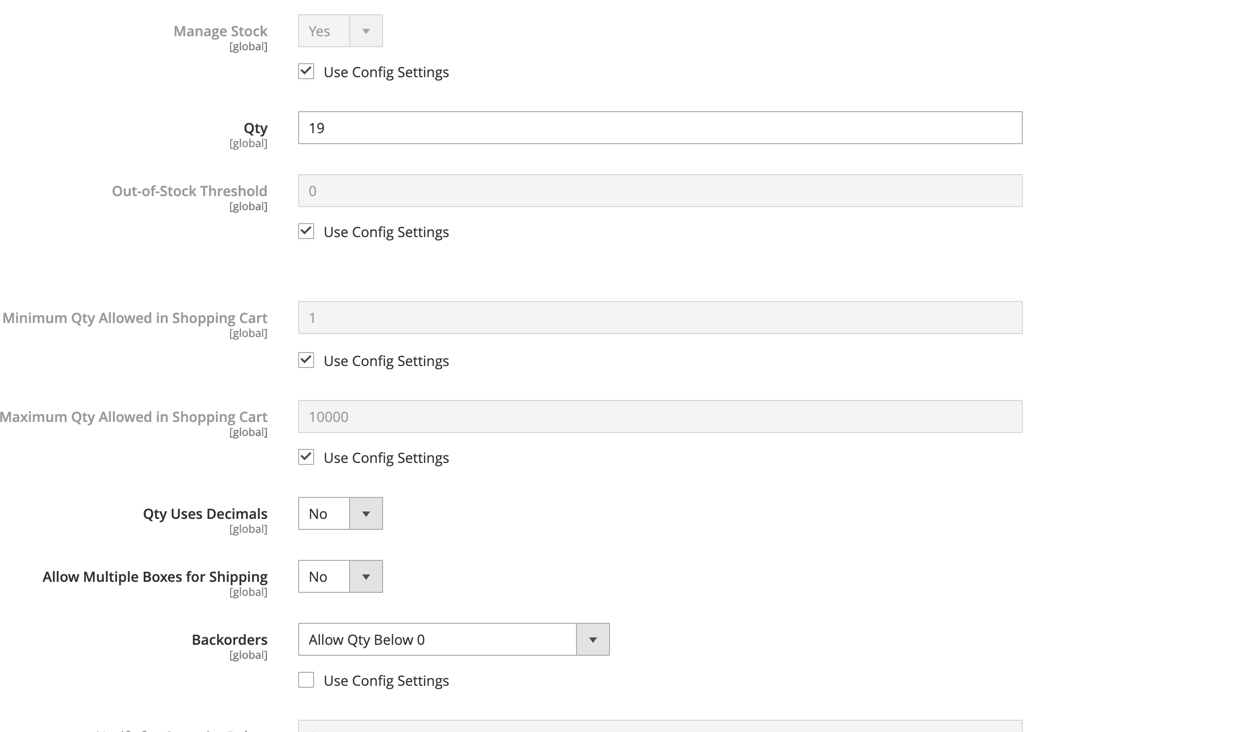
I have this same issue and I am using core vanilla 2.3 code. I have a product configured with quantity 19 and an order placed for 59 units. When creating shipment in the admin UI, I receive the error "Not all of your products are available in the requested quantity.". This error is coming from module-inventory-source-deduction-api/Model/SourceDeductionService.php.
        $sourceItem = $this->getSourceItemBySourceCodeAndSku->execute($sourceCode, $itemSku);
        if (($sourceItem->getQuantity() - $qty) >= 0) {
            $sourceItem->setQuantity($sourceItem->getQuantity() - $qty);
            $sourceItems[] = $sourceItem;
        } else {
            throw new LocalizedException(
                __('Not all of your products are available in the requested quantity.')
            );
        }
The admin panel allows you to configure sell below 0, however the code above has no check or concern about this setting which is significantly different behavior than 1x. IMO the designed behavior is not explained and conflicts with how the product can be configured in the admin panel. Can someone from the core team please explain if this is expected behavior why it is allowed to configure to sell below 0 but yet prevent creation of shipment.
 aliomattux
on 6 Jan 2020
aliomattux
on 6 Jan 2020
aliomattux
on 6 Jan 2020

aliomattux
on 6 Jan 2020
IMO, the product configuration should CLEARLY explain that configuring selling below 0 will prevent shipment from being created, especially because prior to M2 this was standard behavior
aliomattux
on 6 Jan 2020
I have this same issue and I am using core vanilla 2.3 code. I have a product configured with quantity 19 and an order placed for 59 units. When creating shipment in the admin UI, I receive the error "Not all of your products are available in the requested quantity.". This error is coming from module-inventory-source-deduction-api/Model/SourceDeductionService.php.
        $sourceItem = $this->getSourceItemBySourceCodeAndSku->execute($sourceCode, $itemSku);
        if (($sourceItem->getQuantity() - $qty) >= 0) {
            $sourceItem->setQuantity($sourceItem->getQuantity() - $qty);
            $sourceItems[] = $sourceItem;
        } else {
            throw new LocalizedException(
                __('Not all of your products are available in the requested quantity.')
            );
        }
The admin panel allows you to configure sell below 0, however the code above has no check or concern about this setting which is significantly different behavior than 1x. IMO the designed behavior is not explained and conflicts with how the product can be configured in the admin panel. Can someone from the core team please explain if this is expected behavior why it is allowed to configure to sell below 0 but yet prevent creation of shipment.
We have this issue time and time again. How is this issue closed? Obviously there are so many merchants that suffer from this issue and I could find no explanation or sufficient solution except disabling MSI completely. Sometimes we can't just turn off MSI because some other modules like Magesuite rely on it.
https://magento.stackexchange.com/questions/277993/disable-stock-check-decrease-when-shipping-an-order-in-magento-2-3-1
https://magento.stackexchange.com/questions/269982/magento-2-cant-ship-order-in-the-backend
https://github.com/magento/inventory/issues/2725
 mtsmtyuta
on 24 Aug 2020
mtsmtyuta
on 24 Aug 2020
Related issues
 phirunson
·
3Comments
phirunson
·
3Comments
 punkstar
·
3Comments
punkstar
·
3Comments
 kirashet666
·
3Comments
kirashet666
·
3Comments
 spyrule
·
3Comments
spyrule
·
3Comments
 comunidademagento
·
3Comments
comunidademagento
·
3Comments