Magento2: An error occurred on the server. Please try to place the order again.
Preconditions
- PHP Version 7.0.21
- Magento ver. 2.1.5
Steps to reproduce
- Issue with Paypal payflow pro
- Getting "An error occurred on the server. Please try to place the order again." when place order by using Paypal payflow pro, while paypal express checkout working fine.
3
Expected result
1.
Actual result
- [Screenshot, logs]
I have spend too much time on this and at last I have concluded that in the ResponseValidator.php file line number 56 throw new LocalizedException(__('Transaction has been declined'));
throw an error. Code is working before this line and after this line it is throwing server error.
There seems to be a bug with LocalizedException in magento 2.
Can anyone let meknow the solution for this?
vendor\magento\module-paypal\Model\Payflow\Service\Response\Validator\ResponseValidator.php
public function validate(DataObject $response, Transparent $transparentModel)
{
switch ($response->getResult()) {
case Payflowpro::RESPONSE_CODE_APPROVED:
case Payflowpro::RESPONSE_CODE_FRAUDSERVICE_FILTER:
foreach ($this->validators as $validator) {
if ($validator->validate($response, $transparentModel) === false) {
throw new LocalizedException(__('Transaction has been declined'));
}
}
break;
case Payflowpro::RESPONSE_CODE_INVALID_AMOUNT:
break;
default:
throw new LocalizedException(__('Transaction has been declined'));
}
}
 sunilwebcreation
All 21 comments
@sunilwebcreation,
if ($validator->validate($response, $transparentModel) === false) {
What is the response and why it does not pass validation?
 orlangur
on 23 Mar 2018
orlangur
on 23 Mar 2018
@sunilwebcreation ,thank you for your report.
We were not able to reproduce this issue by following the steps you provided. Please provide more detailed steps to reproduce or try to reproduce this issue on a clean installation or latest release.
 magento-engcom-team
on 23 Mar 2018
magento-engcom-team
on 23 Mar 2018
I have this problem on Magento 2.2.2. I haven't seen the PHP errors but my problems are exactly the same. I can provide information about the website I'm working on (we're pre-production) including passwords that you can use to access the various things that you need. Please let me know what is a secure way to get you this information.
 rheckart
on 29 Mar 2018
rheckart
on 29 Mar 2018
@magento-engcom-team Is anyone interested in following up on this issue? I haven't heard a thing & we're still stuck.
rheckart
on 6 Apr 2018
@rheckart same question to you then: https://github.com/magento/magento2/issues/14283#issuecomment-375657027
Try to log some information on your site and post it here.
orlangur
on 9 Apr 2018
I have Debug Mode set to Yes under Advanced Settings in PayPal Payflow Pro. Where do those logs get written to? I'm looking in /var/logs, but debug, exception and system.log don't seem to have any payment process information in them.
rheckart
on 10 Apr 2018
Hi @magento-engcom-team
I have now go into deep and noticed that the below line is creating issue.
vendor\magento\module-paypal\Model\Payflow\Service\Response\Validator\ResponseValidator.php
_throw new LocalizedException(('Transaction has been declined'));_
when I print some text before this line then its works but when I print some text after this line then it return error message.
Further if I remove keyword throw i.e
_new LocalizedException(('Transaction has been declined'));_
then it print the text.
Please suggest.
sunilwebcreation
on 16 Apr 2018
any solution?
 mariamghalleb
on 16 Apr 2018
mariamghalleb
on 16 Apr 2018
@mariamghalleb, this is how I got around solving the issue:
You may echo the actual error message on this file: vendor/magento/module-payment/view/frontend/templates/transparent/iframe.phtml if you have not extend the file yet. If you have, you may edit this file: app/design/[vendor]/[theme]/ go to line 42 and replace this
message: $t('An error occurred on the server. Please try to place the order again.')with this
`message: $t('<?php echo $params['error_msg'];?>')`
 ArbyLeon
on 29 Apr 2018
ArbyLeon
on 29 Apr 2018
Editing iframe.phtml seems to work above. However, the error message is still not descriptive enough. When the card fails an AVS check, the $params['error_msg'] message returns a message about the transaction being declined but it doesn't indicate it's an AVS problem.
If I do an inspect on the page, and view the network tab, I can see that paypal is returning a variable called RESPMSG and the value is:
RESPMSG: Failed AVS Check: 10554-The transaction was refused.
I would like to print this error if possible so people know they just need to update the address, and it's not a card decline issue.
I'm actually really surprised by this - anybody using paypal as their payment processor is currently getting the message "An error occurred on the server. Please try to place the order again." whenever there's a problem with the credit card? That seems really bad.
 djview
on 30 Apr 2018
djview
on 30 Apr 2018
@ArbyLeon The errors seem more user friendly now,
does your solution cause any problems?
Thank you !
mariamghalleb
on 10 May 2018
@djview ,
You're right! It's not descriptive enough,
But do you think it has to be that descriptive? from my experience online (as a user) the errors are never that detailed!
But I do still agree, maybe Magento should fix this? ...
mariamghalleb
on 10 May 2018
@mariamhalleb,
it is important to know what the issue is if the issue is from our end and not the customer, which was the case for us. I understand the security risks as you’re exposing the system. Therefore, I would only keep it this way for a short time.
Also, I think the error is descriptive enough to know the general direction of the issue. IMO, being too descriptive might cause security risks.
ArbyLeon
on 10 May 2018
I guess I always thought it was useful if customers knew the billing address was not matching the card (AVS error) vs the card declining. What do other people think? Is that a security risk? The problem with editing this file is the same message is displayed on the front end AND the backend. It would be nice to display the full message in the admin area at the very least, and then display some more user friendly messages in the front end.
djview
on 15 May 2018
hey @sunilwebcreation,
i am also facing exact same issue. I have also spend too much time on this and not got any solution.
have you or anyone else found any solution?
Preconditions
PHP Version => 7.0.29
Magento ver. => 2.1.7
 balwant20
on 15 May 2018
balwant20
on 15 May 2018
@balwant20 According to this community post that I created & PayPal's response, PayPal needs to set up Reference Transactions on their end for your account. I am still waiting for them to enable this to test it. These are the instructions I received:
Thank you for contacting PayPal Merchant Technical Support. I am happy to assist you with the Magento 2.2.2 integration.
Please follow these steps to adjust the settings in your manager account.
- Login to manager.paypal.com and click Service Settings
- Select “Set Up”
- Toggles on this page include:
a. Transaction Process Mode > Live
b. Return URL Method > POST
c. Check CSC boxes under Billing Information for both required and editable fields
d. CSC > No
e. AVS > No
f. Enable Secure Token > Yes- Click “Save Changes”
- Go to Service Settings > Customize
a. Select Layout C > Save and Publish (this avoids a bug that occurs on some accounts for
transparent redirect)- Click “Account Administration”
a. Click “Transaction Settings” under Manager Security header
i. Set “Allow Reference Transactions” to “Yes”Reference transactions need to be enabled on your PayPal account as well, which I have submitted a ticket for. You will receive an email notification when this is complete.
Please let me know if you have further questions or if the issue has been resolved so I can close your support ticket appropriately.
Sincerely,
Alex
Global Technical Support
PayPal, Inc.
rheckart
on 15 May 2018
Thanks @rheckart
It's working for me.you saved my lot of time.
Happy Coding...!!!
balwant20
on 16 May 2018
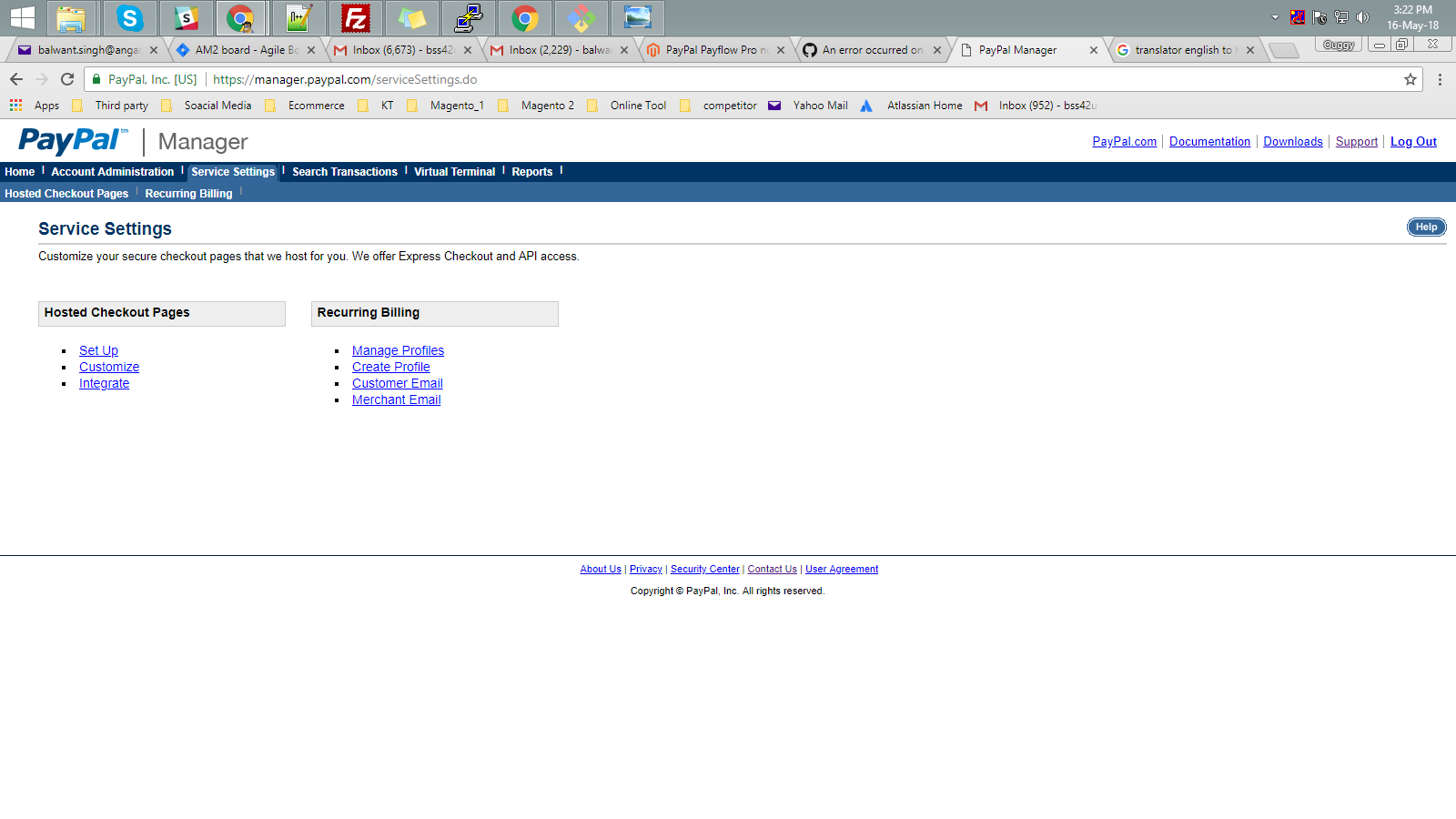
@rheckart i have one doubt in my mind.i have paypal manager sandbox and live account.but i can only change settings for my sandbox account which you mentioned above but i cannot find Set Up under Service Settings in my live paypal manager account.so do you have any idea what is going wrong with my live account?i am attaching screenshot of my sandbox account and live account page.

balwant20
on 16 May 2018
@sunilwebcreation Closing the issue by @rheckart comment, If you'd like to update it, please reopen the issue.
 ghost
on 30 Jul 2018
ghost
on 30 Jul 2018
Do we need to setup return url too as mentioned https://community.magento.com/t5/Magento-2-x-Technical-Issues/PayPal-Payflow-Pro-not-working-in-Magento-2-2-2/m-p/93219/highlight/true#M4811
 shachiarkatkar
on 7 Jan 2019
shachiarkatkar
on 7 Jan 2019
I am not understanding documentation given by paypal can anyone please assist
shachiarkatkar
on 7 Jan 2019
Related issues
 PushEngineering
·
3Comments
PushEngineering
·
3Comments
 PascalBrouwers
·
3Comments
PascalBrouwers
·
3Comments
 phirunson
·
3Comments
phirunson
·
3Comments
 dmitry-fedyuk
·
3Comments
dmitry-fedyuk
·
3Comments
 denis-g
·
3Comments
denis-g
·
3Comments