Magento2: Enabling "Automatic (equalize product counts)" on Price Navigation Step Calculation causes "Undefined offset" Notice
Preconditions
- Magento 2.1.9
- PHP 7.0.20
- MySQL 5.6.36
- Use Flat Catalog Category (Yes) in
Stores > Config > Catalog > Storefront - Use Flat Catalog Product (Yes) in
Stores > Config > Catalog > Storefront - Search Engine MySQL in
Stores > Config > Catalog > Catalog Search - Minimal Query Length 3 in
Stores > Config > Catalog > Catalog Search - Maximum Query Length 128 in
Stores > Config > Catalog > Catalog Search
Steps to reproduce
- Enable Display Product Count in
Stores > Config > Catalog > Layered Navigation. - Set Price Navigation Step Calculation to
Automatic (equalize product counts) - Clear Caches
- Perfom a full re-index
- Perfom a search i.e.
/catalogsearch/result/?q=tops
Expected result
- The results page with the list of products
Actual result
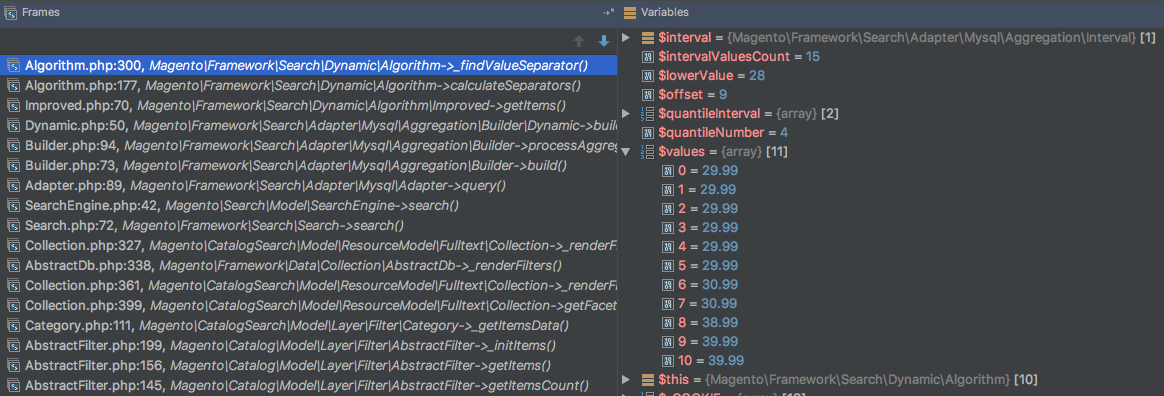
Exception #0 (Exception): Notice: Undefined offset: 14 in /Users/me/Sites/magento2/vendor/magento/framework/Search/Dynamic/Algorithm.php on line 300
As you can see from the screenshot below, $values[14]; in this case is not in $values.
_Screenshot of values at time of Error:_
 Loxzibit
All 7 comments
@Loxzibit, thank you for your report.
We were not able to reproduce this issue by following the steps you provided. If you'd like to update it, please reopen the issue.
We tested the issue on 2.1.9
 magento-engcom-team
on 28 Sep 2017
magento-engcom-team
on 28 Sep 2017
I have the same problem here.
After changed back to equalize price range, no more error message.
Should reopen this case.
 dzl00700
on 19 Oct 2017
dzl00700
on 19 Oct 2017
If this is the same as what I ran into, it is an issue with the layered navigation block when using this setting and Amasty Improved Layered Navigation. So the bug should remain closed. It's an Amasty bug, not a Magento bug.
 evermoretech
on 15 Feb 2018
evermoretech
on 15 Feb 2018
I am running into the same issues, when I disable the
Display Product Count in Stores > Config > Catalog > Layered Navigation
and change this option to Manuel:
Set Price Navigation Step Calculation to Automatic (equalize product counts)
It work.
 ahmadalkaid
on 13 Jun 2018
ahmadalkaid
on 13 Jun 2018
i have same problem, any idea to fix this
 haimarlboro
on 4 Sep 2019
haimarlboro
on 4 Sep 2019
@haimarlboro just switch back to equalize price ranges.
Equalize product counts causes this error in Magento 2.3.2 with Elasticsearch.
 mateisuica
on 8 Sep 2019
mateisuica
on 8 Sep 2019
I have just had this, no elastic search, on both 2.3.2 and 2.3.3
 iphigenie
on 18 Jan 2020
iphigenie
on 18 Jan 2020
Related issues
 phirunson
·
3Comments
phirunson
·
3Comments
 jzalenski
·
3Comments
jzalenski
·
3Comments
 andreaskoch
·
3Comments
andreaskoch
·
3Comments
 PushEngineering
·
3Comments
PushEngineering
·
3Comments
 fvillata
·
3Comments
fvillata
·
3Comments
Most helpful comment
I am running into the same issues, when I disable the
Display Product Count in Stores > Config > Catalog > Layered Navigation
and change this option to Manuel:
Set Price Navigation Step Calculation to Automatic (equalize product counts)
It work.