Is your feature request related to a problem? Please describe.
When I open MacPass via spotlight, the unlock password input is already selected. When I unlock the database, I have to click the search box to search for an entry.
Describe the solution you'd like
The ideal would be that the search-box is already selected.
Describe alternatives you've considered
I've looked for a shortcut to select the search box, and tried tab to select the search-box and neither options are available.
Additional context
This is the only road block to inputing a password from macPass completely mouse free.
 dotjersh
All 13 comments
my plugin provides that functionally - hoping to work @mstarke on porting/re-writing the code into the core code base..
https://github.com/georgesnow/MacPassRevealer
Check out:
941
 georgesnow
on 2 Oct 2019
georgesnow
on 2 Oct 2019
@dotjersh did you ever give the updated build a try?
georgesnow
on 7 Oct 2019
@dotjersh saw your other post. I am also working on the ability to add your master password to your keychain (as convenance feature) as well as Touch ID. #514 if you are interested.
georgesnow
on 7 Oct 2019
in regards to your completely mouse free efforts
georgesnow
on 7 Oct 2019
You can use Cmd + F to start the search. Also available under Edit -> Find
 mstarke
on 30 Oct 2019
mstarke
on 30 Oct 2019
right, my plugin eliminates that step of Cmd+F. After entering your password and pressing enter as soon as the database unlocks focus is moved to the search box. Samething when using the hotkey in the plugin.
KeePass for windows has I believe a similar function as my plugin:
https://sourceforge.net/p/keepass/discussion/329220/thread/30af2475a2/
georgesnow
on 30 Oct 2019
Describe the solution you'd like
The ideal would be that the search-box is already selected.
Otherwise an option will be to select the first entry of the database - here in the German version 'Allgemein' from which a keyboard based navigation is possible.
Additional context
This is the only road block to inputing a password from macPass completely mouse free.
Full by your side.
 ryanthara
on 1 Nov 2019
ryanthara
on 1 Nov 2019
You can use
Cmd + Fto start the search. Also available under Edit -> Find
Holy crap, this is exactly what I was looking for.
dotjersh
on 5 Nov 2019
Unfortunately @georgesnow plugin no-longer seems to work.
Autofocus upon unlock without a plugin would be a really wonderful option to have.
 iparr
on 22 Sep 2020
iparr
on 22 Sep 2020
@iparr oh really? did you check the console for errors? is it not loading the plugin?
and your second point. if I actually get chunk of time I will tackle this. all my side dev stuff has had to take backseat. 😕
georgesnow
on 22 Sep 2020
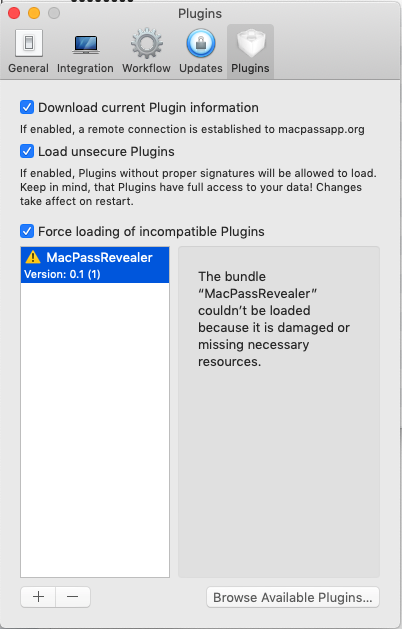
This is all I'm going off. I'm unable to find the console - sorry.
Such is life! Thank you.
iparr
on 22 Sep 2020
This might be a side-effect of notarization. The error message is produced when MacPass tries to load the plugin bundle and this one is early on so I suspect some gatekeeper issue.
mstarke
on 24 Sep 2020
So it might need some entitlements (entitlements.plist) that needs to be pointed at when you codesign.
 DominusExult
on 24 Sep 2020
DominusExult
on 24 Sep 2020
Related issues
 martinl
·
6Comments
martinl
·
6Comments
 Lapin
·
5Comments
Lapin
·
5Comments
 rathisarov
·
7Comments
rathisarov
·
7Comments
 aliok
·
7Comments
aliok
·
7Comments
 hugoholzwurm
·
5Comments
hugoholzwurm
·
5Comments
Most helpful comment
my plugin provides that functionally - hoping to work @mstarke on porting/re-writing the code into the core code base..
https://github.com/georgesnow/MacPassRevealer
Check out:
941