Macpass: Autotype doesn't work in macOS 10.15 Beta (Catalina)
Describe the bug
Autotype doesn't work in macOS 10.15 Beta (19A487m) because of MacPass doesn't see other window titles.
To Reproduce
Steps to reproduce the behavior:
- Open login page in browser
- Press Autotype hotkey.
- "No match for (null)!" error message appears.
Expected behavior
Password will be filled according to URL or window title
Desktop (please complete the following information):
- macOS: 10.15 Beta (19A487m)
- Version 0.7.9 (21570)
Additional context
I fully understand that macOS beta version may not be supported. I just only want to report this behavior.
I believe that problem is caused by OS is denying MacPass to see other window titles. If I list window titles in Autotype tab of particular record only MacPass window is listed.
 darnel
All 72 comments
Thank you. This is due to tightened security in 10.15 for screen recording. The window name is not visible for other processes. Could you try to allow MacPass to record the screen and see if this makes any difference? I would suspect there's not dialog popping up for a request and the access is denied silently.
 mstarke
on 27 Jun 2019
mstarke
on 27 Jun 2019
Thanks, how can I invoke screen recording request? My "Screen recording" section is empty, but I don't know how to add application manually. I have MacPass in "Accessibility" section.
darnel
on 27 Jun 2019
There seems to be no setting to add an app to the screen capture settings but instead a request will only be presented by the os when an app tries to capture the screen.
I'm pondering about adding a "autotype doctor" to check for various things and fold the accessibilty check into this setup. This might be a better place for users to find out what's wrong and get hints on what to fix those.
mstarke
on 29 Jun 2019
The upcomming continous release does include an Autotype Doctor. This should allow you to enable screen recording for MacPass under 10.15. If you find time to test this out I'd love to hear some feedback.
mstarke
on 9 Jul 2019
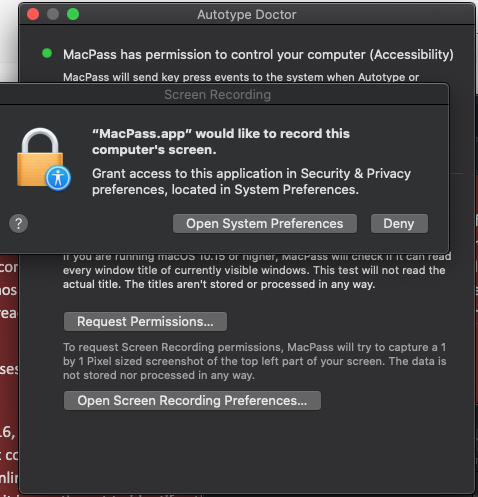
When I opened Autotype Doctor request for Screen recording popped up automatically, so I check it.
Accessibility permission was indicated as not given however it was checked previously in System settings. Autotype functionality shows AUTOTYPE_PERMISSION_NOT_GIVEN (or something similar :) I unchecked and re-checked Accessibility permission and then it's working!
I guess Accessibility permission was given to previous version of MacPass.
Thanks!
darnel
on 11 Jul 2019
Hi @mstarke
In my case clicking "Open Screen Recording Preferences ..." opens first options in Security & Privacy - Location Services.
In Screen Recording I have message "Apps that have requested access to record the contents of your screen will appear here."
After pressing Autotype hotkey I get "MacPass does not have all necessary permissions to perform Autotype."
macOS: 10.15 Beta (19A546d)
Version 0.7.9 (22660)
 ddzieduch
on 10 Sep 2019
ddzieduch
on 10 Sep 2019
The deep-link to open the screen recording preferences wasn't set since I did not know it but this is included in the current master. I did switch the detection algorithm to not capture a screenshot but this had the unforseen downside that MacPass now does not gain access to screen recording since there seems to be no way to manually add an app via the system preferences.
I will add a button to fix the screen recording permission by requesting a screenshot as it was done before. I hope this then fixes the issue on 10.15.
mstarke
on 10 Sep 2019
The upcoming continuous release will include both the deep link fix as well as a way to request for screen recording permissions. If you have time to test this out it would be highly appreciated
mstarke
on 10 Sep 2019
Now I see new button "Request Permisions...". I don't see change after clicking.
ddzieduch
on 10 Sep 2019
I'm seeing the same issue -- my Privacy > Screen Recording pane is blank. Autotype Doctor does indeed show the "Request Permission..." button, but pressing that does nothing but activate the button.
Presuming a bad setting got stored at some point, would reseting TCC using tccutil? What bundle should I spec? Would that even help?
Running 0.7.9 (20190910120914-continuous)
 alphaman64
on 17 Sep 2019
alphaman64
on 17 Sep 2019
Normally calling the screen recording APIs should yield the permissions dialog. The Button simply tries to take a screenshot. I will investigate if this is not working as advertised. Resetting with tccutil might be a good idea. The bundle-id is com.hicknhacksoftware.MacPass
mstarke
on 17 Sep 2019
Well. Turns out™ I did not wire up the action to the button so clicking it didn't do a thing. It's fixed with f134290c27fef656e16f18488b2694433ff3dddd and will be included in todays continous release. This should not take that long. I would really love if you have the time to test the new build and check if the permissions are now requested correctly.
mstarke
on 17 Sep 2019
Continous is up to date so you might want to give it a try.
mstarke
on 17 Sep 2019
Tested -- button works perfectly, as expected.
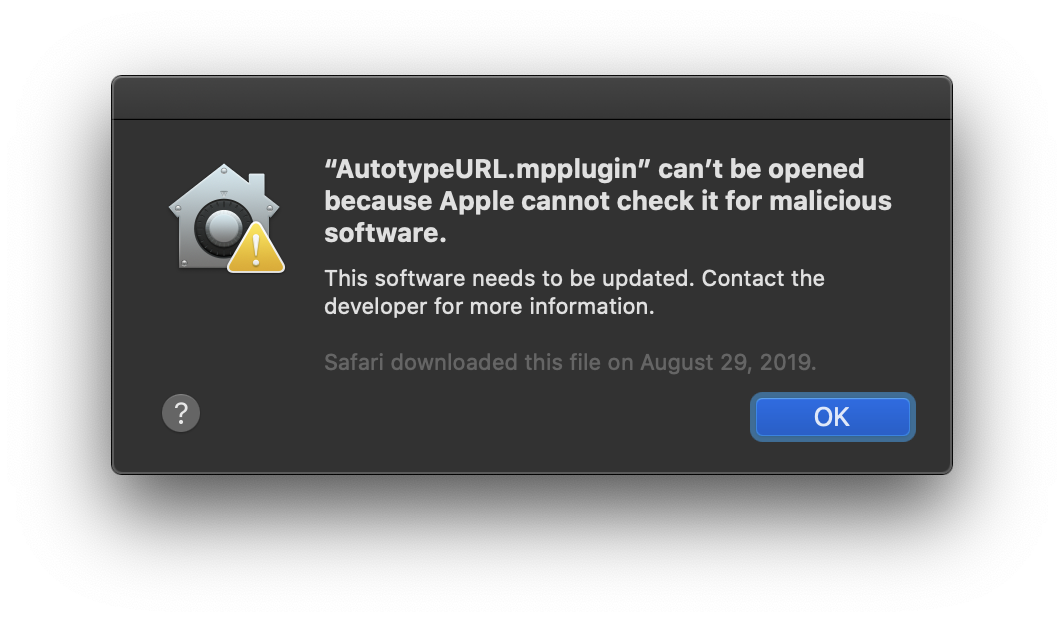
Only problem now is that I get a popup upon launch saying that AutotypeURL.mpplugin can't be opened because it can't be scanned for malicious code.
alphaman64
on 17 Sep 2019
I need to dig into this. Might be due to notarization restrictions
mstarke
on 17 Sep 2019
I got around it by turning on both "Load unsecure Plugins" and "Force loading of incompatible Plugins".
All features now working as expected in Catalina, tyvm.
alphaman64
on 17 Sep 2019
Now works perfectly. Thanks @mstarke
ddzieduch
on 17 Sep 2019
I found strange behaviour. For example when we open System Preferences > Network > Advanced tab and then try to use Autotype, app will not have access to these settings.
Even if we close this tab app will not perform Autotype until restart.
Maybe it is OS issue.
ddzieduch
on 21 Sep 2019
Just downloaded the official release version of macOS Catalina and having the same issues. I downloaded the continuous version, but the autotype doctor somehow doesn't do anything for me if I press it
 fgross95
on 9 Oct 2019
fgross95
on 9 Oct 2019
Can you specify what you mean by pressing the Autotype doctor?
mstarke
on 9 Oct 2019
After pressing my autotype shortcut, it says that MacPass doesn't have all necessary permissions. If I press on this notification, it says "show autotype doctor", but this only leads me to macpass or doesn't do anything.
fgross95
on 9 Oct 2019
I've just updated to 10.15 Catalina.
It would be nice to get this fix into the stable & published release so that users that rely on Auto-Type don't have to use the unsigned & buggy continuous build.
 Neo23x0
on 9 Oct 2019
Neo23x0
on 9 Oct 2019
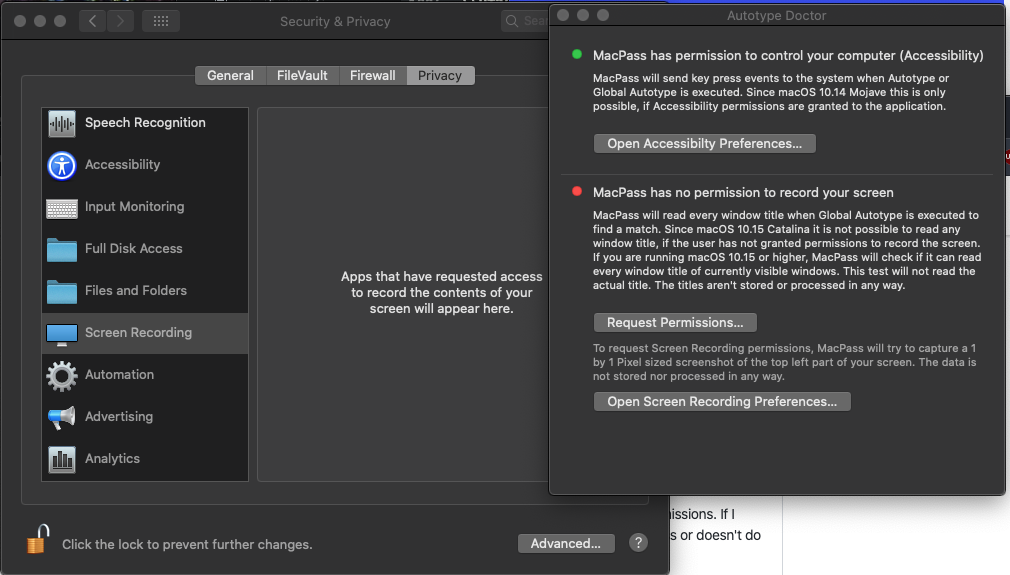
For me, clicking the button "Request Permission" has no effect.
Neo23x0
on 9 Oct 2019
Okay nevermind, I assumed the autotype doctor would open automatically. After I found it in the menubar it worked perfectly!
fgross95
on 9 Oct 2019
The notification might be broken since i‘m Using private APIs to display buttons. Also it’s using deprecated NSUserNotification which might have broken in 10.15
mstarke
on 9 Oct 2019
so I updated 2 Macs. One of them no issue with continuous build and running my plugins. Autotype doctor worked when it brought me to the window. I toggled the permission. It quit MacPass. I re-opened and it works. My other Mac all the permissions are good (like the first Mac that does work the "Run Autotype Doctor" button doesn't appear after clicking it and allowing the proper permissions), but when you trigger GAutoType. it just unhides and activates MacPass. so I am thinking maybe I should just uninstall MacPass and reinstall the continuous build. anyone else have this inconsistent behavior or tried MacPass on Catalina (Public Release) on more than one Mac?
 georgesnow
on 9 Oct 2019
georgesnow
on 9 Oct 2019
I updated 2 MacBook Pros. On both I gave MacPass permissions in Accessibility and in Screen Recording. On both when I activate Global Autotype I get the notification "MacPass does not have all necessary permissions to perform Autotype." Autotype doctor reports permissions only in Accessibility, not in Screen Recording. On checking again, both permissions are set in System Preferences.
Interestingly, if I try to perform Autotype in a window for which there is no Autotype setup in MacPass, I get the notification "No match for [window title]". So it seems that MacPass can get the window title but somehow cannot perform Autotype.
 tramir
on 9 Oct 2019
tramir
on 9 Oct 2019
so I don't think this is just MacPass. I just installed a fresh copy of Alfred. All the permission shortcuts it offers work except Full disk permissions. It opens system preferences, but I had to manually add it. Not exactly 1 for 1, but it seems Screen Recording and full disk permissions have different exceptions compared to Automation permissions etc...
georgesnow
on 9 Oct 2019
Ha, strange things happen. I unlocked my mac from standby later today. MacPass App was completely closed, although I didn't quit it before the standby. After I started the App I reopened "Autotype Doctor" and gave it a try and the dialogue appeared.
Neo23x0
on 9 Oct 2019
So I tried MacPass after I saw the reference @michaelblyons made in the bug I opened for this on KeePassXC (see reference above here)
I installed the continuous version of MacPass (commit f134290)
I made a copy of my original .kdbx file (just in case) and opened it up with MacPass after I allowed the app to run due to it not being signed.
Went to Window -> Autotype doctor.
The buttons in this window seem to add an entry for MacPass in their respectful permission list but linking to the actual setting does not seem to work. No problem I know what I am looking for.
I gave both accessibility and screen recording permissions to MacPass.app.
My autotype doctor shows 2 green dots for the permissions.
The things i've noticed"
- Setting up a global shortcut for autotype does not seem to work for me.
- When I select the correct entry in MacPass while having the website or application open and press CMD+T the autotype does seem to work.
 Shuyinsama
on 10 Oct 2019
Shuyinsama
on 10 Oct 2019
When I select the correct entry in MacPass while having the website or application open and press CMD+T the autotype does seem to work.
I notice this as well on my one Mac that it just actives/unhides macpass when using the hot key for global auto type
georgesnow
on 10 Oct 2019
so good news and bad news. Good news I got mine working...bad news I doubt this will fix it for anyone else. I had an old version macpassHTTP that I had modified and I forgot about...🤦♂️ which was causing issue with MacPass. I removed the plugin restarted macPass and Global Autotype works.
georgesnow
on 10 Oct 2019
Hi, just tried Continuous 2019-09-17 version.
I gave both - accessibility and screen recording permissions to MacPass.
Autotype doctor shows 2 green dots for the permissions.
Global autotype works perfectly.
Autotype when selecting the correct entry in MacPass while having the website open and press CMD+T also works as expected.
 emikaadeo-git
on 12 Oct 2019
emikaadeo-git
on 12 Oct 2019
I noticed the permissions for screen recording don’t seem to persist. And seems to be an OS (that’s speculation) because in privacy settings everything looks good. But global auto type doesn’t always work. Wondering if it is timing thing
georgesnow
on 13 Oct 2019
But global auto type doesn’t always work. Wondering if it is timing thing
Yeah, I noticed this on my MBP as well. I also noticed, that if I change shortcut for global autotype in MacPass, it starts working again.
emikaadeo-git
on 13 Oct 2019
Just tried changing the global autotype shortcut but that did not seem to do anything for me immediately but after I restarted MacPass it did start to work. (I guess this has to do with the fact that my browser/application needs to be started before MacPass?)
I am using Chrome
Shuyinsama
on 14 Oct 2019
A few days after I reported this issue as fixed for me, it stopped working reporting that

The state of Autotype Doctor and the Security Settings look like this.
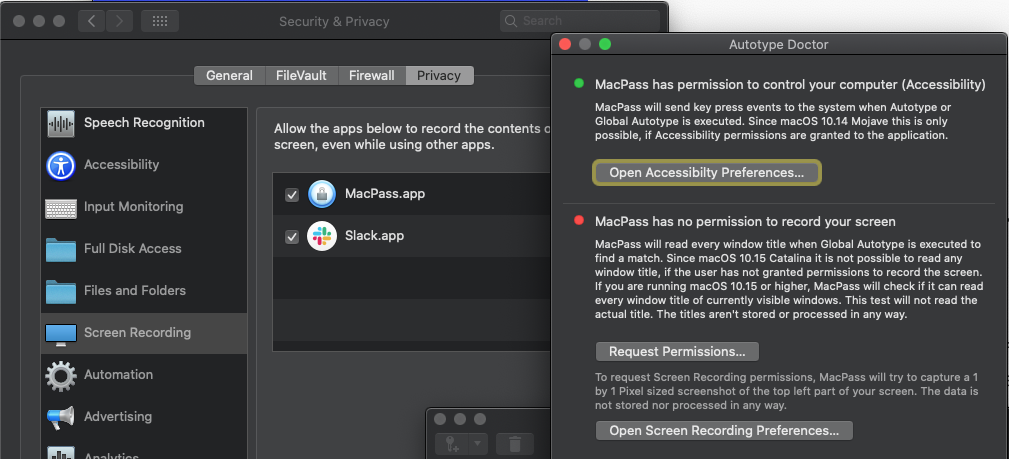
I restarted MacPass but it didn't fix the issue. Clicking the "Request Permissions ..." button does nothing.
Neo23x0
on 14 Oct 2019
A few days after I reported this issue as fixed for me, it stopped working reporting that
The state of Autotype Doctor and the Security Settings look like this.
I restarted MacPass but it didn't fix the issue. Clicking the "Request Permissions ..." button does nothing.
This was my step-by-step installation:
Remove completely MacPass 0.7.9 version (with AppCleaner if that matters)
Check in System Preferences -> Security & Privacy -> Privacy if there are some MacPass leftovers. If so, remove them manually.
Install MacPass Continuous 2019-09-17 version.
Run Autotype Doctor.
Gave both - Accessibility and Screen recording permissions to MacPass.
Autotype doctor shows 2 green dots for the permissions.
Change global Autotype shortcut to Option+Command+L (if that matters)
Since then, MacPass global Autotype works every time for me.
emikaadeo-git
on 14 Oct 2019
Running multiple versions of MacPass is problematic. MacOS seems to not work well when permissions are granted to multiple versions. I run into this all the time when developing MacPass and my dev-build will always re-request permissions. If then given, the release version will act up. I suspect that the reported effects are somewhat related to this. Regarding the Autotype global hotkey not registering, I have no idea why this happens but I will investigate once my dev setup is on 10.15 which might take some time given the drawbacks.
mstarke
on 14 Oct 2019
This was my step-by-step installation:
* Remove completely MacPass 0.7.9 version (with AppCleaner if that matters)

* Check in System Preferences -> Security & Privacy -> Privacy if there are some MacPass leftovers. If so, remove them manually.

* Install MacPass Continuous 2019-09-17 version.

* Run Autotype Doctor.

* Gave both - Accessibility and Screen recording permissions to MacPass.

* Autotype doctor shows 2 green dots for the permissions.

* Change global Autotype shortcut to Option+Command+L (if that matters)
Since then, MacPass global Autotype works every time for me.
I can confirm that this has worked for me. I followed the steps exactly (including the use of Appcleaner). I also had to reenable global Autotype checkbox in the preferences again and used a different shortcut (SHIFT+CTRL+A)
 RicardoCapricciosa
on 15 Oct 2019
RicardoCapricciosa
on 15 Oct 2019
I discovered that just changing the auto type hotkey seems to fix it. I like @mstarke have more than 1 build loaded, which when I made a new build I noticed this issue got significantly worse.
georgesnow
on 15 Oct 2019
Hi, I'm becoming crazy... I uninstalled. Installed again, but I don't find AutoType doctor... how to run it?
Thanks in advance
 mbrucco
on 16 Oct 2019
mbrucco
on 16 Oct 2019
it's only present in the continuous build.
mstarke
on 16 Oct 2019
@mbrucco on the continuous if it stops working. I found just changing the hotkey to something else then back to what you had before seems to fix it.
georgesnow
on 16 Oct 2019
Have you link to download it?
Inviato da iPhone
Il giorno 16 ott 2019, alle ore 15:21, Michael Starke notifications@github.com ha scritto:
it's only present in the continuous build.—
You are receiving this because you commented.
Reply to this email directly, view it on GitHub, or unsubscribe.
mbrucco
on 16 Oct 2019
Its in the releases on GitHub.
mstarke
on 16 Oct 2019
Any ETA when the fix for this (in the continuous build) will be put into an official release? I can tolerate copy/pasting passwords while I wait for the next release, but if it takes too long I might as well install the continuous build now.
 JamsheedMistri
on 17 Oct 2019
JamsheedMistri
on 17 Oct 2019
@JamsheedMistri you can download the continuous build only to run the autotype doctor and then trash it (from your download folder). Stable MacPass will then works.
 gagarine
on 18 Oct 2019
gagarine
on 18 Oct 2019
Autotype is not working always for me, let me try to explain.
I'm on Version 0.7.9 (20190917110936-continuous) (Removed all previous versions)
Ran the autotype doctor so both settings (accessibility/screen recording) are green
After sleeping sometimes MacPass autotypes no longer functions
Running the autotype doctor screen recording is then red, however the MacPass application still has the permission if I check it in preferences
At this point I quit and restart MacPass and try autotype: Macpass complains about missing permissions (screen recording) but if I check the setting in preferences they are still there.
I've tried the tip of @emikaadeo-git but that didn't work
Let me know if I can provide you with more information
 rogierg
on 21 Oct 2019
rogierg
on 21 Oct 2019
@JamsheedMistri you can download the continuous build only to run the autotype doctor and then trash it (from your download folder). Stable MacPass will then works.
Are you sure? I thought the permission specifically targets the version of the program set.
rogierg
on 21 Oct 2019
It seems related to bundle id. Also I noticed after sleep the screen recording permissions seem to stop working. Maybe is assumed if the machine is asleep kill the recording permission? I found toggling the auto type to different hotkey then back and the. off and on. Fixes it and o noticed the permissions for screen recording still show a red dot. But auto type works
georgesnow
on 21 Oct 2019
I am thinking the permissions need to be re-requested after sleep.
Maybe using this:
https://developer.apple.com/documentation/appkit/nsworkspacedidwakenotification?language=objc
georgesnow
on 21 Oct 2019
I can also confirm:
(1) assigning a different shortcut makes global autotype work (and it keeps working after reverting to the default shortcut)
(2) permissions are lost after wake-up from sleep so (1) above needs to be repeated
If global autotype is activated before (1), then several application restarts and Autotype Doctor runs are needed to get it to work again -- I couldn't figure out yet the "correct" sequence.
tramir
on 22 Oct 2019
Please tell me in the continuous version auto-type works? Thanks
I uninstall previous version. Then install 0.7.9 (20190917110936-continuous).
Now my MacPass looks like this
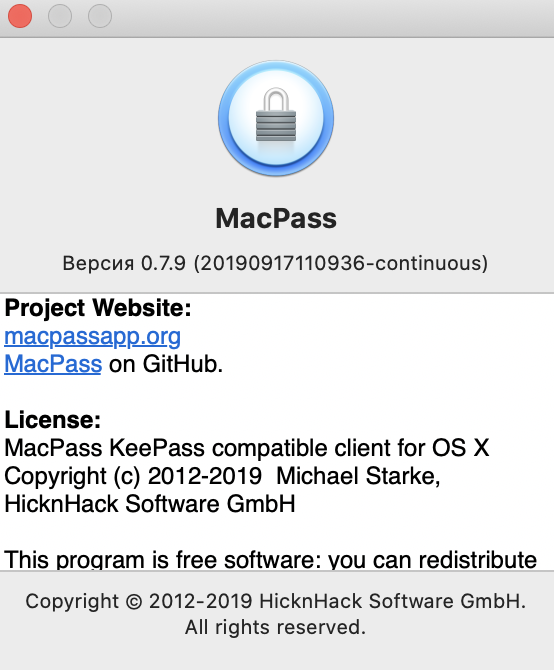
When I press Command + T, a system notification appears. It suggests opening the Autotype helper. I clamp.
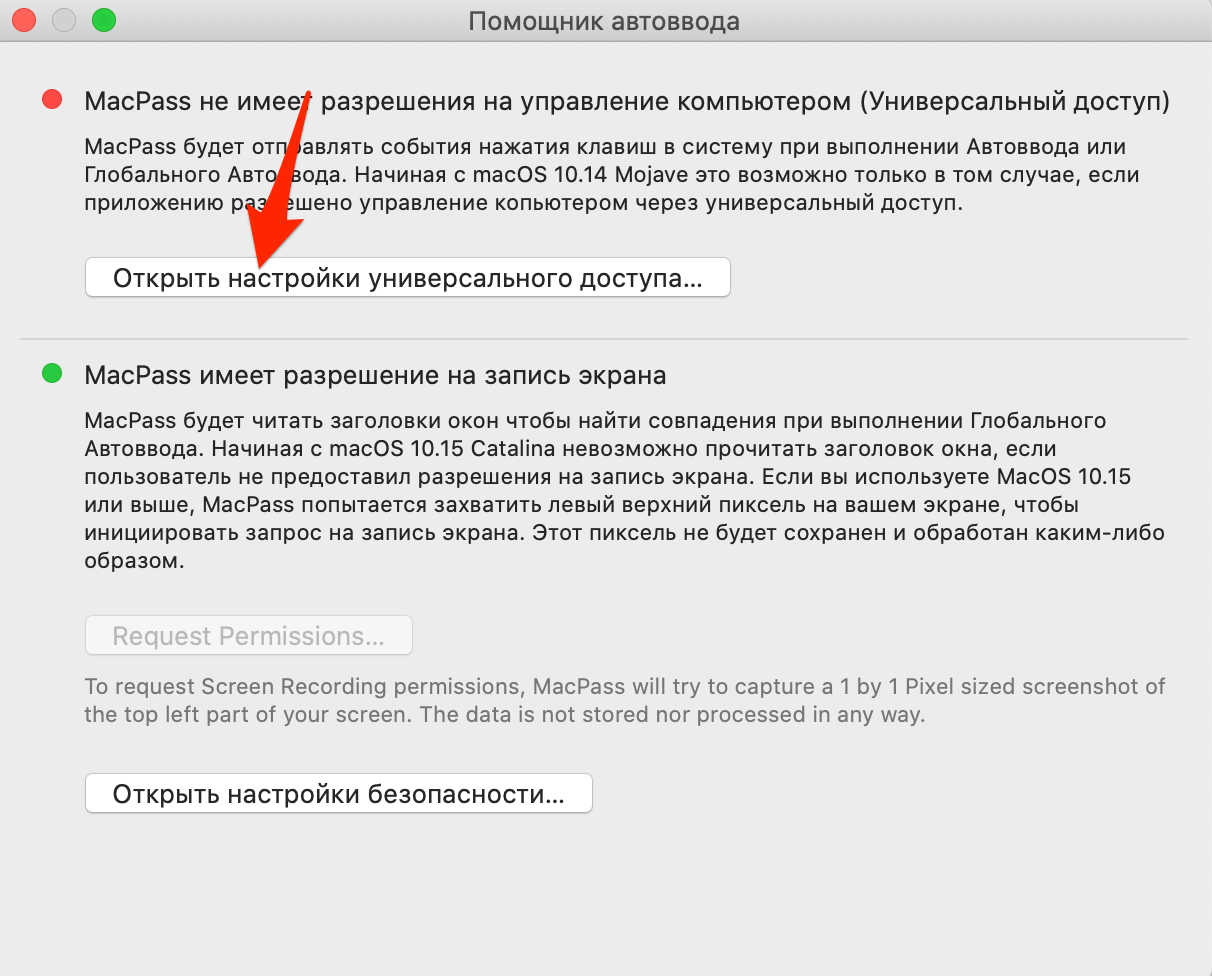
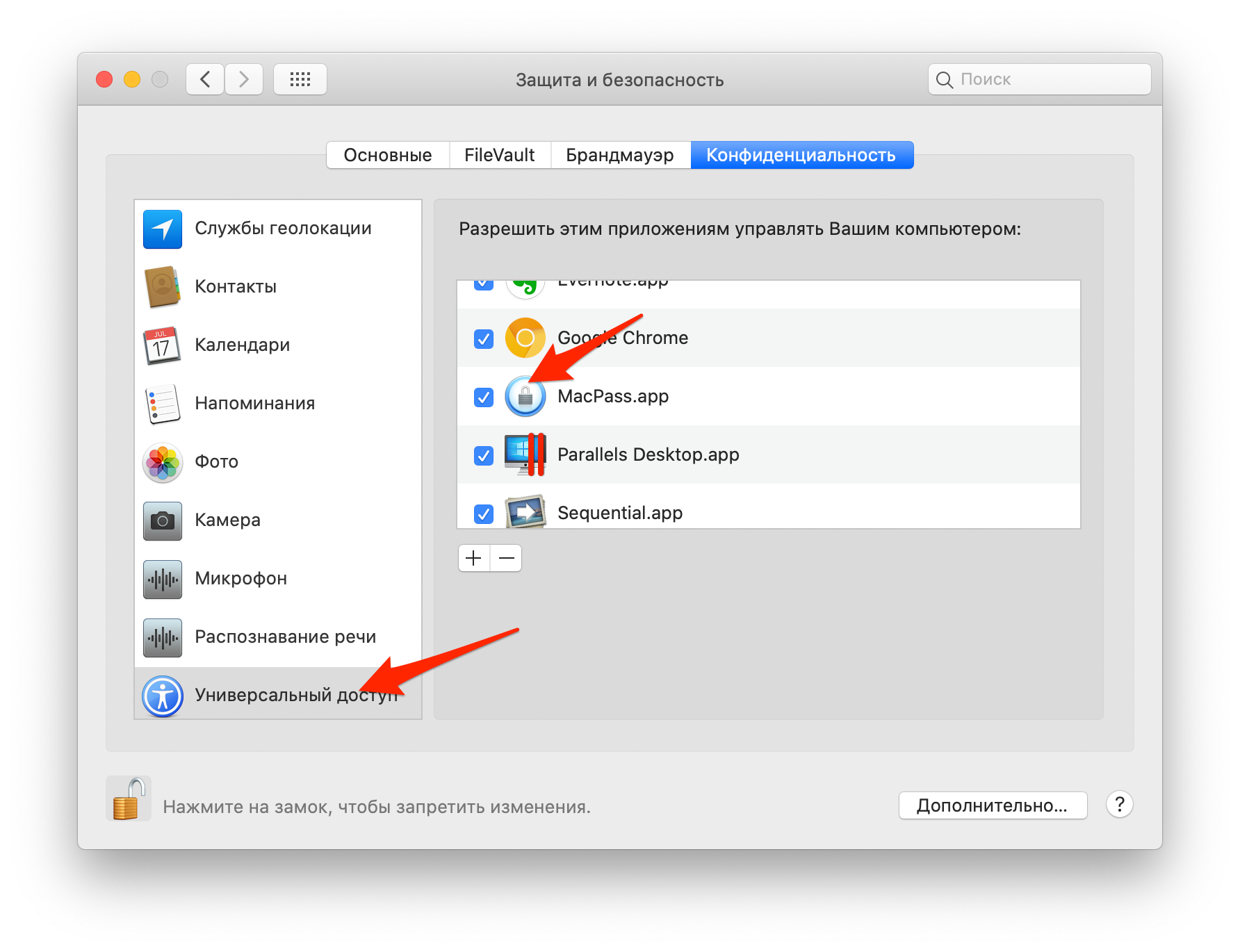

In the pictures I tried to demonstrate the settings of the Autotype assistant.
Is it possible to customize the work of Autotype? If so, how to do it?
Thank.
 valueff
on 26 Oct 2019
valueff
on 26 Oct 2019
As stated above before, assisitve access is sometimes broken when using a different build. Please remove MacPass from both the screen recording and the Assistive settings (remove the app, not just uncheck it if possible) and run the Autotype doctor again. This might alleviate the problem for you.
mstarke
on 28 Oct 2019
About the issue on the hotkey not being present after waking from sleep: I need to investigate this. It might also stem from having a low deployment target of 10.10. My work setup prevents me from upgrading to 10.15 for now so this might take a bit longer than usual. I am sorry for the delay but all the changes in 10.15 make MacPass rather fragile in the Autotype department.
mstarke
on 28 Oct 2019
I will add so since my last post auto type hasn’t broken on either of my 2 macs that have Catalina. And they have been asleep and rebooted. I have used other user accounts. So This really seems like a an OS.
georgesnow
on 28 Oct 2019
Removed Macpass from Accessibility, then added it again. Earned)
Thank you very much.
valueff
on 28 Oct 2019
Works great so far with latest 0.7.10 stable version.
Before install 0.7.10 -> uninstall Continuous 2019-09-17 version and remove all previously granted permissions.
emikaadeo-git
on 29 Oct 2019
so cause I have had multiple copies of MacPass it messes up Autotype. however, this workaround seems to work every time.
Successful work around:
Quit MacPass
Open terminal run following commands:
tccutil reset ScreenCapture com.hicknhacksoftware.MacPass
tccutil reset Automation com.hicknhacksoftware.MacPass
Reopen MacPass => Preferences=>Intergration
Run Doctor to get permissions set again
Quit MacPass
Reopen MacPass => Preferences=>Intergration
Change the hotkey for Global Autotype to anything else
Disable Autotype
Renable Autotype
Re-assign back to hotkey you wanted
yay auto type works again...or at least it should ....hopefully...
georgesnow
on 5 Nov 2019
be carefull, you must REMOVE all granted permission and not only uncheck it to make it work. So carefully uninstall MacPass (application/send to trash/empty trash). Remove all granted permission remaining. Install 0.7.10. MacPass/Preferences/Integration -> must be good this time.
 jmcollin78
on 9 Nov 2019
jmcollin78
on 9 Nov 2019
Side note: it sometimes still reports "does not have the necessary permissions" but only after resume from standby AND with opened settings window. Restart of MacPass or the browser doesn't help. Only closing the settings window does.
Neo23x0
on 11 Nov 2019
@Neo23x0 this is a known issue #993 and already fixed. Will be released with 0.7.11.
mstarke
on 11 Nov 2019
Hi, I have the same issue, that Autotype is not working. I recognized that I need to minimize or hide "Brackets" to resolve this "necessary permission" issue.
 Jan-Ko
on 14 Nov 2019
Jan-Ko
on 14 Nov 2019
As stated in https://github.com/MacPass/MacPass/issues/948#issuecomment-552335453 this issue is known and already fixes for the upcomming release
mstarke
on 14 Nov 2019
@mstarke thanks a lot for all your work on MacPass, I love it!
It took me a longer while to really understand that the most current latest release (.10), which I get via Homebrew, isn't working fine.
I would appreciate the .11 release that includes the fix ❤️
 StephenKing
on 14 Jan 2020
StephenKing
on 14 Jan 2020
Is it really necessary to give the screen recording permission for just the regular Auto-Type for a manually selected entry? I don't use Global Auto-Type and don't want to give applications Screen Recording permissions if they don't need them. I'd like if you disabled looking at window titles in Preferences, that it would no longer bug you to need the Screen Recording permission whenever you press Cmd+T.
 woalk
on 2 Jul 2020
woalk
on 2 Jul 2020
@woalk Valid point. I tend not to be this pessimistic about the users consent. For auto-type no screen recording permission is needed.
mstarke
on 2 Jul 2020
@mstarke Features should always work with the minimum amount of permissions, in my opinion. Apple also seems to agree, especially considering that they're locking more and more system features behind increasingly fine-grained permissions. This makes an app much more trustworthy for the average user who cannot check the source code for what an app actually does with a permission. It also can reduce potential attack vectors if less programs are granted very intrusive permissions like screen recording.
woalk
on 7 Jul 2020
I'll try to reduce the amount of permissions needed in a future update since I do agree with your reasoning.
mstarke
on 7 Jul 2020
Created issue #1091
mstarke
on 7 Jul 2020
Is it really necessary to give the screen recording permission for just the regular Auto-Type for a manually selected entry? I don't use Global Auto-Type and don't want to give applications Screen Recording permissions if they don't need them. I'd like if you disabled looking at window titles in Preferences, that it would no longer bug you to need the Screen Recording permission whenever you press
Cmd+T.
I was just about to implement the reduced permissions when it dawned on me that even auto-type requires the window title since it will try to match window titles on the selected entry. So there is no way to reduce the required permissions for auto-type since both do require all permissions.
mstarke
on 12 Oct 2020
Related issues
 btxtiger
·
7Comments
btxtiger
·
7Comments
 uwqwxing886
·
5Comments
uwqwxing886
·
5Comments
 aliok
·
7Comments
aliok
·
7Comments
 Waldgeister
·
7Comments
Waldgeister
·
7Comments
 martinl
·
6Comments
martinl
·
6Comments
Most helpful comment
@Neo23x0 this is a known issue #993 and already fixed. Will be released with 0.7.11.