Machinelearningnotebooks: AutoML location/version confusion
I'm currently developing an AutoML pipeline, in which I use the AutoML Step.
This link is the only place I was able to get to documentation regarding the AutoML step.
Looking around, I noticed that in the rc versions, AutoML was completely moved to azureml-sdk (with no AutoML step documentation to be found under azureml-core). I'm hesitant to switch to an rc version for production code, especially with the lack of the AutoML step documentation in the new location.
Any help with that?
 jadhosn
All 14 comments
@jadhosn - AutoMLStep is fully supported by our team (Azure AutoML team within Azure ML team).
You also have the following two notebooks using AutoMLStep within an AML Pipeline:
Thanks for the feedback on the reference documentation, we'll take it into account in order to improve the docs. 👍
 CESARDELATORRE
on 5 Mar 2020
CESARDELATORRE
on 5 Mar 2020
@CESARDELATORRE I was going through the AutoML step, it's outdated since there is a mention of data_script where this feature has been deprecated. With the updated step, ss there a way to feed in pipeline data object to an AutoML step (other than going through the datasets route)? An updated documentation for the step would be really helpful.
jadhosn
on 6 Mar 2020
@jadhosn - Agree. I think we talked about this point (data_script) by email. About the docs, it's already being updated in a PR from the docs team.
That notebook (https://github.com/Azure/MachineLearningNotebooks/blob/master/how-to-use-azureml/machine-learning-pipelines/intro-to-pipelines/aml-pipelines-with-automated-machine-learning-step.ipynb) was updated partially (train works with latest SDK 1.2.0) but still have a few outdated code and comments and even two errors at the end of the notebook.
I'll make sure it's updated.
Thanks for the feedback! 👍
CESARDELATORRE
on 27 Mar 2020
Adding related issue I created:
https://github.com/Azure/MachineLearningNotebooks/issues/890
CESARDELATORRE
on 27 Mar 2020
@CESARDELATORRE It would be interesting to have a tutorial that shows the conversion from a Pipeline Data object (used as a directory, containing N files) to a Tabular Dataset (so here, we would be selecting a single file from the pipeline data object directory) to be fed into an AutoML step (as this would be the closest to the way we think about pipelines and i/o port binding)
jadhosn
on 27 Mar 2020
@jadhosn - That's an interesting point. Can you provide the reasons why you wound't publish/register the AML Dataset from a PythonScriptStep before the AutoMLStep which would then consume that registered Dataset without needing to make that conversion?
Since the training data is an important milesotne in the process, it should also be tracked/versioned, therefore we believe it'd be important to register the dataset into the Workspace.
Then, once you have it registered in the workspace, you can simply consume it from AutoML.
But I'd like to know and get your feedback about your reasons for doing the approach you mentioned. 👍
CESARDELATORRE
on 31 Mar 2020
@CESARDELATORRE We ended up registering the Datasets in a PythonScriptStep before AutoML.
But at the time, we always thought about pipelines as DAGs where steps are connected together with hooks (step sequencing and i/o port binding through pipeline data objects &/ data references).
We naturally drifted to using the same paradigm with the AutoML step (it is a step after all), so the first approach we went down was maintaining the same type of hooks, which meant passing data to the next step (which happens to be the AutoML step) using Pipeline Data objects.
Going through the documentation, and some of the examples, I realized that for the conversion from Pipeline data objects into TabularDatasets to work, the Pipeline data object must house at most a single file (or multiple partition files that will all lead to a single Tabular Dataset).
For our use case, where we faced an OOM bug, the workaround that we adopted (partitioning the single dataset into multiple smaller Datasets split column-wise instead of row-wise, as it fits the business use case better) meant that we have to register some 100 Datasets before it can be fed into the AutoML step.
Also, since we were using the AutoML _framework_ as a tool to evaluate and reduce our search space in terms of featurization techniques, algorithms and help focus our energy on the most performing models, there was no major gain between feeding these Datasets into an AutoML config that runs locally instead of an AutoML step that runs on the remote compute.
jadhosn
on 31 Mar 2020
@CESARDELATORRE
Hi ,
I have registered my dataset using a python script step and I have given the dataset (Tabular Dataset) as input to AutoMLConfig. When I submit the AutoMLConfig as an experiment, The run is successful.
Problem with AutoMLstep:
However when I include the AutoMLConfig in the AutoML step and try to submit the pipeline. I face the followig error.
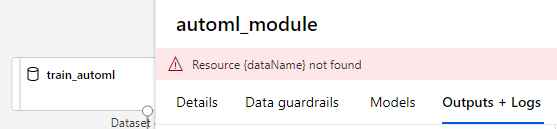
I used the following for AutoML step

The automl_config above is working fine when it is submitted separately.
The AutoML step is imported as follows
from azureml.pipeline.steps import AutoMLStep
Could not debug this as there is no clear indication of
What is {dataName} and what is not found. And also Automl config works fine but the same doesnt work with AutoML step.
Kindly help ASAP.
 Meenakshi-subramanian
on 26 Aug 2020
Meenakshi-subramanian
on 26 Aug 2020
@Meenakshi-subramanian I talk to the team and the root cause has yet to be determined for this issue but we suspect that the path parameter is not set in the users AutoMLConfig.
In the <=1.12.0 SDK this causes that error. Most likely due to a missing snapshot which does not get created when path is not specified.
One of our devs (Piet) created a PR that checked in a few days ago and fixes this issue for AutoMLStep, however that might not be publicly available, yet.
A workaround for the time being is to explicitly specify the path parameter to AutoMLConfig.
I talked to Piet so he can provide further details here, ok?
CESARDELATORRE
on 28 Aug 2020
@Meenakshi-subramanian Can you also provide the following for further research from the team, please?
- Your Pipeline Run Id and the AutoMLStep RunID plus their related log files
- Notebook code: AutoMLConfig code and AutoMLStep code
- Sample dataset for repro
CESARDELATORRE
on 28 Aug 2020
@Meenakshi-subramanian , could you try setting the path parameter in the AutoMLConfig that you pass to AutoMLStep and let me know if that works?
The fix for this AutoMLStep issue will be in an upcoming release but in the meantime, please try this work around.
Note, the path can be set to any valid directory name (ie. "./project", "./experiment", etc...).
 pieths
on 29 Aug 2020
pieths
on 29 Aug 2020
@CESARDELATORRE can you pls review this issue?
 swatig007
on 31 Aug 2020
swatig007
on 31 Aug 2020
please-close - This issue is not actionable until Meenakshi confirms if Piet's advice helped and if not, until Meenakshi provides the above requested repro info.
Please, re-open if the issue persists and the repro info and Run ID is provided here, ok?
Thanks,
CESARDELATORRE
on 1 Sep 2020
Apologies for the delayed response. The work around worked fine. Thank you
so much.
Regarding sharing diagnostic information, I have raised a support ticket
CASE ID 120090223001308
I have also informed about my connect through git hub.
Many thanks for your support.
On Wed, Sep 2, 2020, 12:00 AM PRMerger13 notifications@github.com wrote:
Closed #844 https://github.com/Azure/MachineLearningNotebooks/issues/844
.—
You are receiving this because you were mentioned.
Reply to this email directly, view it on GitHub
https://github.com/Azure/MachineLearningNotebooks/issues/844#event-3716288776,
or unsubscribe
https://github.com/notifications/unsubscribe-auth/AEFIN5T75GFVSMZ5UXQ65WDSDU4SXANCNFSM4LCNIWWQ
.
Meenakshi-subramanian
on 3 Sep 2020
Related issues
 dumbledad
·
3Comments
dumbledad
·
3Comments
 swanderz
·
4Comments
swanderz
·
4Comments
 ashic
·
3Comments
ashic
·
3Comments
 vineetgarhewal
·
3Comments
swanderz
·
5Comments
vineetgarhewal
·
3Comments
swanderz
·
5Comments