Machinelearningnotebooks: AttributeError: 'AzureFileDatastore' object has no attribute 'blob_service'
I tried following this notebook: https://github.com/Azure/MachineLearningNotebooks/blob/master/how-to-use-azureml/work-with-data/datadrift-tutorial/datadrift-tutorial.ipynb and I am getting the below error when I tried to get the metrics/results of the dataset monitors using the python SDK:
running:
monitor = DataDriftDetector.get_by_name(ws, 'weather-monitor')
results, metrics = monitor.get_output(start_time=datetime(year=2015, month=4, day=1))
causes this error:
`---------------------------------------------------------------------------
AttributeError Traceback (most recent call last)
c:\Users**\create_monitors.py in
2
3 # get results from Python SDK (wait for backfills or monitor runs to finish)
----> 4 results, metrics = monitor.get_output(start_time=datetime(year=2015, month=4, day=1))
~\AppData\Local\Continuum\miniconda3\envs\aml72\lib\site-packages\azureml\datadrift\datadriftdetector.py in get_output(self, start_time, end_time, run_id)
1263 self._latest_run_time = d.latest_run_time
1264
-> 1265 return _all_outputs(self, start_time, end_time, run_id, actlogger)
1266
1267 def update(self, services=..., compute_target=..., feature_list=..., schedule_start=..., alert_config=...,
~\AppData\Local\Continuum\miniconda3\envs\aml72\lib\site-packages\azureml\datadrift_result_handler.py in _all_outputs(datadriftdetector, start_time, end_time, run_id, activity_logger)
129 else:
130 metrics_got = _get_metrics(datadriftdetector, start_time, end_time, run_id,
--> 131 daily_latest_only=True, logger=logger)
132 if len(metrics_got) < 1:
133 logger.error("No resoults found for scheduled/backfill runs. All results are from adhoc runs.")
~\AppData\Local\Continuum\miniconda3\envs\aml72\lib\site-packages\azureml\datadrift_result_handler.py in _get_metrics(datadriftdetector, start_time, end_time, run_id, daily_latest_only, with_adhoc, logger)
203 if drift_type == DATADRIFT_TYPE_DATASET:
204 metrics, latest_pipeline_times = _download_from_blob_metrics(datadriftdetector, local_temp_root, None,
--> 205 start_time, end_time, run_id, with_adhoc, logger)
206 # Only model based drift needs check all services.
207 elif drift_type == DATADRIFT_TYPE_MODEL:
~\AppData\Local\Continuum\miniconda3\envs\aml72\lib\site-packages\azureml\datadrift_result_handler.py in _download_from_blob_metrics(datadriftdetector, local_temp_root, service, start_time, end_time, run_id, with_adhoc, logger)
304 metrics_rel_base = _get_metrics_path(model_name, model_version, service,
305 drift_type=drift_type, datadrift_id=datadrift_id,
--> 306 datastore=data_store, logger=logger)
307 logger.info("Relative metrics path confirmed. Drift id = {}, path = {}".format(datadrift_id, metrics_rel_base))
308
~\AppData\Local\Continuum\miniconda3\envs\aml72\lib\site-packages\azureml\datadrift_result_handler.py in _get_metrics_path(model_name, model_version, service, target_date, drift_type, datadrift_id, datastore, logger)
422 general_output_folder_exist = True
423 if datastore:
--> 424 blobs = datastore.blob_service.list_blobs(container_name=datastore.container_name, prefix=metrics_output_path)
425 blobs = datastore._filter_conflicting_blobs(blobs)
426 if len(blobs) == 0:
AttributeError: 'AzureFileDatastore' object has no attribute 'blob_service'`
@swanderz
 alieus
All 12 comments
Hi, alieus,
Thanks for trying the notebook.
To investigate the issue, could you try these codes in your notebook if it's still running?
`
import azureml.core
from azureml.core import Datastore
print('SDK version:', azureml.core.VERSION)
print(monitor)
ds = Datastore.get_default(monitor.workspace)
dir(ds)
`
Thank you!
 msdavx
on 30 Dec 2019
msdavx
on 30 Dec 2019
Hi, msdavx,
I just ran that. Here's the anonymized output:
SDK version: 1.0.81
{'_workspace': Workspace.create(name='*', subscription_id='*', resource_group='*'), '_frequency': 'Week', '_schedule_start': None, '_schedule_id': None, '_interval': 1, '_state': 'Disabled', '_alert_config': None, '_type': 'DatasetBased', '_id': '37f9544b-0ae4-4b31-b164-*', '_model_name': None, '_model_version': 0, '_services': None, '_compute_target_name': 'ret-master', '_drift_threshold': 0.2, '_baseline_dataset_id': 'ea4b2462-bb70-4520-81ef-*, '_target_dataset_id': '91093a14-b0d1-41b1-8cd0-**', '_feature_list': ['usaf', 'wban', 'datetime', 'latitude', 'longitude', 'elevation', 'windAngle', 'windSpeed', 'temperature', 'seaLvlPressure', 'cloudCoverage', 'presentWeatherIndicator', 'pastWeatherIndicator', 'precipTime', 'precipDepth', 'snowDepth', 'stationName', 'countryOrRegion', 'p_k'], '_latency': 0, '_name': 'weather-monitor', '_latest_run_time': datetime.datetime(2019, 12, 30, 17, 59, 28, 636721, tzinfo=
['__class__',
'__delattr__',
'__dict__',
'__dir__',
'__doc__',
'__eq__',
'__format__',
'__ge__',
'__getattribute__',
'__gt__',
'__hash__',
'__init__',
'__init_subclass__',
'__le__',
'__lt__',
'__metaclass__',
'__module__',
'__ne__',
'__new__',
'__reduce__',
'__reduce_ex__',
'__repr__',
'__setattr__',
'__sizeof__',
'__str__',
'__subclasshook__',
'__weakref__',
'_as_dict',
'_client',
'_data_reference',
'_datastore_type',
'_download_file',
'_file_share_upload',
'_get_console_logger',
'_get_data_reference',
'_get_default_request_session',
'_get_progress_logger',
'_get_task_handler',
'_get_upload_from_dir',
'_get_upload_from_files',
'_name',
'_num_workers',
'_sanitize_regex',
'_sanitize_target_path',
'_start_upload_task',
'_verify_prefix',
'_workspace',
'account_key',
'account_name',
'as_download',
'as_mount',
'as_upload',
'container_name',
'credential_type',
'datastore_type',
'download',
'endpoint',
'file_service',
'is_sas',
'name',
'path',
'protocol',
'sas_token',
'set_as_default',
'unregister',
'upload',
'upload_files',
'workspace']
alieus
on 30 Dec 2019
Hi,
I tested with my workspace for version 1.0.81 and it works.
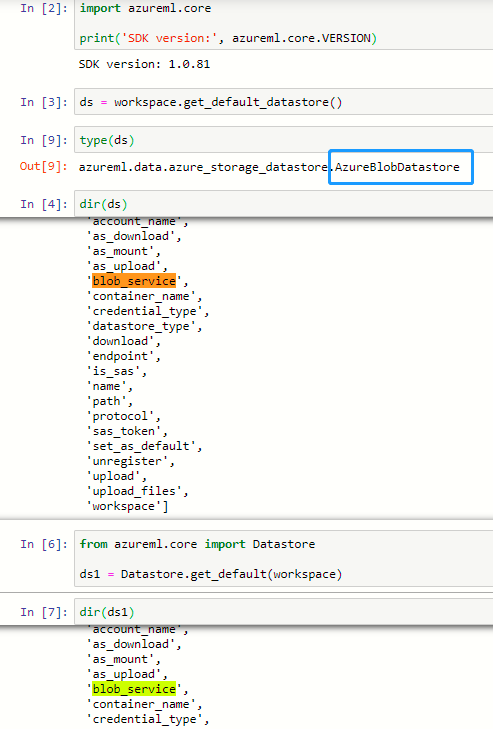
By checking type of the datastore instance, noticed that your default datastore is 'AzureFileDatastore' and mine is 'AzureBlobDatastore', which I think it the root cause why "blob_service" is unavailable.
Given the datastore could be configured or modified without touching data drift service, so may suggest you to check if the default storage was configured as AzureFileDatastore on purpose.
Thanks!
msdavx
on 31 Dec 2019
Thanks for the response!
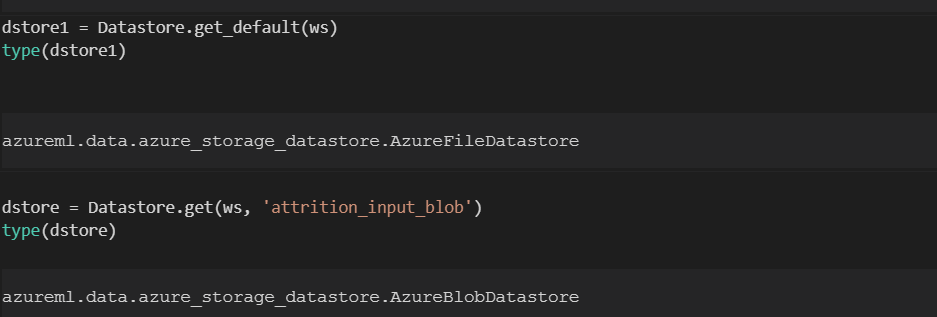
You are right that my default datastore is an 'AzureFileDatastore', but I am referring to a specific datastore which is in fact an 'AzureBlobDatastore'.
alieus
on 31 Dec 2019
Hi,
Currently data drift works with AzureBlobDatastore and may always stores results in default datastore. So maybe you can try it in another workspace with default blobl storage, it should work.
Thanks!
msdavx
on 31 Dec 2019
@alieus I switched the default datastore to workspaceblobstore. Want to see if this resolves the issue?
 swanderz
on 31 Dec 2019
swanderz
on 31 Dec 2019
Thanks @swanderz and @msdavx . monitor.get_output() works fine after changing the default datastore from AzureFileDatastore to AzureBlobDatastore
alieus
on 31 Dec 2019
@alieus
We will now proceed to close this thread. If there are further questions regarding this matter, please respond here and @YutongTie-MSFT and we will gladly continue the discussion.
 YutongTie-MSFT
on 2 Jan 2020
YutongTie-MSFT
on 2 Jan 2020
@YutongTie-MSFT I believe this should stay open until it is the requirement of Data Drift to have blob as default datastore is properly documented. @j-martens @MayMSFT agreed?
swanderz
on 2 Jan 2020
@swanderz Let me reopen it and we can close this again when everyone believes it should be. ^^ Happy new year!
YutongTie-MSFT
on 2 Jan 2020
The blob storage requirement is documented here: https://docs.microsoft.com/azure/machine-learning/how-to-monitor-datasets. Thank you everyone. Should you still have questions regarding this issue, please comment here and reopen it. We're closing it for now. #please-close
 Cathyyiwhua
on 4 Dec 2020
Cathyyiwhua
on 4 Dec 2020
please-close
 meyetman
on 9 Dec 2020
meyetman
on 9 Dec 2020
Related issues
 tylercmsft
·
4Comments
swanderz
·
5Comments
tylercmsft
·
4Comments
swanderz
·
5Comments
 chengyu-liu-cs
·
3Comments
swanderz
·
5Comments
chengyu-liu-cs
·
3Comments
swanderz
·
5Comments
 jarandaf
·
4Comments
jarandaf
·
4Comments