Machinelearningnotebooks: View/Use output dataset from "Data Labeling"...
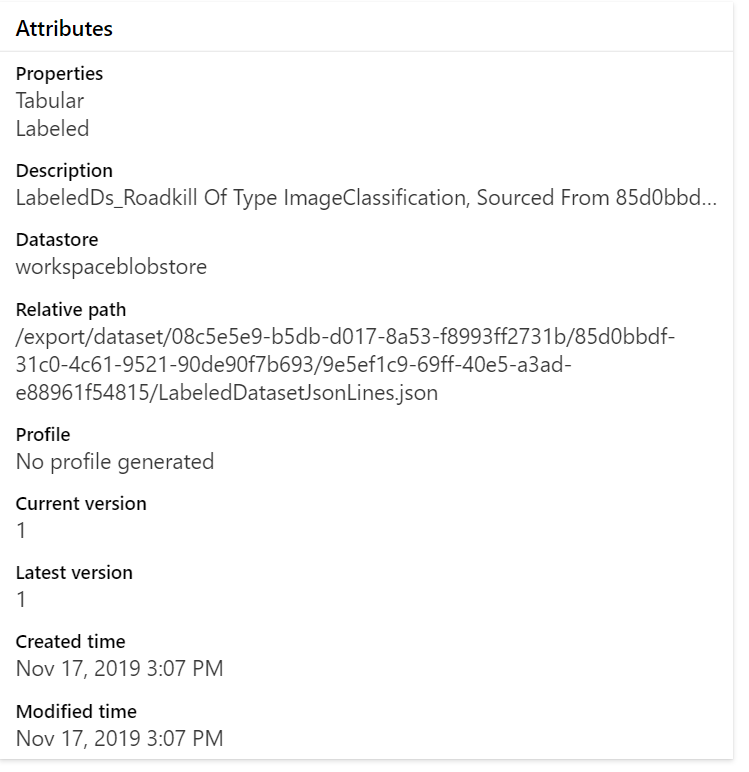
I used the "Data Labeling" tool to label 16 images, then saved the result as a Dataset. In the studio, I'm told the dataset is Tabular and Labeled and also of Type ImageClassification.
How am I supposed to make use of this dataset?
How can I view a given image?
How do I pass them images to a model?
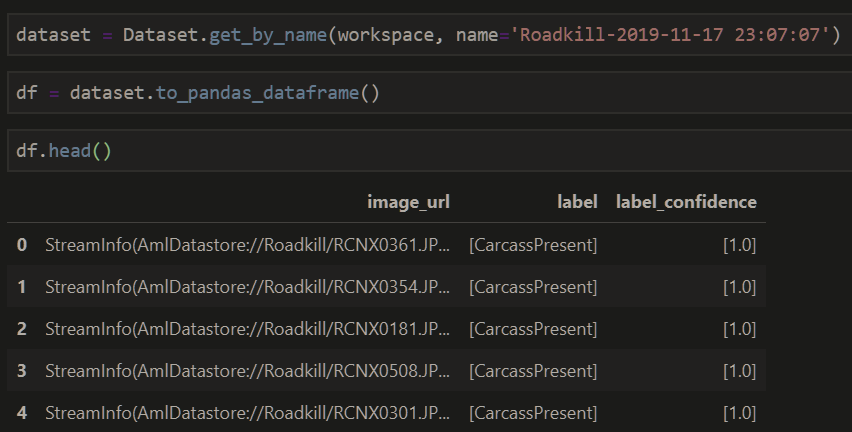
image_url: StreamInfo(AmlDatastore://Roadkill/RCNX0361.JPG[{'subscription': 'acac416d-c75b-42cb-bcd3-829fe0a5f6fe', 'resourceGroup': 'ajsdev', 'workspaceName': 'ajsdevml', 'datastoreName': 'workspaceblobstore'}])
@MayMSFT @rastala
 swanderz
All 12 comments
i will check in a sample notebook next week
 MayMSFT
on 18 Nov 2019
MayMSFT
on 18 Nov 2019
I'm your guidance to get a labelled dataset loaded so that I can display it w/ matplotlib, but I'm getting this error when I call
dataset = Dataset.get_by_name(workspace, name='Roadkill2-2019-11-24 18:20:22')
df = dataset.to_pandas_dataframe(
    file_handling_option=FileHandlingOption.MOUNT, target_path='./download/'
)
df.head()
```python
KeyError Traceback (most recent call last)
1 dataset = Dataset.get_by_name(workspace, name='Roadkill2-2019-11-24 18:20:22')
2 df = dataset.to_pandas_dataframe(
----> 3 file_handling_option=FileHandlingOption.MOUNT, target_path='./download/'
4 )
5 df.head()
/anaconda/envs/azureml_py36/lib/python3.6/site-packages/azureml/data/_loggerfactory.py in wrapper(args, *kwargs)
76 with _LoggerFactory.track_activity(logger, func.__name__, activity_type, custom_dimensions) as al:
77 try:
---> 78 return func(args, *kwargs)
79 except Exception as e:
80 if hasattr(al, 'activity_info') and hasattr(e, 'error_code'):
/anaconda/envs/azureml_py36/lib/python3.6/site-packages/azureml/contrib/dataset/labeled_dataset.py in _labeled_ds_to_pandas_dataframe(self, file_handling_option, target_path, overwrite_download)
381 return _try_execute(dflow.to_pandas_dataframe, extended_types=True)
382
--> 383 path_column = self.image[_IMAGE_URL_COLUMN_NAME]
384
385 if file_handling_option == FileHandlingOption.DOWNLOAD:
KeyError: 'column'
````
swanderz
on 24 Nov 2019
@yikei can you take a look
MayMSFT
on 25 Nov 2019
Followed up on this last week. There is an issue with the integration between Data Labeling and Dataset. We are deploying a fix to address this issue.
 yikei
on 3 Dec 2019
yikei
on 3 Dec 2019
any update on this? we're pretty much blocked from using the Data Labeling feature... right now.
swanderz
on 20 Dec 2019
Hi Anders,
As far as I'm aware Monica (yikei) did fix this issue, I have a confirmed that a PR was completed early December for SDK side issues. Though this issue also had a Service side fix required, I am confirming if that fix was completed.
 tot0
on 23 Dec 2019
tot0
on 23 Dec 2019
Hi Anders,
This issue should have been fixed by now. I just verified it by testing it with our internal workspace and dataset. Please make sure that you are using the latest version of the SDK. However, if you are still blocked, here is a quick temporary fix for you:
After you retrieve the dataset via the get_by_name method and before you use to_pandas_dataframe,
just run the following lines:
dataset.label['column'] = 'label'
dataset.label['type'] = 'ImageClassification'
 sachinparyani
on 23 Dec 2019
sachinparyani
on 23 Dec 2019
the initial fix missed remote training scenario. will check in another fix and target release Jan 6
MayMSFT
on 26 Dec 2019
Hi @MayMSFT . I'm encoutering an issue that seems to be related.
Could you confirm that the fix you are talking will be released Jan 6 ?
 kbeaugrand
on 4 Jan 2020
kbeaugrand
on 4 Jan 2020
yes. it's scheduled for release on Jan 6. will test it myself once released and update here.
MayMSFT
on 6 Jan 2020
Hi, we have verified the fix. Please make sure you install the latest version of 'azureml-sdk==1.0.83' and 'azureml-contrib-dataset==1.0.83'. If you plan to use mount for labeled dataset, please make sure you install 'azureml-dataprep[fuse,pandas]' on your compute target.
sample code of how to set up the estimator:
est = TensorFlow(entry_script='test.py',
                 source_directory=script_folder,
                 inputs=[dataset.as_named_input('labeled_dataset_3')],
                 pip_packages = ['azureml-sdk==1.0.83','azureml-dataprep[fuse,pandas]',
                                 'azureml-contrib-dataset==1.0.83'],
                 compute_target=compute_target)
Thanks!
MayMSFT
on 10 Jan 2020
@swanderz
We will now proceed to close this thread. If there are further questions regarding this matter, please respond here and @YutongTie-MSFT and we will gladly continue the discussion.
 YutongTie-MSFT
on 26 Feb 2020
YutongTie-MSFT
on 26 Feb 2020
Related issues
 shankarpandala
·
3Comments
swanderz
·
5Comments
shankarpandala
·
3Comments
swanderz
·
5Comments
 ahyerman
·
3Comments
ahyerman
·
3Comments
 nswitanek
·
4Comments
swanderz
·
4Comments
nswitanek
·
4Comments
swanderz
·
4Comments