Machinelearning: [AutoML] Auto detection of extra header rows mixed into the dataset
I have dataset in text file with 20 columns, 1st column is the class name (string), other columns are features (floats)
Here are first lines of this file
Class   A1  A2  A3  A4  A5  A6  A7  A8  A9  A10 A11 A12 A13 A14 A15 A16 A17 A18 A19
CS  61.00000    0.16855 0.00000 1.77778 3.00000 0.25375 0.07984 0.00169 0.02250 0.01535 0.07984 0.01027 0.27415 6.00000 4.00000 0.37649 3552.00000  0   26.00000
CS  316.00000   0.14823 15.00000    1.77778 10.00000    0.02352 0.00440 0.20407 0.00357 0.00914 0.03585 0.14171 0.01674 21.00000    4.00000 0.14961 4235.00000  0   17.00000
CS  176.00000   0.00000 20.00000    1.77778 3.00000 0.01850 0.19659 0.00469 0.03895 0.00000 0.19659 0.59670 0.19659 10.00000    5.00000 0.23767 3850.00000  0   24.00000
CS  133.00000   0.00000 4.00000 1.33333 3.00000 0.00049 0.01214 0.22827 0.18777 0.18778 0.12627 0.00915 0.18777 11.00000    7.00000 0.32619 1880.00000  0   16.00000
CS  140.00000   0.00000 14.00000    1.33333 1.00000 0.01787 0.02860 0.48472 0.02860 0.59853 0.02860 1.06538 0.02860 9.00000 7.00000 0.02860 1876.00000  0   142.00000
and the full file data.txt
Let's execute AutoML
mlnet auto-train --task
multiclass-classification--dataset "data.txt" --has-header --label-column-nameClass--max-exploration-time 10
as a results AutoML will generate ModelInput.cs file that starts like this
 public class ModelInput
    {
        [ColumnName("Class"), LoadColumn(0)]
        public string Class { get; set; }
        [ColumnName("A1"), LoadColumn(1)]
        public string A1 { get; set; }
        [ColumnName("A2"), LoadColumn(2)]
        public string A2 { get; set; }
        [ColumnName("A3"), LoadColumn(3)]
        public string A3 { get; set; }
all columns are recognized as string instead of float 😢
as a result data pipeline also incorrect (OneHotEncoding was applied to numeric columns)
            var dataProcessPipeline = mlContext.Transforms.Conversion.MapValueToKey("Class", "Class")
                .Append(mlContext.Transforms.Categorical.OneHotEncoding(new[]
                {
                    new InputOutputColumnPair("A3", "A3"), new InputOutputColumnPair("A4", "A4"),
                    new InputOutputColumnPair("A5", "A5"), new InputOutputColumnPair("A14", "A14"),
                    new InputOutputColumnPair("A15", "A15"), new InputOutputColumnPair("A18", "A18")
                }))
                .Append(mlContext.Transforms.Categorical.OneHotHashEncoding(new[]
                {
                    new InputOutputColumnPair("A1", "A1"), new InputOutputColumnPair("A2", "A2"),
                    new InputOutputColumnPair("A6", "A6"), new InputOutputColumnPair("A17", "A17"),
                    new InputOutputColumnPair("A19", "A19")
                }))
                .Append(mlContext.Transforms.Concatenate("Features",
                    new[] {"A3", "A4", "A5", "A14", "A15", "A18", "A1", "A2", "A6", "A17", "A19"}))
                .Append(mlContext.Transforms.NormalizeMinMax("Features", "Features"))
                .AppendCacheCheckpoint(mlContext);
Why in this case all columns recognized as strings?
Why in some columns OneHotHashEncoding was used instead of OneHotEncoding?
 sergey-tihon
All 12 comments
@sergey-tihon
Dumb question perhaps but try 2 things,
- make sure your local number format matches the "US" view of things as you're parsing text to numbers and it can be that that's an issue.
- Change format from tsv to csv, I did not find blank spaces but would be nice to eliminate that as a cause
 PeterPann23
on 15 May 2019
PeterPann23
on 15 May 2019
Took a bit of digging but there's extra header rows mixed into the dataset.
This is likely a case we should automatically handle, as merging multiple dataset files to a single is rather common.
Before removing extra header rows:
===============================================Experiment Results=================================================
------------------------------------------------------------------------------------------------------------------
|                                                     Summary                                                    |
------------------------------------------------------------------------------------------------------------------
|ML Task: multiclass-classification                                                                              |
|Dataset: data.txt                                                                                               |
|Label : Class                                                                                                   |
|Total experiment time : 10.62 Secs                                                                              |
|Total number of models explored: 5                                                                              |
------------------------------------------------------------------------------------------------------------------
|                                              Top 5 models explored                                             |
------------------------------------------------------------------------------------------------------------------
|     Trainer                              MicroAccuracy  MacroAccuracy  Duration #Iteration                     |
|1    AveragedPerceptronOva                       0.8818         0.8889       1.7          1                     |
|2    SdcaMaximumEntropyMulti                     0.8712         0.8805       2.2          2                     |
|3    LightGbmMulti                               0.8593         0.8682       1.8          3                     |
|4    FastTreeOva                                 0.8522         0.8637       3.2          5                     |
|5    SymbolicSgdLogisticRegressionOva            0.8274         0.8387       0.7          4                     |
------------------------------------------------------------------------------------------------------------------
After:
===============================================Experiment Results=================================================
------------------------------------------------------------------------------------------------------------------
|                                                     Summary                                                    |
------------------------------------------------------------------------------------------------------------------
|ML Task: multiclass-classification                                                                              |
|Dataset: data.txt                                                                                               |
|Label : Class                                                                                                   |
|Total experiment time : 10.64 Secs                                                                              |
|Total number of models explored: 12                                                                             |
------------------------------------------------------------------------------------------------------------------
|                                              Top 5 models explored                                             |
------------------------------------------------------------------------------------------------------------------
|     Trainer                              MicroAccuracy  MacroAccuracy  Duration #Iteration                     |
|1    FastTreeOva                                 0.9173         0.9183       1.6          5                     |
|2    LightGbmMulti                               0.9149         0.9193       0.9          3                     |
|3    LightGbmMulti                               0.8995         0.9029       1.0         11                     |
|4    FastForestOva                               0.8593         0.8681       1.6          9                     |
|5    FastTreeOva                                 0.8322         0.8464       0.6         12                     |
------------------------------------------------------------------------------------------------------------------
 justinormont
on 15 May 2019
justinormont
on 15 May 2019
@justinormont can you please specify what exactly you removed from dataset? header row?
sergey-tihon
on 15 May 2019
No you have multiple headers in your file I found 3 on,
- on line 1
- on line 3022
- on line 4220
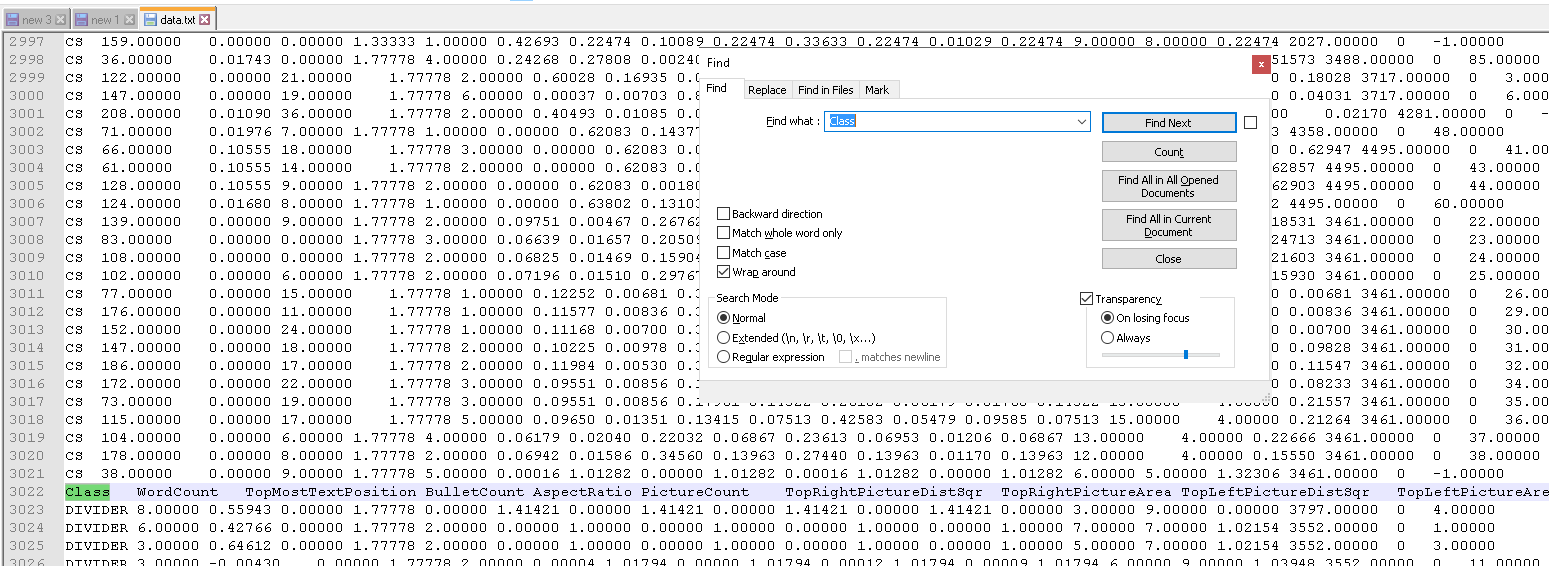
You find them when looking for the common word named Class
PeterPann23
on 15 May 2019
@PeterPann23 Make sense, fur sure it is my mistake 😢 Thank you!
dotnet/machinelearning#3684 will definitely help me and other to avoid such issues in the future.
@justinormont Should I close this issue or you would like to keep it open and track support of multiple headers (auto removal or user friendly error reporting)?
sergey-tihon
on 15 May 2019
@sergey-tihon We can keep this issue open as we need to see how to handle such anomalies in the dataset.
 srsaggam
on 15 May 2019
srsaggam
on 15 May 2019
@gvashishtha: This issue would be better in the machineleaning repo, as it would be implemented in the AutoML code during the dataset analysis.
Work:
When AutoML takes a sample of the dataset to figure out the dataset columns and column purposes, if there is a header row, then check if subsequent rows match it.
I'd purpose doing dataset checks as a new step after InferSplit() and InferColumnTypes():
https://github.com/dotnet/machinelearning/blob/e5a19af589dfb1468cd99628e82f6b49fb125323/src/Microsoft.ML.AutoML/ColumnInference/ColumnInferenceApi.cs#L16-L18
justinormont
on 22 Apr 2020
@justinormont After discovering the initial header row, would we be scanning the entire dataset to figure out if the header row has been duplicated?
 harishsk
on 23 Apr 2020
harishsk
on 23 Apr 2020
@justinormont After discovering the initial header row, would we be scanning the entire dataset to figure out if the header row has been duplicated?
The trade-off is the ability to catch duplicate headers 100% of the time, but the runtime is poor for all users (scan the whole dataset); vs catching 95% _[guesstimate]_ of datasets with duplicate header but the runtime is mostly unaffected (scan only the sample).
I would recommend optimizing the happy path by scanning the sample. Scanning the entire dataset, while more through, can be time consuming. The current dataset analysis is done on a subsample of the dataset for performance reasons.
justinormont
on 23 Apr 2020
What if we moved this functionality to TextLoader? That is, instead of sampling, the text loader retains the header and discards header rows if it encounters it in the stream?
harishsk
on 24 Apr 2020
That's a pretty cool idea. There are existing checks within the TextLoader which check for non-parsable data elements and rows of data.
If done in the TextLoader you would want to ensure the added equality comparison doesn't slow the loader. The loader is one component which you want to be very fast. One trick will be to disable the checks after the 1st full pass of the dataset.
One issue is how to raise the concern to the user level. The logging, linked above, (last I checked) is a channel of either nothing, or firehose. Have we implemented logging levels to our output channels?
justinormont
on 24 Apr 2020
If we are discarding the row, we can log a warning. We have implemented logging levels.
The comparison (if done correctly) shouldn't cause too much of an impact.
harishsk
on 24 Apr 2020
Related issues
 samueleresca
·
3Comments
samueleresca
·
3Comments
 OneCyrus
·
4Comments
OneCyrus
·
4Comments
 rogancarr
·
3Comments
rogancarr
·
3Comments
 rebecca-burwei
·
3Comments
rebecca-burwei
·
3Comments
 ddobric
·
4Comments
ddobric
·
4Comments
Most helpful comment
No you have multiple headers in your file I found 3 on,
You find them when looking for the common word named Class