Describe the bug
To Reproduce
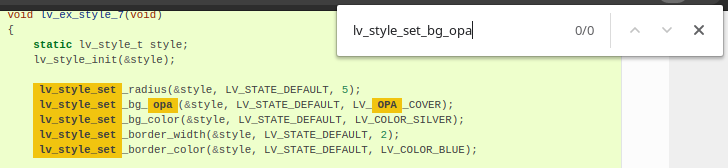
If you go to e.g. https://docs.lvgl.io/v7/en/html/overview/style.html?highlight=lv_style_set%20opa and try to search for e.g. lv_style_set_bg_opa then there are no results. Which is incorrect.
Expected behavior
The documentation pages don't break Ctrl+F. Currently it makes the entire documentation a massive pain in the arse to use, if not useless. Being able to find a relevant piece of documentation really matters.
Screenshots
 Avamander
All 4 comments
Yes; it's annoying. There's not much we ourselves can do about this, because we use Sphinx to generate the documentation, and this is how its search feature behaves.
A workaround is to remove the ?highlight from your URL; that will prevent Sphinx from doing the highlight itself and you will be able to use Ctrl+F as normal.
 embeddedt
on 19 Oct 2020
embeddedt
on 19 Oct 2020
Has this bug been reported to Sphinx?
Avamander
on 19 Oct 2020
I couldn't find it with a quick search so I filed one: https://github.com/sphinx-doc/sphinx/issues/8322
Avamander
on 19 Oct 2020
I close this issue as it should be fixed on Sphinx's side.
 kisvegabor
on 9 Nov 2020
kisvegabor
on 9 Nov 2020
Related issues
 IronCaterpillar
·
4Comments
IronCaterpillar
·
4Comments
 MShahrukh0
·
6Comments
MShahrukh0
·
6Comments
 puzrin
·
5Comments
puzrin
·
5Comments
 Moo2017
·
3Comments
Moo2017
·
3Comments
 ashrafkamel5
·
5Comments
ashrafkamel5
·
5Comments
Most helpful comment
I couldn't find it with a quick search so I filed one: https://github.com/sphinx-doc/sphinx/issues/8322