Lsp: [Question] How do I configure the environment to get goto definition for absolute imports?
I have a non TS project (so JS), with following in .babelrcfile
{
    ...,
    "@babel/plugin-transform-react-jsx",
    [
      "module-resolver",
      {
        "alias": {
          "components": "./src/components",
        }
      }
    ]
}
This allows me to import components like so: import { Blah } from 'components'. This works fine for babel and webpack, but LSP doesn't seem to acknowledge this for GOTO definition.
I'd appreciate any pointers!
 adamgajzlerowicz
All 8 comments
Maybe this could help.
Try creating a jsconfig.json(learn more) file at the root of your JavaScript project.
I think you need to change the baseUrl setting to resolve non-relative module names.
Here is an example of how a jsconfig.json file looks like:
{
    "compilerOptions": {
        "module": "es2015", // see other available options
        "checkJs": true, // this enables typechecking in js files, which is awesome
        "baseUrl": "."  // probablly what you need to set
    },
    "exclude": ["node_modules"]
}
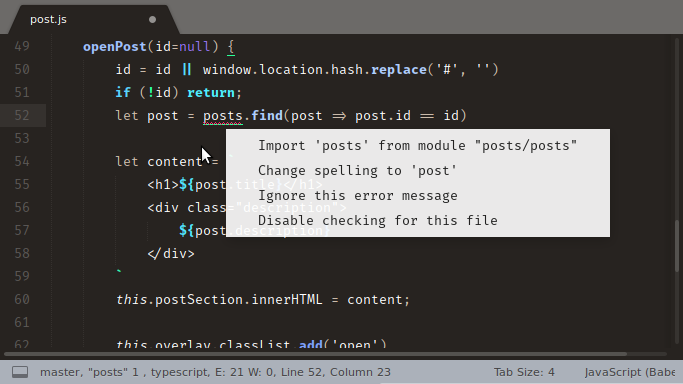
Also by specifying the baseUrl , you get some cool code actions. like this:
 predragnikolic
on 13 Nov 2018
predragnikolic
on 13 Nov 2018
BTW, what language server do you use?
predragnikolic
on 13 Nov 2018
I am using LSP
I tried the following, but with no luck
{
  "compilerOptions": {
    "paths": {
      "components/*": ["src/components/*"],
    },
    "module": "es2015", // see other available options
    "checkJs": true, // this enables typechecking in js files, which is awesome
    "baseUrl": ".",  // probablly what you need to set
    "rootDir": ".",
  },
  "exclude": ["node_modules"]
}
Strange. Your jsconfig file looks good. I tried it, works for me.
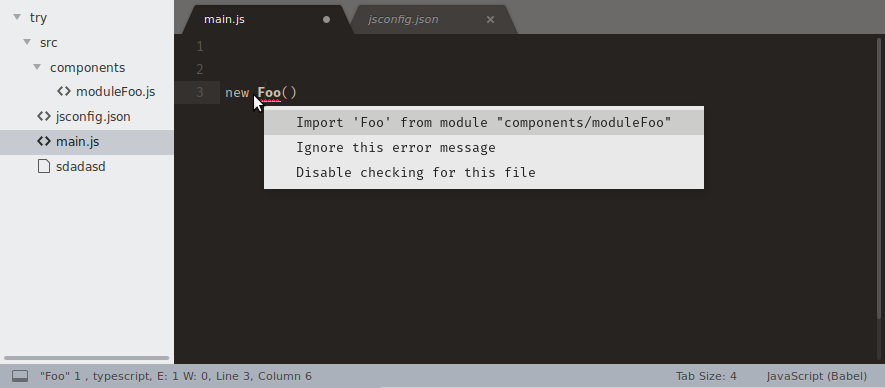
[not to be confused, the main.js file is outside of the src folder]
I am using the lsp-tsserver.
Another problem might be that you created the jsconfig.json file while the server was already running. Try closing all the files, just to make sure when the next time you open a js file and the server starts, the server will pick up that the jsconfig.json file exist.
predragnikolic
on 13 Nov 2018
My file was called tsconfig.json and was never picked up. Just spotted in your answer @predragnikolic what should be the correct name of the file, and it all started working.
Thank you so much guys!
adamgajzlerowicz
on 16 Nov 2018
Now module resolution works better then in InteliJ - I never thought those times would come!
adamgajzlerowicz
on 16 Nov 2018
Tip:
jsconfig.jsonis a descendant oftsconfig.json, which is a configuration file for TypeScript.jsconfig.jsonistsconfig.jsonwith"allowJs"attribute set totrue.
So that means that you can still use tsconfig.json for js projects as long as you set allowJs to true. Either way, glad you got it working :)
predragnikolic
on 17 Nov 2018
Strange thing was that the file was called tsconfig with allowJs set to true, but it was not being picked up..
Thanks again for help!
adamgajzlerowicz
on 17 Nov 2018
Related issues
 lsmenicucci
·
3Comments
lsmenicucci
·
3Comments
 arsham
·
3Comments
arsham
·
3Comments
 JeremyBois
·
6Comments
JeremyBois
·
6Comments
 devnix
·
3Comments
devnix
·
3Comments
 toxinu
·
5Comments
toxinu
·
5Comments