Is there any way to disable diagnostic gutters?
Thanks!
 toxinu
All 5 comments
No, but it would be trivial to add a setting to change from the current "dot" to "" or None.
Can you describe the issue caused by the gutter marks? Is it a conflict with another package using regions to draw in the gutter?
 tomv564
on 13 Sep 2017
tomv564
on 13 Sep 2017
Is it a conflict with another package using regions to draw in the gutter?
There can be only one icon in the gutter. If you have a linter-style marks, vcs marks, bookmarks and something like BracketHighlighter and it becomes pretty complicated. GitGutter seems to have finally stopped hiding my bookmarks recently for instance.
So, I like having control over this and disable the marks for packages where I don't really need them. In this particular case years of Word and SublimeLinter have trained me to look for squiggly underlines and I find them more easily than the red dots in the gutter. I'd rather save the space for GitGutter.
 braver
on 16 Sep 2017
braver
on 16 Sep 2017
Thanks for clarifying - let's add a setting for this!
tomv564
on 16 Sep 2017
Commit https://github.com/tomv564/LSP/commit/bb577d6ec9be2e5774d3634edef8aeb2be6fbcf7 introduced a diagnostics_gutter_marker setting, defaulted to "dot". It can be set to "" to not show gutter markers for diagnostics.
I noticed that GitGutter reliably overwrites LSP's gutter markers.
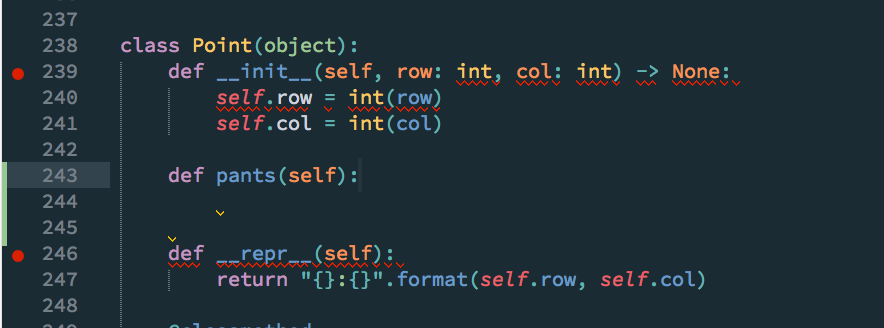
To reverse this behaviour, you would have to add LSP's regions to protected_regions in GitGutter.sublime-settings:
"protected_regions": [
  // include the default protected regions here
  "lsp_error",
  "lsp_warning",
  "lsp_info",
  "lsp_hint"
]
:+1: to GitGutter for implementing this.
- [ ] Before closing, add this to documentation.
tomv564
on 17 Sep 2017
Sorry for being late. @braver exactly explain the reason of my issue :-)
toxinu
on 20 Sep 2017
Related issues
 frou
·
3Comments
frou
·
3Comments
 devnix
·
3Comments
devnix
·
3Comments
 chenglou
·
4Comments
chenglou
·
4Comments
 jfcherng
·
4Comments
jfcherng
·
4Comments
 predragnikolic
·
7Comments
predragnikolic
·
7Comments
Most helpful comment
Commit https://github.com/tomv564/LSP/commit/bb577d6ec9be2e5774d3634edef8aeb2be6fbcf7 introduced a
diagnostics_gutter_markersetting, defaulted to "dot". It can be set to "" to not show gutter markers for diagnostics.I noticed that GitGutter reliably overwrites LSP's gutter markers.
To reverse this behaviour, you would have to add LSP's regions to protected_regions in GitGutter.sublime-settings:
:+1: to GitGutter for implementing this.