Lsp: Snippet-lookin' things are rendered verbatim in the autocompletion popup
_Sublime 3203
LSP from Package Control 0.8.2
python-language-server 0.25.0
macOS 10.14.4_
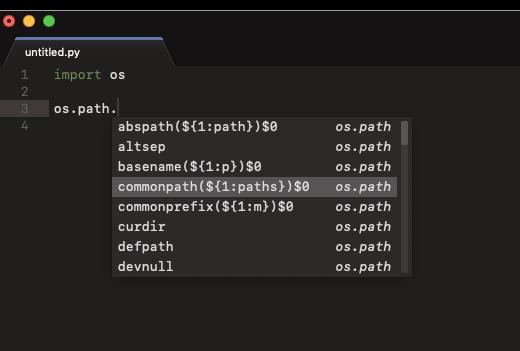
Is it intended that these snippet things are being presented like that? It makes the autocompletion quite hard to read.
This package has the setting:
// Resolve completions and apply snippet if received.
"resolve_completion_for_snippets": false,
I've tried both true and false and it has no effect on the above problem.
BTW, I'm not entirely clear on what that setting does from reading its comment. Could you please describe the difference the user would experience (in terms of what they see and type) between having that enabled and disabled?
 frou
frou
All 3 comments
This is unintended and is being worked on to get fixed.
 rwols
on 31 Mar 2019
rwols
on 31 Mar 2019
I think we could introduce another setting where the user can specify if they want LSP to indicate snippet support (as it appears that pyls's snippets just started showing up without the user opting in)
The other setting is because the javascript-typescript language server needed a resolveCompletion call to the server to get the actual snippet. I'd like to get rid of that feature as I suspect few people use it.
 tomv564
on 1 Apr 2019
tomv564
on 1 Apr 2019
fixed by #551
rwols
on 6 Apr 2019
Related issues
 JonasPf
·
6Comments
JonasPf
·
6Comments
 ryanpcmcquen
·
4Comments
ryanpcmcquen
·
4Comments
 arsham
·
4Comments
arsham
·
4Comments
 devnix
·
3Comments
devnix
·
3Comments
 predragnikolic
·
7Comments
predragnikolic
·
7Comments
Most helpful comment
I think we could introduce another setting where the user can specify if they want LSP to indicate snippet support (as it appears that pyls's snippets just started showing up without the user opting in)
The other setting is because the javascript-typescript language server needed a resolveCompletion call to the server to get the actual snippet. I'd like to get rid of that feature as I suspect few people use it.