Lsp: Evaluate language-specific extensibility
@golddranks and @coder543:
I've done some quick exploration on what it would take to support Rusts's extensions _outside_ of LSP in https://github.com/tomv564/LSP-rust.
Only a single hook was exposed (in branch https://github.com/tomv564/LSP/tree/feature-enhance-clients) for adding extra listeners to Rust's notifications.
Adding functionality for rustDocument/implementations was a matter of copying and pasting the References logic and changing a few parameters. This is an example of real value that we can deliver outside the common LSP package.
Are you interested in taking this code and improving the Rust language server experience on top of LSP?
There are plenty of other features to deliver:
The setup flow in RLS's VS Code client works really hard to help the user keep their server up-to-date and configured correctly for example.
 tomv564
All 14 comments
Unfortunately, my time has been overwhelmed with other projects and business trips for over a month now, so I don't know when I'll have time. It's something I would like to do eventually.
 coder543
on 21 Nov 2017
coder543
on 21 Nov 2017
I'm glad to see that work is being done to allow external LSP-extensions, since I'm sure other communities have nonstandard things they want to support, and this foundational work will be necessary to support such things.
coder543
on 21 Nov 2017
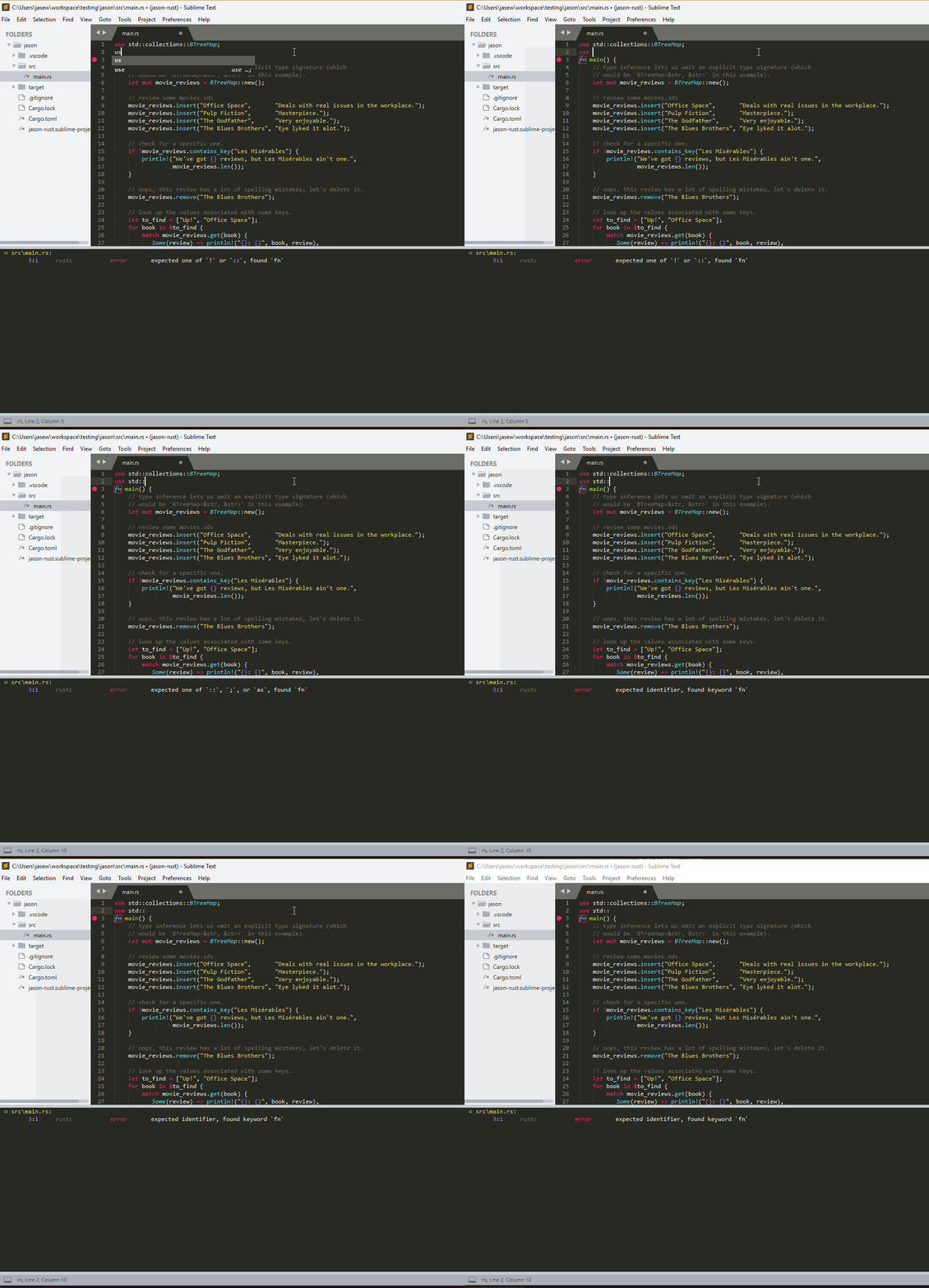
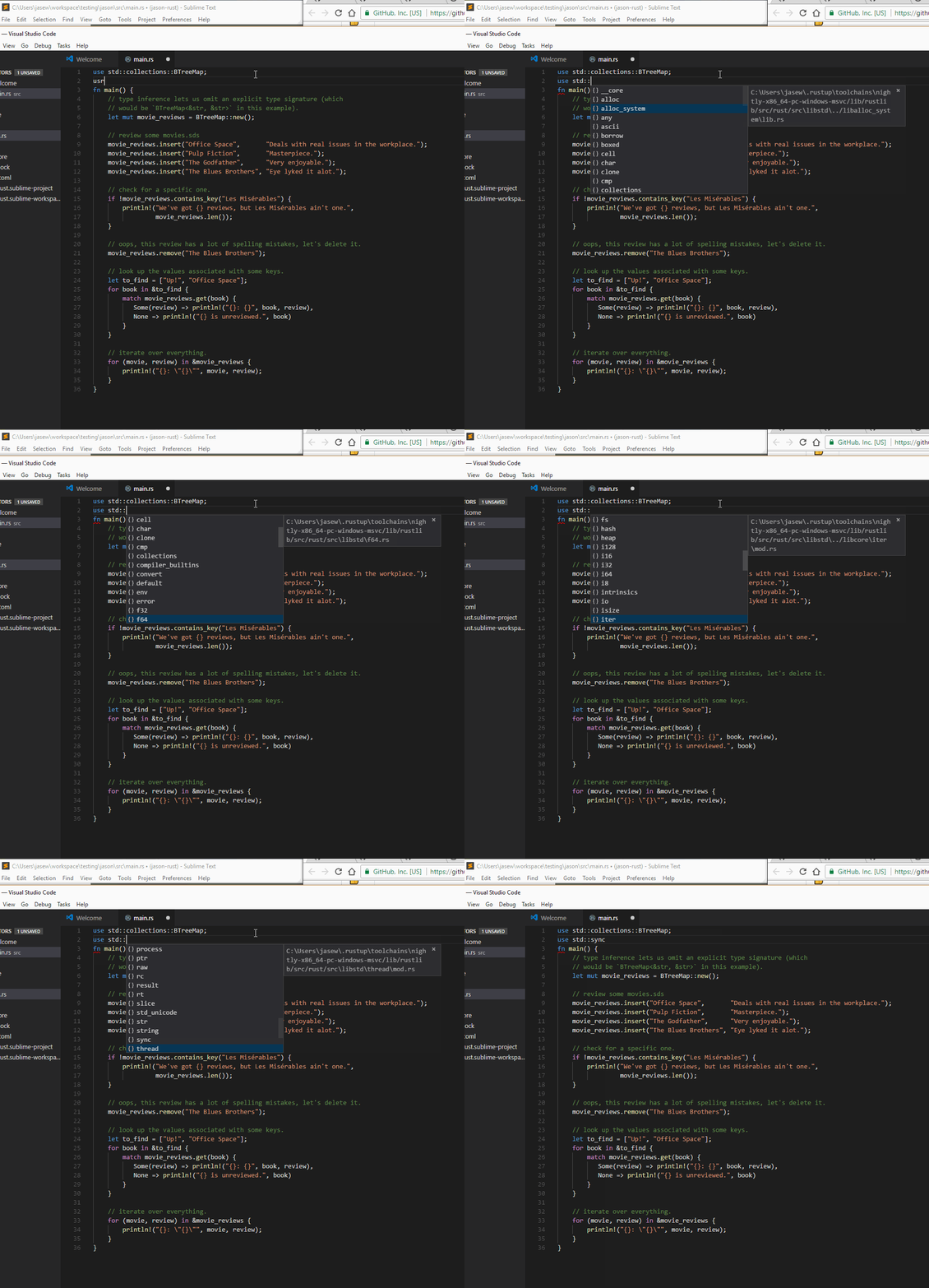
@tomv564 any idea why the auto complete menu doesn't work properly for Rust?
After typing :: i expect to see some options, this seems to work well in VSCode, are we missing something?
This is what i get in VSCode
 jasonwilliams
on 19 Dec 2017
jasonwilliams
on 19 Dec 2017
Under Sublime's general settings, you might need to override its notion of an autocomplete trigger character:
"auto_complete_triggers":
[
    {
        "characters": ".:",
        "selector": "source.rust"
    }
]
But, even then, it doesn't work exceptionally well. The official VS Code plugin has gotten really good lately. I still enjoy some of the features in my fork of this LSP plugin, but you're probably going to have a better Rust experience on VS Code, in my opinion.
coder543
on 19 Dec 2017
There isn't any inherent reason why it shouldn't work in LSP. If there is an autocompletion that works on VS Code and not on Sublime/LSP, it's a bug, and those are, in my experience, not that hard to fix, since all the plugins do is exchange messages with the server, and the server does the hard work. If you have any example code to link to, I can try and arrange some time to look at it this Friday.
 golddranks
on 20 Dec 2017
golddranks
on 20 Dec 2017
Thanks @coder543 that fixed it for me, i will see if Rust Enhanced can handle this.
@coder543 what better experience does VSCode offer over sublime at the moment? Ive only toyed with it a bit
jasonwilliams
on 20 Dec 2017
@tomv564 we currently have to override LSP's settings with these:
https://gist.github.com/urschrei/b0427f513dc78a9e32329e4bc8a65846
Could some of these go into the main settings file?
I think the main difference is this
https://gist.github.com/urschrei/b0427f513dc78a9e32329e4bc8a65846#file-lsp_settings-json-L4-L26
jasonwilliams
on 20 Dec 2017
I just added the RustEnhanced syntax in https://github.com/tomv564/LSP/commit/af7166c7bc8f94e3f75115e41a70ff7920dfd700.
Another difference is the enabled: true setting.
Because LSP ships with so many configs, all of them are disabled until the user opts-in. I suggest that Rust Enhanced when installed could also globally enable LSP's Rust support.
tomv564
on 20 Dec 2017
@tomv564 when will you be releasing your https://github.com/tomv564/LSP/commit/af7166c7bc8f94e3f75115e41a70ff7920dfd700 fix ?
jasonwilliams
on 6 Jan 2018
also @tomv564 LSP doesn't seem to work when the Rust package is disabled (but Rust Enhanced is enabled) is this by design?
jasonwilliams
on 6 Jan 2018
Sorry another query, is it currently possible to send settings to RLS, similar to how VScode does? https://github.com/rust-lang-nursery/rls#configuration
jasonwilliams
on 6 Jan 2018
Hi @Jayflux, I'll try to get a release out soon - it is high time.
I merged the hook mentioned in the first message, allowing you to handle RLS's extra messages as is done in https://github.com/tomv564/LSP-rust.
LSP should be sending settings to RLS at startup (and when changed), they can be provided in two places:
In the global Preferences: LSP Settings (below an example of pyls with settings)
{
  "clients": {
    "rls": {
      "enabled": true,
      "settings": {
        "build_lib": true
      }
    }
  }
}
In your Sublime Project settings (where they will override the global settings:
{
    "folders":
    [
        {
            "path": "."
        }
    ],
    "settings": {
        "LSP": {
            "rls": {
                "settings": {
                    "build_lib": true
                }
            }
        }
    }
}
Hi @Jayflux, the support for RustEnhanced syntax was released a while ago, hope this simplifies your setup!
Also your previous question:
LSP doesn't seem to work when the Rust package is disabled (but Rust Enhanced is enabled) is this by design?
This is absolutely not by design, would be great if you can share some start up logs with a recent version of LSP!
tomv564
on 17 Jan 2018
An update to the initial API which thankfully was never adopted is waiting at #298.
The motivation is:
- I want to delete the "default" configurations eventually (instead, install LSP-your-server or eg. Rust-enhanced to get config + extras)
- Expose hooks before and after a client is started for installation and custom messages.
Please leave comments!
tomv564
on 3 Apr 2018
Related issues
 JeremyBois
·
6Comments
JeremyBois
·
6Comments
 toxinu
·
5Comments
toxinu
·
5Comments
 chenglou
·
4Comments
chenglou
·
4Comments
 brainplot
·
3Comments
brainplot
·
3Comments
 evandrocoan
·
7Comments
evandrocoan
·
7Comments
Most helpful comment
An update to the initial API which thankfully was never adopted is waiting at #298.
The motivation is:
Please leave comments!