I'm finding that the error pane is popping up as I'm in the middle of typing a phrase. Obviously while the line is unfinished, the syntax is not correct, that's just distracting. As such, I think it would be helpful to add some kind of delay before triggering the error popup panel. Even better would be to make the delay configurable.
 jakeparis
All 11 comments
What language server is this?
 rwols
on 27 Oct 2017
rwols
on 27 Oct 2017
Javascript
jakeparis
on 27 Oct 2017
Agree that the panel (and the squiggly lines) showing up mid-statement can be distracting!
I usually leave the error panel open for that reason.
Would you want a delay on:
- The panel opening
- Diagnostics updating in the panel
- Diagnostics updating in the panel _and_ the document?
Perhaps you can try the same edits in VS Code so we can see where the diagnostics handling differs?
 tomv564
on 29 Oct 2017
tomv564
on 29 Oct 2017
I think the _most important_ delay would be on the panel opening, as that large movement within your field of vision is the biggest problem. I have my panel set to only open when there's a problem, and that's mainly to maximize editing real estate on my screen.
I think it makes the most sense to have at least a slight delay on all of the things you mentioned. I don't have VSCode set up.
jakeparis
on 30 Oct 2017
I see two options:
- We add the file's diagnostics count to the status area, you would open the panel manually when you see the diagnostics there (no need to decide what delay suits you)
- We wait to hear if other users are interested in this delay (as I'd like to avoid adding a setting for just one user)
tomv564
on 12 Nov 2017
Automatically opening the panel, regardless of delays, is super annoying IMO. I'd rather have a hint (e.g. a counter) that tells me something is in there and then I can open it when I want to, and close it when I'm done. So, that first option sounds great to me.
 braver
on 23 Nov 2017
braver
on 23 Nov 2017
I quite like the SublimeLinter behaviour, which has lint modes. The save mode is super useful, since it only shows you the errors when they're relevant (i.e. when you're going to run the code).
That said, background mode is quite useful. SublimeLinter by default has a delay of 0.25s before it shows the errors. In terms of how that actually works, it appears to be handled in SL's queueing.
 rmccue
on 11 Dec 2017
rmccue
on 11 Dec 2017
I like the idea of a counter.
LSP has a config option to turn off auto show of the diagnostics panel.
"auto_show_diagnostics_panel": false,
When he does that, the only way he knows if he has errors is to open the diagnostic panel.
A counter in the status bar could solve that problem.
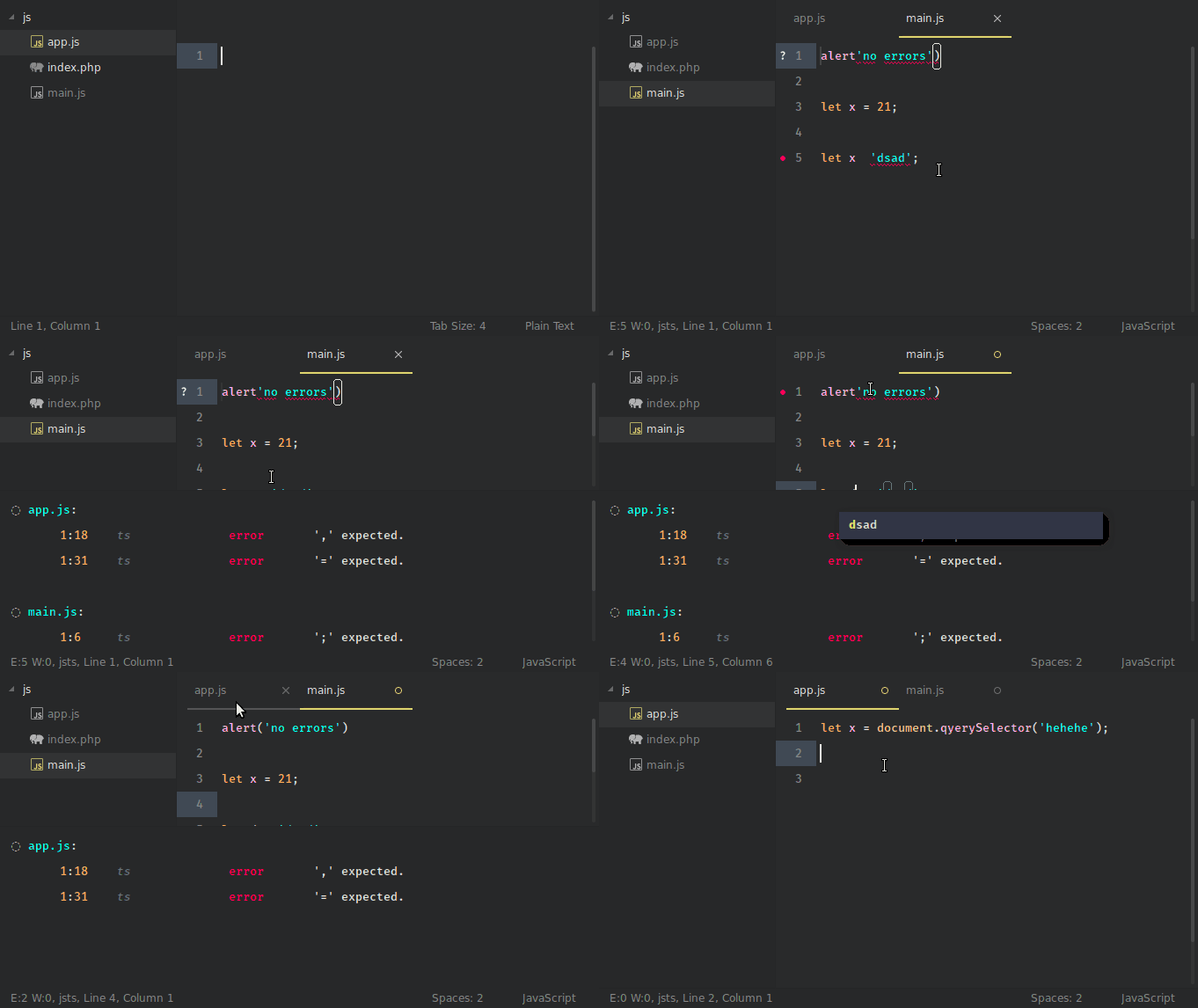
See the E: COUNT W: COUNT in the left of the status bar
 predragnikolic
on 6 Mar 2018
predragnikolic
on 6 Mar 2018
I am working on a counter in the status bar. If you want you can try it here.
I also changed the behavior of the diagnostic panel to always hide itself when there is no errors.
The current implementation firsts check if the "auto_show_diagnostics_panel" is enabled, and if so, it will hide it.
I planed to add a setting show_diagnostics_count_in_view_status
and to change the default value for auto_show_diagnostics_panel from true to false.
But first to check if you are ok with the changes I made :)
predragnikolic
on 18 Apr 2018
@jakeparis @rmccue I closed this immediately, but perhaps you'd like to leave feedback about @predragnikolic's work here?
tomv564
on 10 Jun 2018
I'd definitely still prefer to have the diagnostics panel show up when I save a file. The status bar is useful, but I'll likely just end up ignoring it.
(The autohiding makes sense in any case I think.)
rmccue
on 13 Jun 2018
Related issues
tomv564
·
4Comments
 ryanpcmcquen
·
4Comments
ryanpcmcquen
·
4Comments
 devnix
·
3Comments
devnix
·
3Comments
 JeremyBois
·
6Comments
JeremyBois
·
6Comments
 frou
·
3Comments
frou
·
3Comments
Most helpful comment
Automatically opening the panel, regardless of delays, is super annoying IMO. I'd rather have a hint (e.g. a counter) that tells me something is in there and then I can open it when I want to, and close it when I'm done. So, that first option sounds great to me.